
B2B Product Feed Management: The Complete 2026 Guide for Manufacturers, Distributors, and Wholesalers
Every guide on product feed management is written for a B2C store owner trying to win on Google Shopping.
This one is not.
B2B product feed management is a structurally different problem. You are not optimising a single public price for one consumer audience. You are managing contract-negotiated pricing tiers, customer-specific catalog visibility, multi-supplier data normalisation, procurement system integrations, and technical product attributes that no consumer feed format was ever designed to handle.
The top-ranking articles on this topic either ignore these realities entirely, or they mention "customer-specific pricing" in a single sentence before pivoting back to Google Shopping best practices.
This guide fills every gap they leave. We cover seven distinct B2B angles from feed architecture to procurement channel integration to AI-powered discovery and answer the ten questions no competitor bothers to address.
Why B2B product feed management is fundamentally different from B2C
Before diving into tactics, this distinction needs to be stated plainly, because almost every article on this topic misses it.

In B2C, a product feed is a file containing your products with one public price, one set of images, and one description - distributed to advertising channels to attract consumer buyers.
In B2B, a "product feed" means something architecturally different. It may need to:
Show different prices to different buyers based on negotiated contracts, not a single public MSRP
Show different products to different buyers based on which SKUs a customer's contract authorises
Integrate with procurement systems (Ariba, Coupa, SAP SRM) rather than advertising platforms
Carry technical specifications, part cross-references, compliance documentation, and fitment data that consumer channels don't understand
Flow bidirectionally with an ERP rather than pulling from a simple product database
Serve distributor partners who need to publish your catalog data through their own storefronts
The channels are different. The data requirements are different. The architecture is different. And critically, the consequences of data errors are different - a wrong price in a B2B contract feed doesn't just cost you a click; it can trigger a chargeback clause or a procurement audit.
Everything that follows is grounded in this distinction.
The B2B product data stack: ERP → PIM → feed tool → channel
One of the most common sources of B2B feed chaos is not knowing which system should own which part of the product data. Here is a clear map.

ERP (System of Record)
Your ERP - SAP, Oracle, Microsoft Dynamics, NetSuite, Infor - is the authoritative source for:
Contract pricing and customer-specific price lists
Inventory levels and real-time availability
Customer account structure (which accounts exist, what their payment terms are, which product lines they are authorised to buy)
Order history and credit status
The ERP is where pricing originates. It is rarely where pricing should be formatted for distribution. That formatting work belongs in a layer above.
PIM (Product Information Management)
A PIM system - Akeneo, Pimcore, OdooPIM, Plytix - centralises and enriches your product content:
Marketing descriptions and rich text content
Technical specifications and attribute sets
Digital assets (images, CAD files, data sheets, compliance documents)
Taxonomy and categorisation for different channel requirements
Customer-facing part numbers and cross-references
The PIM enriches the raw product data from your ERP with everything a buyer needs to understand, specify, and purchase the product. For companies with simple catalogs, a PIM may be optional. For manufacturers or distributors with thousands of complex SKUs, it is essential.
Feed management tool
A feed management tool such as FeedOn - sits between your enriched product data and your distribution channels. It handles:
Format conversion: transforming your master data into the specific format each channel requires
Field mapping and transformation: rules that normalise, rename, filter, or enrich fields for each destination
Pricing logic application: applying the correct contract price for each customer or distributor segment
Catalog segmentation: sending only the authorised product set to each partner
Automated error detection: catching data quality issues before they cause disapprovals or procurement failures
Schedule management: pushing feed updates on the right cadence for each channel
A feed audit at this layer catches issues before they reach channels - a step that is especially critical in B2B where errors have commercial consequences.
Distribution channels
Where your product data ultimately lands: distributor portals, Google Shopping, procurement platforms, marketplace APIs, EDI trading partners, or customer-specific feed URLs.
Where most B2B feed projects go wrong
The most common failure mode: companies try to use their ERP to do the work of a feed tool, or use a feed tool to do work that belongs in a PIM, or skip one layer entirely and manage everything in spreadsheets. Each of these paths creates a different flavour of chaos.
The right question is not "which tool do I buy?" It is "which system owns which responsibility in my data chain?" Map the ownership first, then choose tools to fill each role.
How contract pricing feeds work - without leaking confidential rates
This is the most technically complex and most underexplained aspect of B2B feed management. Here is how it works in practice.

The problem
In B2B, pricing is not public. A platinum-tier distributor pays 40% less than a standard account. Enterprise accounts have negotiated rates that your sales team spent months closing. If the wrong price appears in the wrong feed, if Distributor A's rates are visible to Distributor B, you have a commercial and potentially legal problem.
How the pricing flow works
Price lists originate in the ERP.
Your ERP holds the master pricing logic: base cost, tier discounts, customer-specific overrides, volume breaks, promotional pricing windows. This is the source of truth.
Price lists are exported or synced to your feed layer.
This happens either via a scheduled export (a flat file of price lists per customer group, typically daily or hourly) or via a real-time API call that queries the ERP at feed generation time.
The feed tool applies pricing rules per destination.
Rather than one global feed, you generate segmented feeds - one per distributor, one per customer tier, or one per account group. Each feed contains only the pricing relevant to its intended recipient.
Each recipient receives a unique feed URL.
The feed URL is authenticated (typically by API key or IP whitelist) so only the intended recipient can access it. Some B2B platforms like B2B Wave generate unique per-customer feed URLs that automatically reflect that customer's contracted prices and product visibility.
Practical architecture options
Approach                            Best for                                      Risk
One feed per major distributor      Fewer than 20 distributors                    Manual to maintain at scale
Customer-group feeds                20–200 account segments                       Requires solid ERP→feed sync
Real-time pricing API               Enterprise procurement integrations           Higher complexity, higher reliability
Punchout catalog                    Large enterprise buyers using Ariba/Coupa     Requires cXML implementation
What to never do
Never put contract pricing in a public product feed. Never use the same feed URL for multiple customer tiers without authentication. Never let a feed generate pricing from a stale ERP export - pricing drift between your ERP and your distributed feeds is how chargebacks happen.
Manufacturer vs distributor: two opposite feed management problems
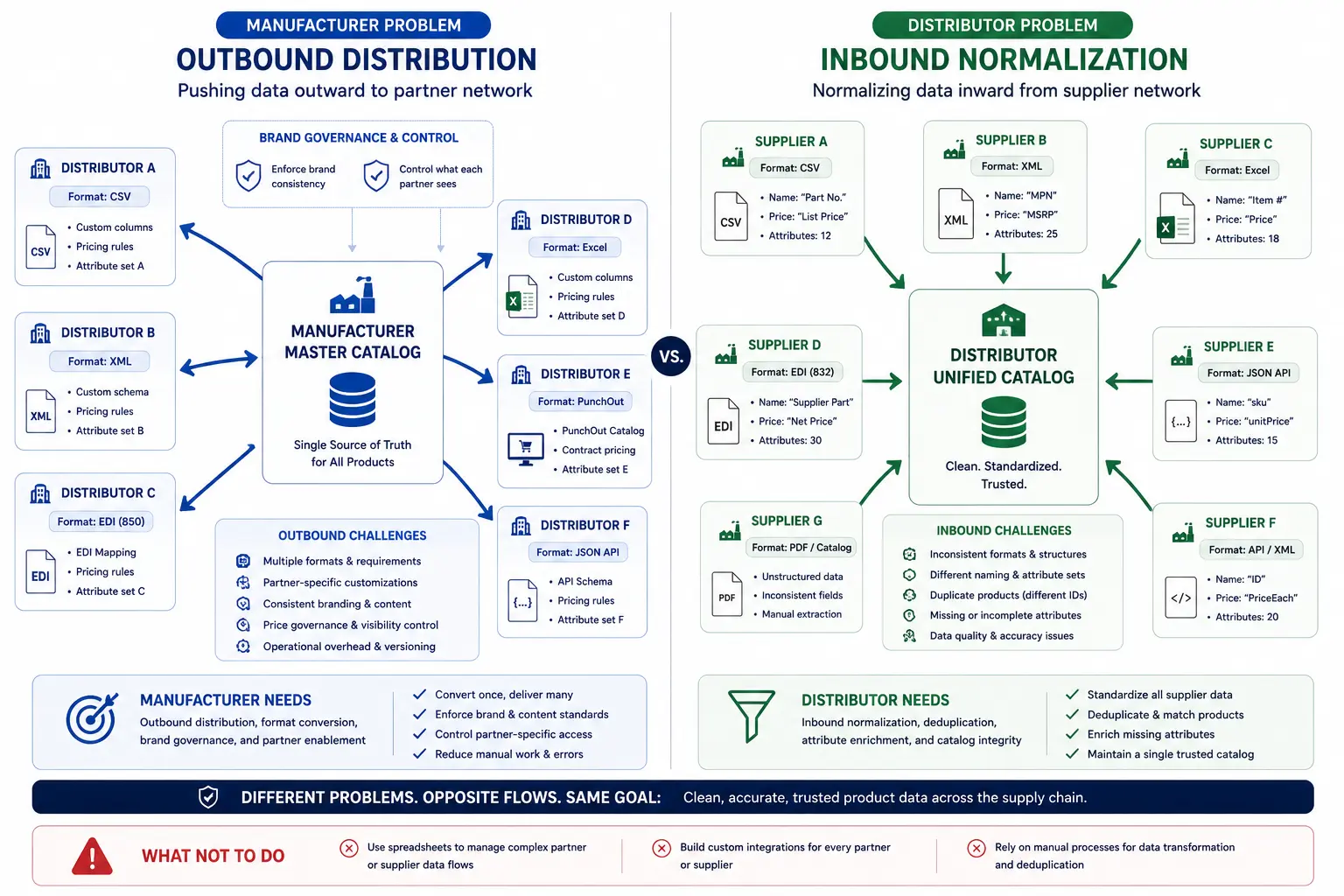
Most guides treat manufacturers and distributors as if they have the same feed management challenge. They don't. They are structurally opposite problems.
The manufacturer's problem: pushing data outward
A manufacturer creates products and needs to distribute product data downward through a distribution network.
The manufacturer's feed challenge is:
Standardising data for multiple distributor ingestion requirements: Distributor A wants CSV. Distributor B wants XML. Distributor C uses a proprietary EDI format. Each has different required fields, category taxonomies, and image specifications.
Maintaining brand consistency across partner storefronts: Your product descriptions, images, and specifications need to appear correctly on every distributor's website - not reformatted into something you don't recognise.
Controlling what data distributors can see: A regional distributor carrying only part of your line should only receive that part of your catalog. A distributor in one geography shouldn't see pricing for another region.
Keeping everyone current: When you discontinue a product, update a specification, or change pricing, every downstream distributor feed needs to reflect that immediately.
The manufacturer's primary feed management motion is outbound distribution to a partner network.
The distributor's problem: normalising data inward
A distributor aggregates products from multiple suppliers and needs to create a coherent, searchable catalog from inconsistent upstream data.
The distributor's feed challenge is:
Normalising inconsistent supplier data: Each of your 50+ suppliers uses different naming conventions, different attribute schemas, different image standards, and different category codes. Supplier A calls it "Material: Stainless Steel." Supplier B has "Composition: SS 316." These are the same thing.
Deduplicating the same product from multiple suppliers: If three suppliers carry the same part, your catalog should show one listing with the best price - not three confusing duplicates.
Mapping supplier product IDs to your internal SKU system: Your customers know products by your part numbers. Your suppliers know them by their own. The feed layer must maintain both mappings simultaneously.
Enriching incomplete supplier data: Many suppliers provide bare-minimum product data. Adding descriptions, images, and technical specifications to improve searchability is the distributor's content responsibility.
The distributor's primary feed management motion is inbound normalisation from a supplier network.
Why this matters for tool selection
A manufacturer primarily needs outbound feed distribution capabilities - format conversion, segmentation by partner, scheduling, and brand governance controls.
A distributor primarily needs inbound feed ingestion capabilities - format normalisation, deduplication logic, attribute mapping, and data quality monitoring.
FeedOn's AI-powered attribute extraction addresses the distributor's enrichment problem directly automatically filling missing attributes from product images and text, bridging the gap between sparse supplier data and the rich product content buyers expect.
B2B product feeds beyond Google Shopping: EDI, punchout, Ariba, and Coupa

Here is the channel reality that every ranking article ignores entirely: the largest B2B purchases don't happen on Google Shopping. They happen through procurement systems.
When a procurement manager at a Fortune 500 company needs to buy 5,000 units of industrial supplies, they are not browsing Google Shopping. They are logging into their company's procurement platform SAP Ariba, Coupa, Oracle Procurement Cloud, Jaggaer and either searching a supplier's punchout catalog or sending an EDI purchase order.
If your product data doesn't exist in these channels, you are invisible to enterprise buyers, regardless of how well-optimised your Google Shopping feed is.
EDI product catalog transactions
EDI (Electronic Data Interchange) is the standard for automated business document exchange between trading partners. For product data, the relevant transaction sets include:
EDI 832 (Price/Sales Catalog): The B2B equivalent of a product feed a structured electronic document transmitting product information, pricing, and availability to a trading partner's procurement system.
EDI 846 (Inventory Inquiry/Advice): Real-time inventory availability data sent to buyers or trading platforms.
EDI 843 (Response to Request for Quotation): Product and pricing data in response to a buyer's RFQ.
EDI feeds require specific format compliance (X12 or EDIFACT standards), trading partner agreements, and often a Value-Added Network (VAN) or direct AS2 connection. This is not a Google Shopping CSV it is a structured electronic document exchange with legal and contractual weight.
Punchout catalogs
A punchout catalog is an interactive, buyer-facing product catalog that lives on the supplier's website but is accessed through the buyer's procurement system.

Here is how it works:
The enterprise buyer logs into Ariba or Coupa.
They click "Punchout to [Supplier Name]."
Their procurement system sends a cXML PunchOutSetupRequest to the supplier's website, passing the buyer's identity and session token.
The supplier's website receives this request, identifies the buyer's account, and displays the correct customer-specific catalog with contracted pricing.
The buyer browses and adds items to their cart.
When they check out, the selected items are returned to their procurement system as a cXML PunchOutOrderMessage.
The procurement system creates a purchase requisition, which routes through the buyer's approval workflow.
An approved Purchase Order is sent back to the supplier as a cXML OrderRequest or EDI 850.
For suppliers, punchout catalog management means:
Technical integration: Implementing cXML (or OCI for SAP SRM) endpoints on your web store or using a punchout middleware provider.
Account-specific rendering: When the punchout session is initiated, your catalog must correctly render the contracted prices and product assortment for that specific buyer account — pulling from your ERP pricing data.
Real-time data accuracy: Pricing and availability must be live, not cached from a daily export. If a product is out of stock, the punchout catalog must reflect that immediately.
Ariba Network and Coupa Advantage
Beyond punchout catalogs, procurement platforms also offer catalog management within the platform itself:
SAP Ariba Network: Suppliers can publish catalog content (CIF files - Catalog Interchange Format) directly to Ariba, which enterprise buyers can browse without leaving their procurement system. CIF format has strict requirements for fields, pricing structure, and categorisation.
Coupa Advantage: Similar catalog publishing capability within the Coupa ecosystem. Coupa also supports punchout and can use Coupa Advantage content for AI-assisted procurement recommendations.
The feed management implication
These procurement channels require product data in fundamentally different formats than Google Shopping or Meta. The data requirements overlap (you still need title, description, price, availability, part number) but the technical implementation, format standards, and integration architecture are completely different.
The multi-channel publishing capability of a modern feed management tool should ideally handle both consumer advertising channels and B2B procurement channel exports from the same master product data - reducing the duplication of maintaining separate data processes for each destination.
Feed management for technical products: specs, part numbers, CAD, and compliance docs
The B2B product categories that have the most complex feed management requirements are precisely the ones nobody writes about: industrial supplies, MRO (Maintenance, Repair, and Operations), automotive parts, electronic components, laboratory equipment, and building materials.

For these categories, a "product feed" containing title, description, price, and an image is completely insufficient. Buyers cannot make purchasing decisions - and engineers cannot approve product specifications - without much richer data.
Technical attribute requirements by industry
Industrial and MRO products:
Dimensional specifications (length, width, height, weight, thread specifications)
Material composition (specific alloy grades, not just "stainless steel")
Operating specifications (pressure rating, temperature range, voltage, current)
Standards compliance (ISO, ASTM, DIN standards certifications)
Safety Data Sheets (SDS/MSDS) attached as documents
Manufacturer Part Number (MPN) - the primary identifier in industrial procurement
Automotive parts (ACES/PIES standard): The automotive aftermarket has its own industry-standard data format: ACES (Aftermarket Catalog Exchange Standard) for fitment data and PIES (Product Information Exchange Standard) for product attributes.
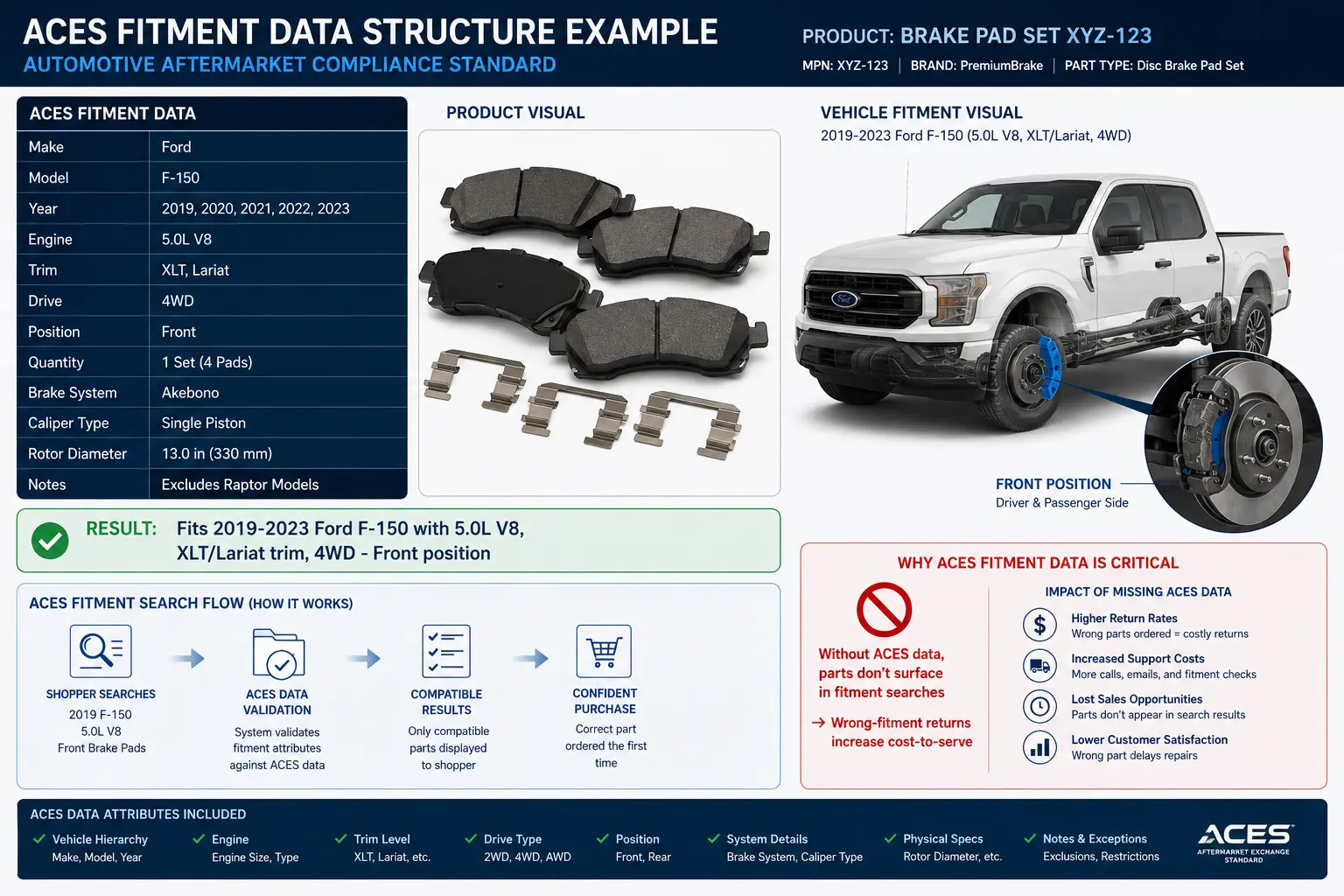
ACES fitment data specifies exactly which vehicle makes, models, years, and configurations a part fits e.g., "fits 2019–2023 Ford F-150 with 5.0L V8 engine and XLT trim, 4WD." Without accurate ACES data, your parts will not surface in fitment-based searches, and wrong-fitment returns will increase your cost-to-serve significantly.
Electronic components:
Part number cross-references (your part number, manufacturer part number, industry-standard ECCN classification)
Technical datasheets (PDF documents)
RoHS and REACH compliance status
Operating temperature range, voltage specifications
Lifecycle status (active, end-of-life, last-time-buy)
Country of origin for import compliance
Laboratory and scientific equipment:
Method validation documentation
Regulatory approvals (FDA, CE marking, IVD classification)
Calibration specifications
Compatible reagents and consumables (cross-sell data embedded in the feed)
Part number management: the B2B-specific feed challenge
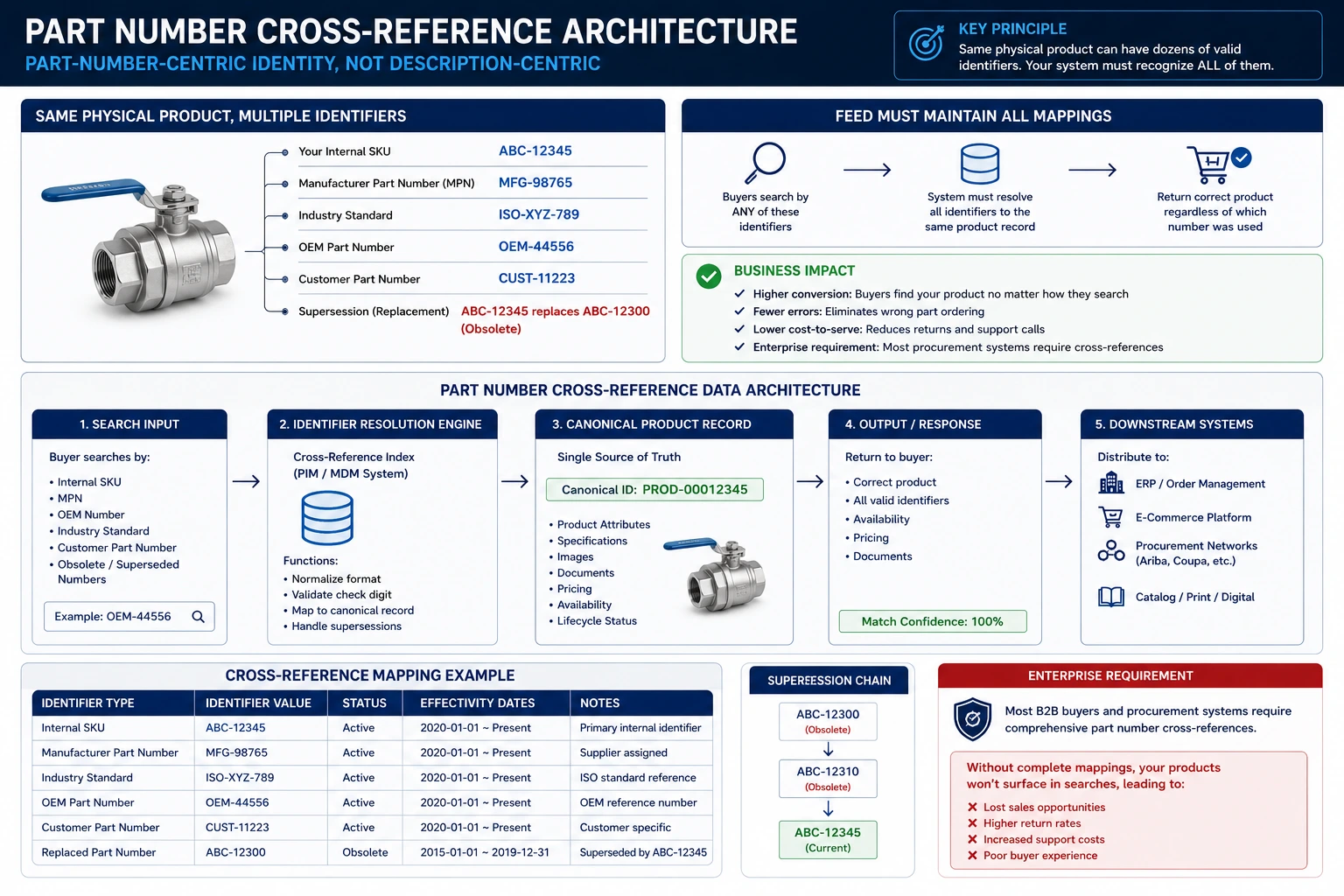
In B2B, product identity is part-number-centric, not description-centric. Buyers search by part number, not by product description. Your feed must carry:
Your internal SKU or part number
Manufacturer part number (MPN)
Industry standard part numbers (for automotive: OEM part numbers; for industrial: ISO or DIN reference numbers)
Supersession information: if a part has been superseded by a newer part number, your feed should reflect the replacement
A distributor may also need to maintain customer part number cross-references - their enterprise customers often have their own internal numbering system, and the feed needs to map between the customer's part number and the distributor's SKU so buyers can search by either.
Compliance documentation as feed attributes
In regulated industries (medical devices, chemicals, food ingredients, building materials), compliance documentation is not optional marketing content, it is a prerequisite for purchase. Enterprise buyers cannot raise a purchase order for a product without the relevant compliance documentation in their procurement system.
This means your product feed for regulated products should include:
Links to SDS/MSDS documents (with version control, outdated compliance docs are as problematic as missing ones)
Certificate of Conformance (COC) references
Regulatory approval numbers (FDA 510(k) clearance, CE marking declaration reference)
Country of origin and HS code (for international procurement)
A feed audit process for technical B2B products should check not only whether required fields are present, but whether compliance document links are valid and documents are current.
How to onboard 50+ supplier catalogs with inconsistent data
For distributors and marketplace operators, supplier data onboarding is one of the highest-friction, most time-consuming operational challenges in the business. Here is a methodology that actually scales.

Why supplier data is always inconsistent
Every supplier structures their product data according to their own internal systems, category logic, and naming conventions. When you aggregate 50 suppliers, you get 50 different:
File formats (some CSV, some XML, some Excel, some proprietary API)
Category taxonomies (Supplier A has "Fasteners > Bolts > Hex Head"; Supplier B has "Hardware > Threaded Products > Machine Bolts")
Attribute names for the same concept ("Material," "Composition," "Substrate," "Made from")
Image quality standards (some have 2000px white-background images; some have 200px catalogue scans)
Pricing structures (unit pricing, per-hundred pricing, per-thousand pricing for the same product type)
Availability signals ("Y/N," "In Stock/Out of Stock," "Available," numeric quantity)
No two suppliers speak the same data language.
Supplier data assessment (before onboarding begins)

Before committing to onboard a new supplier, assess the quality of their data:
Request a sample file of at least 100 products: Review it for completeness of required fields, image quality, consistency of naming conventions, presence of GTINs/MPNs.
Run a preliminary feed audit against your platform's requirements: FeedOn's feed audit catches issues across 60+ quality checks - apply this to supplier sample data before you are committed to cleaning up a full catalog.
Score the supplier on a data quality matrix: field completeness, naming consistency, image quality, GTIN/MPN coverage. This score tells you the cleanup effort required and informs your supplier onboarding SLA.
Format normalisation
Once you commit to onboarding, build a format normalisation process:
Field mapping: Create a mapping table that translates the supplier's field names to your internal schema. "Supplier_SKU" → "external_id", "Item_Description" → "title", "List_Price" → "base_price". Store this mapping per supplier so the transformation is automatic on every future import.
Value normalisation: Standardise field values to your controlled vocabulary. If your platform uses "in_stock" and "out_of_stock" for availability, transform all supplier variants ("Y", "Yes", "Available", "1") to your standard. Build a transformation lookup table for each supplier.
Unit standardisation: Ensure all measurements use consistent units. If a supplier sends dimensions in inches and your platform stores centimetres, apply the conversion transformation at import time, not manually.
Deduplication and ID mapping
When multiple suppliers carry the same product (identified by matching GTIN/EAN/UPC or MPN), you need a deduplication strategy:
GTIN-based deduplication: Products with matching GTINs are the same item. Merge them into a single listing with the best price and your preferred description.
MPN + brand deduplication: Where GTINs are absent (common in industrial parts), match on manufacturer part number + brand name.
Fuzzy matching for unidentified duplicates: Use title similarity scoring to flag potential duplicates for manual review.
Maintain a cross-reference table that maps each supplier's product ID to your internal SKU so you can trace back to source data for any product.
Enrichment for completeness
Most supplier data is incomplete. After normalisation, systematically fill gaps:
AI attribute extraction from product images: FeedOn's Vision AI extracts colour, material, dimensions, and category classification from product images - filling attribute gaps that suppliers never provided.
Category classification: Map supplier categories to your internal taxonomy and to Google/channel taxonomies using AI-assisted classification.
Title enrichment: Rewrite bare-minimum supplier titles into searchable, structured product titles. FeedOn's AI title optimisation applies channel-specific title structures at scale.
Governance and ongoing quality monitoring
Supplier data is not static. Prices change, products are discontinued, new SKUs are added. Build:
Automated daily imports from supplier feeds (FTP pull, API, or scheduled URL fetch)
Change detection that flags significant price changes, availability changes, or new/discontinued products for review
Data quality monitoring that alerts you when a supplier's feed degrades in quality (missing fields, broken image URLs, price anomalies)
Supplier scorecards that track data quality metrics per supplier over time, giving you data for supplier performance conversations

How AI-powered discovery changes what B2B product data needs to look like
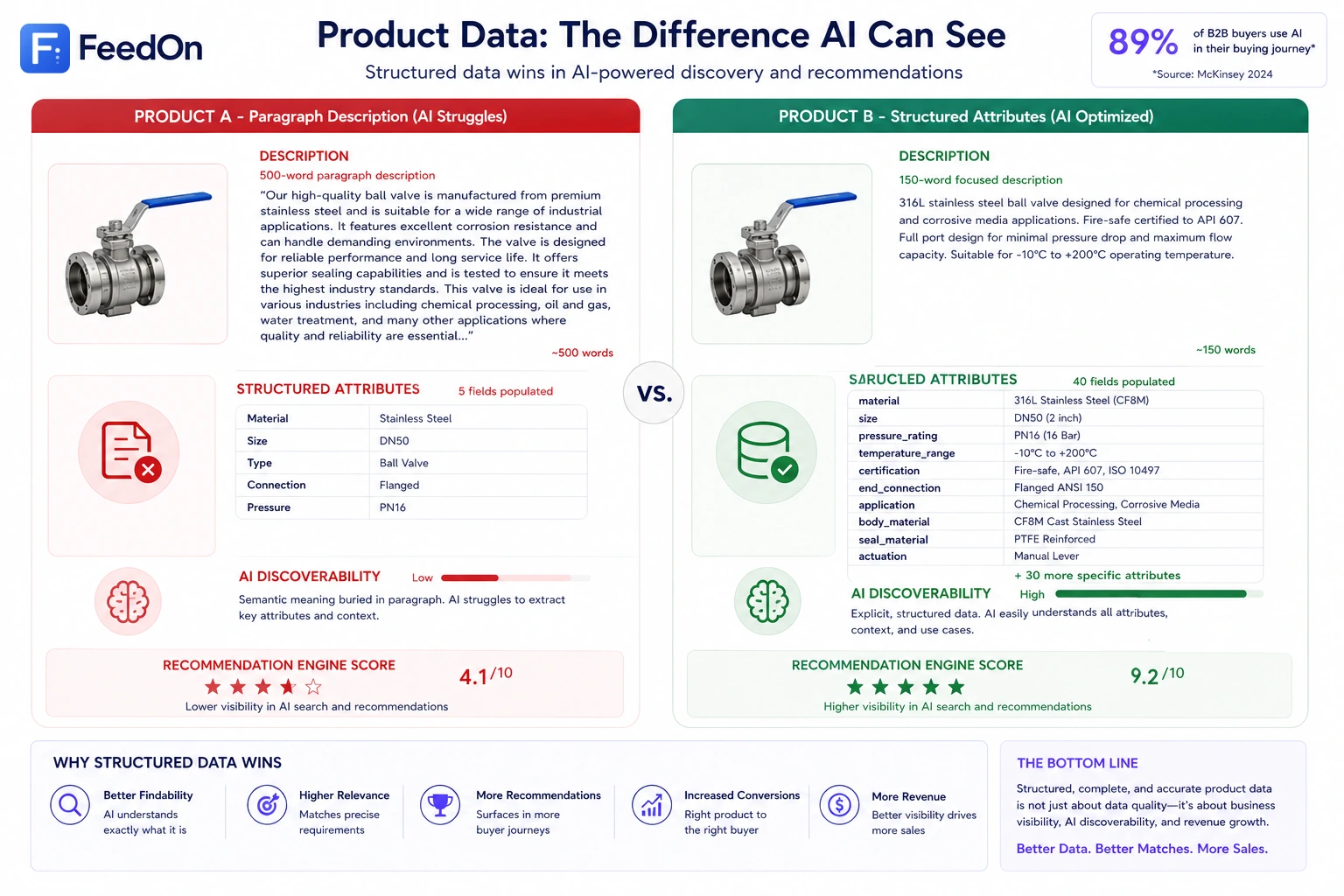
Research shows that 89% of B2B buyers now use generative AI somewhere in their buying journey. This is not a future trend - it is the current reality for procurement managers, engineers, and operations buyers evaluating suppliers and specifying products.

This fundamentally changes what "well-optimised" product data looks like.
How traditional search optimisation worked
Traditional B2B product feed optimisation for search meant: put the right keywords in your title and description, ensure category classification is accurate, and make sure your part numbers are indexed.
Buyers typed a query. Search engines matched keywords. Products with the right keyword density in the right fields ranked higher.
How AI-powered discovery works differently
When a procurement manager asks ChatGPT "find me a 316L stainless steel ball valve, DN50, PN16-rated, with fire-safe certification, for a chemical plant application" - that query is not matched against keyword frequency. The AI interprets the semantic meaning of every attribute and matches it against product data that is structured, specific, and attribute-complete.
Products that will surface in AI-powered discovery have:
Structured technical attributes as explicit fields - not buried in a long description paragraph, but as separate, machine-readable attribute fields: material: 316L stainless steel, size: DN50, pressure_rating: PN16, certification: fire-safe.
Semantic richness in descriptions - descriptions that explain applications, compatible use cases, and technical context. "Suitable for chemical plant environments with corrosive media" gives an AI discovery engine far more to work with than "high-quality ball valve."
Complete attribute coverage - missing attributes are invisible to AI systems. An AI cannot infer that a product is fire-safe certified if that attribute is not explicitly present in the product data. FeedOn's attribute extraction fills these gaps automatically but for B2B technical products, the attributes need to come from authoritative sources, not inference.
Part number coverage and cross-references - AI-powered procurement tools often work from buyer-specified part numbers. If your product data carries accurate MPN, GTIN, and cross-reference part numbers, AI systems can match buyer requirements to your catalog even when the buyer is using a different part number system.
What to change in your B2B product data strategy
Move away from paragraph-heavy descriptions toward structured attribute sets. A 500-word product description is harder for AI to parse than 20 explicit attribute fields with values.
Prioritise attribute completeness over description length. An AI recommendation engine that sees a product with 40 complete attribute fields will recommend it ahead of a product with a 1,000-word description and 5 attributes.
Use industry-standard terminology in attribute values. Don't invent your own nomenclature. Use recognised industry terms (DN/NPS for pipe sizing, SAE/ISO grade designations for fasteners, IEC standards codes for electrical components). AI systems trained on industry data recognise standard terminology.
Keep product data current with real-time feeds. AI procurement assistants that surface out-of-stock products or wrong prices lose buyer trust immediately. Automated feed refresh ensures your data is always current wherever it is distributed.
The hidden cost of B2B product data errors
In B2C, a feed error costs you a disapproval and lost ad impressions. In B2B, the cost structure is fundamentally more severe.
Price discrepancy: chargeback and contract risk
If your product feed shows a price that differs from the price on your invoice or in your contract, you are not just annoying a buyer - you may be creating a contractual liability.
Many B2B procurement contracts include a Most Favoured Customer (MFC) clause or a price matching guarantee. If a buyer finds that your feed showed a lower price to another distributor, they may invoke the clause for retroactive price adjustments across their entire purchase history.
In government procurement contexts, a price discrepancy between your catalog data and your invoiced price can trigger a False Claims Act exposure in the US, or equivalent procurement fraud regulations in other jurisdictions.
The cost: Legal fees, price adjustments, contract renegotiation, and potential debarment from the procurement relationship. Far more expensive than any feed management tool.
Wrong product specifications: returns, wrong-part orders, and field failures
In technical and industrial products, a wrong specification in your product feed - incorrect thread size, wrong voltage rating, wrong material grade - causes buyers to order the wrong product.
At B2B order volumes, a wrong-fitment or wrong-specification order is not one unit to return. It may be 500 units, already installed and requiring recall.
The cost: Return freight, restocking fees, replacement product costs, potential liability for consequential damages if a wrong specification caused an equipment failure or safety incident.
Missing compliance documentation: blocked procurement approvals
In regulated industries, a purchase order cannot be approved by an enterprise procurement system if the product lacks the required compliance documentation, CE marking declaration, FDA clearance, SDS.
If your product feed does not carry links to current compliance documents, your products will be blocked at the procurement approval stage, not because there is anything wrong with the product, but because the paperwork is missing from the data.
The cost: Lost sale, damaged relationship with the procurement team, and the reputational signal that your data hygiene is poor.
Stale availability data: emergency procurement failures
Industrial buyers often place orders for critical replacement parts under time pressure. If your feed says a product is in stock when your warehouse is empty, a buyer places an urgent order, and you cannot fulfil it, you have created an operational emergency for your customer.
In MRO contexts, a machine downtime event can cost thousands of dollars per hour. If your stale availability data contributed to a delayed emergency procurement, you bear some of the reputational cost of that failure.
The cost: Lost account, damaged relationship, and potential liability for consequential downtime costs in some contractual contexts.
The ROI case for proper B2B feed management
When you quantify these risks, the cost of proper B2B feed management infrastructure ERP sync, automated error detection, real-time availability updates, is trivially small compared to the commercial exposure of managing product data carelessly.
A feed audit that catches a pricing discrepancy before it reaches a distributor's catalog pays for itself the first time it prevents a chargeback conversation.
Distributor tier visibility and access control in product feeds
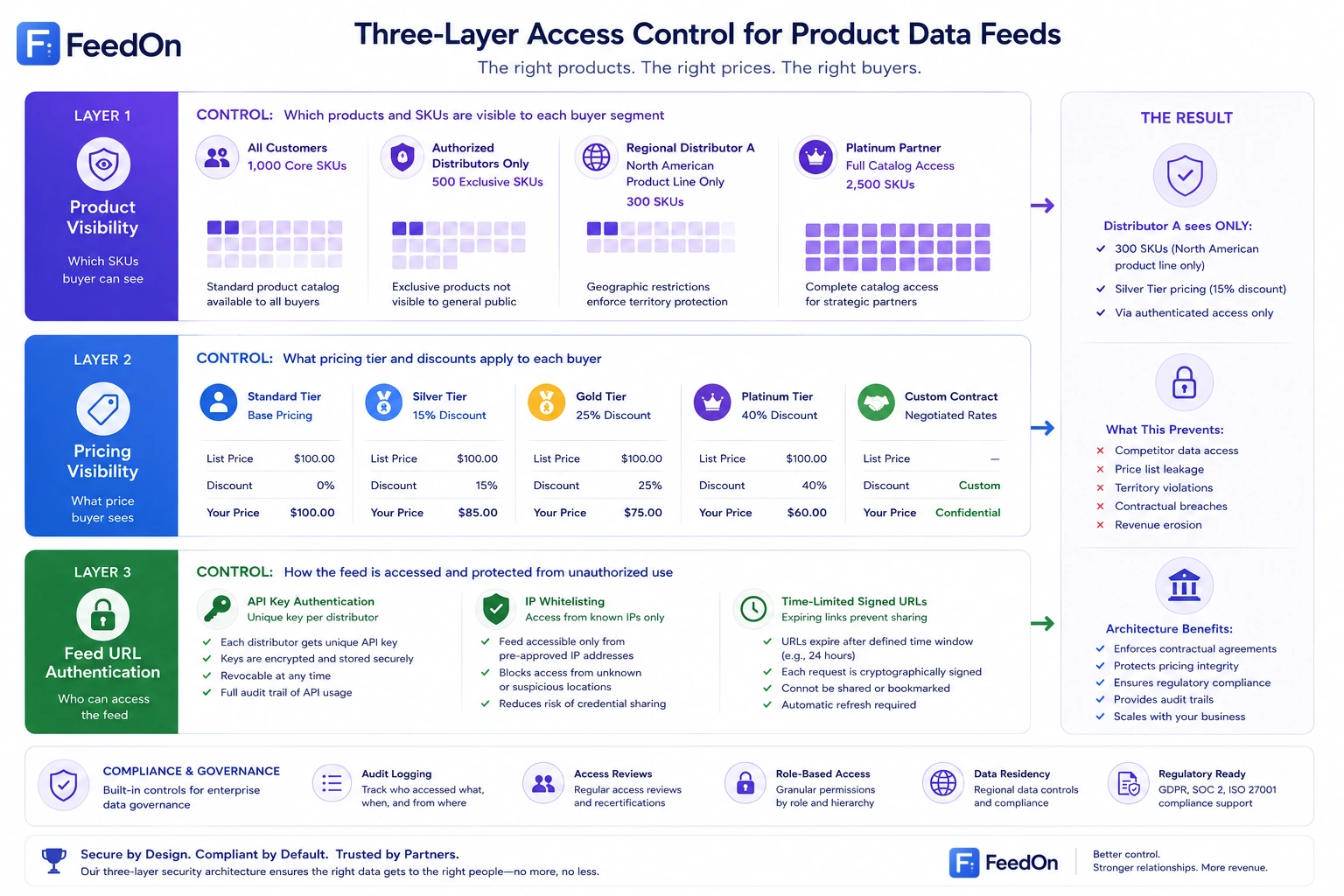
One of the most important and least-discussed capabilities in B2B product feed management is access control ensuring that each distributor or buyer segment sees exactly what their contract authorises, and nothing more.
Why access control is a feed management problem
Without proper access control in your product feeds:
A silver-tier distributor can see the platinum-tier pricing your best customer negotiated
A regional distributor carrying only your North American product line can see your European-exclusive SKUs
A new prospect can access your full pricing structure before any commercial agreement is in place
A competitor who becomes a customer can use their access to benchmark your pricing strategy
This is not a hypothetical risk. It happens every time a company manages B2B product feeds carelessly.
The three layers of B2B catalog access control
Product visibility - which products a given buyer can see.
Some products are available to all customers. Others are contract-exclusive SKUs, regional products, or product lines carried only by certain authorised distributors. Your feed segmentation must enforce visibility at the product level: Distributor A receives a feed containing only the 2,000 SKUs they are authorised to carry.
Pricing visibility - what price a given buyer sees for the products they can access.
Even among products visible to a distributor, pricing may vary by account tier, contract terms, or volume commitments. The feed must apply the correct price list per recipient - not expose a price matrix that reveals the structure of your other deals.
Feed URL authentication - ensuring only the intended recipient can access a given feed.
A customer-specific feed URL must be authenticated so that only the intended recipient can retrieve it. Common approaches:
API key authentication: each distributor receives a unique API key that must be passed in the feed request header
IP whitelisting: the feed endpoint is only accessible from the distributor's known IP range
Time-limited signed URLs: feed URLs expire after a short window and must be re-generated, preventing old links from being shared
Managing feed access through a product feed tool
For distributors managing many trading partners, maintaining separate authenticated feed URLs per partner is operationally complex. A feed management platform with per-destination feed rules can manage this at scale: one platform generates and manages hundreds of outgoing partner feeds, each applying the correct pricing logic and product visibility rules for its intended recipient.
The realistic B2B feed implementation timeline and where projects fail

No article on this topic gives you an honest implementation timeline. Here is one.
Data audit and architecture design (Weeks 1–4)
Before writing a single line of feed configuration, map your current state:
Audit your ERP data quality: how complete are your product records? How consistent are pricing structures? Are customer-specific price lists actually maintained in the ERP, or do they live in account manager spreadsheets?
Identify your channel priorities: which distribution channels need product data first? Start with the highest-revenue relationships.
Design your data ownership model: which system owns pricing, which owns descriptions, which owns compliance documents?
Map the integration points: how will data flow from ERP → PIM → feed tool → channels?
Common failure at this phase: Discovering that "customer-specific pricing" in theory lives in spreadsheets in practice, and the ERP migration to consolidate that data takes 6 months before any feed work can begin.
Core feed infrastructure (Weeks 4–10)
Configure your feed management platform with your master product catalog
Build the ERP integration or scheduled pricing export
Create the format transformation rules for your priority channels
Implement access control and per-partner feed segmentation
Run the first feed audit against your priority channels
Common failure at this phase: The ERP integration takes 3× longer than estimated because ERP data is dirtier than anyone expected. Fields that nominally exist are empty or inconsistently populated. Budget time for data cleaning, not just integration development.
Partner onboarding (Weeks 8–16, overlapping with Phase 2)
Begin onboarding your highest-volume distributor partners with their specific feed requirements
Set up authenticated feed URLs per partner
Run acceptance testing: have partners confirm the feed data looks correct in their system
Document each partner's specific requirements for future reference
Common failure at this phase: Partners have requirements they do not tell you about until they are testing the feed. Budget for two or three rounds of revision per partner.
Monitoring and optimisation (Ongoing from Week 12)
Set up automated data quality monitoring
Configure alerts for pricing anomalies, availability discrepancies, and broken image URLs
Establish a regular cadence for reviewing feed health metrics
Build a supplier/product data quality governance process for ongoing maintenance
Common failure at this phase: Nobody owns feed health monitoring. The team that built the feed moves on to other projects, and feed quality degrades silently over months until a partner complains.
Where B2B feed projects fail (honest summary)
Failure mode                                   Frequency       Prevention
ERP data quality worse than expected           Very common     Audit ERP data quality before project kick-off
Pricing logic lives outside the ERP            Common          Consolidate pricing to ERP before feed project begins
Partner requirements discovered late           Common          Run structured requirements sessions with each partner upfront
No one owns ongoing feed health                Very Common     Define a named owner with KPIs before go-live
Scope creep from new channel requests          Common          Agree channel priority order and stick to it in Phase 1
Feed tool cannot handle pricing complexity     Occasional      Validate pricing logic capability in tool selection phase
How FeedOn.ai supports B2B feed management needs
Most feed management tools are built for B2C advertising campaigns. FeedOn is built around the real operational complexity of managing product data across multiple channels with high data quality requirements - capabilities that map directly to the B2B needs covered in this guide.
Feed audit and quality monitoring. FeedOn's feed audit runs 60+ automated quality checks against your product data, identifying missing attributes, broken image URLs, pricing issues, and category errors before they reach your distribution channels. For B2B, catching these before they reach a distributor's catalog or procurement system is critical.
AI attribute extraction. FeedOn's Vision AI extracts missing product attributes from images and text — colour, material, category classification, and 15+ other fields. For distributors enriching incomplete supplier data, this dramatically reduces the manual effort of catalog onboarding. For technical products, it provides a starting point for attribute enrichment that human review then verifies and augments.

Multi-channel publishing from one source. FeedOn's multi-channel publishing exports optimised feeds to Google Shopping, Meta, TikTok, Amazon, and custom channel formats from a single product data source. For B2B companies selling across both advertising channels and custom partner destinations, this eliminates the maintenance of separate data processes per channel.
AI-powered title and description optimisation. FeedOn's bulk copy generation rewrites product titles and descriptions per channel structured for search intent on Google Shopping, optimised for technical specificity on procurement platforms. The same product can have a consumer-friendly title for B2C channels and a specification-rich title for B2B procurement contexts.
Platform flexibility. FeedOn works with Shopify, WooCommerce, Magento, BigCommerce, and raw CSV or XML uploads. For B2B companies on non-standard or custom platforms, the CSV/XML import path means no integration dependency to get started.
The free plan covers up to 200 products with a 7-day trial enough to run a full feed audit and see exactly what your current data quality issues are before committing to any paid plan.
Putting it all together: the B2B product feed management priority order
If you are starting or overhauling your B2B product feed management, here is the sequence that produces the fastest return:
Step 1: Audit your current data quality. You cannot fix what you have not measured. Run a feed audit against your existing product data before doing anything else.
Step 2: Fix your data ownership architecture. Which system owns pricing? Which owns descriptions? If the answer is "spreadsheets" or "nobody is sure," address this before building any feed infrastructure on top of it.
Step 3: Prioritise by revenue impact. Which distributor relationship or procurement channel represents the most revenue? Start there, not with the most technically interesting channel.
Step 4: Implement access control from day one. It is far harder to retrofit proper feed segmentation and authentication onto an existing system than to build it correctly from the start.
Step 5: Monitor continuously. B2B feed quality degrades. Prices change. Products are discontinued. Suppliers update their data in inconsistent ways. Automated monitoring catches these degradations before they become commercial problems.
B2B product feed management is not a project. It is an operational discipline. The companies that treat it as infrastructure not a one-time implementation are the ones whose digital channels actually perform.
Frequently Asked Questions
What is the difference between B2B and B2C product feed management?
B2C feed management distributes a single public catalog with one price per product to advertising channels like Google Shopping. B2B feed management must handle customer-specific pricing, segmented catalog visibility, procurement system integrations (EDI, punchout catalogs), and often much richer technical attribute sets — all while maintaining access control to prevent pricing leakage between customer tiers.
Do B2B companies need Google Shopping feeds?
Yes, if they sell products where buyers use Google Search to find suppliers. B2B buyers increasingly research and discover suppliers through organic search and Google Shopping before engaging procurement channels. However, Google Shopping is rarely the primary transaction channel for large B2B purchases those happen through EDI, punchout catalogs, or direct portal ordering. Both channels need properly managed product data.
How often should B2B product feeds be updated?
For advertising channels (Google, Meta): at minimum daily for pricing and availability. For procurement channels and distributor feeds: real-time or near-real-time for pricing and availability; daily for attribute and content changes. Stale availability data is especially costly in B2B because procurement decisions are made based on that data.
What is a punchout catalog and do I need one?
A punchout catalog is an interactive product catalog on your website that can be accessed directly from a buyer's procurement system (Ariba, Coupa, SAP). Enterprise buyers browse and add items to their cart within your catalog, and the selected items are returned to their procurement system as a requisition. If your B2B customers are large enterprises with formal procurement processes, punchout catalog capability will unlock sales that are otherwise inaccessible.
How does AI change B2B product feed management?
AI affects B2B feed management in two ways: (1) AI tools automate the feed management work itself attribute extraction, title optimisation, quality monitoring; and (2) AI-powered procurement discovery systems (ChatGPT, Perplexity, AI-assisted procurement tools) are increasingly how B2B buyers find and evaluate products, which means product data needs to be structured, attribute-complete, and semantically rich to surface in AI-generated recommendations.