
The Ultimate Google Shopping Feed Optimization Guide
Throwing thousands of dollars at a Google Shopping campaign will not guarantee sales if your product feed falls short. Many e-commerce brands assume that setting a high daily budget is enough to dominate search results. However, Google operates differently than traditional search networks. Your product feed acts as the actual engine driving your campaign performance.
If your product data is incomplete, inaccurate, or poorly formatted, Google simply will not show your ads to the right buyers. You will end up paying for irrelevant clicks while your best-selling items remain hidden from high-intent shoppers. Proper google shopping feed optimisation bridges the gap between your inventory and the people actively looking to buy what you sell.
By treating your product feed as a strategic asset, you can dramatically increase your visibility, lower your cost per click, and drive more qualified traffic to your store. In this comprehensive guide, we will explore exactly how Google uses your data. We will also break down the most common errors merchants make and provide a step-by-step roadmap to fully optimize your product feed by product feed optimization tool.
Understanding Google Shopping Feeds
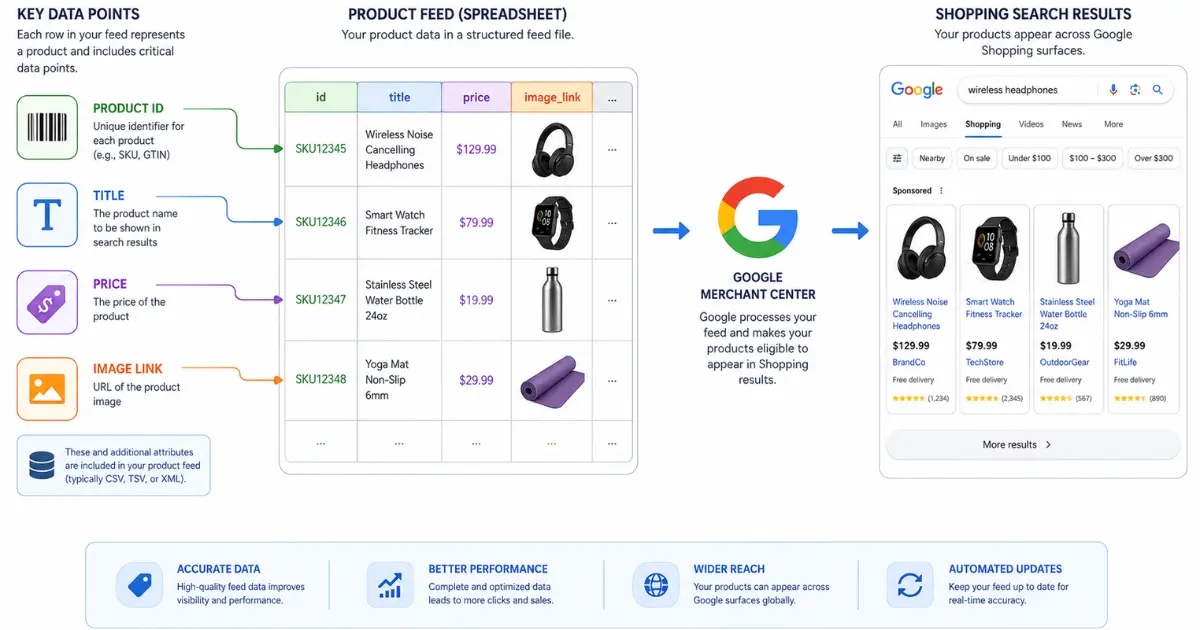
To master Google Shopping, you must first understand how the platform processes your inventory. Unlike standard Google Search ads, you do not bid on specific keywords like "running shoes" or "coffee maker." Instead, Google Merchant Center relies entirely on the data provided in your product feed to match your items with user search queries.
A product feed is essentially a massive spreadsheet containing all the granular details about your inventory. It includes mandatory fields like product ID, title, link, price, and image. It also contains optional fields like color, size, material, and age group.
When a shopper searches for a "women's red leather crossbody bag," Google scans millions of product feeds instantly. The search engine looks for the feed that provides the exact attributes matching that specific query. If your feed only lists your item as a "Red Bag," Google will bypass your product in favor of a competitor who provided a rich, detailed listing.
The more data you provide, the better Google understands your products. This precise understanding allows the algorithm to place your ads in front of shoppers who are ready to make a purchase, ultimately boosting your conversion rates.
Common Mistakes to Avoid
Before you can optimize your feed by using feed audit tool, you need to identify and fix the structural issues holding your campaigns back. Many merchants make critical errors that severely limit their visibility. Avoid these common pitfalls to keep your Google Merchant Center account in good standing.
Ignoring Optional Attributes
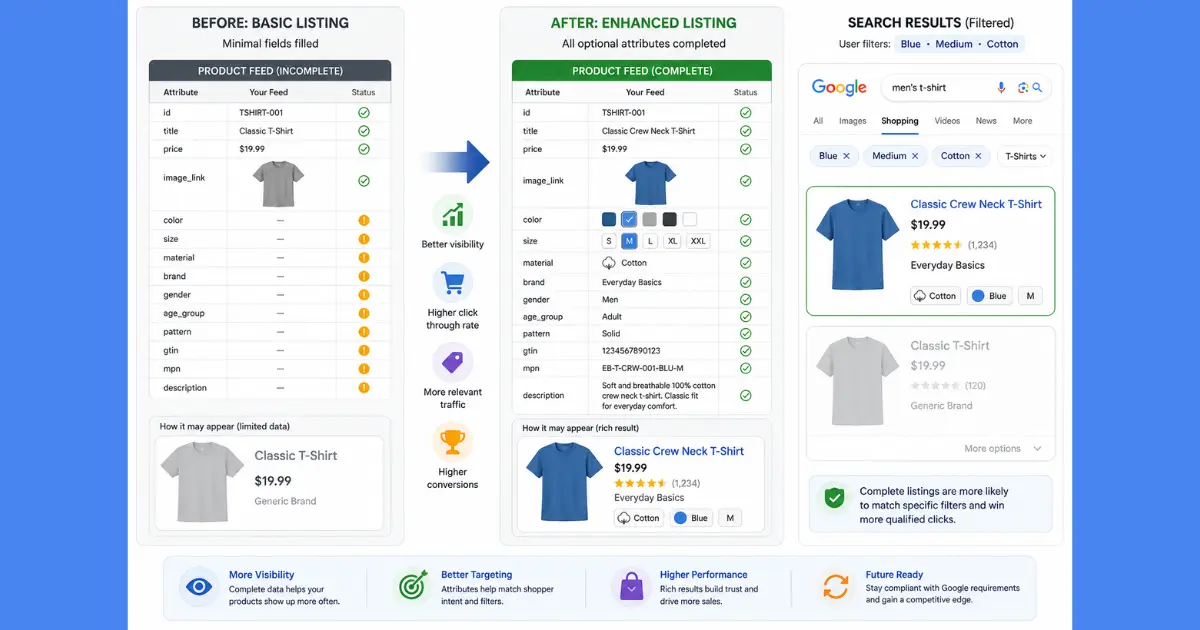
Google requires a specific set of attributes just to approve your products. However, many merchants stop there and ignore the dozens of optional fields available. Leaving fields like size, pattern, and material blank is a massive missed opportunity.
Shoppers frequently use search filters to narrow down their options. If a buyer filters their search to only show "cotton" shirts, and you left the material attribute blank, your ad disappears. Populating optional attributes ensures you capture this highly targeted, long-tail search traffic.
Stock and Price Discrepancies
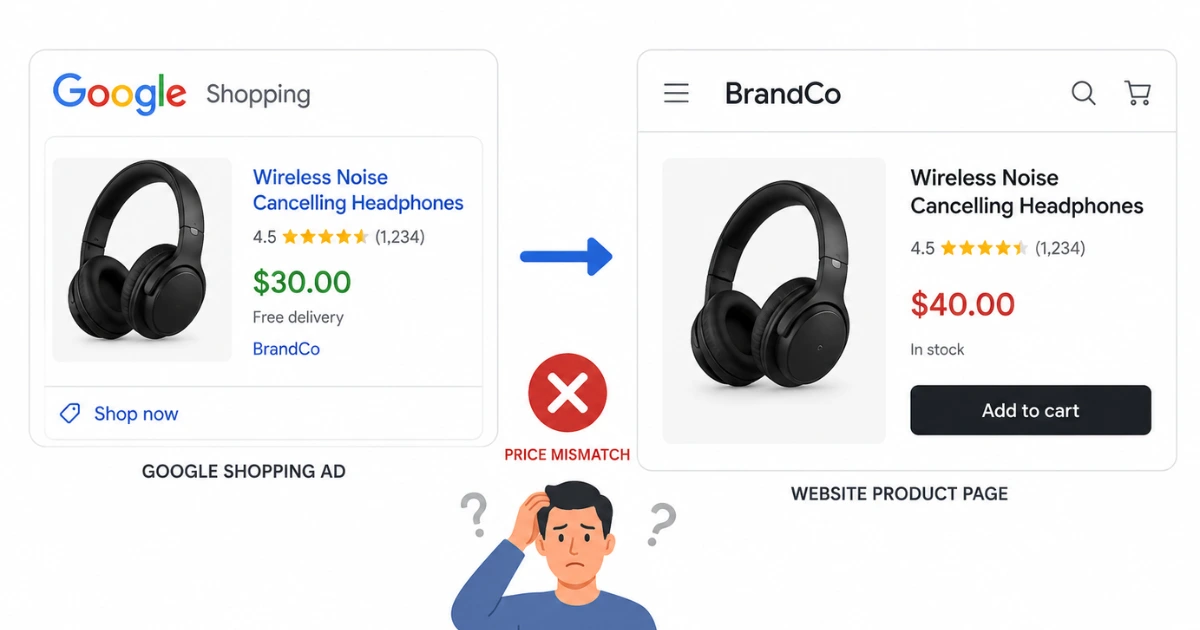
Google prioritizes a seamless user experience above all else. If a shopper clicks your ad expecting to pay thirty dollars, but your website lists the product at forty dollars, the buyer will leave immediately. Google penalizes these data mismatches heavily.
If your feed data does not perfectly match the actual pricing and stock availability on your website, Google will disapprove your items. Consistent mismatches will eventually lead to a total suspension of your Merchant Center account.
Vague or Truncated Product Titles
Your product title serves as the heaviest ranking factor in Google's matching algorithm. Unfortunately, many brands simply copy their website product titles directly into their feed. A title like "The Classic Tee" might look great on your Shopify store, but it tells Google absolutely nothing about the actual product.
Furthermore, Google truncates long titles on mobile devices. If you bury the most important details at the end of the title, shoppers will never see them. Failing to front-load critical keywords hurts both your click-through rates and your search relevance.
Step-by-Step Guide to Optimizing Your Feed
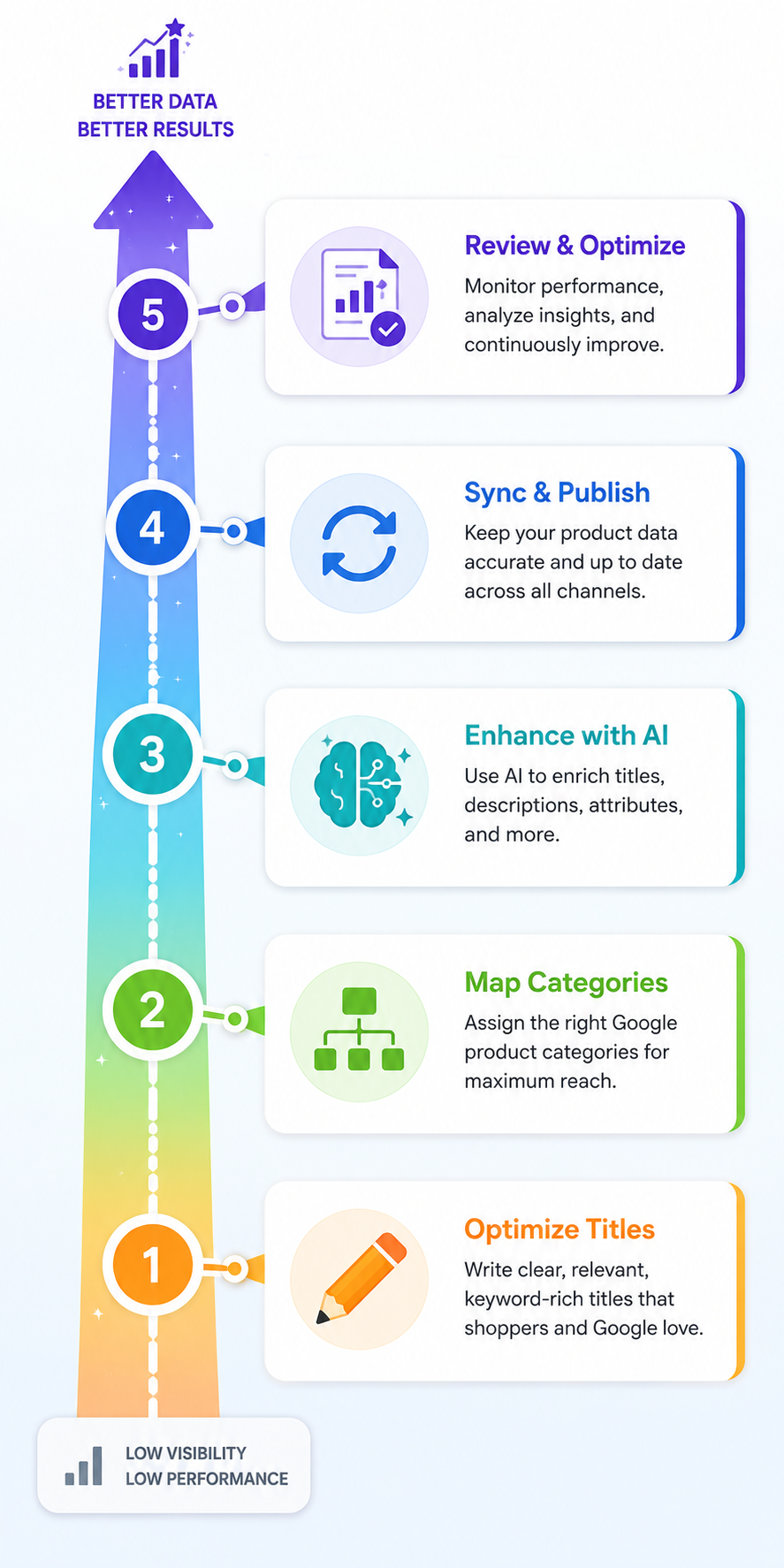
Transforming a basic data export into a highly optimized product feed requires a systematic approach. Follow these actionable steps to upgrade your catalog and maximize your Google Shopping performance.
Step 1: Write Keyword-Rich, Front-Loaded Titles
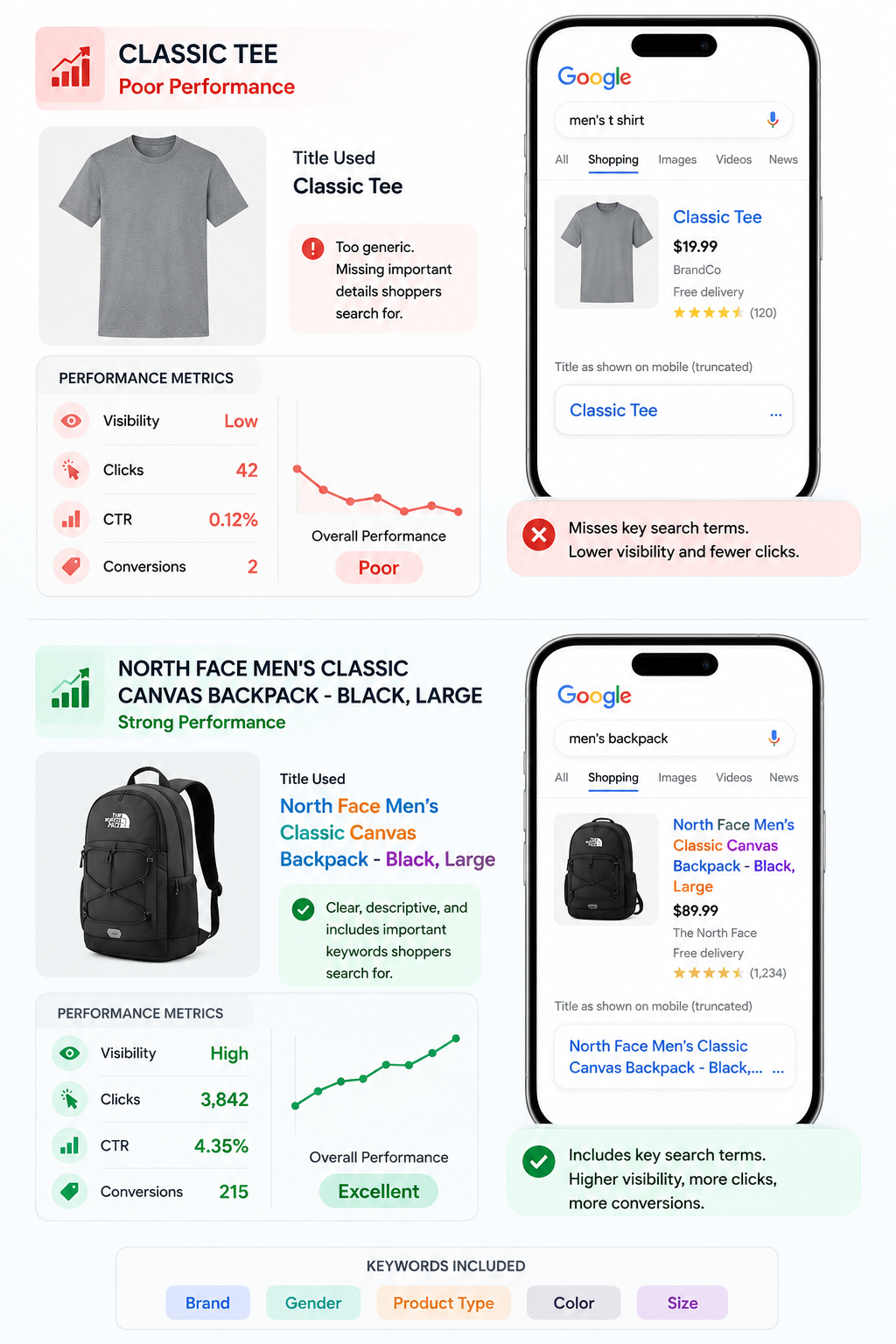
You must rewrite your product titles specifically for Google Shopping. Structure your titles logically, ensuring the most descriptive and important words appear first. Think about exactly what your target audience types into the search bar.
A proven title structure for most apparel and hard goods looks like this: Brand + Gender + Product Type + Attributes (Color, Size, Material).
Instead of naming a product "Classic Canvas Backpack", optimize it to "North Face Men's Classic Canvas Backpack - Black, Large". This structure instantly feeds Google the exact keywords needed to match high-intent searches while ensuring the shopper sees the most relevant information before the text cuts off.
Step 2: Map to the Deepest Google Product Category

Google uses an extensive taxonomy known as the Google Product Category (GPC) to classify items. While the platform attempts to auto-categorize your inventory, its automated system frequently mislabels products. You must take control and manually map your items to the deepest, most specific category available.
Do not settle for a broad category like "Sporting Goods". This forces Google to guess what you actually sell. Instead, map your product down the exact category tree: "Sporting Goods > Outdoor Recreation > Camping & Hiking > Sleeping Bags". Deep categorization helps Google understand your exact niche, improving your ad placement when shoppers browse specific product types.
Step 3: Leverage AI Tools for Attribute Extraction

Manually typing out missing colors, materials, and patterns for thousands of products is an impossible task for a small marketing team. If your e-commerce backend lacks these granular details, you need a smarter way to generate them.
Modern feed management software now uses artificial intelligence to solve this exact problem. Advanced tools feature automated attribute extraction powered by computer vision. These AI tools scan your actual product photos and identify missing details instantly.
If you upload a photo of a plaid flannel shirt, the AI recognizes the pattern and fabric. It seamlessly injects "plaid" and "flannel" directly into your Google feed. Using AI tools saves you countless hours of manual data entry while ensuring your catalog remains fully optimized.
Step 4: Ensure Strict Data Accuracy and Syncing

To prevent account suspensions, you must keep your feed data perfectly synced with your live website. A static spreadsheet uploaded once a month will lead to massive inventory errors and wasted ad spend.
Set up an automated feed management platform or a direct API connection between your store and Google Merchant Center. Configure the system to fetch and push data multiple times a day. If a popular item sells out at noon, your Google Shopping feed should update immediately to stop showing ads for that specific product. Real-time syncing protects your budget and your account standing.
Step 5: Craft Compelling Product Descriptions
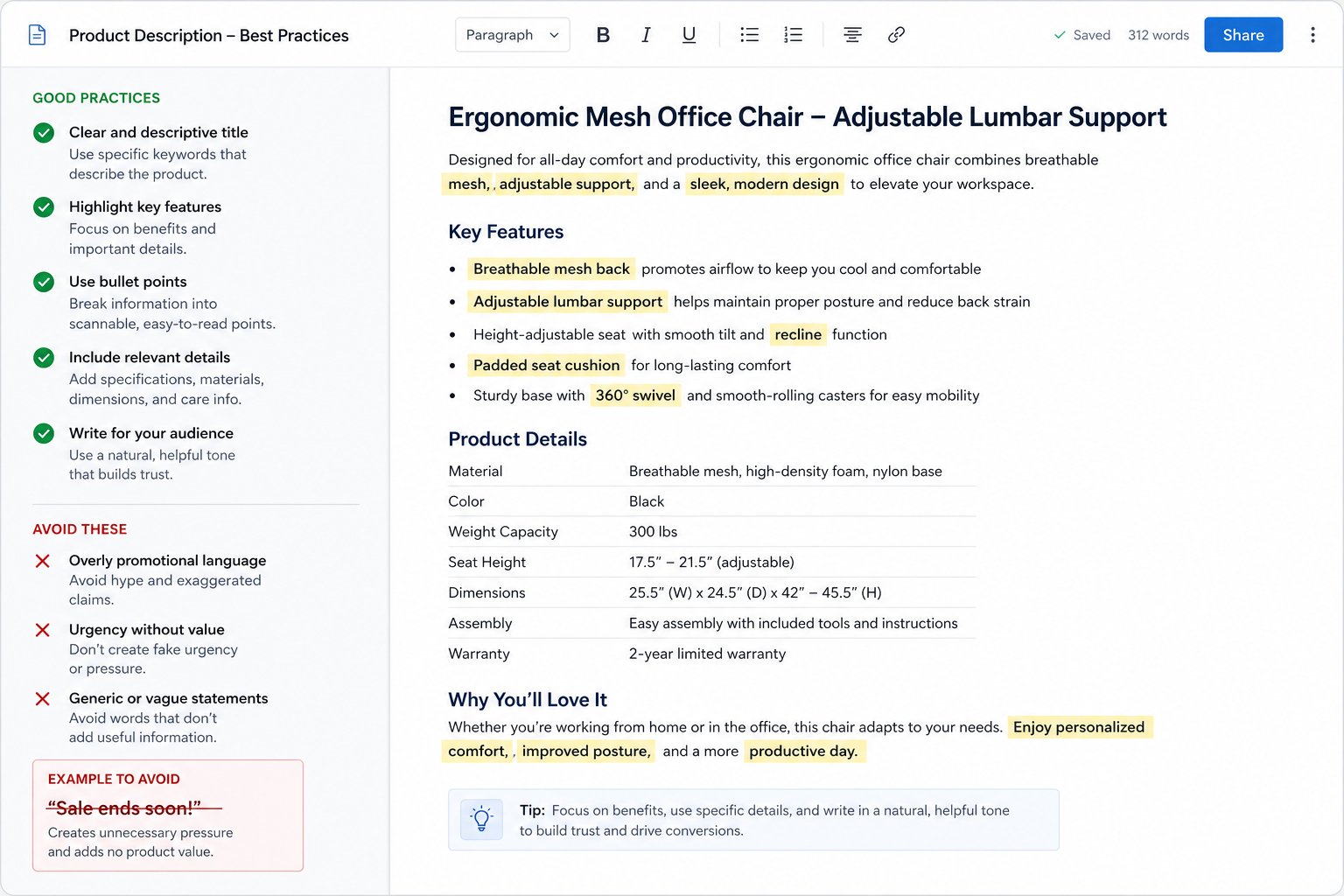
While titles carry the most weight, your descriptions still provide vital context to Google's algorithm. Use the description field to include secondary keywords that did not fit into your title.
Focus entirely on the physical characteristics, exact dimensions, and use cases of the product. Write clear, factual sentences and break up large blocks of text so it is easy to read. Avoid using promotional phrases like "Sale ends soon" or "Number one product." Google explicitly forbids promotional text in descriptions and will flag your items if you include it.
Take Control of Your Google Shopping Performance
Settling for a raw, unoptimized product feed puts a hard limit on your e-commerce growth. You will continue to pay for clicks that do not convert, and you will lose valuable sales to competitors who took the time to structure their data correctly.
Optimizing your feed gives you an immediate, measurable competitive advantage. By writing keyword-rich titles, mapping to deep categories, and utilizing AI to extract missing attributes, you ensure your products appear exactly when buyers want them start for free.
Review your current Google Merchant Center account today. Identify the missing attributes and truncated titles that are currently holding your performance back. Implement these proven strategies to clean up your data, lower your advertising costs, and drive consistent, profitable sales through Google Shopping.
Frequently Asked Questions
Why is feed optimization critical for Google Shopping?
Google Shopping does not use traditional keyword bidding to rank your ads. Instead, the search engine scans your product feed to match your inventory with what shoppers type into the search bar. If your data is rich and accurate, your products show up for the right buyers. This targeted visibility lowers your advertising costs and helps you capture more sales.
What are the most common feed errors to avoid?
The biggest mistakes include missing required attributes, mismatched prices, and vague product titles. If the price in your feed does not match the price on your website, Google will disapprove your items. Furthermore, leaving optional fields like size or material blank causes you to miss out on highly targeted search traffic.
How can I improve my product titles for better visibility?
Put your most important keywords at the very front of your title. Mobile screens often cut off long text, so shoppers need to see the main details first. We recommend using a clear formula like Brand + Gender + Product Type + Attributes (such as color and size). This structure tells both Google and the buyer exactly what you sell right away.
What tools can help automate feed optimization?
Managing product data by hand takes far too much time for growing brands. You can use modern feed management software to speed up the process. Platforms equipped with artificial intelligence actively pull missing details straight from your product photos and rewrite your titles to match specific channel rules.
How often should I update my Google Shopping feed?
You must update your feed as often as your inventory changes. If you sell out of a popular item but your feed does not update, you will pay for ads that send buyers to an out-of-stock page. We highly recommend setting up a direct API connection to push real-time pricing and stock updates from your store to Google.
What are the benefits of using AI for feed management?
Artificial intelligence removes the heavy manual labor from running your e-commerce store. Advanced AI tools scan your product images to find and fill in missing information instantly. They also generate keyword-rich copy perfectly tailored for Google Shopping. This technology saves you countless hours while keeping your catalog fully optimized and highly visible.