
AI Product Title Optimization: The Complete 2026 Guide
Every guide on AI product title optimisation says the same thing: "AI rewrites your titles at scale and your CTR goes up." That's the beginning of the story. It's not the whole story.
This guide opens the black box. You'll find out how AI actually generates a product title at the prompt level, why the same product needs five structurally different titles across five channels, how to score a title before it goes live, what happens when AI gets it wrong, how to A/B test at scale with real methodology, how title optimisation is changing for Google AI Overviews, and how to handle 50 size/colour variants without triggering duplicate disapprovals.
No inflated benchmark stats. No vendor spin. Just the mechanics that actually determine whether your titles perform.
How AI Actually Generates a Product Title
Every competitor page says, "AI rewrites your titles automatically." None of them show you what happens between your raw feed data and the optimised title output.

Here are the actual mechanics.
The Input: What the LLM Reads
When an AI title generator runs, it reads your product's feed attributes as a structured input – typically assembled into a prompt like this:
Product attributes:
brand: Adidas
title (original): Running Shoe
colour: Black
size_type: Regular
gender: Male
material: Mesh upper, rubber sole
product_type: Athletic Footwear > Running Shoes
prompt: A lightweight shoe for road running.
That raw attribute block gets passed to a large language model alongside a system prompt – the hidden instruction set that governs how the model transforms your data into a title.
The System Prompt: The Most Important Thing No One Talks About
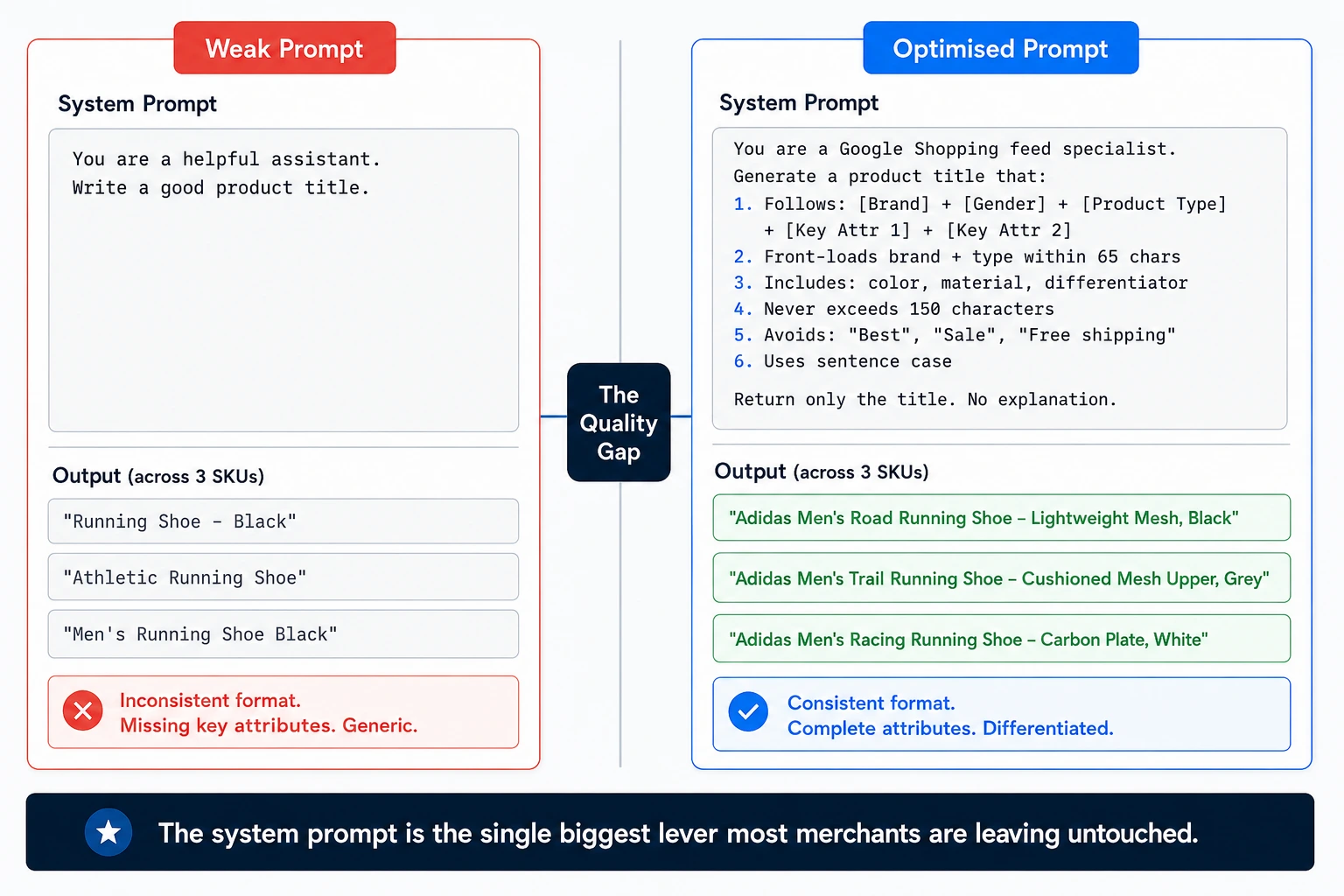
The quality of your AI-generated titles is almost entirely determined by the quality of the system prompt. Here is a minimal example versus an optimised one:
Weak system prompt:
You are a helpful assistant. Write a good product title.
Optimised system prompt for Google Shopping:
You are a Google Shopping feed specialist. Generate a product title that:
Follows the formula: [Brand] + [Gender] + [Product Type] + [Key Attribute 1] + [Key Attribute 2]
Front-loads the brand and product type within the first 65 characters
Includes at minimum: color, material, and one differentiating feature
Never exceeds 150 characters total
Avoids promotional language ("Best", "Sale", "Free shipping")
Uses sentence case, not title case
Return only the title. No explanation.
The difference in output quality between these two prompts across 10,000 SKUs is enormous – and is the single biggest lever most merchants are leaving untouched.
Few-Shot Examples: Teaching the Model Your Format
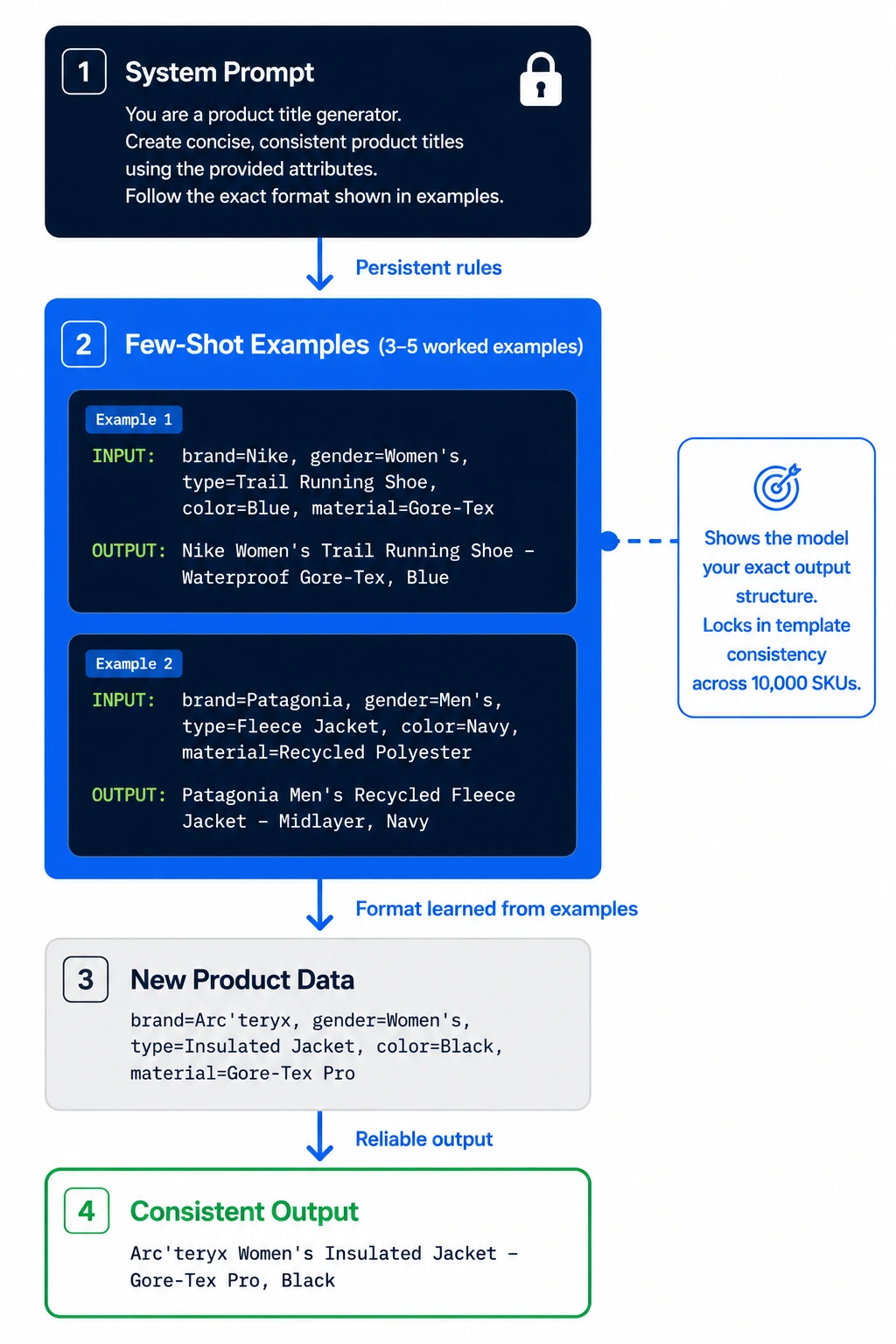
Beyond the system prompt, few-shot examples dramatically improve consistency. Including 3–5 worked examples in your prompt shows the model the exact output structure you want:
Example 1:
Input: brand=Nike, gender=Women's, type=Trail Running Shoe, color=Blue, material=Gore-Tex
Output: Nike Women's Trail Running Shoe – Waterproof Gore-Tex, Blue
Example 2:
Input: brand=Patagonia, gender=Men's, type=Fleece Jacket, color=Navy, material=Recycled Polyester
Output: Patagonia Men's Recycled Fleece Jacket – Midlayer, Navy
Without few-shot examples, the model picks its own title format, which is inconsistent across categories. With them, you lock in a template the model reliably follows.
Why Vague Instructions Produce Generic Titles
The LLM is a pattern-matching machine. If your prompt doesn't specify attribute priority, character constraints, or format requirements, the model defaults to the most statistically average title it has seen in training, which looks like every other title on the SERP.
Specificity in the system prompt directly maps to differentiation in the output.
FeedOn's AI Copy Boosters use channel-specific system prompts built on exactly these principles – generating titles structured for Google Shopping's algorithm rather than generic rewrite logic. You can see how it works in the AI feed enrichment feature overview on feedon.ai.
One Product, Five Channels: How Titles Must Differ
The same product needs a structurally different title on each major channel. Not just a different length, a different logic.

Here is a concrete example using a single product: a women's waterproof trail running shoe by Merrell.
Google Shopping
Formula: Brand + Gender + Product Type + Key Attribute(s)
Optimized title: Merrell Women's Trail Running Shoe – Waterproof, Moab Speed Mid Gore-Tex, Grey
Why: Google's algorithm reads left to right and weights attributes found early in the title more heavily. Brand and product type front-loaded. 'Waterproof' is a high-search modifier, so it appears before 'colour'. Character count: 81 (within the ideal 65–150 range).
Amazon
Formula: Brand + Product Type + Gender + Key Feature + Specifications + Color/Size hint
Optimized title: Merrell Moab Speed Mid Gore-Tex Trail Running Shoe for Women – Waterproof Hiking Sneaker, Grey, Sizes 5–12
Why: Amazon rewards keyword density because its A9 algorithm treats titles as primary keyword fields. The size range hint reduces return rates. "Hiking Sneaker" is added because it captures a secondary search intent that converts on Amazon but would look keyword-stuffed on Google.
Meta (Facebook/Instagram)
Formula: Benefit-first within 40-character truncation window + Product Type
Optimized title: Waterproof Trail Shoe – Merrell Women's Gore-Tex
Why: Meta catalog ads truncate at roughly 40 characters in mobile placements. The most compelling attribute (waterproof) must appear first, or it disappears. The brand moves to the back half since recognition happens through the ad image on Meta, not the title.
TikTok Shop
Formula: Trend-aware modifier + Product Type + Key Feature + Brand
Optimized title: All-Weather Trail Runner – Waterproof Women's Hiking Shoe | Merrell Gore-Tex
Why: TikTok's algorithm surfaces products through interest matching, not keyword search. Conversational phrasing ("All-Weather Trail Runner") performs better than specification strings. The pipe separator is TikTok-native formatting.
Bing Shopping
Formula: Mirrors Google closely but tolerates slightly longer descriptors
Optimized title: Merrell Women's Waterproof Trail Running Shoe – Gore-Tex Mid, Moab Speed, Grey
Why: Bing Shopping's ranking logic is similar to Google's, but the character weight is slightly more forgiving. The same Google title works here with minor reordering.
Channel Title Differences - Summary Table
Channel           Priority Logic                   Ideal Length           Key Rule
Google Shopping   Attribute-first, left-weighted   65–150 chars           Front-load brand + product type
Amazon            Keyword density                  150–200 chars          Include all search variants
Meta              Scroll-stop within truncation    40 chars (visible)     Lead with benefit, not brand
TikTok            Conversational, trend-aware      60–80 chars            Natural language over specs
Bing              Near-Google but more flexible    70–160 chars           Mirror Google structure
FeedOn's multi-channel publishing feature generates a separate, channel-optimised title for each destination from your single catalog - so you're not manually maintaining five title sets per SKU. See also: Multi-Channel Product Feed Management: A Practical Guide.
The AI Product Title Scorecard: Grade Every Title Before It Goes Live
Qualitative advice ("make sure your title includes the brand") doesn't scale to 10,000 SKUs. You need a scoring framework you can apply systematically and, ideally, automate.
Here is a 10-point title quality scorecard you can apply to any product title before it goes live.
The FeedOn Title Quality Scorecard
Criterion                           Points     How to Check
Brand name present                  1          String match on brand field
Product type is specific            1          "Running Shoe" ✓ vs "Shoe" ✗
2+ key attributes included          2          Attribute count in title
Front-loaded within 65 characters   2          The char count of first 65 chars contains brand + type
No policy violations                1          Blocklist regex check
Variant-unique                      1          Deduplication check across variants
Channel-compliant length            1          Length within channel spec
No keyword stuffing                 1          Token frequency check
Total                               10
Automating the Scorecard
You can run this scoring logic at scale using a spreadsheet formula or a simple API call against your feed. In Google Sheets, a formula chain checking character position, attribute inclusion, and blocked terms handles criteria 1–5 and 7–8. Criteria 6 (variant uniqueness) requires a cross-row comparison.
If you're using a feed management platform like FeedOn, the FeedPilot audit runs 60+ quality checks across your entire catalog automatically – surfacing exactly which titles score below the threshold and why. That audit covers not just title quality but the full feed health picture, including missing GTINs, broken images, and category mismatches.
When AI Gets Titles Wrong: Failure Modes and the Human Review Layer
Google's own FeedGen documentation explicitly states, "We highly recommend manually reviewing and verifying the generated titles". That is the only honest sentence in most AI title guides, and it's usually buried in a footnote.
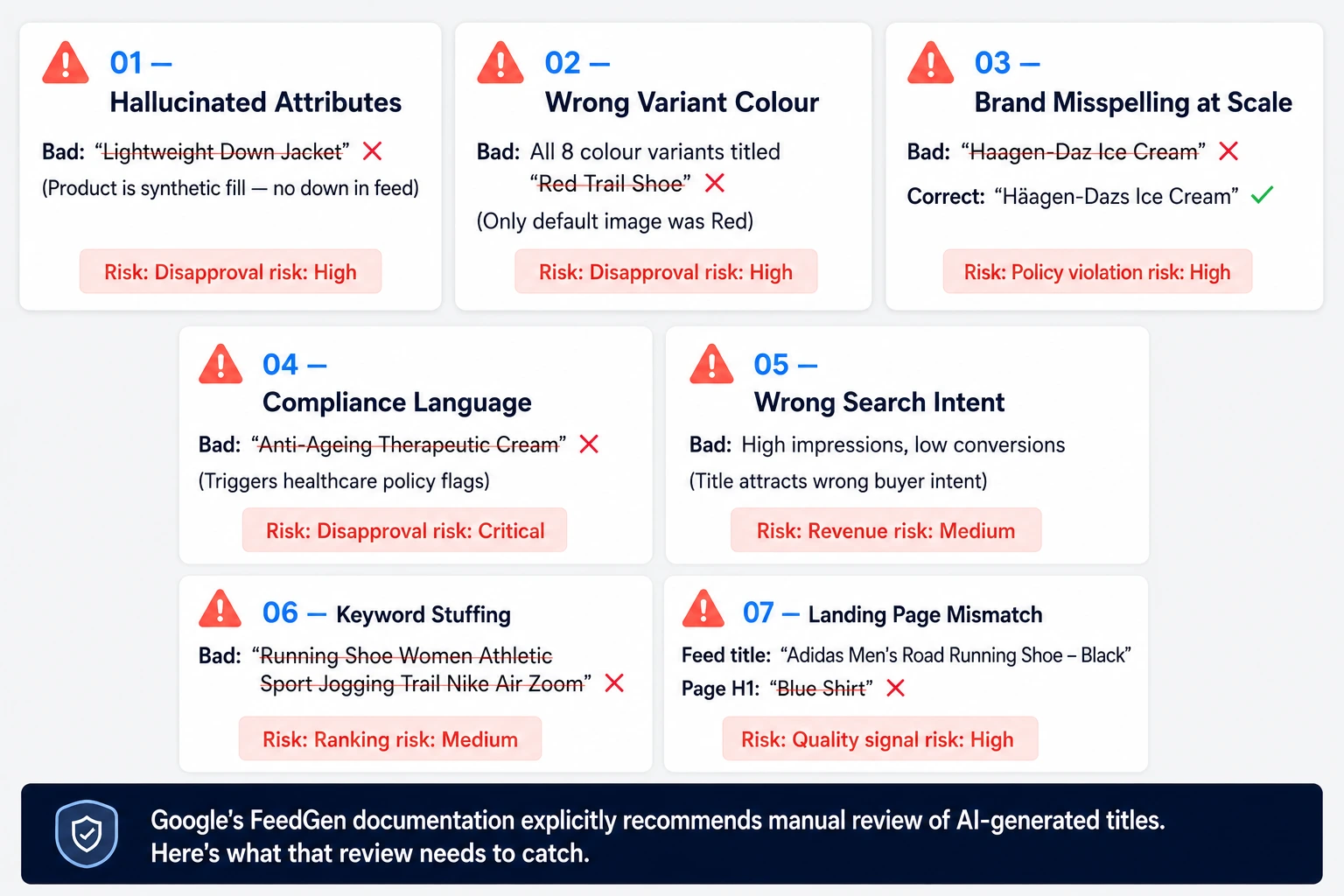
Here are the seven most common ways AI-generated titles fail, and what to do about each.
Hallucinated Attributes
What happens: The LLM infers an attribute that doesn't exist in your feed data. A jacket described as "lightweight" might get titled "Lightweight Down Jacket" when the product is actually synthetic fill.
Why it happens: LLMs complete patterns. If every other jacket in your feed is down-filled, the model may extrapolate. If the product image shows a puffy jacket, the model may infer down even without a material label.
How to catch it: Cross-reference every attribute in the generated title against the feed's structured attribute fields. Any title containing an attribute not present in material, colour, description, or product type fields gets flagged for review.
Wrong Variant Attribute Pulled from Image
What happens: For a product with 8 colour variants, the AI processes the default product image (which shows "red") and writes "red" into all 8 variant titles, including the blue and green variants.
Why it happens: The model receives the parent image URL, not the variant-specific image. Without variant-level image routing, every child title inherits the parent's visual attributes.
How to catch it: Run a check. Does the colour word in the generated title match the colour attribute in the feed row? A mismatch is an automatic flag.
Brand Name Misspelling at Scale
What happens: LLMs sometimes respell brand names phonetically or blend them with similar-sounding brands. "Häagen-Dazs" becomes "Haagen-Daz". "Lululemon" becomes "Lulu Lemon". At 10,000 SKUs, this is invisible until a merchant centre policy violation surfaces.
How to catch it: Maintain a brand-name allow list. Run a post-generation check: does the brand string in each title exactly match the canonical brand name in your brand field? Any deviation is an automatic fail.
Compliance Violations Generated at Scale
What happens: Medical devices, supplements, financial products, and some apparel categories have channel-specific language restrictions. An AI model trained on general e-commerce copy may generate titles like "anti-ageing cream" or "therapeutic compression sock" – terms that trigger Google's healthcare and medical device policies.
How to catch it: Maintain a compliance blocklist by category. Run generated titles against the blocklist before publishing. For regulated categories, always include a human review step regardless of score.
Titles That Pass Policy but Rank for Wrong Intent
What happens: The title is technically correct and policy-compliant, but it attracts the wrong search intent. A "Women's Cross-Training Shoe" listed with excessive running-shoe attributes may rank for marathon training searches, drive traffic that doesn't convert, and lower the product's quality score over time.
How to catch it: Spot-check impression and CTR data for titles that look clean but underperform. If CTR is low despite good impression share, the title may be matching the wrong query intent.
Keyword Stuffing Below the Detection Threshold
What happens: The prompt instructs the model to "include as many relevant keywords as possible". The model packs the title: "Running Shoe Women Athletic Sport Jogging Trail Nike Air Zoom". This is technically under the character limit and avoids the exact phrases on Google's blocklist, but it violates spirit-of-policy guidelines and performs poorly in ranking.
How to catch it: Check for keyword repetition (same root word appearing more than once) and unnatural attribute strings (3+ comma-separated terms with no connecting language).
Landing Page Title Mismatch
What happens: Your AI generates an optimised shopping title, but <h1> on the landing page it still reads "Blue Shirt". Google cross-references the feed title against the landing page content as part of its quality signal. Significant mismatches can cause disapprovals or quality downgrades.
How to catch it: After title optimisation, run a fetch on your landing page URLs and check that the key terms in your feed title (brand, product type, and key attribute) appear in the page <h1> or <title> tag.
The Human Review Workflow at Scale
You cannot manually review 10,000 titles. But you should always manually review:
All titles in regulated categories (medical, supplements, financial, pet food claims)
All titles where generated attributes don't match feed attributes (flagged automatically)
All titles for luxury, heritage, or brand-sensitive product lines where brand voice matters
A random 1% sample of the full catalog on every major batch run as a quality audit
For everything else, the scoring framework in Section 3 plus the automated checks above provides sufficient quality control before publication.
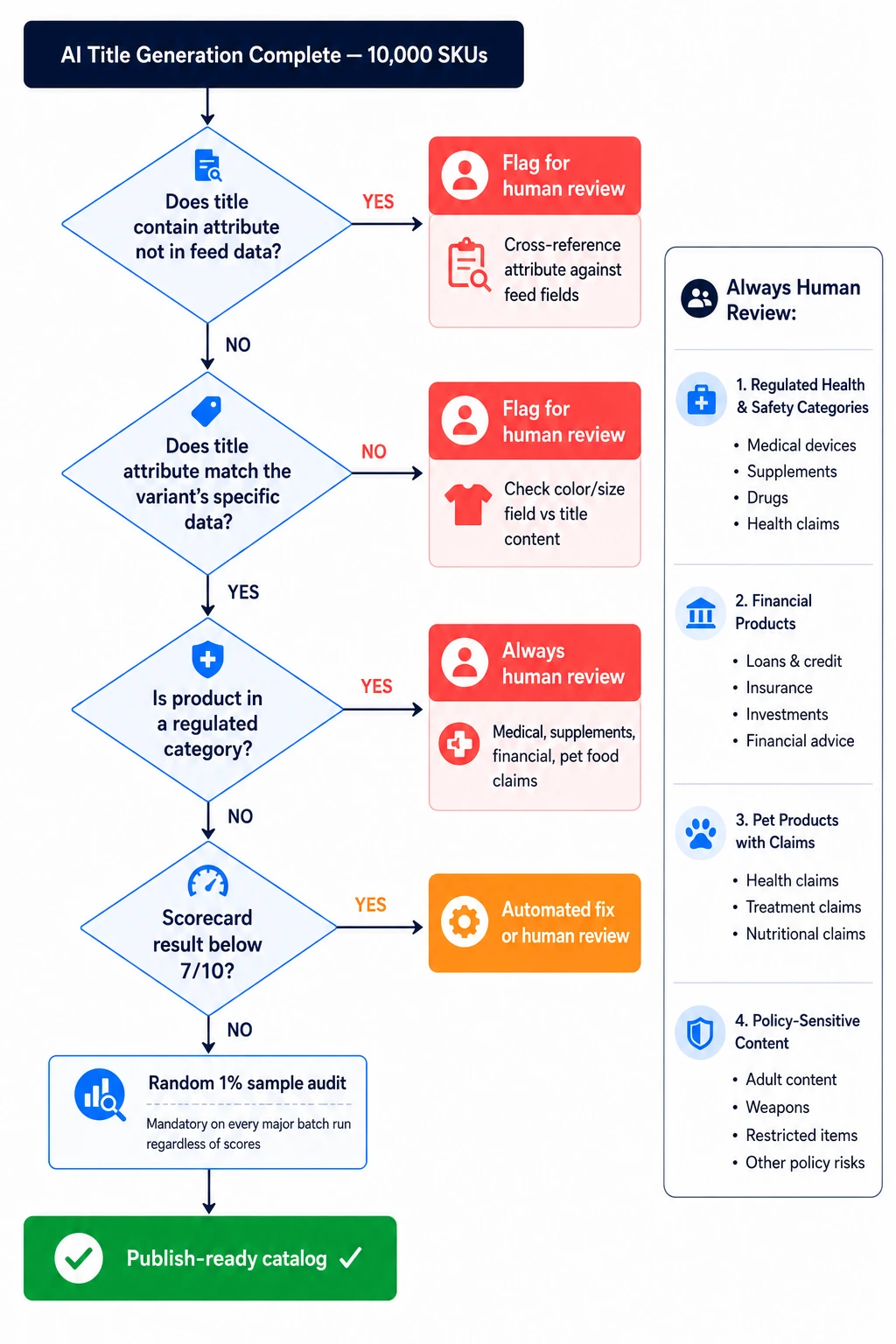
FeedOn's feed audit runs these consistency checks automatically as part of the FeedPilot workflow – surfacing mismatches between generated titles and underlying feed attributes before anything goes live.
The A/B Testing Playbook for AI-Generated Titles at Scale
"A/B test your titles" is advice that appears in approximately every feed optimisation guide. The methodology for actually doing it – control groups, sample size, significance, test duration, and how to track variants – appears in none of them.
Here is the full playbook.
Split Your Catalog with Custom Labels
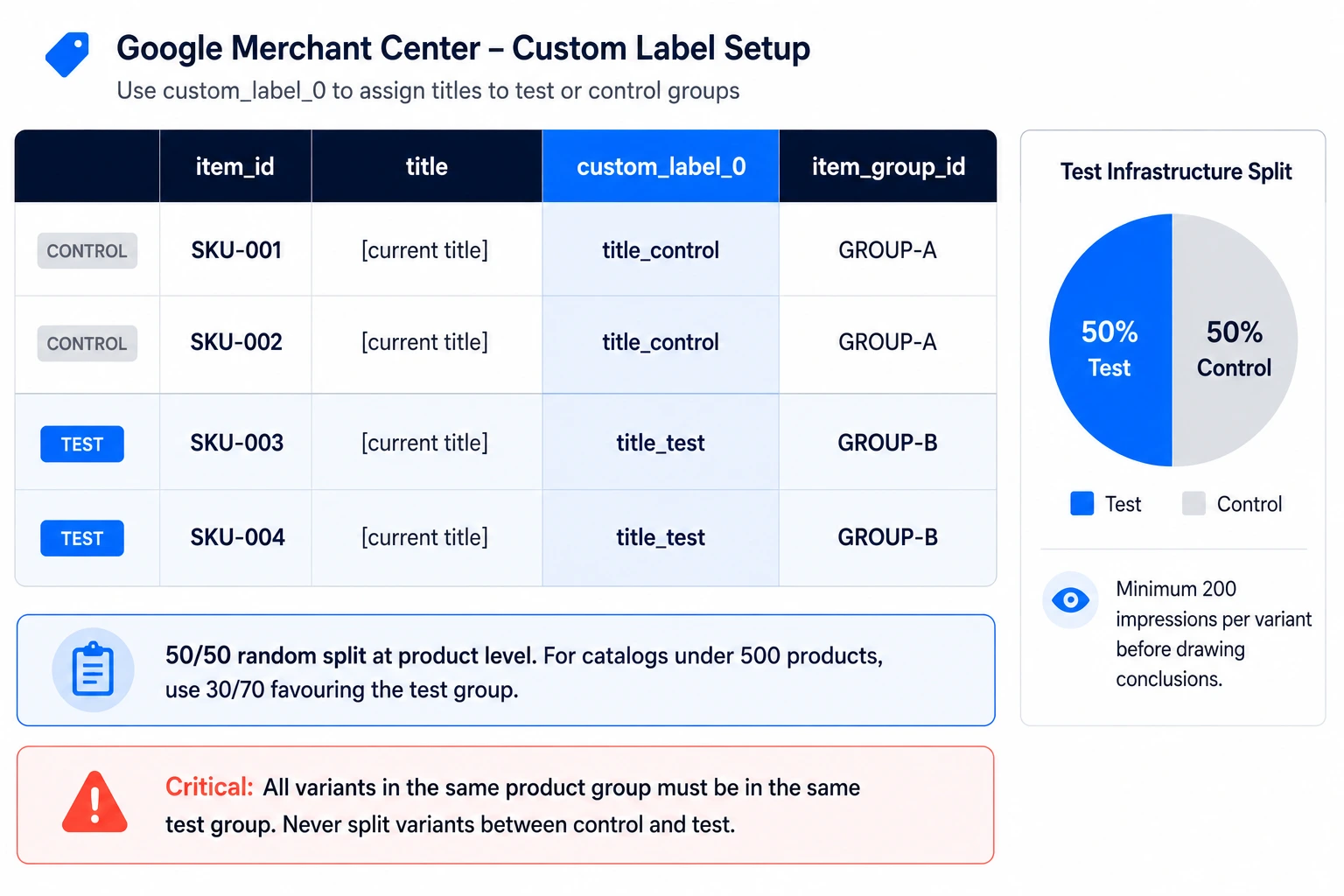
Google Merchant Center's Custom Label fields (custom_label_0 through custom_label_4) are your test infrastructure. Before generating AI titles, tag your catalog:
custom_label_0 = title_control → keeps original titles
custom_label_0 = title_test → receives AI-optimized titles
Assign products to control and test groups at the product level, not the campaign level. A 50/50 random split works for most catalogs. For smaller catalogs (under 500 products), use a 30/70 split favouring the test group to accumulate impressions faster.
Critical: Products in the same product group (variants of the same base product) should all be in the same group – don't split variants between control and test, or you'll contaminate the data.
Determine Your Sample Size
Rule of thumb: you need a minimum of 200 impressions per variant to draw any conclusions and 500+ impressions per variant before you can claim statistical confidence on CTR differences.
For lower-traffic catalogs, you may need to run the test for 4–6 weeks to accumulate enough data. Resist the temptation to call the test early.
Decide What You're Measuring (In Order)

Optimise for metrics in this sequence – don't skip ahead:
Phase 1 (Week 1–2): Impressions Are the new titles matching more queries? If the test group has significantly more impressions than the control, the AI titles are reaching broader or more relevant search terms.
Phase 2 (Week 2–4): CTR Click-through rate tells you whether shoppers find the title compelling once they see it. A higher CTR with similar impressions means the title is more relevant to the intent.
Phase 3 (Week 4+): Conversions The final arbiter. A title can drive more clicks but worse conversions if it's attracting the wrong intent. Always check the conversion rate and ROAS before scaling the winner.
Step 4: Isolate the Variable
Title tests only work if the title is the only thing changing between control and test groups. Bids, images, prices, and landing pages must be identical between groups during the test window. Even a small bid differential will contaminate the results.
Step 5: How Long to Run the Test
Minimum 2 weeks. Preferred: 4 weeks. The test must span at least one full weekly cycle (weekend shopping patterns differ from weekdays) and ideally capture any seasonal variation in your category.
Step 6: Scaling the Winner
Once the test group shows a statistically meaningful improvement in the full metric sequence (impressions → CTR → conversions), apply the winning title structure to your remaining catalog. Document the winning prompt and the structural pattern – then reuse it as a few-shot example in future title generation runs.
For a practical guide on feed management that supports the kind of catalog-level tagging this requires, see FeedOn's multi-channel feed management guide.
Title Optimization for Google AI Overviews and GEO in 2026
Google's product discovery landscape has fundamentally shifted in 2026. AI Overviews now surface in the majority of shopping-intent queries. Conversational shopping assistants answer "Which waterproof trail shoe is best for wide feet?" before showing a traditional shopping grid.

Your product title optimisation strategy needs to account for both environments.
How AI Overviews Read Product Titles Differently
Traditional shopping ranking is largely a keyword-matching exercise: the algorithm reads your title and matches it against the query terms. A title with "Waterproof Trail Running Shoe" ranks for that query because the terms align.
AI Overviews work differently. The AI agent synthesises across your entire product data structure: title, description, attributes, landing page content, and structured data markup and evaluates whether your product answers a conversational question.

A query like "best waterproof trail shoe for women with wide feet" requires a product that signals the following:
Waterproof explicitly (in title and attributes)
Trail running use case
Women's sizing
Wide width availability (as a feed attribute, not just in the description)
If any of these signals are missing from your structured feed data, the AI agent may exclude your product from the Overview result even if your title matches the keyword.
What Changes in Your Title Strategy for GEO
1. Complete attribute sets become non-negotiable. For AI overview inclusion, every optional attribute that's relevant to your product type needs to be populated. Width sizing, fit type, use case, certification (Gore-Tex, OEKO-TEX) – these are no longer bonus fields. They're signals that AI agents use to match products to conversational queries.
2. Titles should answer one intent directly. Rather than packing every attribute into the title, GEO-optimised titles answer the primary use case query directly: "Merrell Women's Waterproof Trail Shoe – Wide Width Available, Gore-Tex" answers the query at title level. The AI agent can verify the claim against your structured attributes.
3. Natural language description matters more than before. AI Overviews pull context from your full product description, not just the title. Descriptions that directly address common buyer questions ("Will these keep my feet dry in heavy rain? Yes — the Gore-Tex membrane provides full waterproofing up to the ankle" signals to AI agents that your product is the right answer.
4. Q&A-structured data is an emerging signal. Adding FAQ structured markup to your product landing pages that addresses the conversational queries your product answers gives AI agents explicit signals. This is an early-mover advantage in 2026 that most feed optimisation guides are not yet discussing.
FeedOn's AI attribute completion automatically fills structured attribute fields at the catalog level – which is the foundation of AI Overview eligibility. See how that works in the context of the broader Google Shopping feed optimization workflow.
The Variant Title Problem: How AI Handles 50 Size/Color Combinations
If you sell apparel, footwear, or any product with multiple variants, you know the problem: one base product with 50 size/colour combinations needs 50 unique titles and most of them default to being nearly identical.

That creates two compounding problems: duplicate title disapprovals in Google Merchant Center, and wasted ranking potential because each variant title isn't pulling its own search weight.
The Core Challenge
A base product – a women's trail running shoe – might have the following:
6 colors (Black, Grey, Blue, Red, green, and White)
9 sizes (5, 5.5, 6, 6.5, 7, 7.5, 8, 8.5, 9)
2 width options (Regular, Wide)
That's 108 variant combinations. Each needs a title that is
Unique enough to avoid GMC's duplicate title disapproval threshold
Specific enough to rank for the variant-level query ("waterproof trail shoe wide width grey size 7")
Consistent enough to maintain the product family's brand identity
How AI Should Handle Variant Titles
The key is routing variant-specific attributes into the title at the child product level, not the parent level.
A correctly configured AI title generation prompt for variant products looks like this:
System prompt: Generate a Google Shopping title for this specific product variant.
Include ALL of the following variant-specific fields in the title:
exact_colour (from the colour attribute, not inferred from image)
size label (not the size code – convert "7.5W" to "Size 7.5 Wide")
material (from material attribute)
width_type (Regular or Wide)
Title must differ from all other variants in the same product group.
Do not use the parent product image for colour inference.
The result for each variant becomes genuinely unique:
Merrell Women's Trail Running Shoe – Waterproof, Black, Size 6 Regular
Merrell Women's Trail Running Shoe – Waterproof, Grey, Size 7.5 Wide
Merrell Women's Trail Running Shoe – Waterproof, Blue, Size 8 Regular
Google Merchant Center's Duplicate Title Threshold
GMC does not publish an exact threshold for "too similar" titles, but consistent enforcement patterns suggest that titles sharing more than 80% of their word tokens across variants in the same item_group_id are at risk of flagging.
The practical rule: every variant title should contain at least two unique tokens not shared by any sibling title. Colour + size achieves this reliably. Colour alone does not – if you have 9 sizes in one colour, the 9 same-colour titles differ only by size and may still trigger the filter.
Testing Variant Title Uniqueness Programmatically
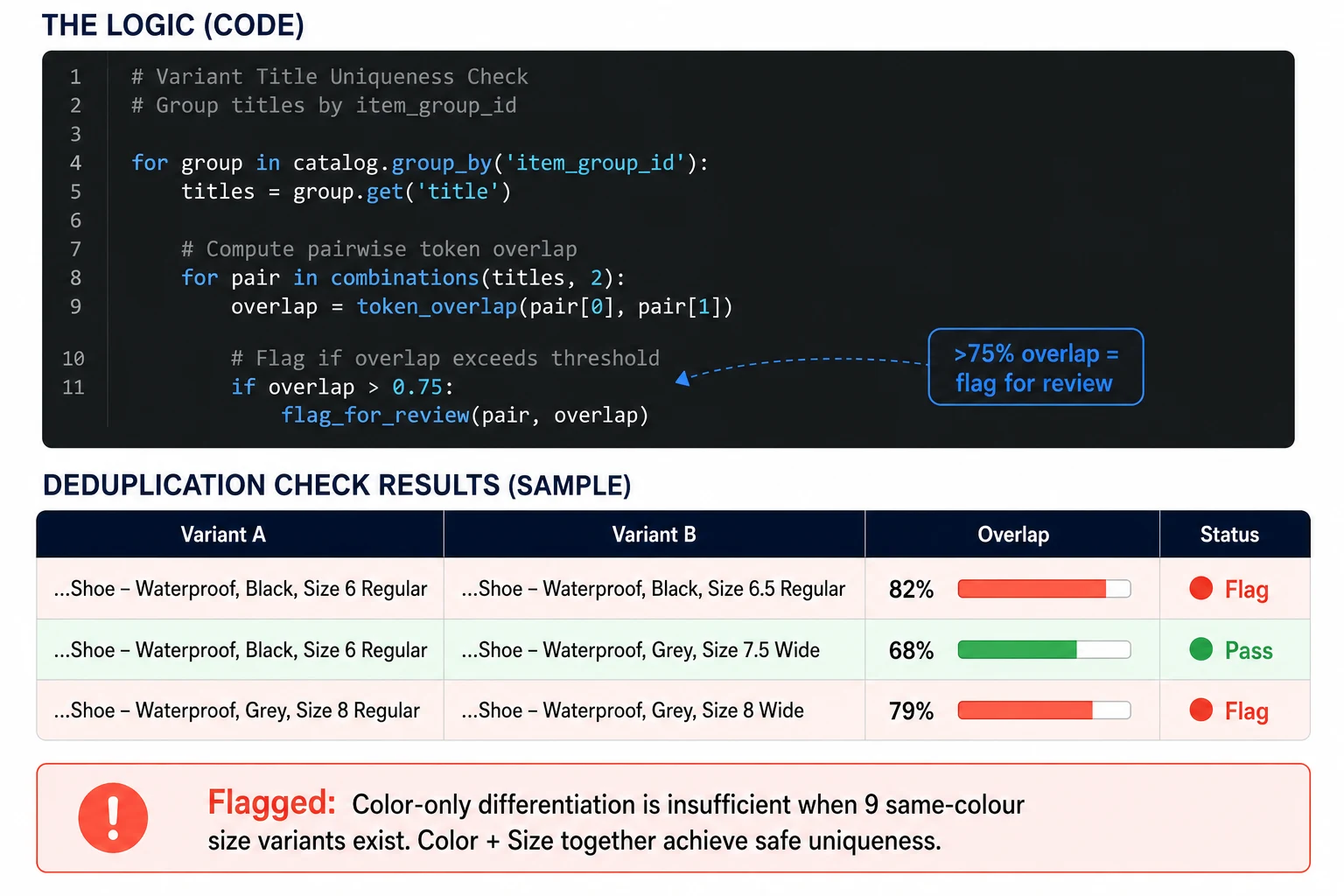
Before publishing, run this check across your variant set:
Group all titles by item_group_id
For each group, compute pairwise token overlap between all title pairs
Flag any pair with >75% token overlap for manual review
This catches the most common failure mode: generating unique titles for the colour dimension but forgetting to differentiate across the size dimension.
What to Do When Your Variant Pool Is Too Narrow
Some product types have limited differentiating attributes. A simple cotton t-shirt in 3 sizes and 2 colours only has 6 variants, and there may not be enough genuine attribute variation to make all 6 titles meaningfully distinct.
In these cases, acceptable differentiators include:
Weight or thread count (if applicable)
Specific use case per size range ("XS–S: designed for petite fit")
Care instruction summary ("Machine Wash")
Avoid invented differentiators. If the product doesn't genuinely differ, don't fabricate distinction in the title – that's a variant of the hallucination problem covered in Section 4.
FeedOn's AI enrichment handles variant attribute routing at the SKU level – pulling colour, size, material, and width_type from each child product row rather than inheriting from the parent. This is part of the broader Shopify feed management workflow and also covered in the WooCommerce Shopping feed setup guide for WooCommerce variable products.
The Full Picture: Title Optimization as a System, Not a Task
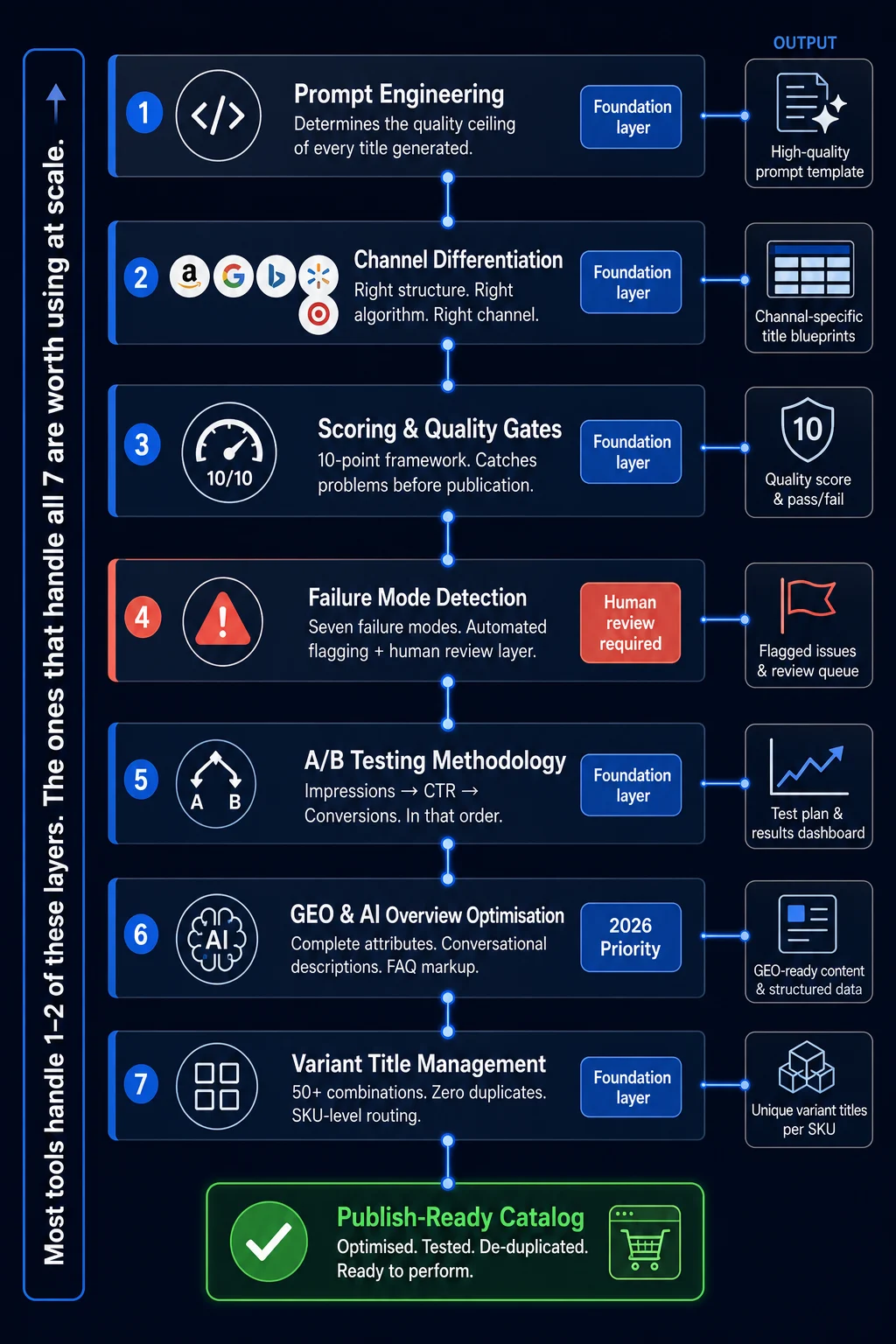
Each section in this guide addresses a different layer of the same system:
Prompt engineering determines the quality ceiling of AI-generated titles
Channel differentiation ensures the right structure reaches the right algorithm
Scoring and quality gates catch problems before they go live
Failure mode awareness prevents the errors that erode trust and cause disapprovals
A/B testing methodology gives you a repeatable way to measure improvement
GEO optimization positions you for AI-driven discovery, not just keyword matching
Variant title management handles the real-world complexity that simple guides ignore
Most tools in this category handle one or two of these layers. The ones that handle all of them and connect them into a single automated workflow are the ones worth using at scale.
If you're managing a Shopify or WooCommerce catalog and want to see how AI title optimisation actually performs on your specific feed (not benchmark statistics), FeedOn's free trial lets you process 200 products with full AI enrichment, no credit card required. The feed audit runs 60+ checks and shows you exactly what's holding your current titles back before you commit to anything.