
Best Feed Management Tools for Shopify (2026): The Complete Guide
Shopify powers more e-commerce stores than any other platform on the planet, but the one thing it cannot do out of the box is give Google everything it needs to show your products to the right buyers. The native Google and YouTube channel synchronises your catalogue to Google Merchant Center and technically makes your products visible. For many stores, that is where Google Shopping performance stops.
The gap between technically visible and commercially competitive is exactly where feed management tools for Shopify make their impact. They extract raw product data from your Shopify backend and turn it into optimised, enriched, channel-ready product data feeds that the Google Shopping algorithm rewards with better placement, lower cost-per-click and higher conversion rates.
As of 2026, the Shopify App Store lists over 200 apps in the product feed category. This guide cuts through that noise. It covers what the native Shopify Google channel actually gives you, where it falls short, how to choose the right tool based on your store size and channel mix, and a detailed breakdown of the best shopify feed management tools available today.
Why Shopify's Native Google Channel Is Not Enough
The built-in Shopify, Google and YouTube channels are reasonable starting points. It connects your store to Google Merchant Center, supports free product listings across Google Search and the Shopping tab, enables Performance Max campaign creation from inside Shopify, and keeps pricing and basic availability updated on a regular sync schedule.

For a new store with under 100 products selling exclusively on Google with clean, complete product data, the native channel often does enough. The problem is that most Shopify stores are not that simple, and the ones that grow past that stage quickly hit a hard ceiling with the native solution.
Here is precisely where the native Shopify Google channel fails. It sends your Shopify product titles to Google exactly as they appear in your admin, with no ability to restructure them for search relevance. If your internal product names are formatted for your store's navigation rather than for how buyers actually search, your google shopping product feed will consistently underperform for high-intent queries.
It offers no rules engine for transforming product data. You cannot prepend your brand name to titles, append size information, exclude low-margin products from campaigns, or combine fields from different product attributes. You get what Shopify exports, nothing more.
It provides no support for supplemental feeds, which means you cannot test title or attribute changes without editing your actual Shopify product data. It syncs only to Google, so it requires a separate setup for all other channels – Meta, Microsoft, Pinterest, TikTok, and Amazon. And it has no AI-powered product feed enrichment capability, so missing attributes like colour, material, and pattern remain missing in your google merchant center feed.
Stores usually move to a dedicated Shopify feed management tool when they reach 200-500 products, start advertising on a second channel, have consistent disapprovals in the Merchant Centre, or see competitors with comparable products consistently outranking them in Shopping even when they have similar budgets.
Key Challenges Shopify Merchants Face with Product Feeds
Understanding the specific challenges Shopify creates for feed management helps you evaluate which tool actually addresses your situation rather than just the general problem.

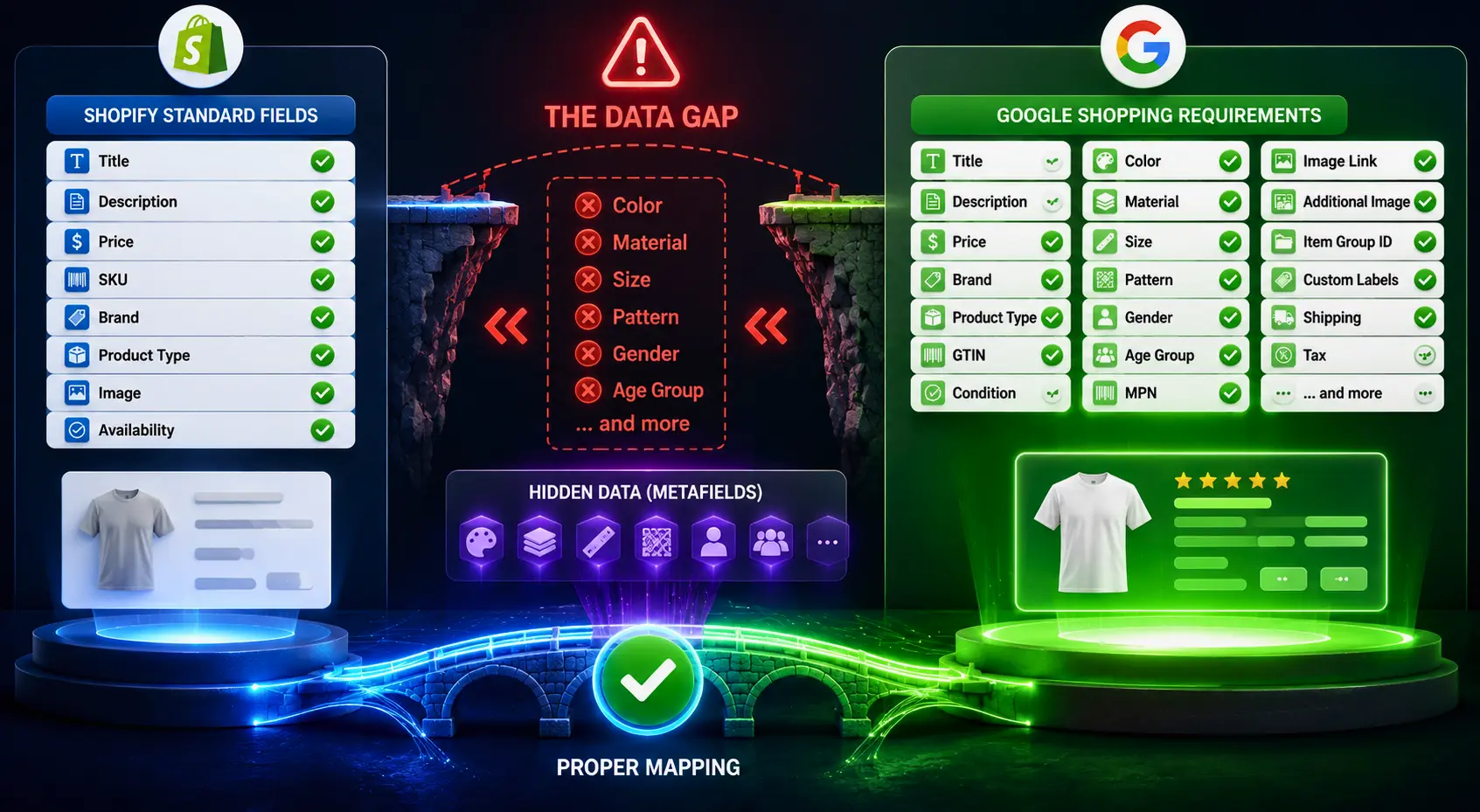
Shopify metafields and attribute gaps. Shopify's standard product fields cover the basics: title, description, price, vendor, product type, and tags. They do not include structured fields for colour, material, size, pattern, gender, or age group in the format Google expects. Many Shopify stores store this information inconsistently in product tags or bury it in descriptions. A strong e-commerce product feed management tool reads Shopify metafields and maps them to the correct Google feed attributes, closing the gap between what your store knows and what Google needs.
Variant complexity. Shopify handles product variants through its own structure, but Google Shopping requires each variant to be submitted as a separate item with its own complete attribute set. So if a product has five colours and three sizes on Shopify, it will have fifteen variants. Each variant will have its own title, image, colour, size and availability data in the feed. The native channel handles this partially but inconsistently. Special feed management tools do the job of feed management across your whole catalogue, in a reliable fashion.
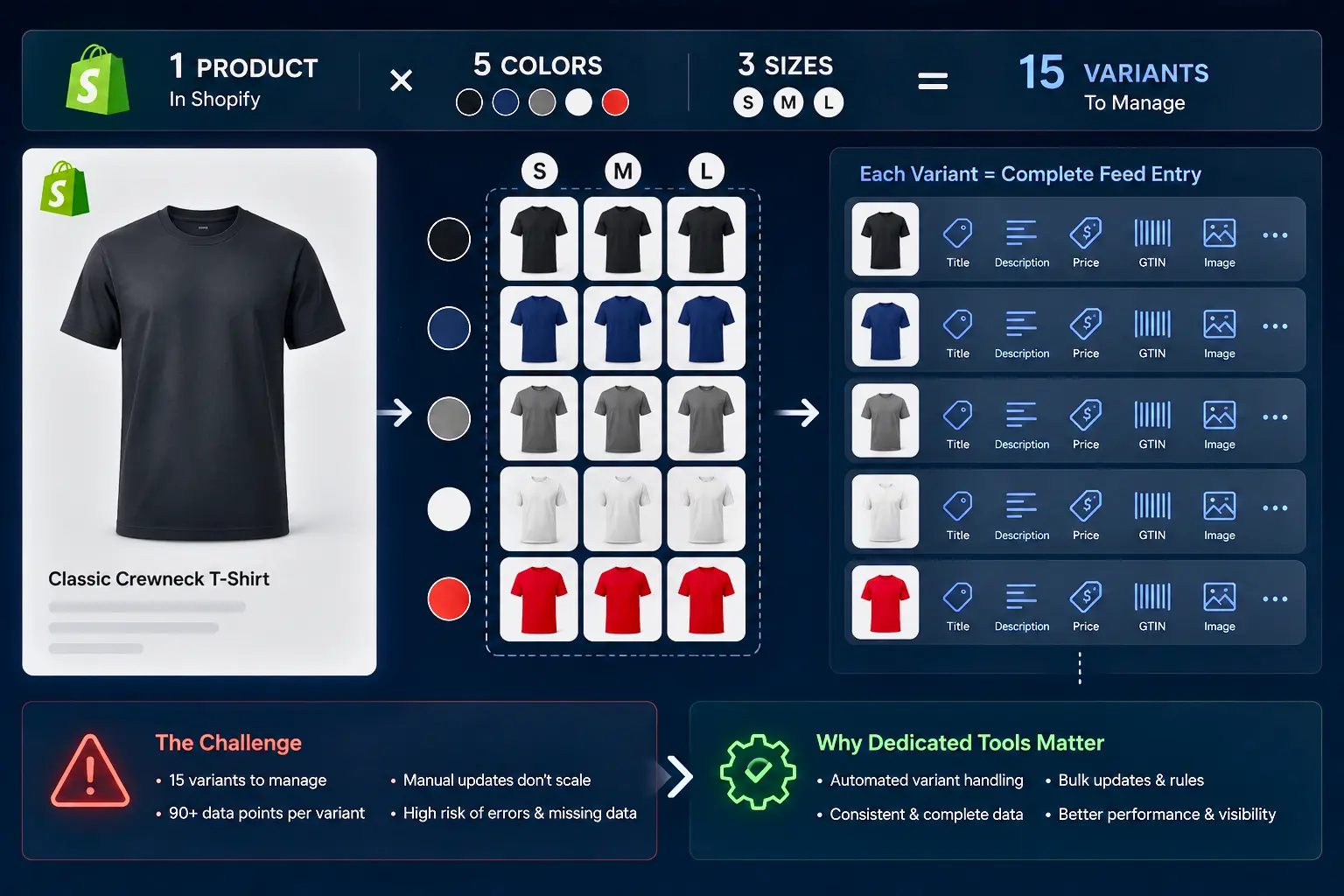
Image quality and lifestyle product data. Google's AI systems increasingly evaluate image quality and product context. Shopify stores often have inconsistent image sets throughout their catalogue; some products have clean white-background images, and others have mixed or lifestyle-only images. Tools that provide AI image analysis and attribute extraction help standardise this across your feed.
Real-time syncing gaps. The native Shopify Google channel syncs prTikTok, andoduct data on a schedule that can lag behind actual inventory changes. For stores with active inventory movement, this creates pricing discrepancies and availability mismatches that trigger disapprovals and deliver poor buyer experiences. Direct API based syncing from your shopify google shopping feed to Merchant Centre removes this lag.
Limited feed diagnostics. Merchant Centre disapprovals are surfaced in the native channel, but little context is provided for fixing them. Dedicated Google Feed Management Tools provide more specific error reporting, specific fix recommendations, and the ability to fix issues in bulk, not product by product.
How to Choose the Right Feed Management Tool for Your Shopify Store
With over 200 apps in the Shopify App Store and several powerful off-platform options, choosing the right shopify product feed tool requires a framework based on your actual situation rather than feature lists.
Store size and catalog complexity are the primary filters. Stores with under 200 products and a simple catalog structure can often start with a lightweight Shopify-native app like Simprosys. A store with 200 to 2,000 products needs a proper rules engine and optimisation capabilities. Stores with over 2,000 products, multiple variants, or missing attribute data at scale need AI-powered enrichment to make complete product feed optimisation operationally feasible.
Channel mix determines whether you need a Google-only tool or a genuine multichannel feed management platform. If Google is your only channel and you have no near-term plans to expand, a Google-specialist app is the most cost-effective choice. If you sell or plan to sell on Meta, Microsoft, Pinterest, TikTok, or marketplaces, a multichannel platform manages all channels from a single product source and is worth the additional investment.
AI capability vs rules-based control reflects a fundamental difference in how tools work. Rules-based tools like DataFeedWatch and Channable give you direct control over every transformation applied to your data. You build the rules, you define the output. AI-native tools like Feedon.ai generate enriched product data that your backend does not contain, filling attribute gaps that rules-based tools cannot address because the data simply does not exist to transform.
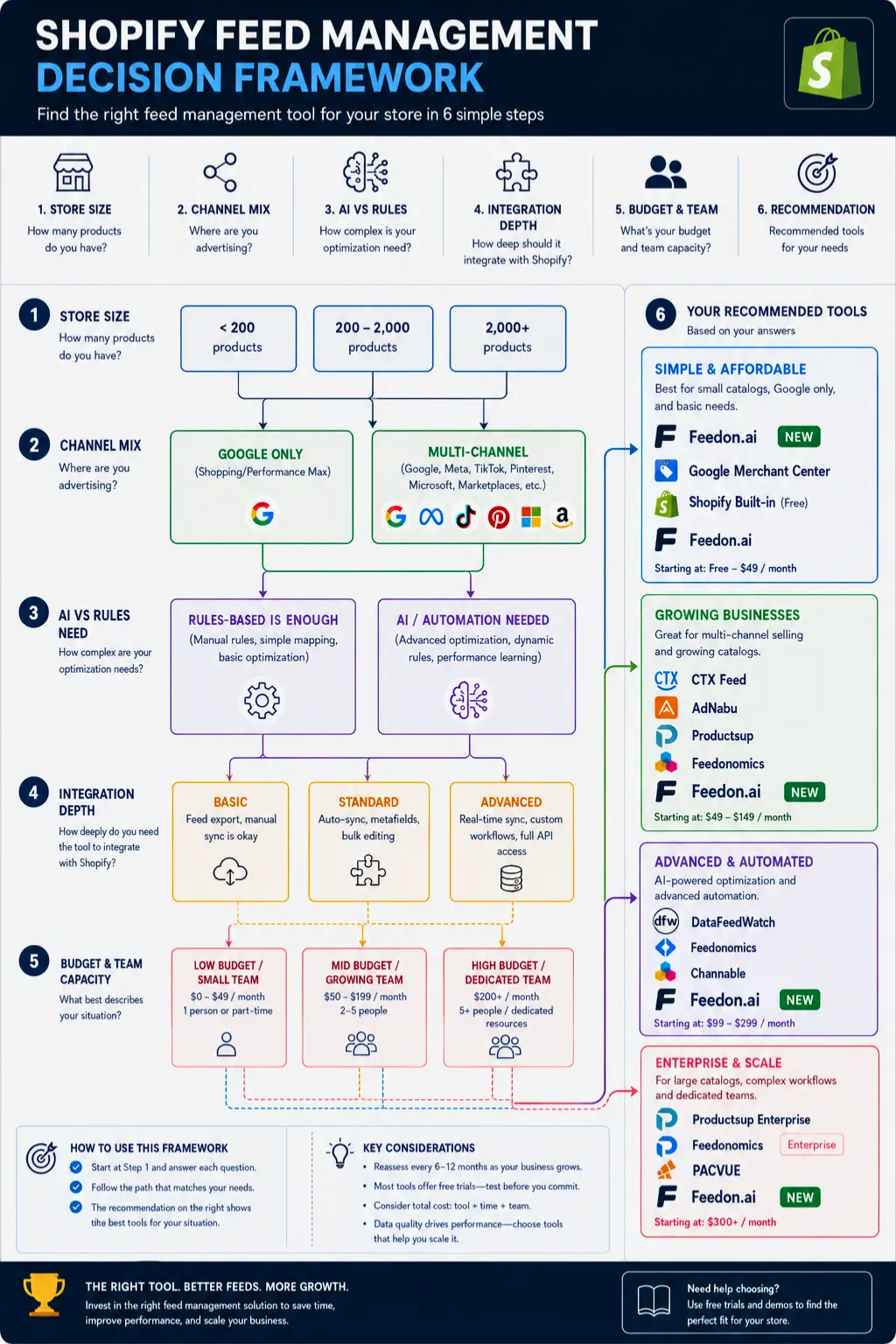
Shopify integration depth matters more than it might seem. A tool with a native Shopify integration reads your product data, metafields, variant structures, and inventory in real time without requiring CSV exports or manual file uploads. A tool that is only useful for file based import creates synchronisation lag and operational overhead that defeats much of the value of a dedicated tool.
Budget and team capacity round out the decision. If you have a lean team and can’t afford to spend hours building and maintaining feed rules, an AI-native tool with automated optimisation will deliver better ongoing results than a rules-based platform that requires constant manual attention.
The Best Feed Management Tools for Shopify in 2026
1. Feedon.ai
Best for: Shopify merchants who want AI-native product feed enrichment, automated optimization, and real-time Merchant Center sync

Feedon.ai is the only feed management tool in this category that is AI-native rather than rules-based from the ground up. Every other tool in this list transforms the data you already have. Feedon.ai generates data you are missing, which is a fundamentally different capability and one that addresses the core reason most Shopify feeds underperform.
The platform uses computer vision on your Shopify product images to automatically pull structured attributes through ai creative studio. Colour, material, pattern, fit and style information that your Shopify backend does not store as individual fields gets identified from the image and added to the right fields in your google merchant centre product feed. Natural language processing runs simultaneously on your product descriptions, extracting specification data like dimensions, materials, and use cases and populating the corresponding Google feed attributes.
This AI enrichment layer is deployed on top of a real-time Shopify integration that pushes changes to your google shopping feed the moment pricing, availability or product data changes in your store. There is no sync delay, no manual export, and no scheduled fetch that might miss an inventory change between updates.
For google shopping product title optimisation, Feedon.ai rewrites titles across your entire catalogue using the Brand, Gender, Product Type and Attribute formula that the google shopping algorithm rewards, without you having to manually configure rules. Your new products added to your Shopify store are enriched and optimised before they go to Merchant Centre.
Feed health monitoring runs continuously, surfacing disapprovals, attribute quality warnings, and missing data alerts so your team can address issues before they compound into account health problems.
The result is a shopify google shopping feed that is not only technically compliant but commercially optimised, with attribute completeness rates that rules-based tools cannot match without manual data entry at scale.
Try Feedon.ai for free and test the AI enrichment capabilities on your catalogue before buying.
2. DataFeedWatch
Best for: Mid-market Shopify merchants and agencies managing multiple client accounts across many channels
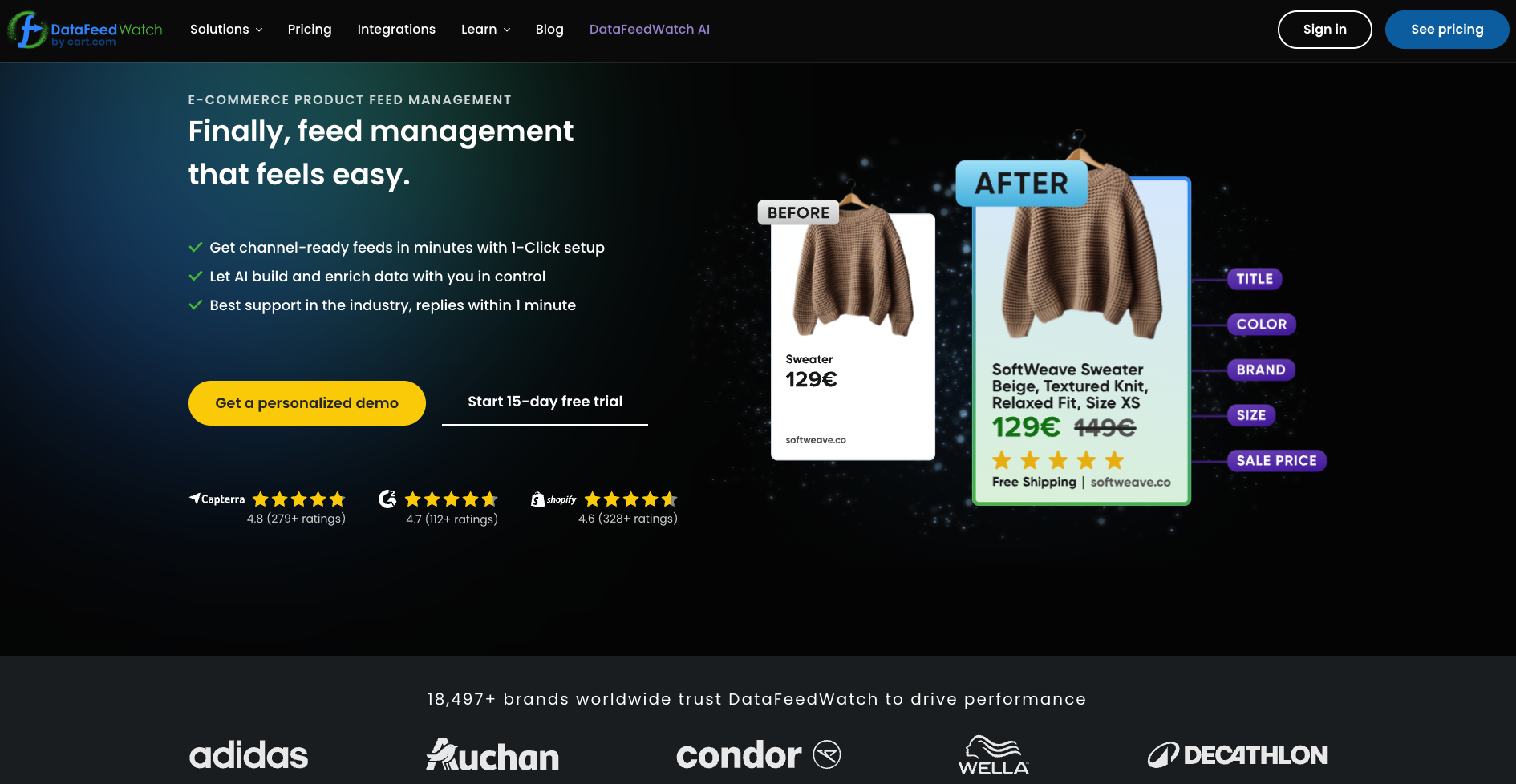
DataFeedWatch is one of the most established names in ecommerce product feed management and remains the strongest rules-based option for Shopify merchants who need broad multi-channel coverage with granular control over every transformation applied to their data.
Its Shopify integration pulls all product data including variants and metafields, and its rules engine lets you restructure titles, combine attributes, apply conditional logic, and exclude products based on any combination of fields in your catalog. Title A/B testing lets you compare different structures and measure which version drives more clicks before rolling changes across your full catalog.
Custom label automation assigns segmentation labels based on price, margin, stock level, or product performance without requiring manual edits to individual Shopify products. Multi-channel support covers Google, Meta, Microsoft, Pinterest, and more than 2,000 other channels, making it the strongest option for merchants who need a single platform managing feeds across a complex channel mix.
The analytics dashboard surfaces product-level performance data, helping identify which products are delivering return on ad spend and which are consuming budget without converting.
Pricing starts at approximately $59 to $64 per month for moderate SKU volumes with a 14-day free trial. Larger catalogs and additional channels move into higher-tier plans.
3. Simprosys Google Shopping Feed
Best for: Budget-conscious Shopify merchants focused primarily on Google Shopping
Simprosys is the most popular Google-focused feed app on the Shopify App Store, with over 4,000 reviews and a 4.9 rating as of early 2026. Its pricing starts at $4.99 per month with a free entry tier, making it the most accessible option for merchants who are just beginning to take google shopping feed management seriously beyond the native Shopify channel.
It handles the core requirements reliably: feed rules for attribute mapping, bulk editing, Shopify metafields support, and coverage for Google, Microsoft, Meta, and Pinterest. Its Shopify Markets integration supports multi-country, multi-language, and multi-currency feeds, which matters for merchants expanding internationally.
What Simprosys does not offer is AI-powered enrichment. It optimizes the data you provide but cannot generate missing attributes. For merchants with complete product data who primarily need reliable delivery and basic optimization, it is excellent value. For merchants with attribute gaps across a large catalog, those gaps will persist until addressed manually or through a tool with enrichment capabilities.
4. AdNabu
Best for: Shopify stores running Google Ads campaigns who want feed and campaign management in one interface

AdNabu is a Shopify-native app that connects feed management to Google Ads campaign performance more directly than most tools in this category. It conducts regular feed quality checks, surfaces improvement recommendations based on search performance data, and provides AI-driven suggestions for title and description optimization.
Its strength is the connection between feed quality and campaign performance. Rather than managing your product data feed in one tool and your campaigns in another, AdNabu surfaces feed improvements in the context of their campaign impact, which helps prioritize where to focus optimization effort.
Pricing starts at $29 per month, making it accessible for smaller Shopify stores that are running active Google Shopping campaigns and want a tighter loop between feed quality and ad performance.
5. Channable
Best for: Growing Shopify brands who want feed management connected to automated campaign creation
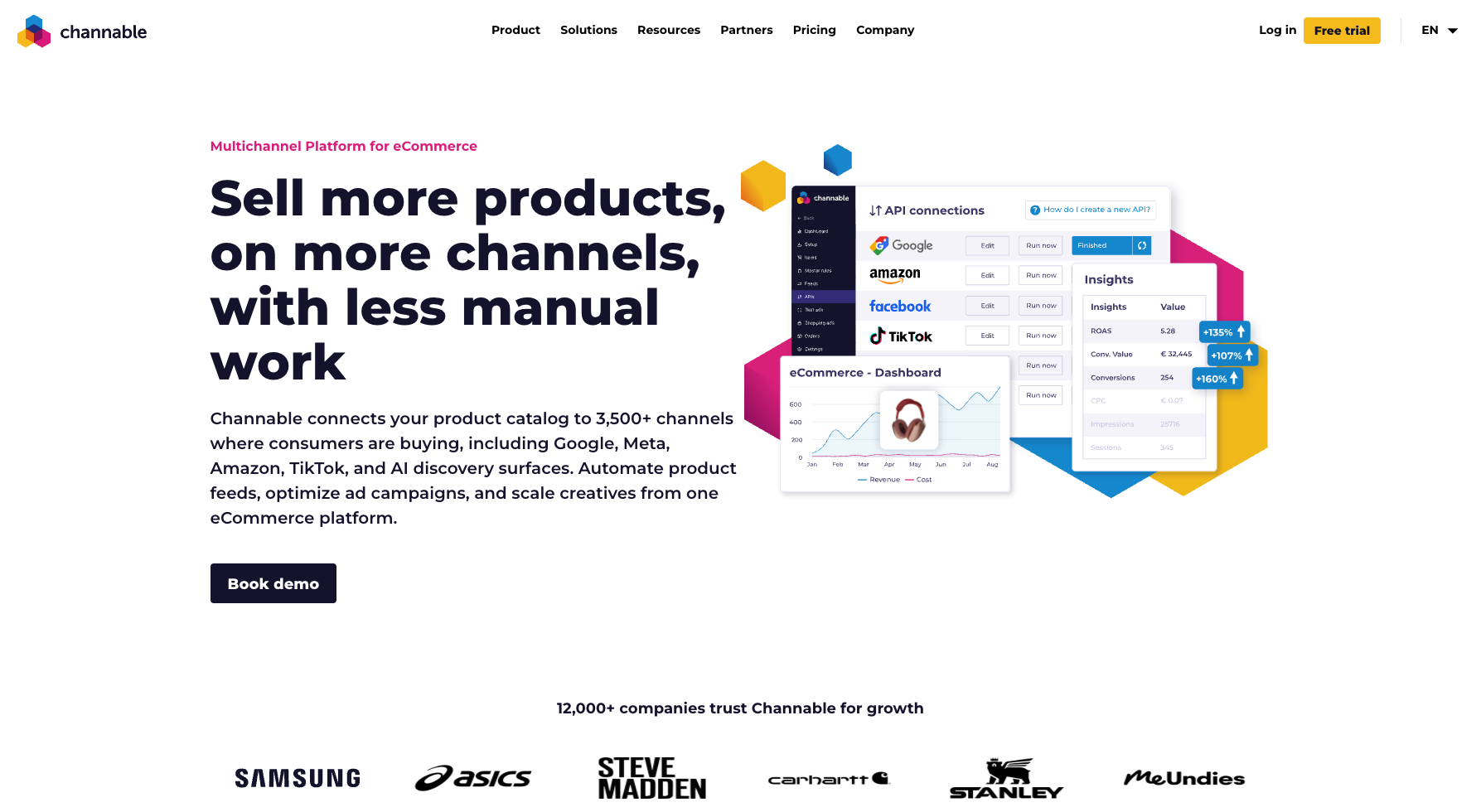
Channable occupies a distinct position in the Google Shopping feed management category because it combines feed distribution with automated PPC campaign generation. Its if-then rule system handles product data transformation, while its campaign module generates and updates Google Shopping and Search campaigns directly from your feed data.
For Shopify merchants who find themselves managing feed rules in one tool and campaign structure in another, Channable consolidates both into a single workflow. When a product goes out of stock, it is automatically paused in your feed and in your campaigns. When a new product is added, it generates ad coverage automatically.
Channable supports more than 2,500 channels, covering Google, Meta, Amazon, eBay, and a wide range of European and international marketplaces. For Shopify stores with multi-channel ambitions and active PPC operations, it delivers more operational leverage than any purely feed-focused tool.
Pricing starts around €39 to $49 per month, scaling with SKU volume and the addition of PPC automation modules.
6. Nabu for Google Shopping Feed
Best for: Growing Shopify stores that want AI-assisted optimization suggestions with multi-language support

Nabu is an AI-powered Shopify app that runs automated quality checks across your feed and surfaces specific improvement suggestions based on search keyword performance. It covers Google Shopping feed management alongside Microsoft, Meta, and Pinterest, and provides multi-language support for merchants operating across multiple markets.
Its approach to AI is recommendation-based rather than fully automated. It identifies what should be improved and suggests how to do it, but the merchant approves and applies changes. For teams that want AI-assisted decision-making without fully automated enrichment, this provides a useful middle ground.
Nabu works best for growing Shopify stores with catalogs large enough that manual review of every product is not feasible, but where the team still wants visibility into and control over what the tool changes.
7. GoDataFeed
Best for: Mid-market Shopify merchants managing Google and Amazon alongside other major channels
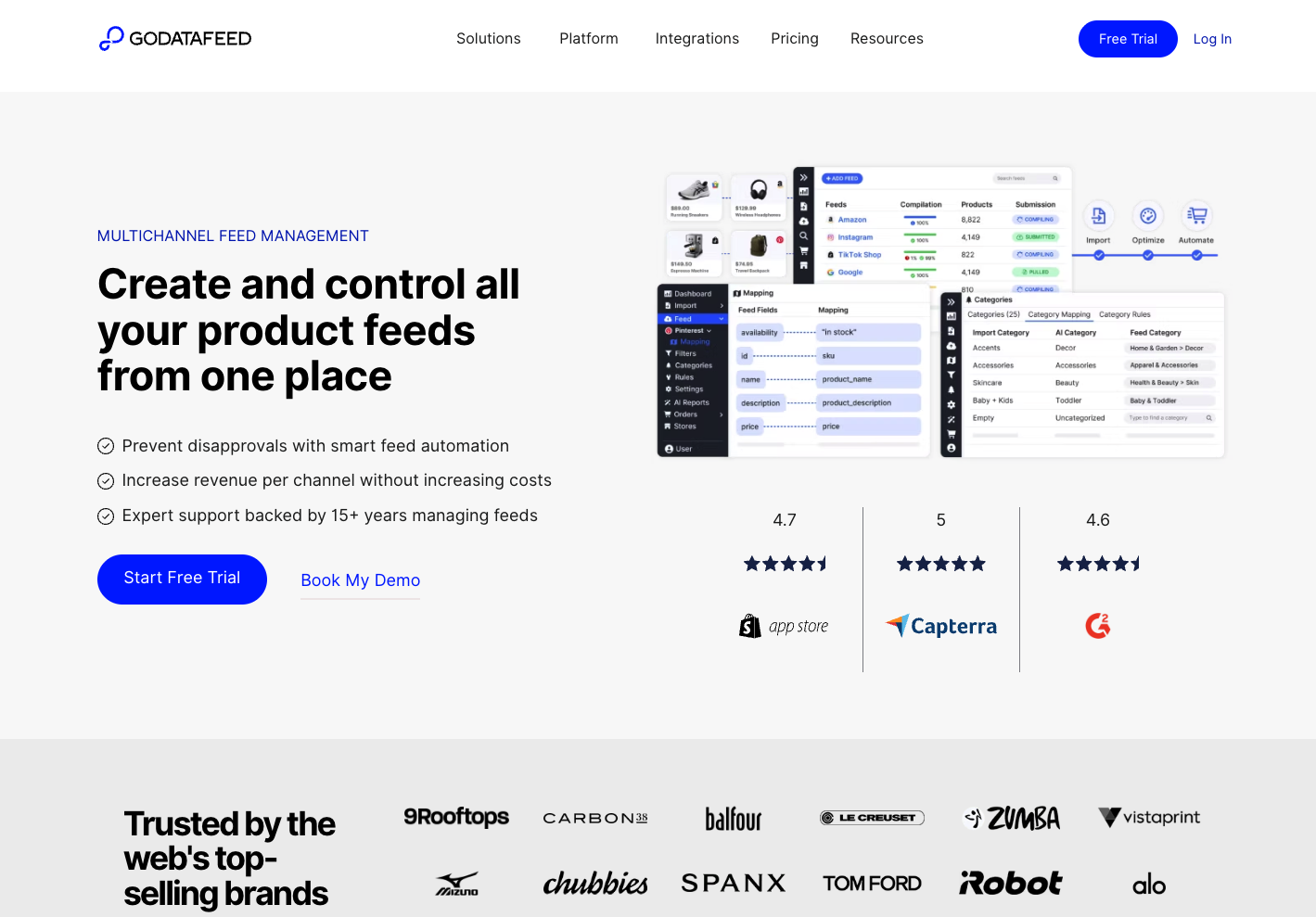
GoDataFeed provides a solid feed management platform for Shopify stores that need reliable multi-channel distribution without the complexity or cost of enterprise platforms. Its template library covers a wide range of channel specifications, and its rule engine allows attribute transformations without coding knowledge.
Feed diagnostics surface disapprovals and quality issues with specific fix guidance, making it useful for merchants who have struggled with account health in Google Merchant Center. Pricing scales from $39 to $99 per month for smaller catalogs, making it accessible for mid-market stores that have outgrown lightweight apps but do not need enterprise infrastructure.
8. Feedonomics
Best for: Enterprise Shopify merchants with complex, high-volume catalogs requiring dedicated managed support

Feedonomics handles ecommerce product feed management at the enterprise tier. Advanced data transformations, merging and splitting variants, restructuring feed architecture, and direct API integrations with Shopify at catalog scales of hundreds of thousands of SKUs are where it operates most effectively. Enterprise clients receive dedicated feed experts who actively manage the account.
For most Shopify merchants, Feedonomics is more infrastructure than needed. Its custom pricing places it well above what small and mid-market stores can justify. For large Shopify-powered retailers where feed quality issues directly translate to significant revenue impact, and where internal teams cannot manage the operational complexity alone, it remains the highest-capability option available.
Shopify Feed Management Tools Comparison at a Glance
The following table summarises the key decision factors for each of the tools discussed in this guide.

When to Upgrade from Shopify's Native Google Channel
The native Shopify Google channel is not the wrong choice for every merchant. It is the wrong choice for merchants who have grown beyond the specific conditions it handles well. Here is a practical framework for knowing when the upgrade makes financial sense.
Upgrade when your catalog exceeds 200 products and you are not seeing competitive impression share for your main product categories. At this scale, title quality and attribute completeness across your full catalog have a material impact on visibility, and manual optimization is no longer realistic without a shopify google shopping feed management tool.
Upgrade when you launch a second advertising channel. Managing separate feed exports for Google and Meta, keeping them synchronized with live pricing and inventory, and optimizing each for its channel's specific requirements becomes operationally expensive without a central feed management platform.
Upgrade when you experience persistent Merchant Center disapprovals. If the same attribute categories keep generating disapprovals despite manual fixes, a tool with systematic product feed optimisation capabilities and proper diagnostics will resolve the underlying data quality issue more effectively than repeated manual corrections.
Upgrade when your competitors with similar products and similar budgets are consistently outranking you. Feed quality differences often explain persistent performance gaps that bid increases cannot fix. An AI-enriched, fully attributed feed competes at a fundamentally different level than a basic export from Shopify's backend.
How Shopify Feed Quality Affects Performance Max Campaigns
Performance Max campaigns now represent the majority of Google Shopping spend for most Shopify merchants, and understanding the connection between your shopify product feed quality and Performance Max performance is essential for getting the most from this campaign type.
Performance Max uses your product feed as its primary signal for determining ad placement, audience targeting, and creative asset selection. The richer and more complete your product data feeds, the more effectively the system can identify the right buyers, match your products to relevant queries, and optimize bidding toward your conversion goals.
In practical terms, this means that improving your feed quality directly improves Performance Max performance without any changes to campaign settings. Adding missing color and material attributes increases the range of specific queries your products match. Restructuring titles to include high-value attributes improves relevance signals. Ensuring accurate product types and Google Product Categories helps the algorithm place your ads in the right auction context.
Merchants who invest in thorough google shopping feed optimisation consistently see better Performance Max results than those who optimize campaign structure without addressing underlying feed quality. The feed is the foundation that all Performance Max signals build on.
How to Use Shopify Metafields for Better Feed Data
Shopify metafields are custom data fields that store additional product information beyond Shopify's standard fields. They are one of the most underutilized sources of product data optimization for Shopify merchants running Google Shopping.
Many Shopify stores already store information like material, care instructions, fit type, and additional specifications in metafields but never surface it in their google shopping feed because the native Google channel does not map metafields to feed attributes by default.
A dedicated feed management tool reads your Shopify metafields and maps them to the corresponding Google feed attributes. If you have a metafield storing fabric composition, it can populate the material attribute in your feed. If you have a metafield for product dimensions, it can populate the size and specification fields.
Before investing in AI enrichment to generate missing attributes, audit your Shopify metafields. You may already have much of the data you need, simply stored in a location your current feed setup is not reading. Connecting that existing data to your google merchant center product feed through proper metafield mapping can close a significant portion of your attribute gap with minimal effort.
Common Shopify Feed Errors and How to Fix Them
Understanding the most common feed errors Shopify merchants encounter in Google Merchant Center helps you evaluate which tools are best equipped to prevent and resolve them.
Missing GTIN errors occur when your products have GTINs that are not being submitted. GTINs are usually available from your supplier or manufacturer. If your tool supports manual GTIN entry or bulk import from a spreadsheet, you can add them to your feed without changing your Shopify product data. If your products are genuinely unique and do not have GTINs, use the identifier exists attribute set to false to prevent the error.
Price mismatch disapprovals happen when the price in your feed does not match the price on your website. This almost always results from sync lag. Moving to a tool with real-time API-based syncing between your Shopify store and your google merchant center feed eliminates this category of error entirely.
Missing required attributes for specific product categories are among the most common and impactful errors in Shopify feeds. Apparel requires color, size, gender, and age group. These attributes are frequently absent from Shopify product data because Shopify does not require them to publish products. AI-powered enrichment tools add these automatically. Rules-based tools can add them if the data exists somewhere in your Shopify catalog to pull from.
Image policy violations occur when product images include promotional overlays, watermarks, or non-product content. Merchant Center now evaluates image quality with AI and will disapprove images that do not meet its standards. Some advanced feed tools offer image processing capabilities that can identify and flag non-compliant images before they cause disapprovals.
Invalid product type values happen when the product type field contains values that are too vague or formatted incorrectly. Using a rules-based tool to standardize your product type values to a consistent hierarchical format reduces this category of error significantly.
Frequently Asked Questions
What is the best feed management tool for Shopify in 2026?
The best tool depends on your store's specific needs. For Shopify merchants who want AI-powered product feed enrichment with fully automated optimization and real-time Merchant Center sync, Feedon.ai is purpose-built for that use case. For multi-channel distribution with granular rules-based control, DataFeedWatch is the strongest option. For budget-conscious Google-focused stores, Simprosys provides excellent value at a very accessible price point.
Does Shopify have a built-in product feed tool?
Yes. The native Shopify Google and YouTube channel app provides basic product feed sync to Google Merchant Center and supports free listings and Performance Max campaigns. It works well for simple setups but lacks title optimization rules, multi-channel support, supplemental feed capabilities, and AI enrichment. Most stores outgrow it once they pass 200 products or start advertising on multiple channels.
How do I optimize my Shopify product feed for Google Shopping?
Start by auditing your attribute completeness in Google Merchant Center diagnostics. Identify which attributes have the highest gap rates across your catalog. Use a feed management tool to map your Shopify metafields to missing Google attributes, restructure your product titles to follow the Brand, Gender, Product Type, and Attribute formula, map products to the most specific Google Product Category available, and ensure real-time syncing for pricing and availability. For attribute data that does not exist anywhere in your Shopify store, AI enrichment tools extract it from your product images and descriptions automatically.
How does feed management improve Shopify store performance?
A well-managed shopify product feed improves store performance by increasing the range of relevant search queries your products match, reducing Merchant Center disapprovals that suppress product visibility, improving click-through rates through better titles and complete attribute data, and providing the rich product signals that Performance Max needs to find the right buyers. The combined effect is better visibility, lower cost-per-click, and higher conversion rates from the same advertising budget.
What is the difference between a Shopify product feed app and a feed management platform?
A Shopify product feed app lives inside the Shopify App Store and integrates directly with your store admin. It typically focuses on a specific set of channels, most commonly Google and Meta. A feed management platform is a standalone tool that connects to Shopify via API but operates independently, usually supporting a much wider range of channels, more advanced transformation capabilities, and enterprise-grade features. Apps are generally more accessible for smaller stores. Platforms are better suited for larger operations with complex channel mixes.
How often should my Shopify feed sync with Google Merchant Center?
For stores with active inventory and daily orders, real-time or near-real-time syncing is the right standard. Pricing changes and stock depletion should reflect in your google merchant center feed within minutes, not hours. Scheduled syncing that runs once or twice a day creates windows where your ads show incorrect pricing or promote out-of-stock items, both of which trigger disapprovals and damage account health. Choose a tool with API-based real-time sync rather than scheduled file-based updates.
Can I manage multiple Shopify stores from one feed management tool?
Yes. DataFeedWatch, Channable, and Feedonomics all support multi-store management from a single account, which is particularly useful for agencies managing multiple client stores or brands operating separate Shopify stores for different markets. Feedon.ai supports this workflow for Shopify merchants managing more than one store. The ability to apply consistent feed rules and optimization standards across multiple stores significantly reduces operational overhead for teams managing more than one catalog.