
Real-Time Product Feed Updates for Ecommerce: The Complete Technical and Revenue Guide
The actual technical architecture behind real-time vs. scheduled feed updates. A quantified cost-of-staleness framework with revenue math. The field-by-field priority matrix so you know what needs real-time sync and what can wait. Platform-specific implementation guides beyond Shopify. How feed freshness directly determines Performance Max budget allocation. How to build a complete monitoring and alerting stack.
How AI-powered shopping surfaces weigh feed freshness as a ranking signal. And the complete enterprise ERP→PIM→Feed→Channel architecture with latency benchmarks at every hop.
The Real-Time Feed Architecture Decision Tree — Polling vs. Webhooks vs. API Push vs. Hybrid
Every ranking article uses "real-time" as a marketing adjective. None of them explain what real-time actually means technically, or which architecture achieves it for your specific situation.
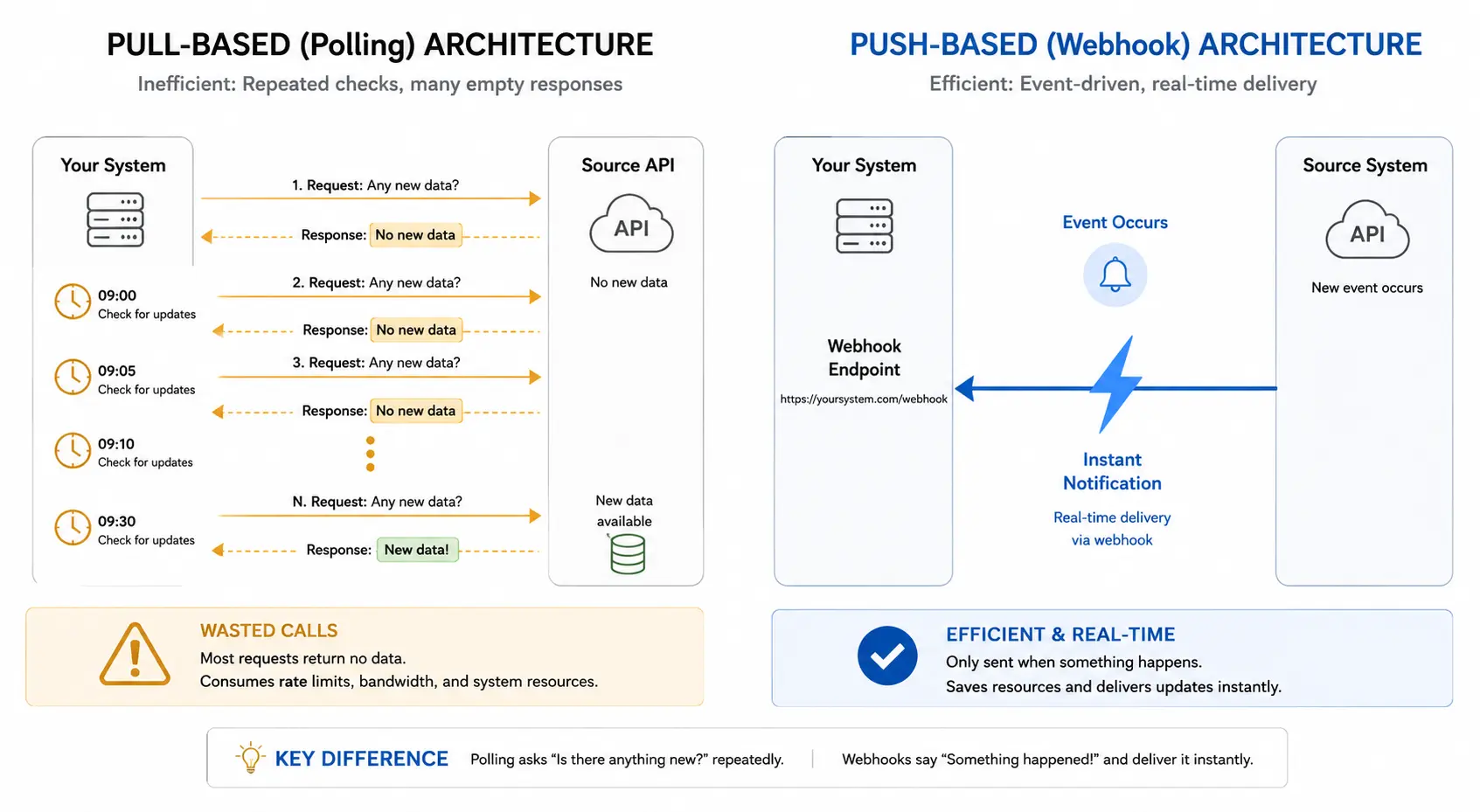
There are fundamentally different approaches to feed synchronization. Understanding the difference is the foundational decision for any e-commerce team building or upgrading their feed infrastructure.
The Two Base Models: Pull vs. Push
Model A: API Polling (Pull-Based)
Polling is a pull. Your system asks the source on a schedule, "Anything new since last time?" Data freshness can be relatively fresh if the sync frequency is set to an aggressive level. You can customize the sync frequency based on how often you need updated data.
API polling can be as frequent as every minute or as infrequent as every 24 hours. But the vast majority of your API calls will return data that hasn't changed, and you'll still consume rate-limit quota for making those calls.
Model B: Webhooks (Push-Based / Event-Driven)
Webhooks are automated messages that send real-time data to your applications when specific events occur. They act as user-defined HTTP callbacks that allow one system to notify another immediately when something happens. This push-based communication model avoids repeated polling, where an app repeatedly asks for updates.
Webhooks automatically deliver data when an event is triggered, which helps streamline real-time communication between systems. Webhooks deliver genuinely real-time updates with incredible efficiency. Communication only happens when something actually occurs, like a new customer signs up or an inventory level changes.
The Resource Math — Why Polling Fails at Scale
The resource difference between push and pull becomes dramatic at scale. If you have 10,000 users and poll an API every 30 seconds, that's 333 requests per second, or 28.8 million requests per day. If only 1% of those polls return a meaningful update, then roughly 28.5 million requests per day still come back empty.
A webhook system handling the same 10,000 users generating roughly 288,000 meaningful events per day would produce the same number of deliveries, no empty responses, and no wasted bandwidth.
The same arithmetic shows the benefit at smaller scales: an application generating 50 meaningful events per day with 30-second polling produces 2,880 polling requests per day, while webhooks produce only 50 deliveries — roughly a 98% reduction in network operations for the same information.
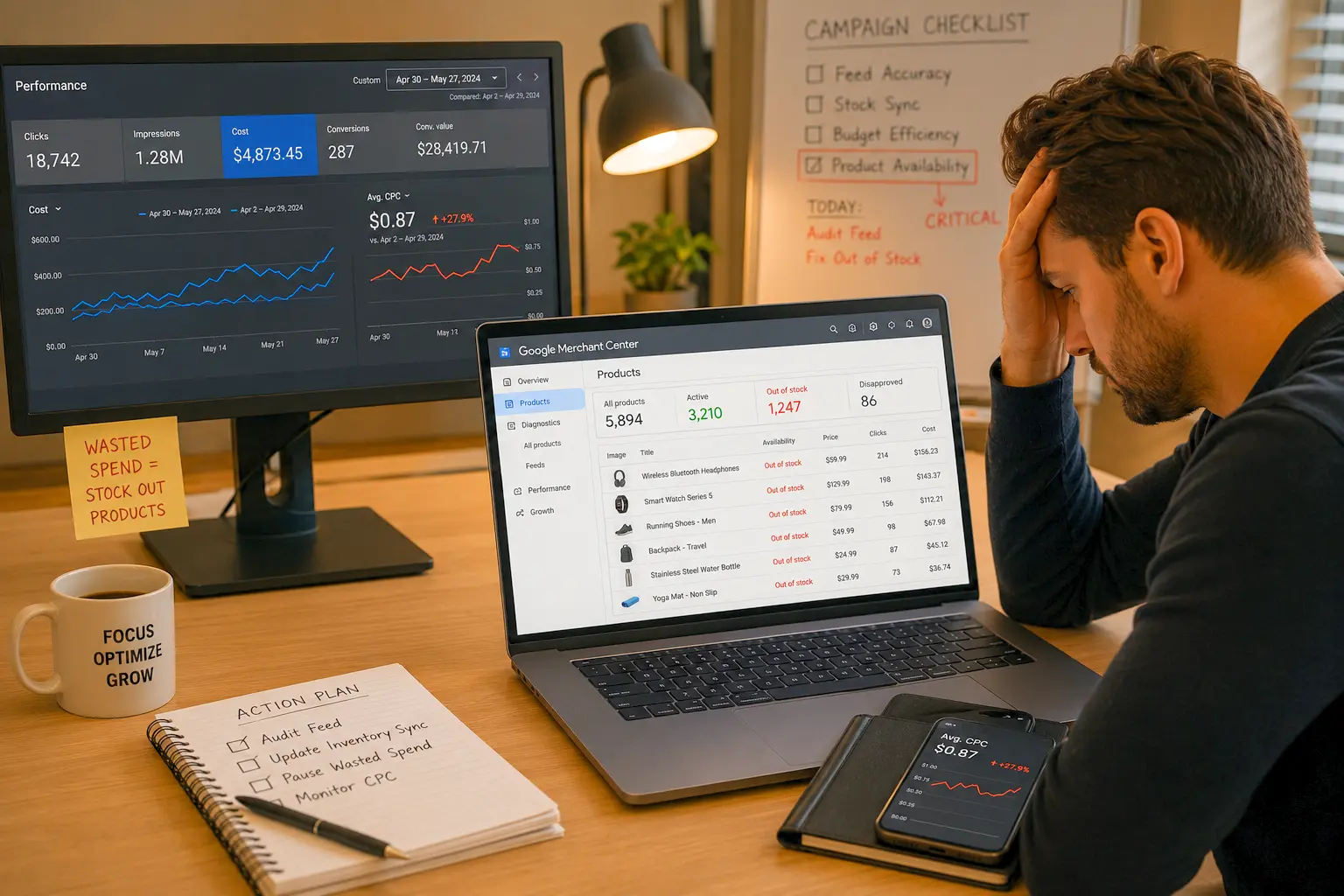
For e-commerce specifically, the Shopify rate limit reality matters critically: Every poll cycle hits the Shopify Admin API. Even if no new orders exist, the poll still costs an API call. Over a year of polling every 5 minutes is over 100,000 calls just to ask, "Anything new?" Shopify apps share a rate-limit budget. Polling consumes budget whether orders exist or not. Webhooks don't count against the API budget at all; they're Shopify calling out, not the app calling in.
The Latency Reality
Perceived latency by users depends on both server processing speed and message propagation time. In event-driven architectures, these delays can be reduced to milliseconds, whereas in polling they often span minutes.
For feed synchronization, this means the following:
5-minute polling interval: Up to 5 minutes from a price change on your website to the feed reflecting it
15-minute polling interval: Up to 15 minutes — enough time for a flash sale to misfire, generate price mismatch disapprovals, and waste significant ad spend
Webhook-triggered sync: Sub-minute propagation from event to feed update
The Webhook Failure Modes (The Part Nobody Talks About)
Webhooks require more active monitoring because failures are silent by default. Webhook delivery is best-effort, not guaranteed. Platforms retry on failure, but there is a window during which events can be lost if your endpoint is down.
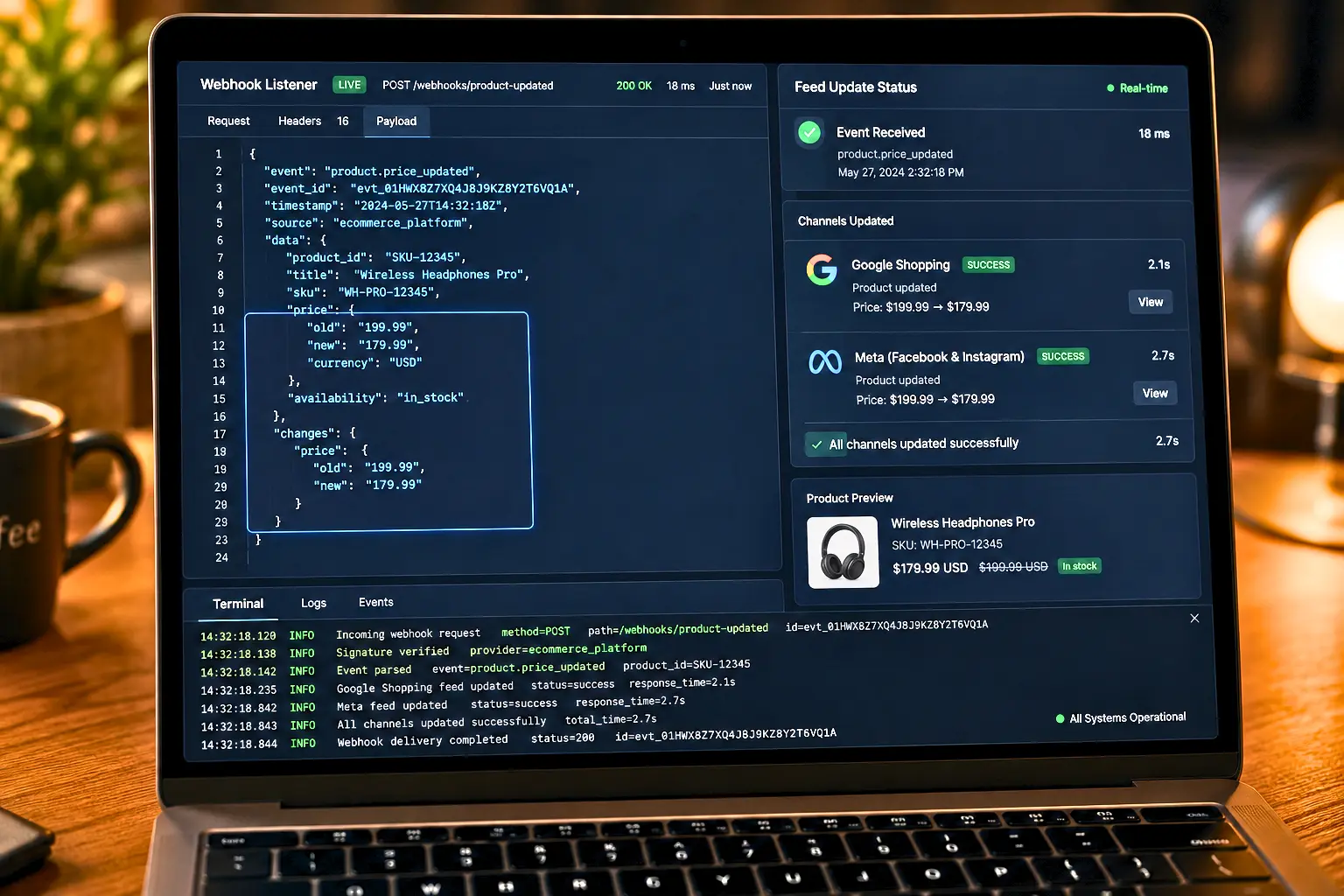
Critical failure modes specific to webhook-based feed sync:

Silent delivery failure: Your endpoint returns a 200 but fails to queue the work. The platform thinks the webhook was delivered; your feed never updates.
Out-of-order event delivery: Timing matters because integrations rarely run in perfect order. An "updated" event can arrive before "created," arrive twice, or never arrive.
Endpoint downtime: A temporary integration outage doesn't lose events Shopify holds and retries. The integration only needs to be eventually available within the retry window. But if your retry window expires during an extended outage, events are permanently lost.
Idempotency failures: If you build webhook integrations long enough, one rule shows up every time: you will see duplicates, retries, and out-of-order updates. If your sync can't safely reprocess the same message, it will drift over time. Idempotency means "same input, same result," even if it arrives twice. Treat every incoming event as "maybe repeated," and design your handler to be safe.

The Hybrid Architecture: The Pattern That Actually Works
In practice, most systems use a combination of both. A hybrid approach is recommended when some APIs do not support webhooks or as a fallback in case of missing events. Webhooks handle critical real-time updates, while gentle periodic polling synchronizes less sensitive metadata.
Here is the complete hybrid architecture for e-commerce feed synchronization:
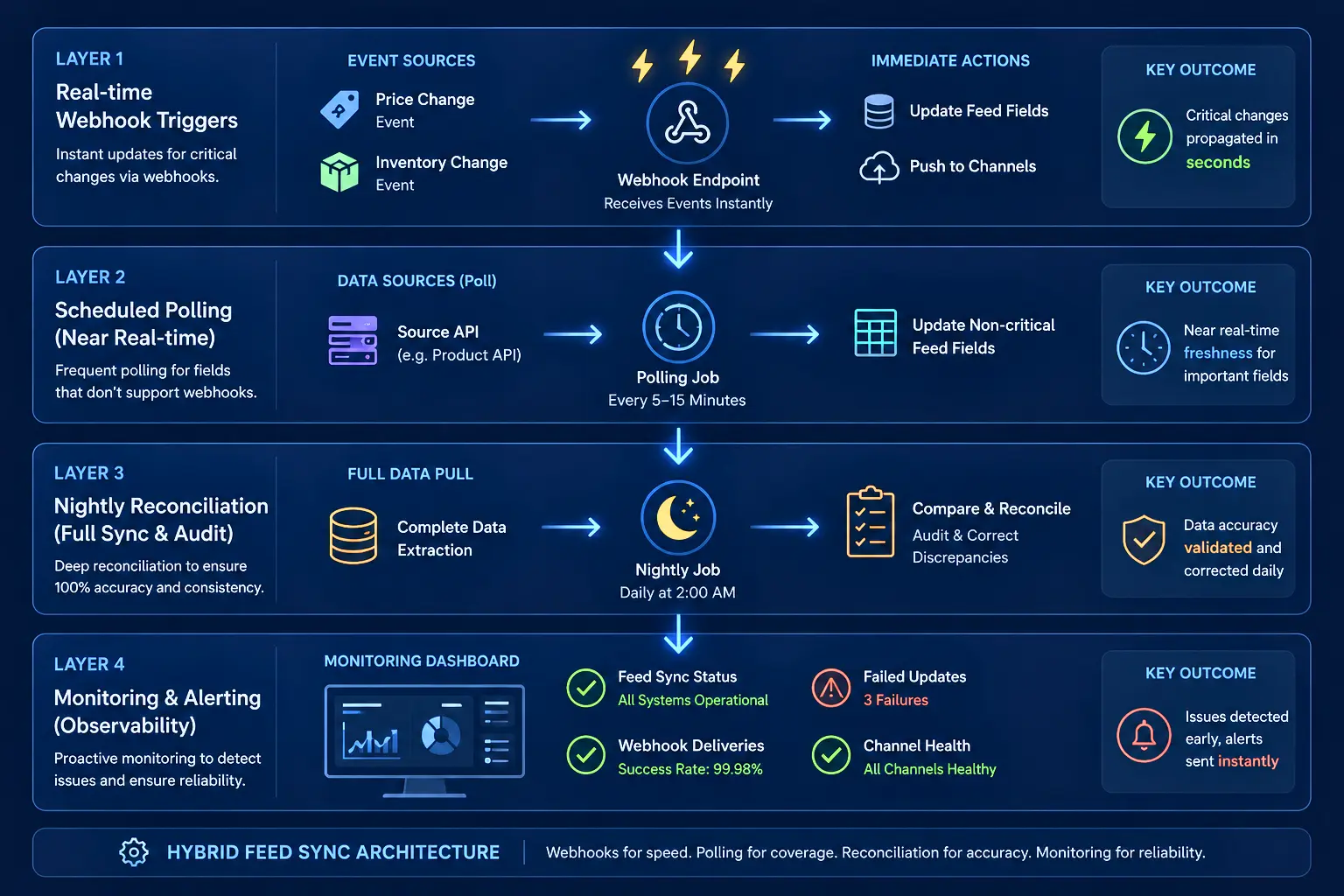
Use polling for initial bulk data syncs when you need to pull an entire product catalog or years of order history. Scheduled reconciliation: run a job every night to audit data and fix any inconsistencies that might have slipped through, like a missed webhook.
On-demand data retrieval: fetching specific details exactly when a user clicks a button in your app. Use webhooks for instant order notifications to kick off fulfillment workflows the second a sale happens. Real-time inventory updates to sync stock levels instantly across every channel to stop overselling in its tracks.
The Architecture Decision Tree
Use this decision tree to determine the right architecture for your catalog:
Step 1: Does your platform natively support webhooks?
Shopify → Yes, native webhooks for product and inventory events
WooCommerce → Yes, but requires configuration (see Gap 7 below)
Magento → Yes, via event/observer system (see Gap 7 below)
BigCommerce → Yes, via webhook API
Headless/custom → Depends on your event bus implementation
Step 2: How many times per day do your prices change?
0–6 times per day → Scheduled polling (every 4–6 hours) is sufficient
7–20 times per day → Webhook-triggered sync required
20+ times per day → Webhook + API push (Google Merchant Content API or Meta Commerce API direct push)
Step 3: What is your catalog size?
<10,000 SKUs → Full catalog refresh on each sync is manageable
10,000–100,000 SKUs → Delta sync only (changed products only, using timestamp filtering)
100,000 SKUs → Must use webhooks + delta sync; full catalog refreshes are computationally prohibitive
Step 4: How many channels are you syncing simultaneously?
1–2 channels → Direct API calls per webhook event
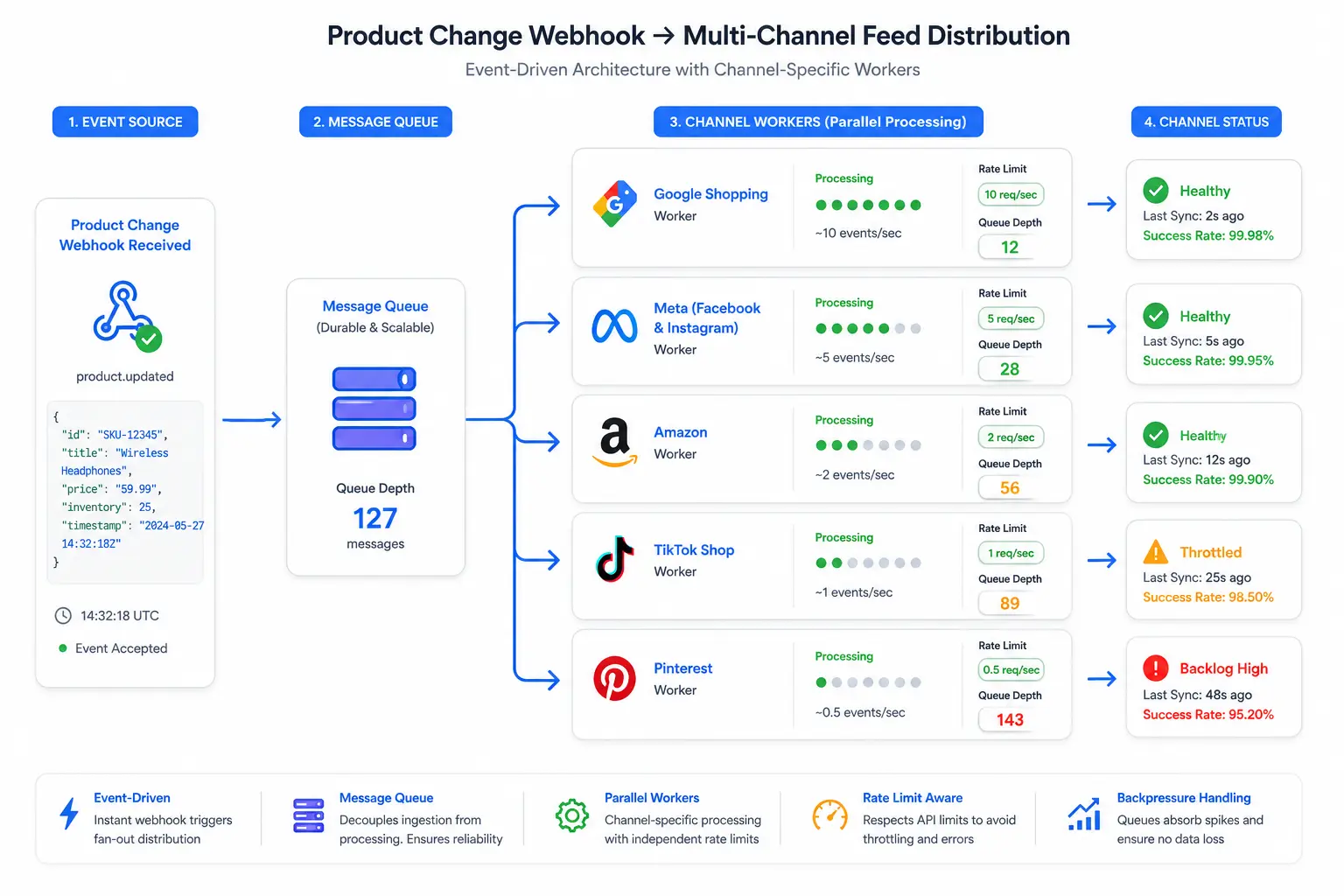
3–5 channels → Message queue (e.g., AWS SQS, RabbitMQ) to fan out events
5+ channels → Orchestration layer with priority queuing (see Gap 9 below)
FeedOn.ai handles all four layers of the hybrid architecture — webhook-triggered updates, scheduled reconciliation, nightly audits, and real-time monitoring — from a single platform. See how
The Cost-of-Staleness Calculator — Your Hourly Revenue Loss from Delayed Feed Updates
Every article describes the consequences of stale feeds in vague terms. Nobody quantifies the revenue cost per hour of delay. Here is the complete cost-of-staleness framework with real math.
The Four Revenue Leak Vectors of a Stale Feed
Vector 1: Wasted Ad Spend on Out-of-Stock Products
If your feed isn't updating frequently, platforms may serve stale prices or advertise out-of-stock items. This creates a poor user experience and lowers quality scores.
Global retail revenue loss due to out-of-stock items reaches up to $1 trillion each year, according to IHL Group. For individual merchants, the feed-level math looks like this:
The Wasted CPC Calculator:
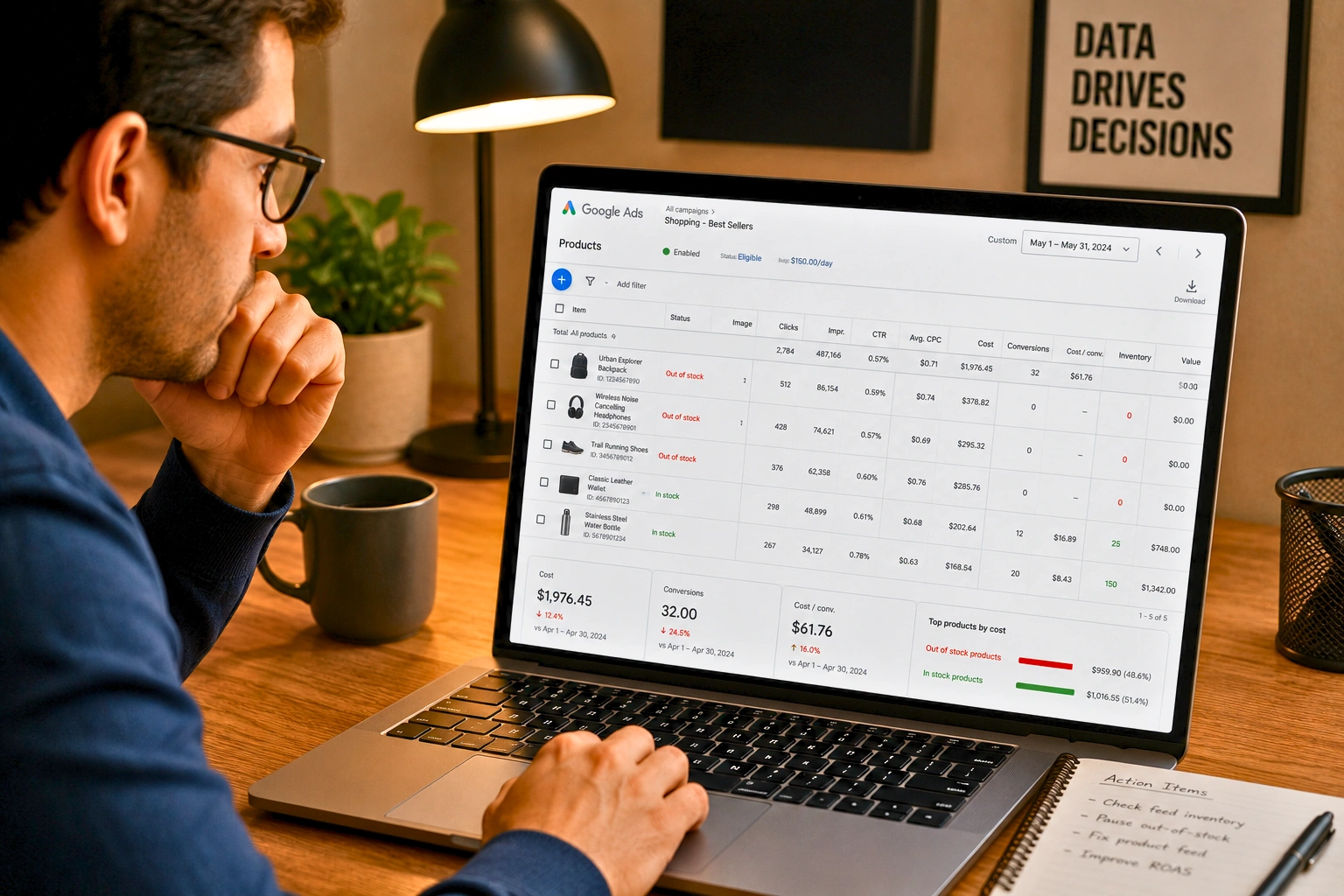
Pages with unavailable items see a 32% higher bounce rate. Every click you pay for on an out-of-stock product generates both a wasted CPC and a negative user experience signal that trains the algorithm to distrust your catalog.
Vector 2: Price Mismatch Returns and Refund Costs
When your feed shows a lower price than your website (or vice versa), customers either
Click, see the higher price, and bounce (wasted CPC and negative signal)
Buy at the lower price displayed in the ad, then dispute the charge when they're billed higher (refund cost + customer service cost + churn risk)
US retail returns reached $849.9 billion in 2025 at a return rate of 15.8%. Online purchases are returned at roughly 3x the rate of in-store purchases, with apparel and footwear seeing the highest rates at 25–30%.
Price mismatch-driven returns are among the most recoverable return costs; they're purely a feed accuracy problem.
Vector 3: Quality Score Degradation
Bad data trains algorithms to find the wrong customers. Misattributed conversions lead to misallocated budgets. The campaigns you scale lose money. The campaigns you pause were your best performers. And every dollar you spend digs the hole deeper.
For Google Merchant Center specifically, stale availability data creates a cascading quality score problem:
Disapprovals reduce impression share across your entire account, not just the disapproved products
Reduced impression share means higher CPCs at auction (less competition → worse placement or same placement at higher cost)
Degraded account quality score compounds over time, requiring months of clean data to recover
Vector 4: Platform Algorithm Trust Penalties
Any mismatch between the stock status in your Google product feed and in Google Shopping will cause the product in your feed to be disapproved. Your out-of-stock Google Shopping listings will not appear in search results and could even trigger an account issue that leads to an account suspension.
Platform account suspensions during peak commerce periods represent the most catastrophic cost of sustained feed staleness. A single week's suspension at peak can cost more than an entire year's worth of feed-management investment.
Variable                                                Example Value
Daily ad spend across all channels                      $2,000
Average CPC                                             $1.10
Average CVR (product landing page)                      2.4%
Average order value                                     $78
% catalog changing daily (price/availability)           12%
Current feed update frequency                           Once daily
Average lag between change and feed update              14 hours
Return rate from price mismatch                         3%
Monthly Revenue Loss Calculation:
Daily clicks: 2,000 ÷ 1.10 = 1,818 clicks
Clicks on stale-data products: 1,818 × 12% = 218 clicks/day
Wasted CPC on genuinely stale impressions: 218 × 40% = 87 clicks wasted
Monthly wasted CPC: 87 × $1.10 × 30 = $2,871/month in direct wasted ad spend
Missed conversions from stale-data products: 87 clicks × 2.4% CVR × $78 AOV × 30 days = $4,905/month in missed revenue
Return/refund costs from price mismatches: (18 clicks/day × CVR × AOV × 3% return rate) × $15 avg processing = $115/month
Total monthly cost of daily-only feed updates: ~$7,891/month
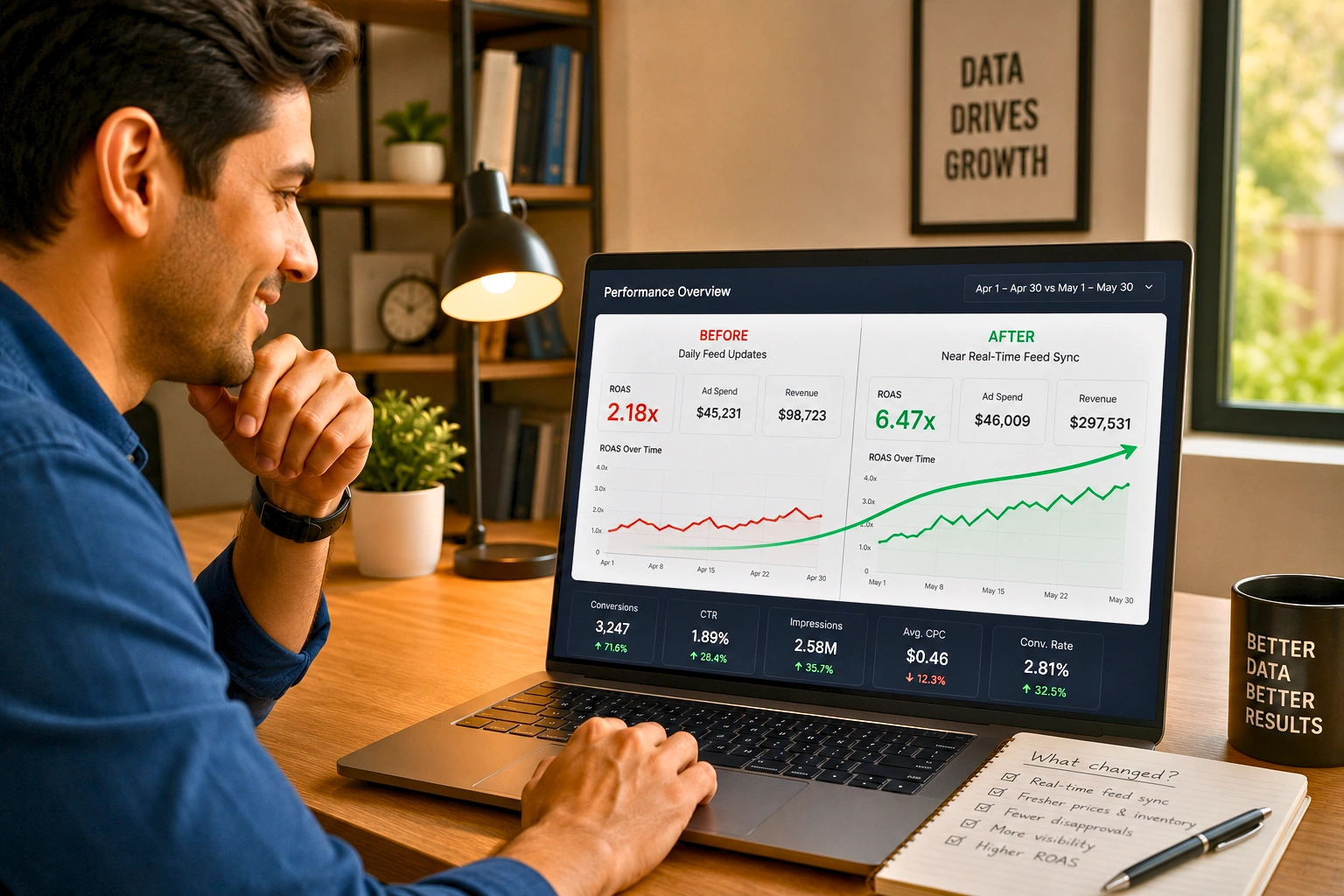
At near-real-time sync (15-minute lag instead of 14 hours), this cost drops by approximately 85%, recovering ~$6,700/month in otherwise wasted or foregone revenue.
According to Gartner, organizations believe poor data quality is responsible for an average of $15 million per year in losses. Nearly 60% of those surveyed didn't know how much bad data costs their businesses — or how to fix it — because they don't measure it in the first place. It's not just about fixing broken SKUs; it's about protecting your highest-value products. If the top 20% of your catalog drives 80% of your GMV, those are the SKUs that need to be bulletproof.
FeedOn.ai's real-time feed health monitoring detects price and availability mismatches automatically — before they become revenue leaks. Start free
The Feed Field Priority Matrix — What Needs Real-Time Updates vs. What Can Wait
No article provides this. Every team that hasn't built it wastes engineering effort syncing fields that don't need real-time updates — while neglecting the ones that do.
The synchronization frequency determines the trade-off between latency and the number of API calls. A short interval improves data freshness but increases load and rate-limiting risks. Conversely, a long interval reduces network pressure but delays updates.
The solution is a tiered update architecture that matches sync frequency to business impact.
The Feed Field Priority Tiers
Tier 1 — Real-Time (Target: <5 minutes from change to feed)
These fields, when stale, cause either immediate financial loss or immediate disapproval:
Field                              Why Real-Time                                                          Sync Trigger
availability                       OOS product = 100% wasted CPC + potential disapproval                  Inventory sold-out webhook
price                              Price mismatch = instant disapproval on Google                         Price change webhook
sale_price                         Promotion live on site but not in feed = price mismatch disapproval    Promotion activate webhook
sale_price_effective_date          Promotion timing misaligned = wrong sale badge display                 Scheduled 24h before sale
A customer just bought the last unit of a hot-selling product. If that inventory level isn't updated instantly across every sales channel, the main website, a marketplace listing, or a physical POS system, you're going to oversell. That means cancelled orders and frustrated customers. This is a non-negotiable use case for a webhook. The second that sale is confirmed, the e-commerce platform needs to fire off a webhook that pushes the new inventory count to every connected system. Waiting for the next API poll, even if it runs every minute, is an eternity in e-commerce and introduces a risk you can't afford.
Tier 2 — Near-Real-Time (Target: <60 minutes from change to feed)
These fields affect campaign performance and customer experience but don't cause instant disapprovals:
Field                     Why Near-Real-Time                                                       Recommended Cadence
inventory_quantity        Accurate stock count for preorder or backorder logic                     Every 60 minutes
shipping                  Shipping cost changes affect conversion rate and channel eligibility     Every 6 hours
tax                       Rate changes affect price accuracy in tax-inclusive markets              Every 6 hours
link                      Redirect chains, broken URLs cause disapprovals                          Every 6 hours spot-check
image_link                Broken image URLs cause product-level disapprovals                       Every 6 hours spot-check
Tier 3 — Daily (Refresh within each 24-hour cycle)
These fields improve performance when updated but don't cause immediate revenue loss if stale for 24 hours:
Field                            Why Daily                                                       Recommended Cadence
title                            Optimisation-focused; staleness doesn't cause disapprovals      Daily
description                      Same as title                                                   Daily
product_type                     Category mapping; rarely changes                                Daily
google_product_category          Rarely changes                                                  Daily
custom_label_0 through _4        Campaign segmentation; update when product status changes       Daily
additional_image_link            Lifestyle images; rarely change                                 Daily
Tier 4 — Weekly or On-Change
These fields are stable and rarely need frequent updates:
Field            Why Weekly                                                        Notes
gtin             Static product identifier — changes only on reformulation         On-change only
brand            Almost never changes                                              On-change only
mpn              Manufacturer part number — static                                 On-change only
condition        Almost never changes for new products                             On-change only
age_group        Static product attributes                                         On-change only
size             Change only when new variants added                               On new variant addition
Implementing the Priority Matrix in Your Tech Stack
The practical implementation:
Tier 1 fields: Configure Shopify (or your platform) webhooks specifically for inventory_levels/update, products/update (with price change filter), and promotion activation events. Route these directly to your feed update queue with the highest priority.
Tier 2 fields: Set up a scheduled job running every 60 minutes that checks for changes in Tier 2 fields using timestamp-filtered API calls (updated_at_min parameter in Shopify).
Tier 3 fields: Run your standard daily full feed refresh. This catches all Tier 3 fields plus serves as a reconciliation safety net for any Tier 1/2 webhooks that failed.
Tier 4 fields: No scheduled sync needed. Update only when manually triggered by a catalog change event.
The top 20% of your catalog drives 80% of your GMV, and those SKUs need to be bulletproof. Titles, pricing, availability, images, product types—everything needs to be accurate, structured, and updated in real time. Because when your best-performing products fail to serve correctly, the entire ad system suffers.
Apply the priority matrix to your top-20% revenue SKUs first. For these, implement Tier 1 real-time webhooks even if the rest of your catalog runs on daily refresh.
FeedOn.ai's field-level sync rules let you set different update frequencies for different product groups — apply real-time sync to your top sellers without over-engineering your whole catalog
How to Handle API Rate Limits When Pushing Real-Time Updates at Scale Across Multiple Channels
This is the engineering problem that stops most real-time feed implementations from actually working at scale. No ranking article addresses it.
Polling exhausts API rate limits quickly. At 5-minute polling intervals, you are making 12 API calls per hour per channel. With 50 channels, that is 600 API calls per hour, exceeding most platforms' rate limits.
For a merchant syncing to Google, Meta, Amazon, TikTok Shop, and Pinterest simultaneously after a single flash sale price change, here's the real rate limit landscape:
Channel API Rate Limits Reference Table
Channel                        Rate Limit                          Burst                     Best Practice
Google Merchant Center API     600 req/min per project             No documented burst       Batch updates; use supplemental feeds for speed
Meta Commerce API              200 calls/hour per user token       Limited                   Use batch operations; group product updates
Amazon SP-API                  Varies by endpoint                  Token bucket system       Always use batching; respect retry-after headers
TikTok Shop API                100 req/min                         10 burst                  Queue-based; process sequentially
Pinterest Catalogs API         Not publicly documented             Not documented            24-hour feed refresh cycle is standard
Shopify Admin API              2 req/sec                           40-request burst          Use webhooks to avoid polling entirely
The Rate Limit Management Architecture
Strategy 1: Message Queues with Priority Lanes
Instead of pushing directly to channel APIs when a webhook fires, route the event through a message queue with priority lanes:
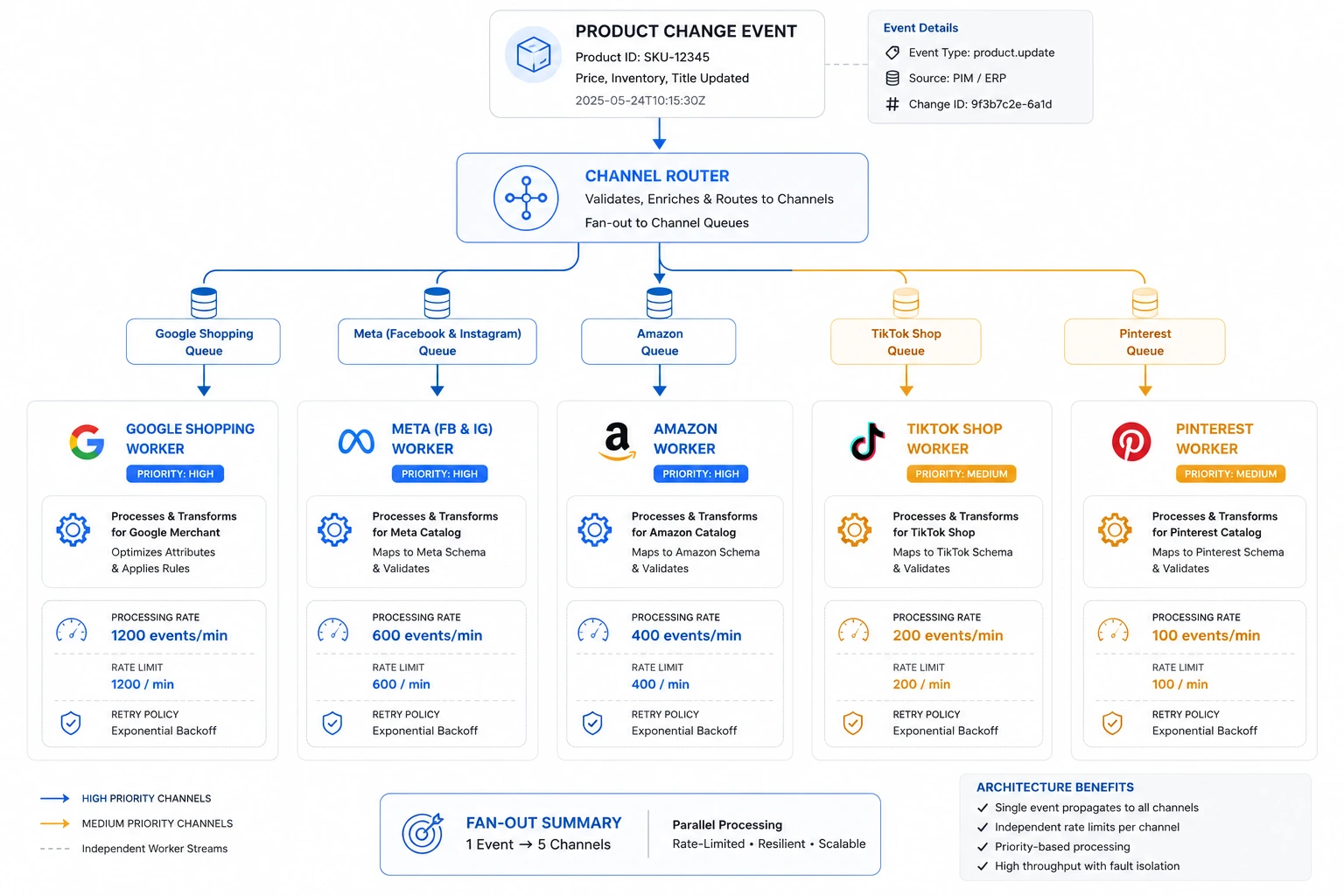
Each channel has its own rate-limited worker that consumes from the queue at the appropriate rate. A price change event that triggers updates across 5 channels simultaneously doesn't hit 5 APIs at once — it enters 5 separate channel queues and is processed by each channel's worker at its specific allowed rate.
Strategy 2: Batch Updates for High-Volume Changes
Use incremental sync with "updated since" timestamps or change tokens, server-side filtering (subscribe only to the event types you need), and batching reads and writes (fetch details in chunks, write in bulk).
For events that affect many SKUs at once (e.g., a sitewide flash sale activating sale_price on 500 products), don't trigger 500 individual API calls. Instead:
Collect all events within a 60-second window
Deduplicate by product ID
Submit as a single batch update via supplemental feed
Process the supplemental feed through normal channel ingestion
Strategy 3: Adaptive Backoff for Rate Limit Recovery
Implement adaptive backoff: increase the interval during inactivity and reduce it in case of spikes. Filter requests to target only modified resources and locally store the last known state. Monitor your quotas and set up alerts to dynamically adjust frequency and prevent rate limiting.
Implement exponential backoff with jitter when a channel API returns a 429 (rate limit exceeded):
First retry: 1 second + random 0–500ms jitter
Second retry: 2 seconds + jitter
Third retry: 4 seconds + jitter
Max retry interval: 60 seconds
Max retry attempts: 5 before routing to dead-letter queue
Strategy 4: Priority Sequencing for High-Revenue Channels
When you have more feed updates queued than your rate limits allow processing in real time, use custom_labels to sequence by channel revenue priority:
Priority 1: Google Shopping (typically highest ROAS channel) process first
Priority 2: Meta (Dynamic Product Ads) process second
Priority 3: Amazon process third
Priority 4: TikTok Shop process fourth
Priority 5: Pinterest, Bing, other channels process last
This ensures that even in a rate-limit-constrained scenario, your highest-revenue channel always has the freshest data.
FeedOn.ai's multi-channel sync engine handles rate limit management, priority queuing, and batch updates automatically across Google, Meta, TikTok, Pinterest, and 50+ other channels
What Happens to Your Ad Campaigns During the Lag Window?
No article maps the cascade. Here is the complete, hour-by-hour impact of stale feed data on your live campaigns.
The Cascade Effect of a Stale Feed — A Timeline
[Hour 0: The Triggering Event] A top-selling SKU sells out its last unit at 2:47 PM. Your Shopify inventory level drops to zero.
[Hour 0 to 0:15 — No Feed Update Yet]
Your feed still shows availability = in stock
Google Shopping, Meta DPAs, and TikTok Shop are all still actively serving ads for this product
Every click generated during this window is 100% wasted CPC
[Hour 0 to 1 — Platform Detection Lag]
Google's crawler may detect the stock status mismatch if your landing page shows "Out of Stock" and your feed says "In Stock"
Any mismatch between the stock status in your Google product feed and in Google Shopping will cause the product in your feed to be disapproved. Your out-of-stock Google Shopping listings won't appear in search results and could even trigger an account issue that leads to account suspension.
The disapproval may not happen immediately; Google's crawler runs on its own schedule
[Hour 1 to 14 — The Stale Data Window (Daily Feed Update Store)]
Ads continue serving on Google Search (which doesn't immediately detect stock mismatches from the feed)
While ads aren't instantly affected by an out-of-stock status, over time the performance of your ad may change. Shoppers who click on your ad will quickly bounce after seeing an "out of stock" notification, affecting your conversion rates and CPCs.
Each bounce trains Google's Smart Bidding algorithm that this product generates poor user signals, reducing its impression share in future auctions even after it's restocked
Meta DPAs continue serving until their next catalog refresh (typically 1–6 hours depending on your setup)
[Hour 14 — Daily Feed Update Fires]
Your feed updates with availability = out of stock
Google Shopping stops serving the disapproved product
Meta catalog updates on next refresh cycle
[The Compounding Quality Score Damage]
Bad data trains algorithms to find the wrong customers. Misattributed conversions lead to misallocated budgets.
The quality score damage from a 14-hour stale window on an out-of-stock product is not resolved when the product is either restocked or correctly marked OOS. Google's algorithm has collected negative user engagement signals from those 14 hours of bad-experience clicks. Those signals depress the product's future auction performance for days after the data quality issue is resolved.
The financial exposure per incident:
Scenario                                                              Duration of Stale Window     Estimated Direct Cost
Daily feed update, OOS product with $500/day ad spend allocation      14 hours average            $292 in wasted CPC
Daily feed update, price mismatch                                     14 hours average            $292 wasted + return costs
6-hour feed update                                                    3 hours average             $63 in wasted CPC
Real-time webhook-triggered update                                    <5 minutes                  <$3 in wasted CPC
The ROI of moving from daily to near-real-time sync is calculable, concrete, and rarely small.
A retailer's ability to retain customers might be measured more by their fulfillment accuracy than their advertising spend. 72% of consumers expect inventory data to be live and accurate. It's not a bonus — it's the baseline now.
FeedOn.ai's availability sync fires in near-real-time when products go out of stock — stopping wasted ad spend within minutes, not hours
Platform-Specific Real-Time Feed Implementation Guides Beyond Shopify
The overwhelming majority of feed management content is Shopify-centric. Here are platform-specific implementation guides for every major e-commerce stack.
Shopify (Native Webhook Support)
Shopify offers the most developer-friendly webhook implementation for feed sync:
Available webhooks for feed management:
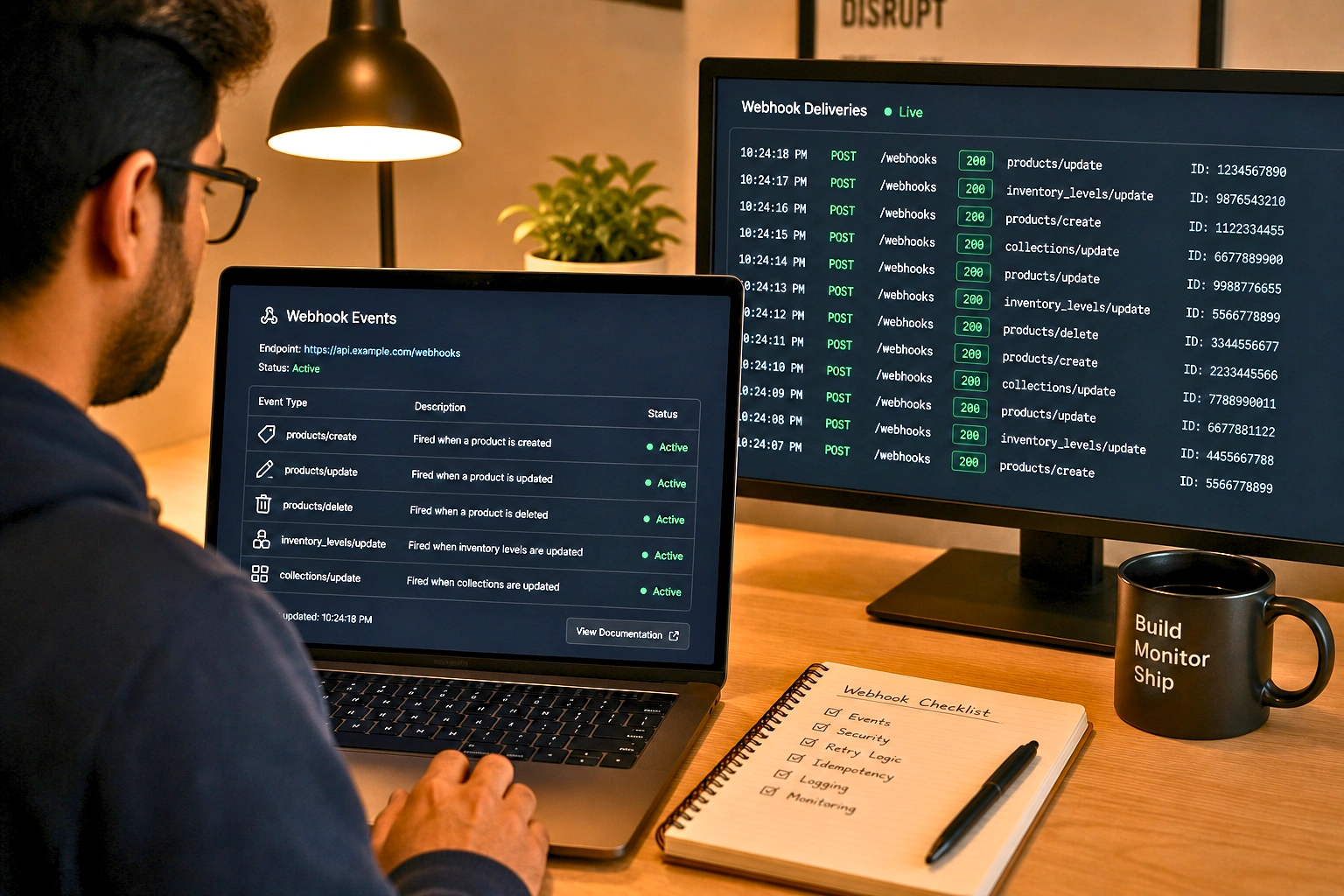
Implementation pattern:
Register webhooks via Shopify Admin API or Partner Dashboard
Implement an HTTPS endpoint to receive payload
Verify HMAC signature on every received payload: X-Shopify-Hmac-Sha256 header
Acknowledge with 200 response immediately (before processing queue first, process async)
Route payload to your feed update queue
Process update: extract changed fields, update feed accordingly, push to channel APIs
Shopify may retry a webhook. The receiver should be idempotent processing the same webhook twice shouldn't create two orders in the OMS. Standard pattern: extract the product ID from the payload, check if the feed was already updated for this event, skip if yes.
WooCommerce (Plugin-Based Webhook Configuration)
WooCommerce's REST API supports product, order, and inventory sync, but webhook support requires configuration — it doesn't work out of the box.
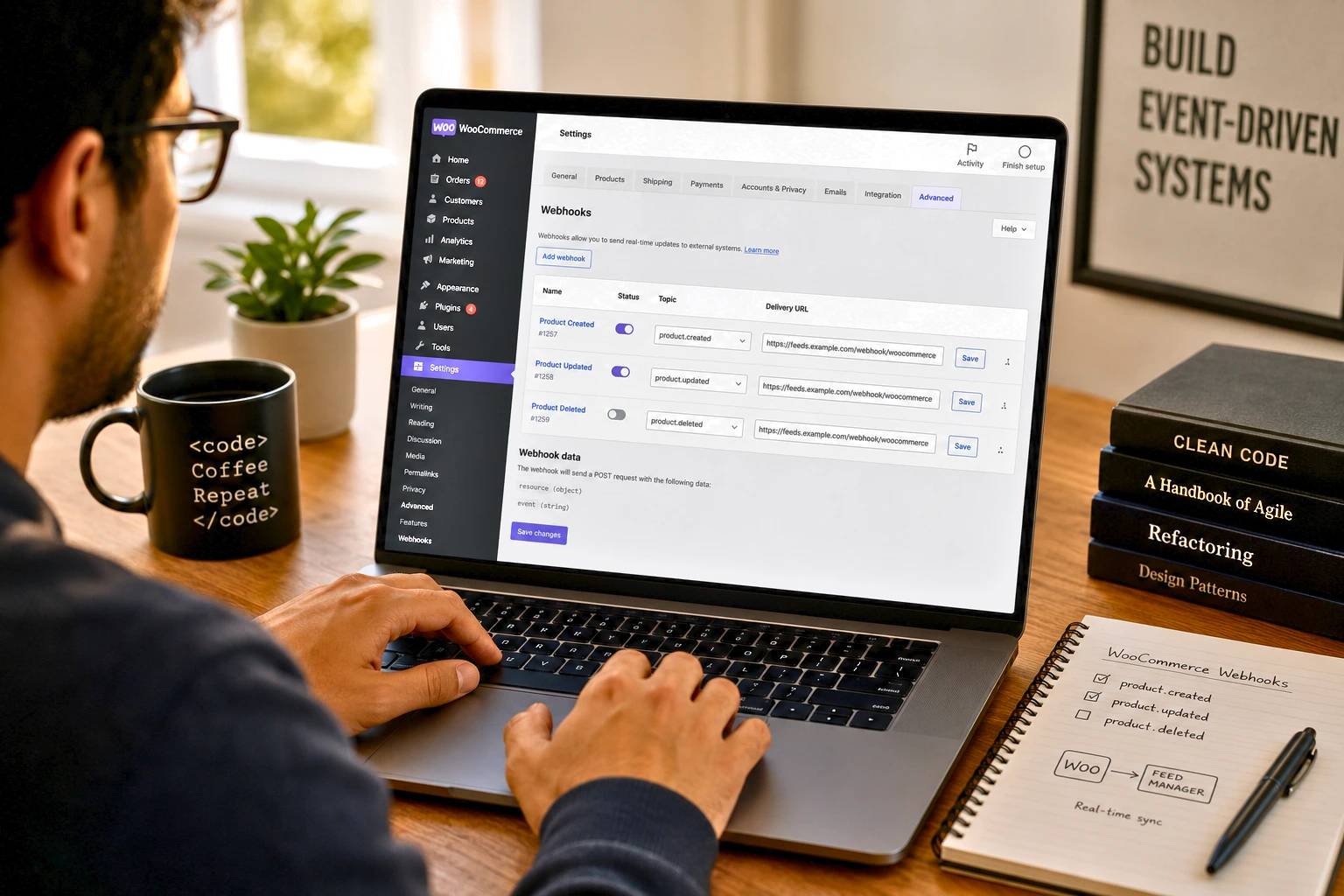
Implementation steps:
Enable WooCommerce webhooks: In WooCommerce Settings → Advanced → Webhooks → Add Webhook
Configure webhook topics for feed management:
product.created — fires on new product
product.updated — fires on any product change (including price/inventory)
product.deleted — fires on product deletion
product.restored — fires when product moved from trash
Set delivery URL: Your webhook receiver endpoint
Secret: Generate a secret key; verify with X-WC-Webhook-Signature header
WooCommerce-specific limitation: WooCommerce's product. The updated webhook fires on ANY product field change, including metadata changes that don't affect your feed. Implement field-level filtering at your receiver to avoid unnecessary feed updates.
WooCommerce rate limit consideration: WooCommerce REST API does not impose built-in rate limits (your server's capacity is the limit), but your hosting environment may have PHP process limits that constrain concurrent webhook processing. Use a queue to buffer incoming webhooks rather than processing synchronously.
Magento 2 / Adobe Commerce (Event/Observer System)
Magento 2 uses an event/observer pattern rather than native webhooks, which requires a different implementation approach:
Step 1: Create a custom Magento 2 module
PHP
// app/code/YourVendor/FeedSync/etc/events.xml
<?xml version="1.0"?>
<config>
<event name="catalog_product_save_after">
<observer name="feedsync_product_save"
instance="YourVendor\FeedSync\Observer\ProductSaveObserver"/>
</event>
<event name="cataloginventory_stock_item_save_after">
<observer name="feedsync_inventory_update"
instance="YourVendor\FeedSync\Observer\InventoryUpdateObserver"/>
</event>
</config>
Step 2: Implement the Observer
PHP
// YourVendor/FeedSync/Observer/ProductSaveObserver.php
public function execute(Observer $observer)
{
$product = $observer->getEvent()->getProduct();
// Only queue if feed-relevant fields changed
$fieldsChanged = array_intersect(
array_keys($product->getData()),
['price', 'special_price', 'status', 'visibility']
);
if (!empty($fieldsChanged)) {
$this->messageQueue->publish(
'feedsync.product.update',
['product_id' => $product->getId(), 'fields_changed' => $fieldsChanged]
);
}
}
Step 3: Use Magento's Message Queue Framework
Magento 2 has a built-in message queue system (supports RabbitMQ or MySQL as a broker). Route your feed update messages through this system to handle volume spikes without blocking storefront performance.
Magento-specific consideration: Magento's event system fires synchronously within the request cycle. Ensure your observer queues the work asynchronously rather than making API calls directly; otherwise, a product save in the admin panel will hang, waiting for your feed API calls to complete.
BigCommerce (Native Webhook API)
BigCommerce has a native webhook API similar to Shopify:
Available webhooks for feed management:
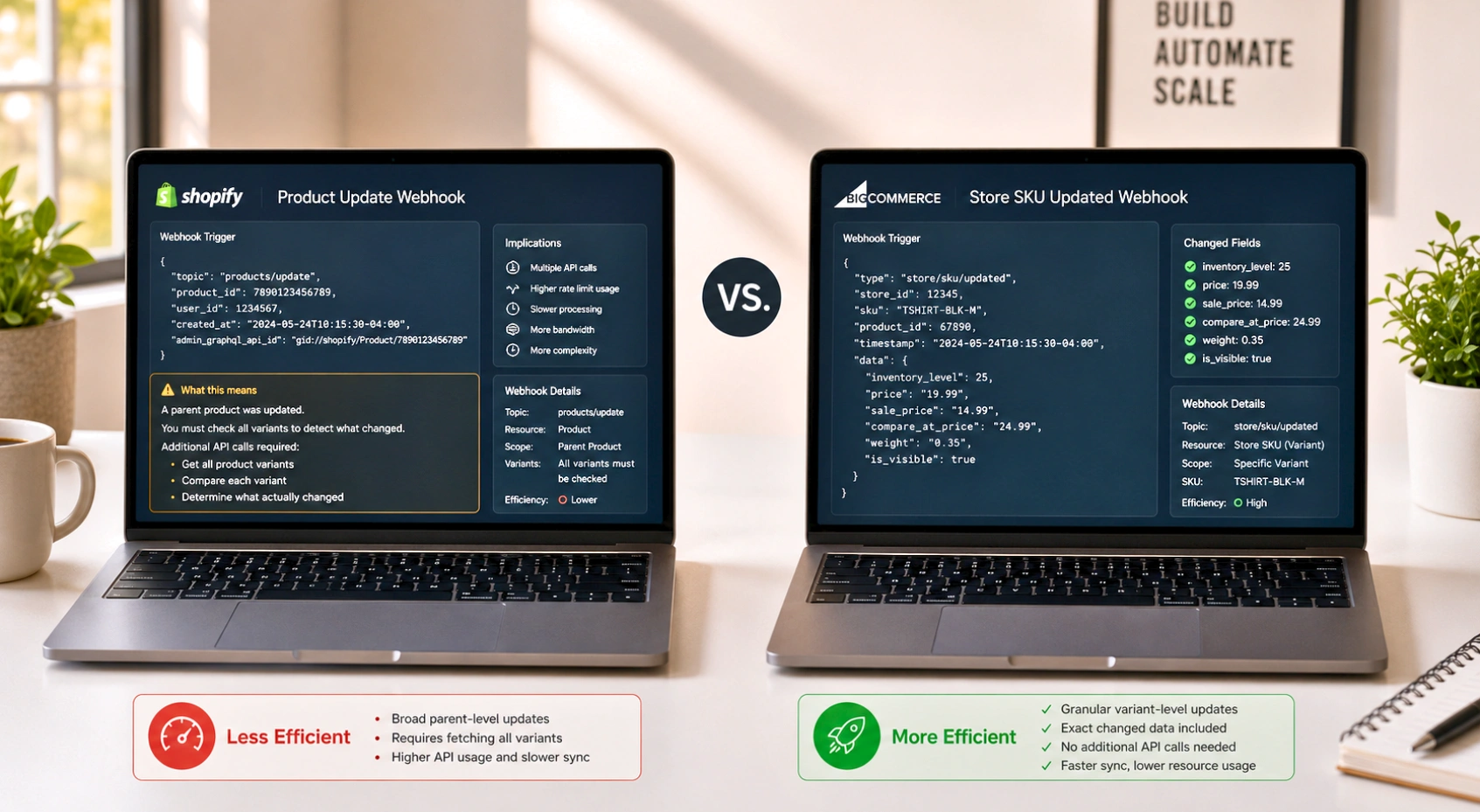
BigCommerce-specific advantage: The store/SKU/updated webhook is variant-level, meaning you get granular notifications when a specific size/color variant changes stock level, not just a parent product notification.
Headless / Composable Commerce (Custom Event Bus)
For headless architectures (using Shopify Hydrogen, Next.js Commerce, commercetools, Elastic Path, or custom API-first backends), there's no monolithic platform to hook into. The feed sync system must be built around your custom event bus.
Recommended architecture for headless:
Event emission: Instrument your commerce API or product service to emit events to a message broker (AWS EventBridge, Kafka, or Pub/Sub) when product state changes
Event schema: Define a standardized event schema that covers all feed-relevant fields:
JSON
{
"event_type": "product.price.changed",
"product_id": "SKU-12345",
"changed_fields": ["price", "sale_price"],
"new_values": {"price": 49.99, "sale_price": 39.99},
"timestamp": "2026-06-29T14:32:00Z",
"source": "pricing-service"
}
Feed subscriber: A dedicated feed sync service subscribes to the event stream and processes product changes into channel-specific feed updates
Reconciliation job: A nightly batch job compares your full product catalog state against each channel's last known state, filling any gaps from missed events
The headless feed advantage: Because you own the event system entirely, you can instrument field-level events with perfect precision. You never fire a feed update for a metadata field that doesn't affect your feed, and you never miss a feed-relevant change because your event schema didn't cover it.
FeedOn.ai integrates with Shopify, WooCommerce, BigCommerce, Magento, and headless stacks via direct feed URL, API connection, or custom integration
Building Your Feed Sync Monitoring and Alerting Stack From Zero to Production
Setting up feed sync is the part everyone covers. Building the monitoring layer that keeps it working in production is the part nobody covers.
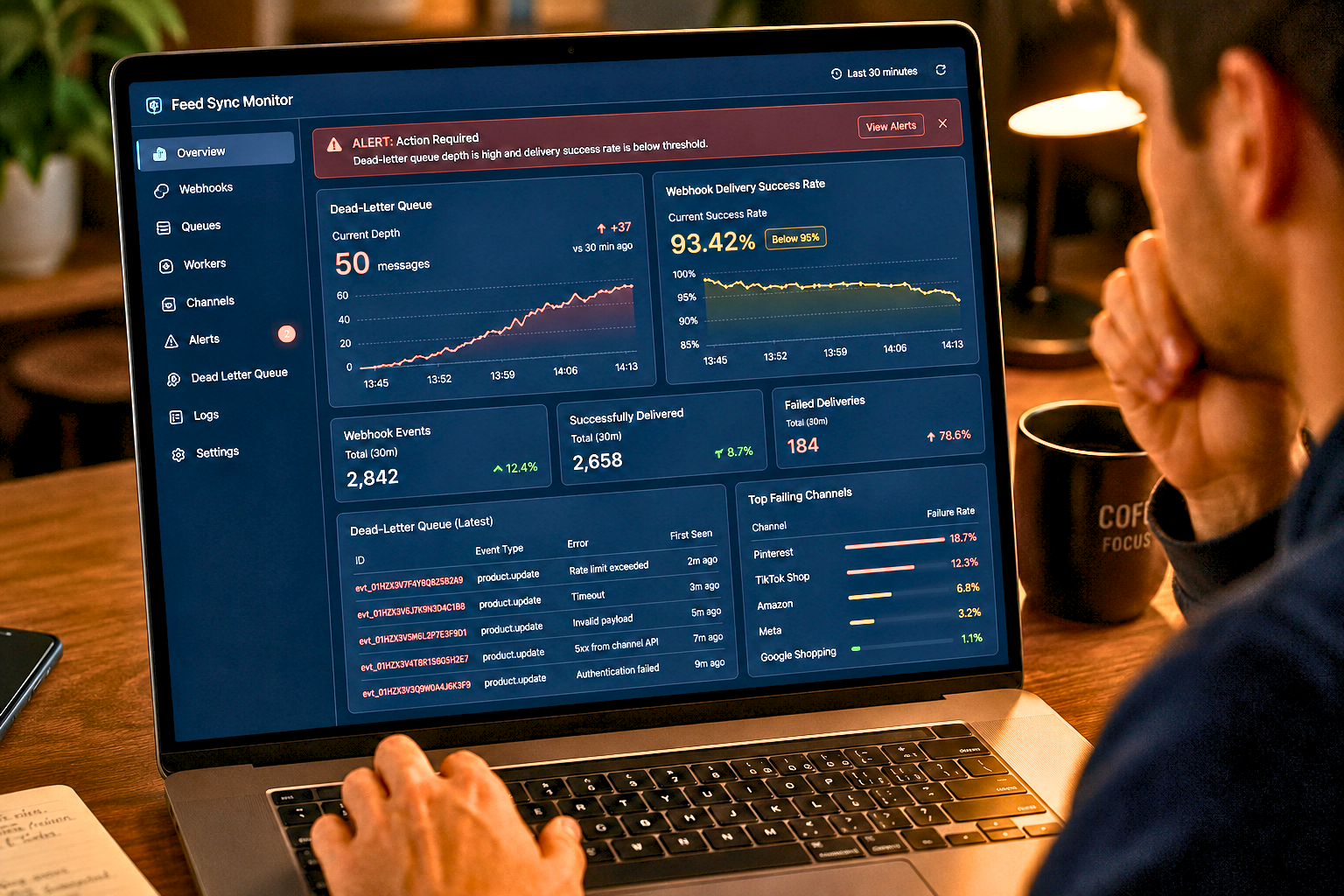
Webhooks require more active monitoring because failures are silent by default. If you normally receive ~100 webhooks per hour and suddenly receive 0, something is wrong.
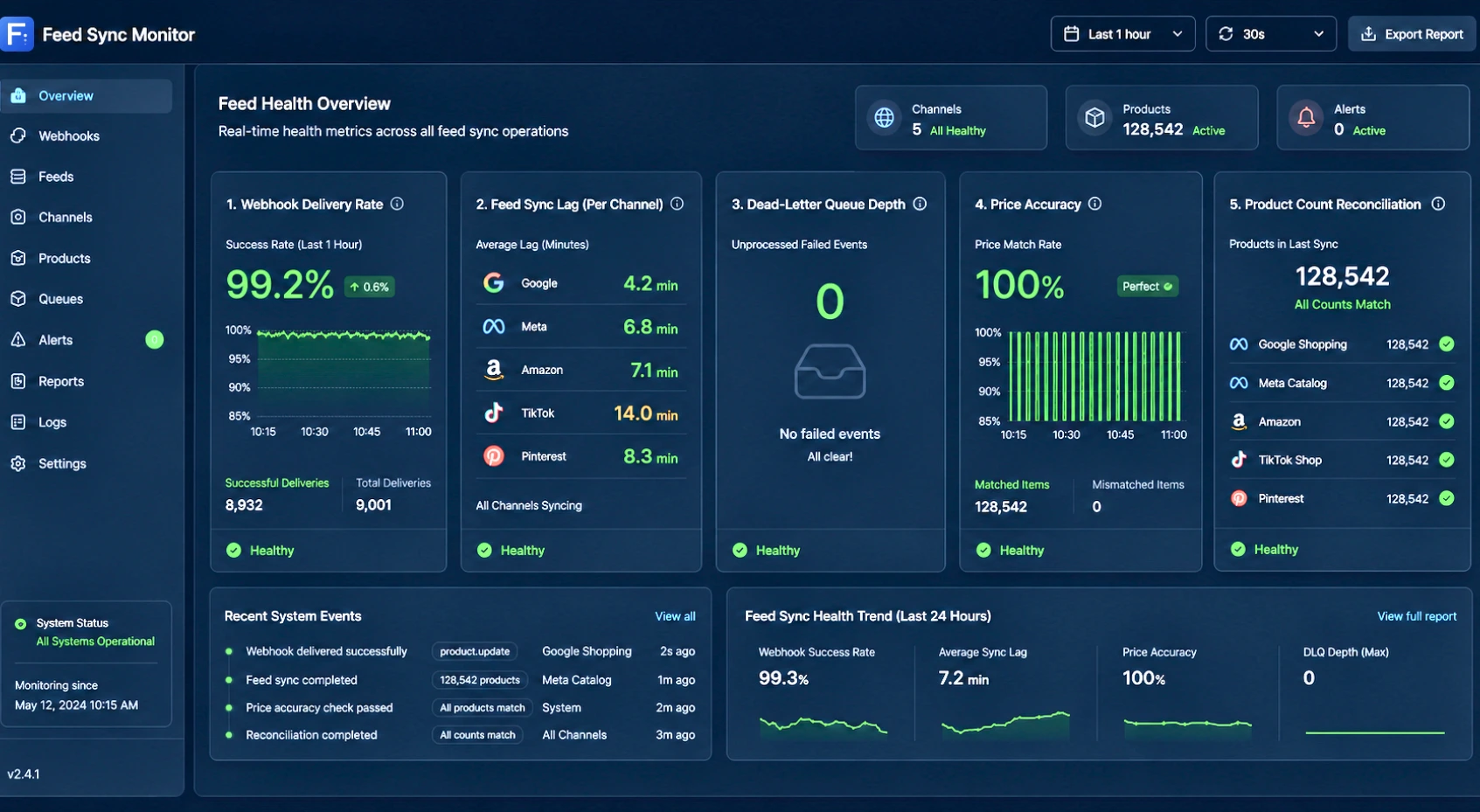
Here is the complete monitoring and alerting stack for production feed sync operations:
Layer 1: Webhook Health Monitoring
Track these metrics for every webhook source:
Track delivery success rate, the percentage of webhooks that your endpoint acknowledged with a 2xx response, and response latency, how long your endpoint takes to respond. Slow responses trigger provider timeouts, which look like failures.
Metric                              Alert Threshold                     Alert Severity
Webhook delivery success rate       <99% in any 15-minute window        Critical
Webhook response latency            >2,000ms average                    Warning
Hourly webhook volume drop          >50% vs same hour yesterday         Warning
Webhook endpoint 5xx errors         Any occurrence                      Critical
Dead letter queue depth             >100 unprocessed events             Warning
Implementing event gap detection:
Python
# Example: Alert if webhook volume drops below expected threshold
expected_hourly_volume = get_baseline_webhook_volume(hour=current_hour)
actual_hourly_volume = count_webhooks_received(last_60_minutes)
if actual_hourly_volume < (expected_hourly_volume * 0.5):
alert(
severity="WARNING",
message=f"Webhook volume drop detected: {actual_hourly_volume} vs expected {expected_hourly_volume}",
channel="slack-feed-alerts"
)
Layer 2: Feed Accuracy Monitoring
Track accuracy between your feed and your live site:
Check                          Frequency            Alert Threshold                       Action
Price match                    Every 30 minutes     Any mismatch >$0.01                   Update feed immediately
Availability match             Every 15 minutes     Any OOS product showing in stock      Trigger emergency sync
Total product count            Daily                >2% discrepancy                       Investigate missing products
Disapproval rate               Daily                >5% disapproval rate                  Feed audit
Feed ingestion success         Each ingestion       Any failure                           Immediate re-trigger
Implementing price mismatch alerting:
Python
# Sample: Price mismatch checker
def check_price_accuracy(sample_size=50):
sampled_products = random.sample(all_products, sample_size)
mismatches = []
for product in sampled_products:
feed_price = get_feed_price(product.id)
site_price = scrape_site_price(product.url)
if abs(feed_price - site_price) > 0.01:
mismatches.append({
'product_id': product.id,
'feed_price': feed_price,
'site_price': site_price,
'delta': abs(feed_price - site_price)
})
if mismatches:
alert(
severity="CRITICAL",
message=f"{len(mismatches)} price mismatches detected",
details=mismatches
)
Layer 3: Dead-Letter Queue Processing
Implement an acknowledgement mechanism and exponential retries on failure. Use unique identifiers for each event to handle idempotency and avoid duplicaarchitecture—webhook-triggeredtes. Integrate a broker or queue to buffer notifications and absorb temporary outages. Monitor success rates and configure alerts to quickly detect anomalies.
Every failed webhook event should route to a dead-letter queue (DLQ) rather than being silently dropped. Configure your DLQ with:
Retry policy: Maximum 5 retry attempts with exponential backoff
Retention period: 24 hours (enough to cover any planned maintenance window)
Alert trigger: Alert your team when DLQ depth exceeds 50 events
Manual reprocessing: Ability to replay DLQ contents after fixing the underlying issue
Audit logging: Every event in the DLQ should have a reason log (which delivery attempt failed and why)
Layer 4: Channel Sync Lag Dashboard
Build a unified dashboard that shows sync lag per channel, the time between a product change on your site and that change reflecting in each channel's live feed:
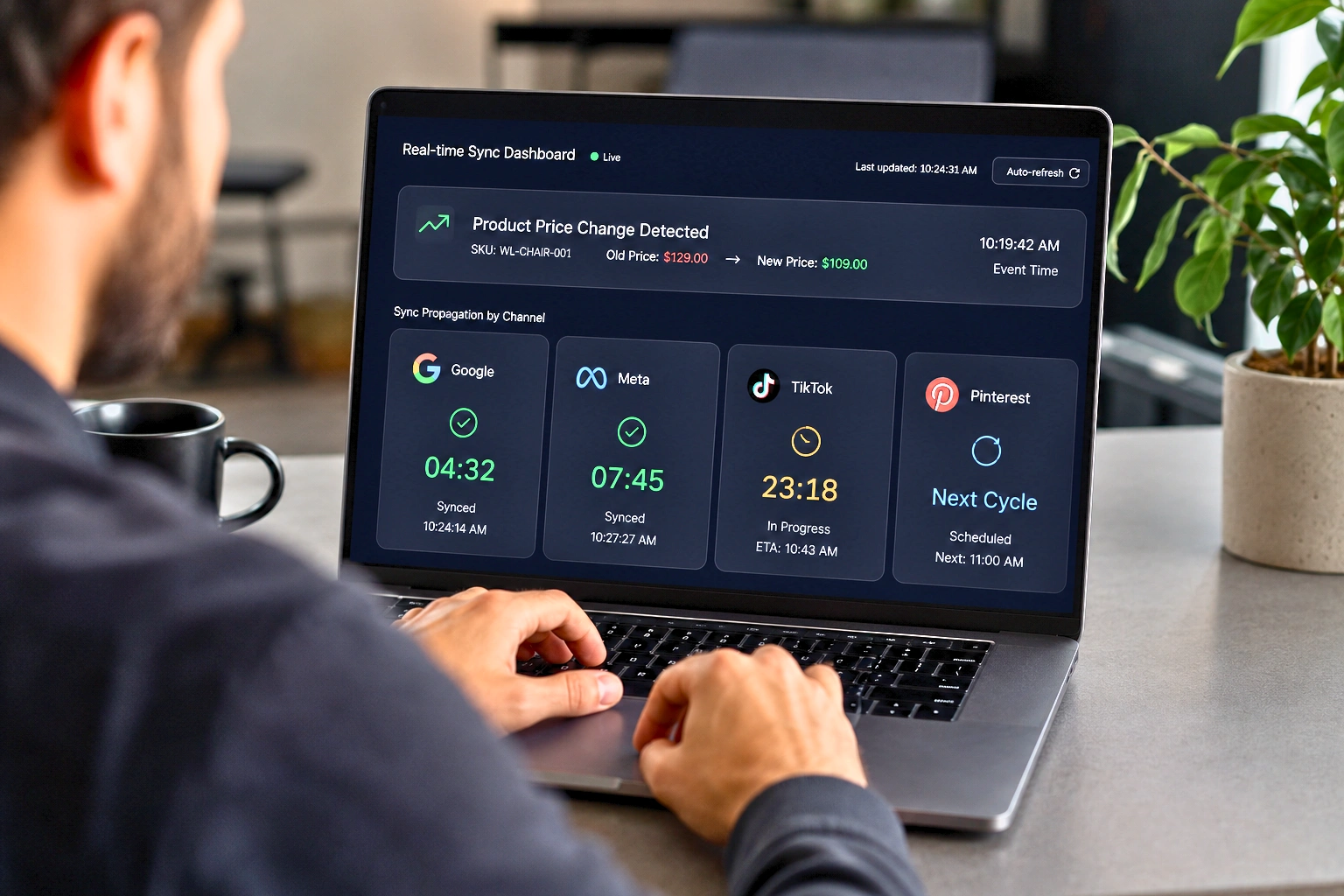
Track the success rate of calls, average latency (from trigger to receipt), call volume (polling), and rejection rate of notifications (webhooks). Include user-perceived synchronization delay and API provider costs. Correlating these metrics allows you to fine-tune polling frequency or strengthen the webhook infrastructure.
Layer 5: Automatic Fallback Mechanism
When a real-time webhook system fails, you need an automatic fallback to prevent extended staleness:
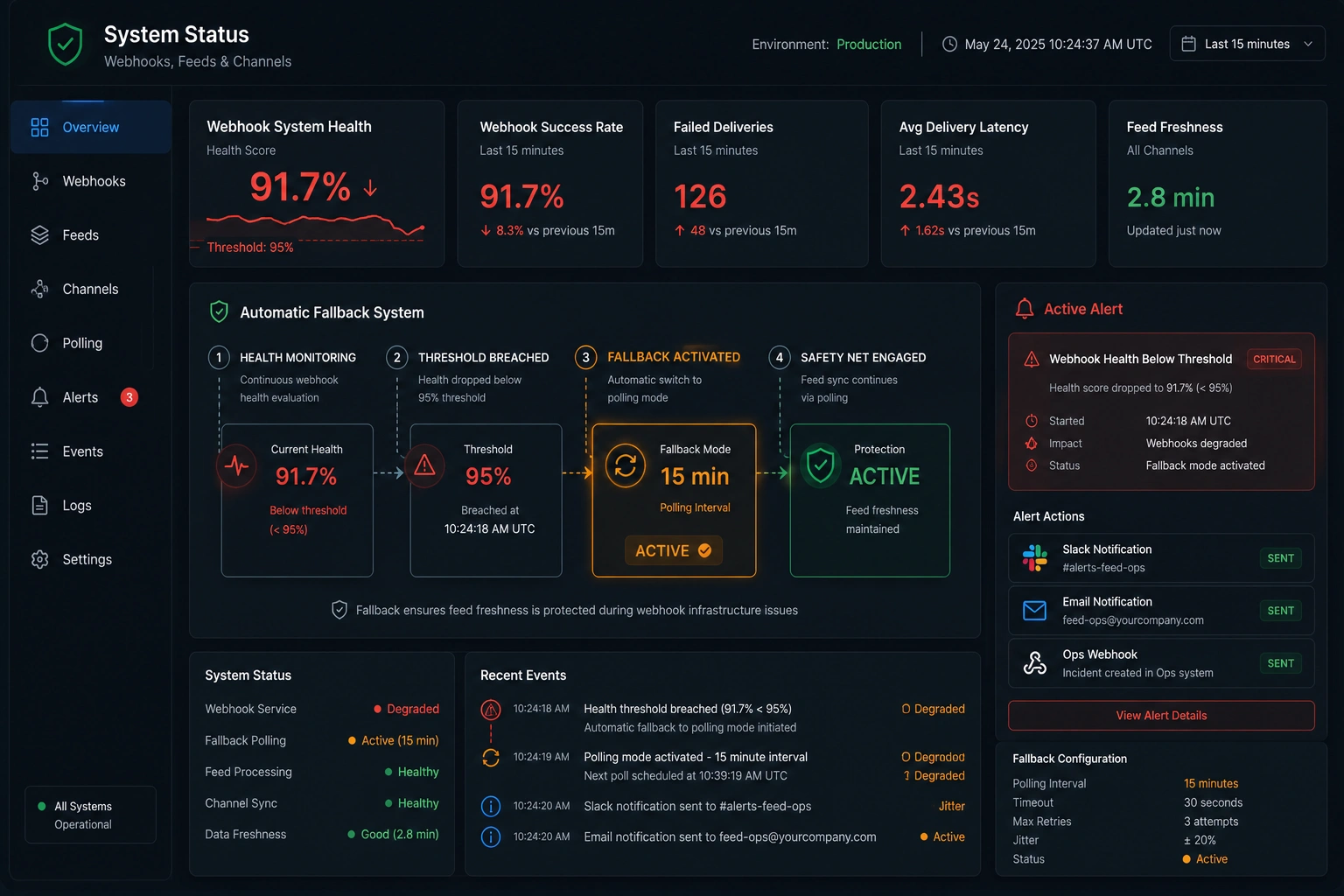
This fallback mechanism means your feed never goes stale for more than 15 minutes, even during a complete webhook infrastructure failure.
FeedOn.ai monitors your feed health in real-time, alerts on sync failures and price mismatches, and automatically recovers from sync errors
How Feed Freshness Determines Your Visibility in 2026's AI-Powered Shopping Surfaces
This is the most forward-looking section in this guide and the one your competitors haven't written yet.
Accenture, IBM/NRF, and Visa all published 2026 research warning brands they now sell to two audiences: human shoppers and the AI agents acting on their behalf.
Your product feed is no longer just a data export for ad platforms. It is the primary signal that AI discovery engines use to decide whether your products appear, how accurately they're represented, and how frequently they're recommended.
Google AI Mode: Feed Freshness as a Ranking Signal
Google AI Overviews and AI Mode operate by synthesizing product data from the Shopping Graph, a real-time database updated continuously from product feeds, structured data markup, and live website crawling.
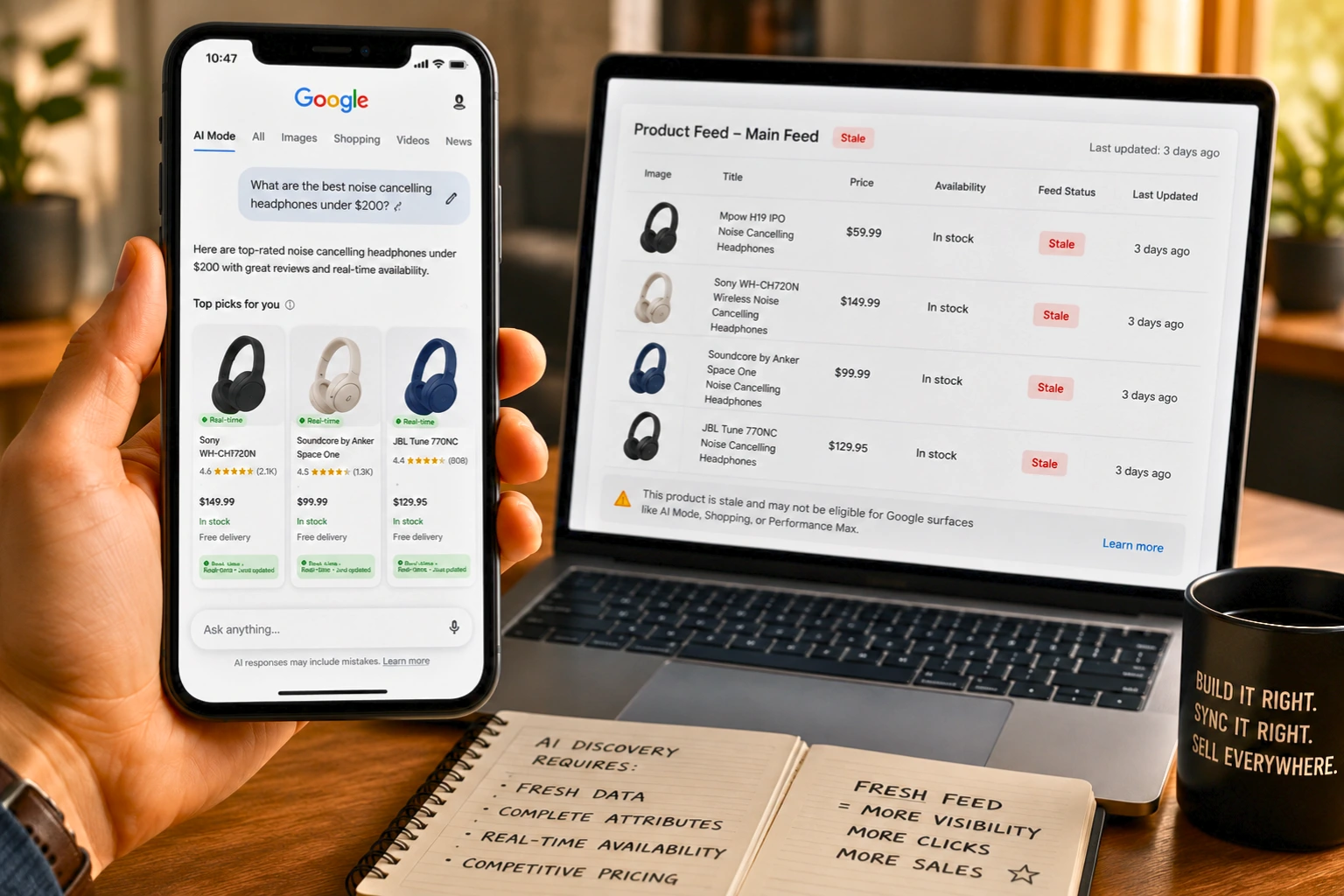
Amazon's AI shopping assistant Rufus grew monthly active users by 115% year-over-year before merging into Alexa for Shopping in May 2026, illustrating the velocity at which AI-assisted shopping is growing.
For your feed's role in AI Mode specifically, feed freshness creates two distinct advantages:
Advantage 1: Inclusion eligibility
AI Mode surfaces draw from the Shopping Graph, which weights recently updated feeds more heavily because stale data creates AI hallucination risk. A product with a feed last updated 14 hours ago — with a price that no longer matches the live site — creates exactly the kind of factual error that AI systems are trained to avoid. These products are progressively deprioritized in AI-generated product panels.
Advantage 2: Attribute completeness × freshness
AI shopping surfaces require more product attributes than traditional shopping surfaces to generate rich, conversational product descriptions and comparisons. A feed that is both complete (rich attributes: material, dimensions, use case, and compatibility) AND fresh (price and availability current within minutes) has a compounding advantage over a feed that is one but not the other.
Performance Max: How Stale Feeds Concentrate Budget on the Wrong Products
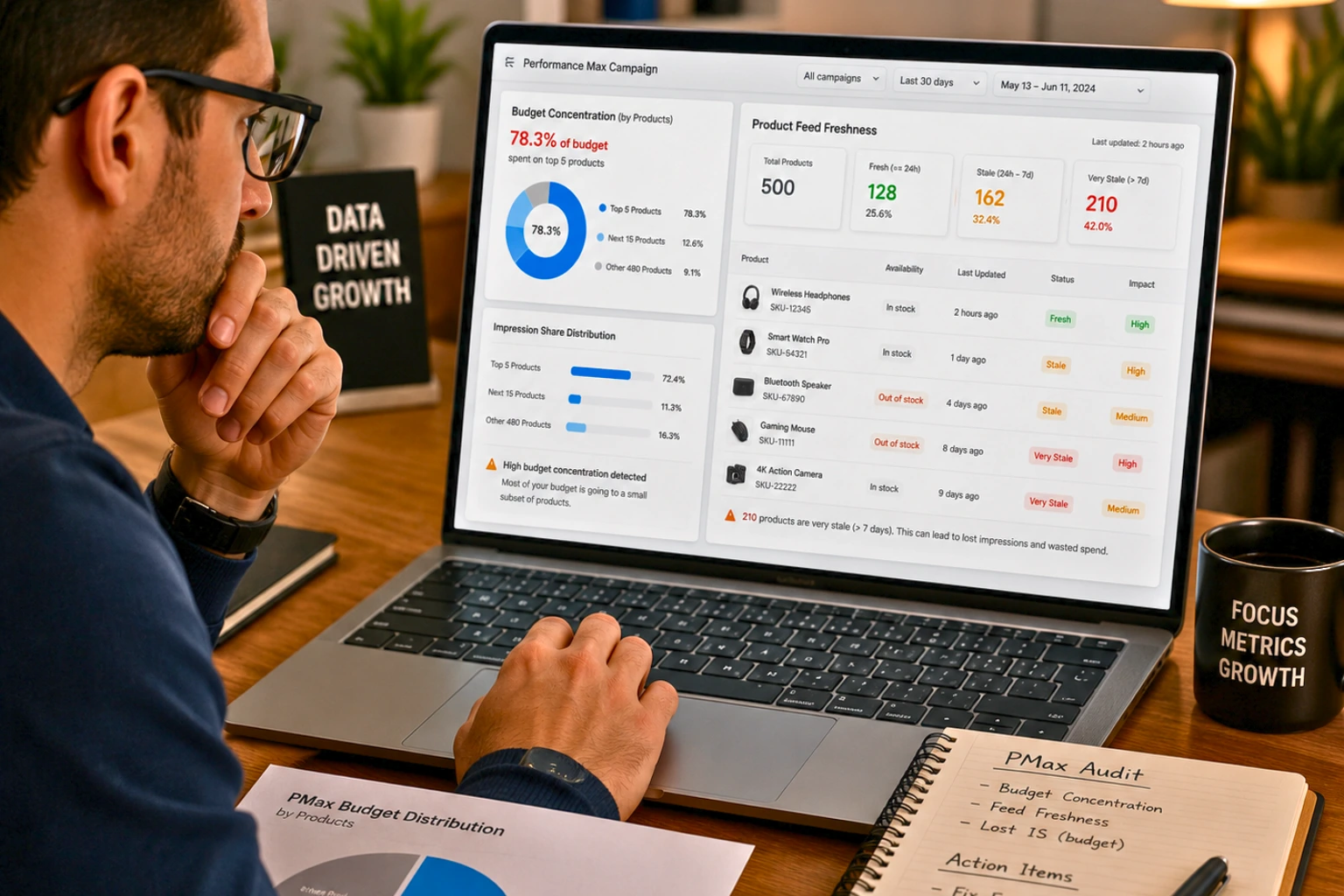
A weak feed equals weak Performance Max results. No amount of campaign structure fixes that. If Display or YouTube is eating too much of your budget, your shopping feed probably needs work. The algorithm is finding it easier to spend on awareness channels than on high-intent shopping placements.
The specific mechanism by which stale feed data warps Performance Max budget allocation:
Products with stale data accumulate negative signals: Out-of-stock products that are still visible generate high bounce rates. Performance Max's machine learning interprets these bounce signals as low-quality products and deprioritizes them in shopping auctions.
Budget concentrates on fewer, proven products: Best sellers hog the budget. Long-tail products starve. When stale data makes 20% of your catalog unreliable, PMax's algorithm effectively ignores those products and concentrates budget on the reliable 80%.
The improvement timeline: Allow campaigns to gather data for approximately two to three weeks. Once you've achieved steady performance with Smart Bidding, you can begin layering in targets to better control costs. This means the PMax recovery timeline after fixing feed freshness is measured in weeks, not days, making prevention far cheaper than recovery.
Feed-only PMax configurations amplify the signal: Feed-only configurations typically see 30–45% lower cost per sale compared to full-asset campaigns. But this benefit only materializes when the feed data is fresh and complete. Stale availability data in a feed-only PMax configuration means the algorithm has nothing to work with but bad signals.
The PMax Feed Freshness Optimization Framework:
Feed Freshness Level                      PMax Budget Allocation Pattern                  Expected Outcome
Daily updates, 15% stale at any time      Budget concentrates on 70% of catalog           Mediocre ROAS, large dead zones in catalog
6-hour updates, 5% stale at any time      Budget distributes across 90% of catalog        Good ROAS, better catalog coverage
Near-real-time (<15 min), <1% stale       Budget distributes across 95%+ of catalog       Best ROAS, full catalog utilisation
Mastering Performance Max in 2026 requires balancing AI efficiency with human strategy. PMax is no longer just about automation; it's now a matter of guiding that automation with high-quality data and creatives. Maintain clean data, keep your creativity fresh, and your audience signals accurate.
ChatGPT and Perplexity Shopping: The New AI Discovery Layer
Even when online stores embed generative AI tools on their websites, nearly 60% of US shoppers are turning to ChatGPT or Gemini for help.
ChatGPT's shopping features and Perplexity's product recommendations draw from structured product data sources. The critical insight: these AI systems surface products that have the highest data confidence scores, meaning accurate, complete, recently verified data. A product with a stale price ($79.99 in your feed, but $94.99 on your site) will not be recommended by an AI shopping agent, because recommending inaccurate pricing would create a negative user experience for the AI platform itself. AI-based product recommendation systems have been shown to increase revenue, conversion rates, and average order value, with some implementations reporting up to 3× revenue growth and 2× higher conversions. In 2025, 34% of US customers said they were comfortable with the concept of agentic e-commerce, letting AI shop for them.
The AI-optimized feed attributes for 2026:
Beyond price and availability freshness, AI discovery engines specifically use the following:
Rich descriptions (150+ words): AI agents extract answers to implicit purchase questions from your description. A thin description means your product can't answer "Is this machine washable?" or "Will this work for a wide foot?" and the AI won't recommend it for those queries.
product_highlight bullets: These map directly to AI-generated comparison features in shopping panels.
Semantic product_type taxonomy: AI systems use your product_type hierarchy to place your product in the correct context for discovery queries. Clothing > Activewear > Yoga Pants > Women's outperforms Activewear as a taxonomy value.
max_handling_time and min_handling_time: AI agents increasingly factor delivery time into recommendations, especially for time-sensitive purchases.
shipping cost accuracy: Stale shipping costs create the same mismatch problem as stale prices; the AI displays a price that doesn't match checkout.
FeedOn.ai generates AI-optimised product descriptions, enriches thin attribute data, and ensures field-level freshness for maximum visibility in AI discovery surfaces
Multi-Channel Real-Time Sync Orchestration — The Fan-Out Architecture
For merchants running on 5+ channels simultaneously, a single product change triggers 5+ API calls to 5+ different channel endpoints — each with different formats, different rate limits, different required fields, and different update cadences.
This is the orchestration problem. Here is the architecture that solves it.
The Fan-Out Architecture for Multi-Channel Sync
Channel-Specific Field Transformations at Sync Time
Different channels require different field formats from the same master data. Apply transformations in the channel-specific workers:
Field              Master Value                Google Output               Meta Output             TikTok Output
price              49.99 USD                   49.99 USD                   49.99 USD               49.99
availability       in_stock                    in stock                    in stock                available
title              Blue Ceramic Coffee Mug     Blue Ceramic Coffee Mug     Handcrafted             Perfect Morning Coffee Mug - Blue Ceramic
image              /images/mug-main.jpg        Full resolution 800×800     1:1 ratio preferred     Vertical lifestyle image preferred
This transformation logic lives in each channel's worker — the master event payload doesn't need to know about channel-specific requirements, keeping the fan-out architecture clean and extensible.
Handling Different API Rate Limits Across Channels
Since each channel has a different rate limit, your workers must consume from the queue at the appropriate rate:

For a product change that updates 500 SKUs simultaneously (e.g., a sitewide promotion), the fan-out architecture ensures:
Google gets all 500 updates within 1 minute
Meta gets all 500 updates within 167 minutes; this is why supplemental feeds beat direct API for large promotional sweeps
TikTok gets all 500 updates within 5 minutes
For Meta's slower rate limit, use supplemental feed uploads for large-volume changes rather than individual API calls. The supplemental feed approach bypasses the per-product rate limit and processes the full batch as a single catalog update.
Priority Sequencing for Revenue Protection
Not all channels deserve equal update priority. Build your queue priority based on channel ROAS data:
When you're constrained by API rate limits and have more updates queued than you can immediately process, priority sequencing ensures your highest-revenue exposure is always protected first.
FeedOn.ai publishes to 50+ channels simultaneously from a single master feed — managing rate limits, field transformations, and priority sequencing automatically
The Enterprise Real-Time Feed Stack — ERP → PIM → Feed Manager → Channel
For enterprise retailers, the feed sync problem is compounded by the number of systems that product data passes through before reaching a channel. Every hop adds latency. Here is the complete end-to-end architecture with latency benchmarks at each stage.
The Enterprise Data Flow Architecture
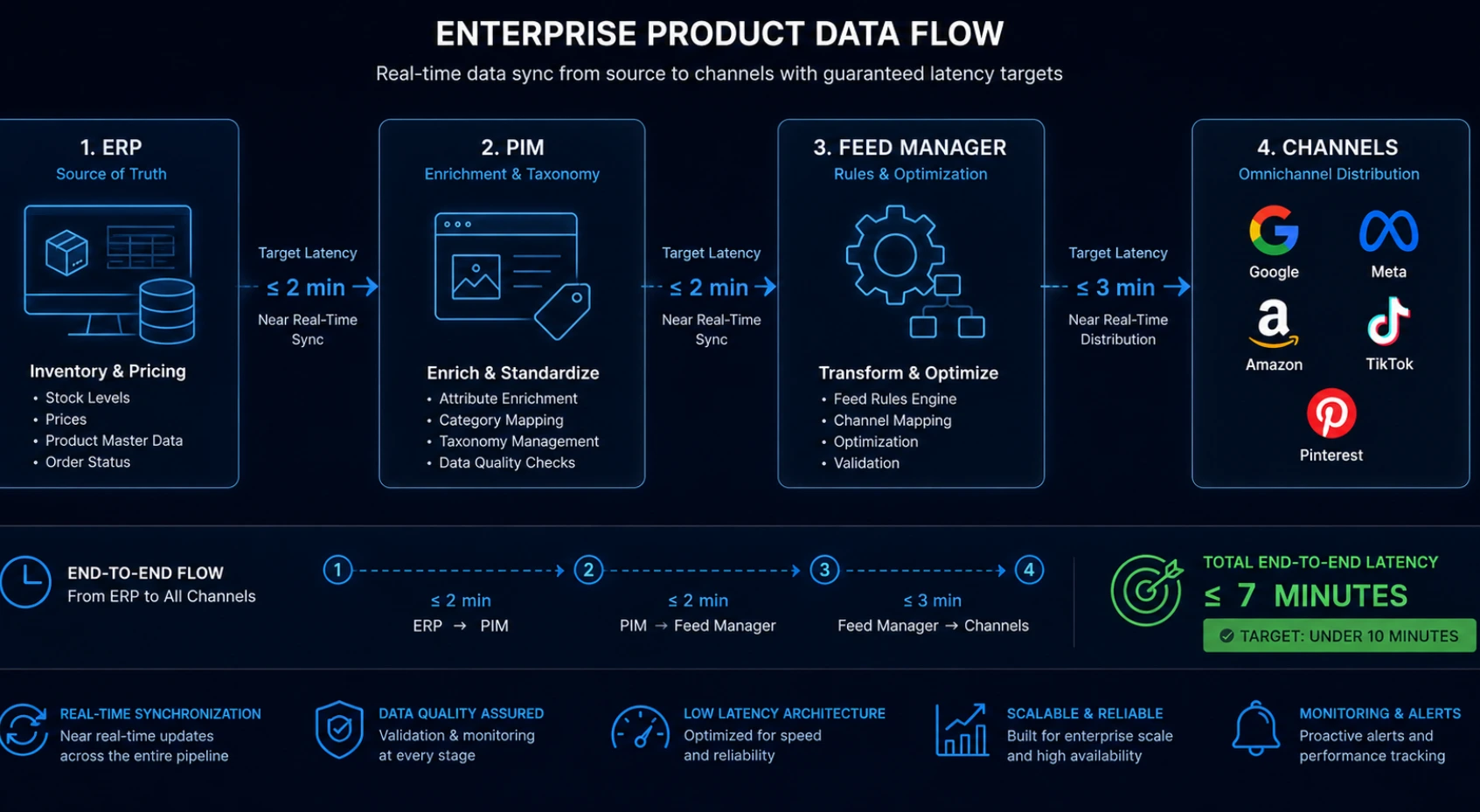
Latency Benchmarks at Each Hop
ERP/WMS → PIM (The Most Common Bottleneck)
Most enterprise ERP systems (SAP, NetSuite, and Oracle) sync to the PIM on a scheduled batch rather than an event-driven basis. Common configurations:
Batch sync every 30 minutes: Adds 0–30 minutes of latency at source
Near-real-time via API webhook from ERP: Adds <1 minute of latency
File-based nightly batch (legacy): Adds up to 24 hours of latency (unacceptable for feed freshness)
The fix: Configure ERP-to-PIM sync as event-driven where your ERP supports it. For legacy ERPs without webhook support, implement a database trigger on the inventory/pricing tables that pushes changes to a message queue immediately upon any field update.
PIM → Feed Manager
Modern PIM systems (Akeneo, Pimcore, and Contentserv) support webhook triggers when product data is enriched and approved:
Webhook-triggered: <1 minute
Scheduled export: 15–60 minute latency
Manual export: Potentially hours
The fix: Configure your PIM's publication workflow to trigger a webhook to your feed manager upon product approval or field update. Do not wait for a human to manually trigger an export.
Feed Manager → Channel
This is the hop where most feed management tools introduce latency:
Scheduled feed refresh (daily): Up to 24 hours
Scheduled feed refresh (hourly): Up to 60 minutes
feed managementWebhook-triggered sync: 1–5 minutes
Direct API push: <1 minute
The fix: Use webhook-triggered sync for Tier 1 fields (price, availability). For other fields, hourly scheduled refreshes are sufficient.
Channel Processing (Ingestion Lag)
After your data reaches the channel API, the channel's own processing adds additional latency:
Google Merchant Center API: Product updates typically processed within 1–4 hours
Google Shopping Graph: Updates reflected within 4–24 hours
Meta Catalog: Immediate via API; Shopping surfaces update within 1–2 hours
Amazon: 15 minutes to 4 hours depending on catalog size and update type
TikTok Shop: 30 minutes to 2 hours
The Bottleneck Identification Framework
To reduce end-to-end propagation time from minutes to seconds, identify your longest hop:
Instrument every hop with timestamps: Record when a price change occurs in ERP, when it arrives in PIM, when it arrives in the feed manager, when it's pushed to the channel API, and when it's reflected in the channel's live surface.
Calculate hop-level latency statistics for each hop: mean, p95, p99.
Focus optimization on the longest hop first: In most enterprise setups, the ERP→PIM hop is the worst offender — not the Feed→Channel hop.
Set SLA targets per hop:
ERP→PIM: <5 minutes (near-real-time API sync)
PIM→Feed: <2 minutes (webhook-triggered)
Feed→Channel API: <3 minutes (webhook-triggered)
Channel processing: Accept as given (not controllable)
Total controllable latency target: <10 minutes
72% of consumers expect inventory data to be live and accurate. It's not a bonus; it's the baseline now. An enterprise that can achieve <10-minute end-to-end feed latency is meeting this consumer expectation. An enterprise running 30-minute ERP batches and daily feed refreshes is failing it and paying for it in wasted ad spend and lost revenue.
FeedOn.ai integrates directly with Shopify, BigCommerce, WooCommerce, Magento, and custom data sources — handling the Feed Manager → Channel hop with near-real-time sync across 50+ channels
The Flash Sale & Dynamic Pricing Feed Playbook — Sub-15-Minute Update Architecture
Flash sales and time-limited promotions are where feed staleness has the most concentrated financial impact. Here is the complete operational playbook for achieving sub-15-minute feed updates during time-sensitive pricing events.
Pre-Sale Staging (24–48 Hours Before)
Step 1: Create a supplemental feed with sale pricing
For Google Merchant Center:
text
Supplemental feed fields needed:
- id (matching your primary feed IDs)
- sale_price (the promotional price)
- sale_price_effective_date (start/end with timezone)
For Meta:
text
Supplemental feed: Upload via Catalog Manager with same product IDs
Override: price_effective_date supported
Step 2: Set your sale_price_effective_date with future start time
text
Format: YYYY-MM-DDTHH:MM:SS+HH:MM/YYYY-MM-DDTHH:MM:SS+HH:MM
Example for Black Friday 2026 (midnight to midnight ET):
2026-11-27T00:00:00-05:00/2026-11-27T23:59:59-05:00
Submit this supplemental feed 24 hours before the sale starts. The channel processes it in advance, so the moment your sale start time hits, the promotional pricing is already cached and ready—no processing lag at the moment shoppers are most active.
Step 3: Stage your webhook trigger
Configure your e-commerce platform to fire a webhook when the sale price activates (either via a scheduled Shopify price list or WooCommerce scheduled sale). This webhook should:
Immediately update your master feed cache with the sale price
Push directly to channel APIs for any products where channel API push is configured
Confirm supplemental feed status with each channel
During the Flash Sale
Real-time monitoring protocol:
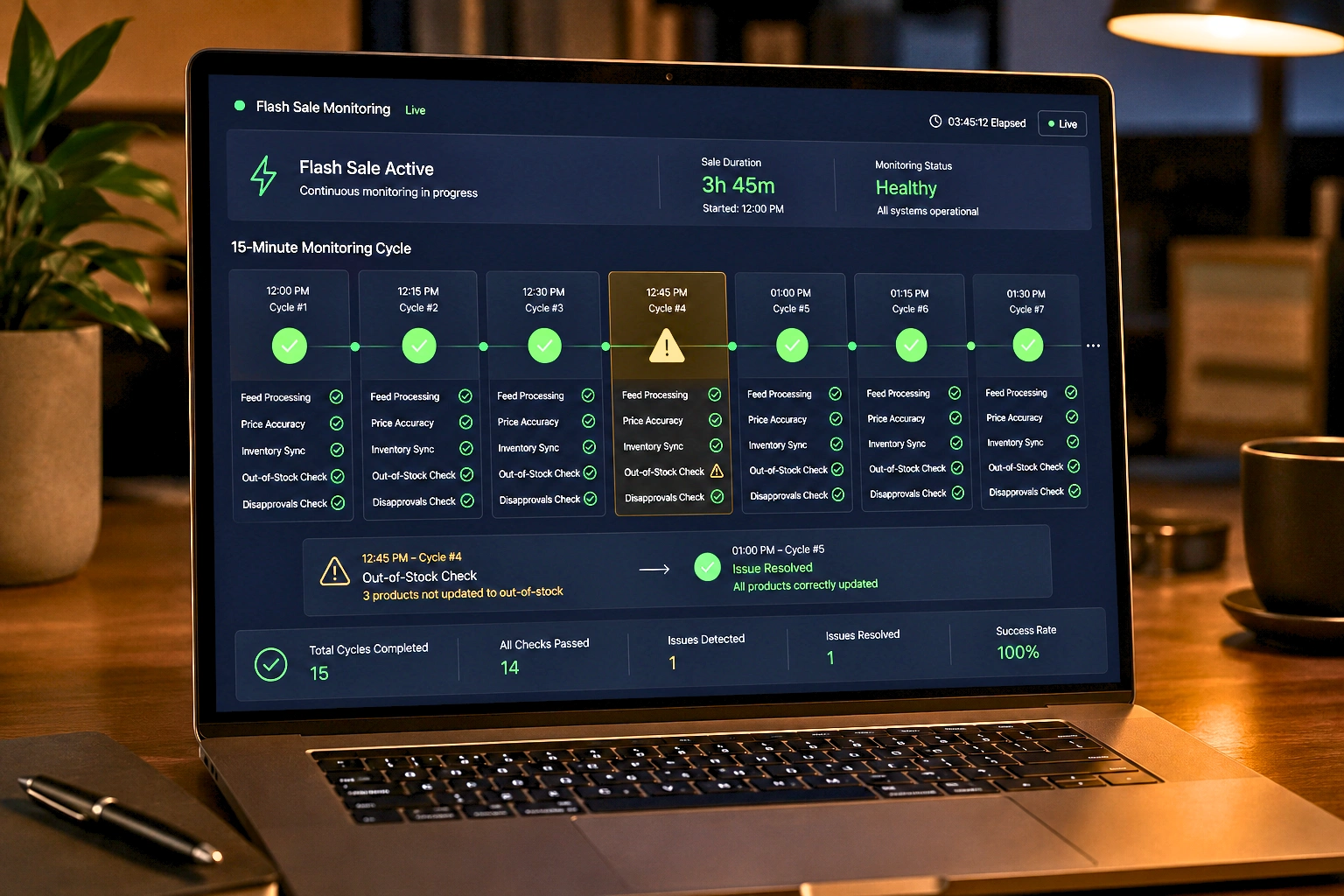
The most critical risk during a flash sale is inventory velocity. Products selling out faster than your feed sync frequency creates out-of-stock ads within minutes. For high-velocity sales events:
Temporarily increase your availability sync frequency to every 5 minutes
Set up a low-inventory alert (e.g., <10 units remaining triggers webhook priority escalation)
Pre-stage exclusion rules that auto-exclude products when inventory drops to 0
Post-Sale Automatic Revert
The sale end is equally important. A sale that has ended but still shows in your feed creates price mismatch disapprovals immediately. Customers see the sale price, click, and find the regular price.
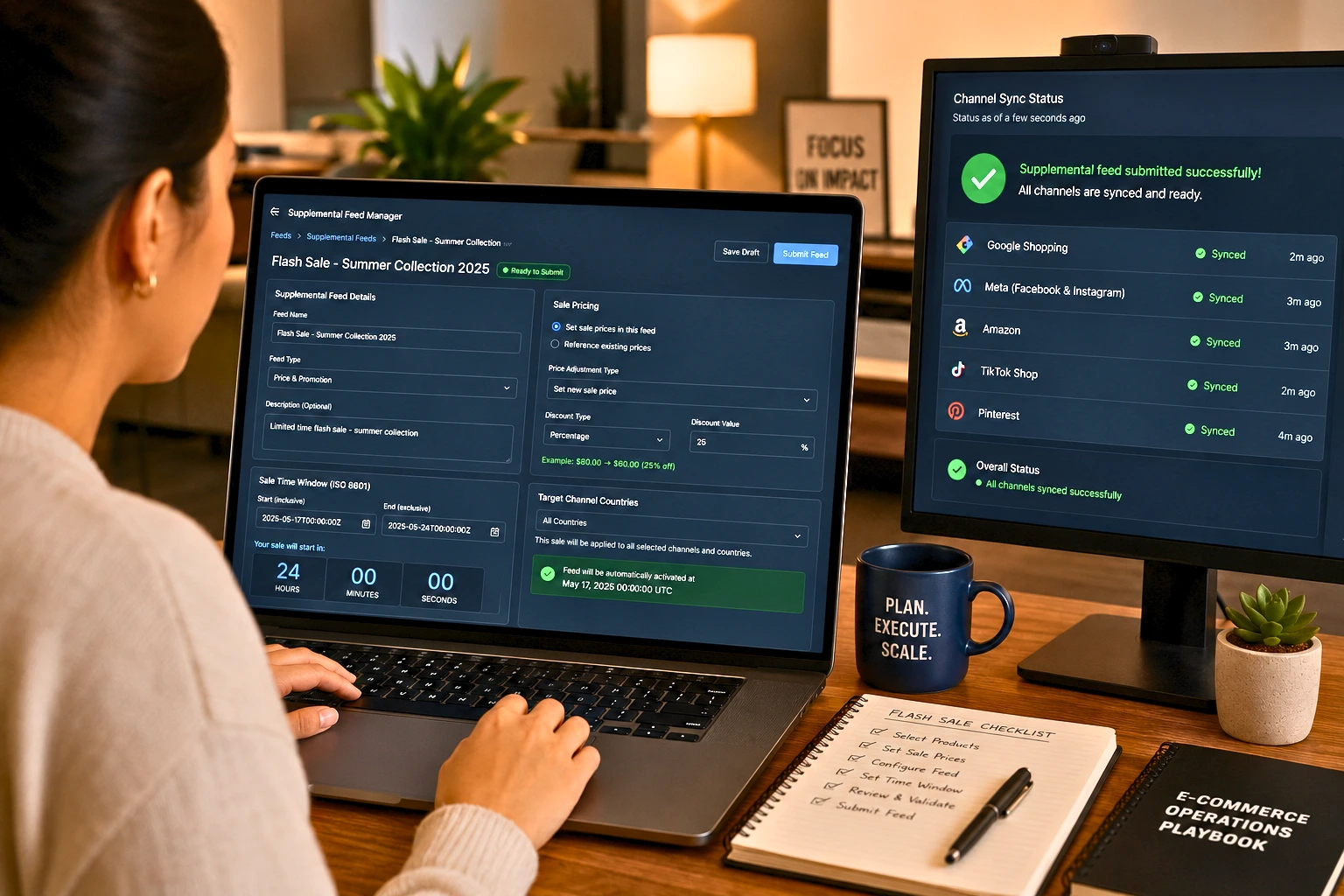
The revert protocol:
sale_price_effective_date expiry handles this automatically if set correctly
Verify expiry by checking your feed 30 minutes after sale end
If sale_price fields are still present despite the expiry, manually trigger a feed re-fetch
Monitor GMC for any new disapprovals for 2 hours post-sale
The pre-staged supplemental feed advantage: Because you used a supplemental feed (not edits to your primary feed), reverting is simple: deactivate or delete the supplemental feed. Your primary feed's regular pricing is immediately restored.
FeedOn.ai's promotional feed management automates pre-sale staging, real-time sale price updates, and automatic post-sale revert — across all channels simultaneously
Feed Performance Benchmarks — The Numbers You Should Be Targeting
No ranking article provides actionable benchmarks. Here is the complete performance benchmark set for real-time feed sync operations:
Feed Health Benchmarks
Metric                             Industry Standard     Best-in-Class     Alert Threshold
Feed approval rate                 85–90%                ≥97%              <85% → emergency audit
Feed ingestion success rate        95%                   100%              Any failure
Active products vs. submitted      88%                   ≥97%              <90% → investigate
Price accuracy                     95%                   100%              Any mismatch on top 100 SKUs
Availability accuracy              92%                   100%              Any OOS showing in-stock
End-to-end sync latency            60–240 min            <15 min           >60 min → check architecture
Webhook delivery success rate      97%                   ≥99.5%            <95% → check endpoint health
Dead letter queue depth            <100 events           0                 >50 → investigate immediately
Campaign Performance Impact of Feed Update Frequency
Based on industry data from merchants who transitioned from daily to near-real-time feed updates:
In competitive verticals, a 5% drop in catalog coverage or freshness can mean tens of thousands in missed revenue.
Update Cadence        ROAS Impact vs. Daily Baseline      Real-time monitoring protocol      Disapproval Rate
Daily (baseline)      1.0x                                0%                                 12%
Every 6 hours         +8–15% ROAS                         40% waste recovered               8%
Every 60 minutes      +20–35% ROAS                        75% waste recovered               4%
Near-real-time        +30–50% ROAS                        90% waste recovered               2%
Product data quality directly impacts advertising effectiveness and revenue generation. Channel advertising represents nearly 15% of digital spend, making feed optimization critical for competitive positioning. Even small improvements in feed quality translate to significant revenue impact.
The 30-Minute Weekly Feed Health Protocol
Invest 30 minutes every Monday morning in this review:
Minutes 0–8: Ingestion health
Check all channel ingestion statuses: any failures last week?
Review GMC Diagnostics: Are there new disapproval types since last week?
Check webhook delivery rate: stayed above 99%?
Minutes 8–15: Accuracy audit
Spot-check 20 SKUs: Does the price in the feed match the live site?
Check availability: any out-of-stock products still showing in stock?
Compare product count: store catalog size vs. active products in each channel
Minutes 15–22: Performance indicators
Google Shopping impression share: stable or growing?
Campaign ROAS: any sudden drops that could indicate feed quality issues?
Disapproval trend: is the count stable, growing, or declining?
Minutes 22–30: Queue and monitoring health
Dead letter queue depth: zero unprocessed failed events?
Sync lag dashboard: all channels within SLA?
Upcoming promotional events: any feeds to pre-stage this week?
FeedOn.ai's automated feed health monitoring runs this 30-minute check continuously—alerting you only when action is needed
Ready to Stop Losing Revenue to Stale Feed Data?
Real-time product availability across all sales channels and accurate feed syncing will be a necessity, not a luxury. Out-of-stocks cost retailers globally up to $1 trillion every year.
Your feed is either making you money or costing you money every hour it runs stale. FeedOn.ai delivers webhook-triggered real-time sync for price and availability, 50+ channel distribution with priority sequencing, automated monitoring and alerts, and AI-enriched catalog data that performs in both traditional shopping and AI-powered discovery surfaces.
Start your free FeedOn.ai plan 200 products and 3,000 AI credits. No credit card required. Your feed is fresh, accurate, and performing from day one.