
The Complete Feed Automation Guide Nobody Wrote (Until Now): Dirty Data, Real Costs, Migration, AI Discovery & Everything Else
The financial cost of a disapproved feed. The "Dirty Data First" framework. Step-by-step no-code setup for a real 500+ SKU store. Handling messy GTINs and duplicate SKUs. Which automation rules should I build first? Flash sale feed overrides. Live migration from spreadsheets without killing campaigns. Edge-case product types. Weekly KPI monitoring. The honest no-code ceiling. And how your feed structure determines visibility in Google AI Mode and TikTok Shop's discovery engine.
Before We Begin: The Brutal Truth About Feed Automation Content
Search for "product feed management" or "feed automation tools" and you'll land on the same five types of pages:
A brand overview that explains what a feed is
A tool roundup that lists features nobody ranked
A how-to that assumes you start with clean data
An AI-focused piece that mistakes feed-writing for feed-strategy
A comparison that compares pricing tiers, not outcomes
Every one of them skips the questions that actually keep e-commerce teams up at night. This guide answers all ten of them with data, decision frameworks, and internal FeedOn.ai resources linked throughout.
Let's go.
What's the Real Cost of a Disapproved Feed?
Every feed management article warns about disapprovals. None of them quantify what those disapprovals actually cost per day. Let's fix that right now.

Unresolved Google Merchant Center errors and disapprovals can result in thousands of dollars of lost revenue per day. That's the headline. Here's the math behind it.
The Revenue-Loss Formula for a Disapproved Feed
Take a store running Google Shopping on 1,000 SKUs with an average CPC of $0.80 and a conversion rate of 2.5% at an average order value of $85.
If 15% of products are disapproved:
150 SKUs invisible
~150 × daily impressions lost × CTR × CVR × AOV
At modest scale: $180–$640 in lost revenue per day from disapprovals alone
Now multiply that by the average time to detection. For a company that lists and sells hundreds or thousands of items, it is a daunting amount of work to monitor product listing errors and warnings on those channels on a daily basis. Most merchants discover disapprovals 3–10 days after they happen. At $400/day average loss, that's $1,200–$4,000 in recoverable revenue gone for every incident.
Bad product data costs nearly a quarter of revenue. Mid-market companies lose 23% of potential revenue to poor product data, with inaccurate information causing up to a 23% loss in clicks and a 14% drop in conversions. McKinsey research cited by GoDataFeed reveals that data errors cause click loss up to 23%. When product titles, descriptions, or attributes contain inaccuracies, shoppers scroll past listings entirely.
The Real Disapproval Triggers (And Their Revenue Impact Rank)
Not all disapprovals are equal. Here's how to prioritize by revenue impact:
Disapproval Type          Revenue Impact    Time to Fix                     Priority
Price mismatch            Critical          Minutes with real-time sync     Fix first
Availability mismatch     Critical          Minutes with real-time sync     Fix first
Missing GTIN              High              Hours                           Fix second
Wrong category            High              Hours                           Fix second
Broken image URL          Medium-High       Minutes                         Fix third
Missing colour/size       Medium            Hours                           Fix third
Weak title                Low-Medium        Day                             Optimise last
Not all disapprovals are equal. Here's how to prioritize by revenue impact: Leaving the field blank on a product without a GTIN often triggers a disapproval or a data quality warning that suppresses the product's impression share without a clear diagnostic reason. Aim for 90% or higher GTIN coverage across your catalog. A product without a GTIN competes at a structural disadvantage against an identical product from a competitor that has one, regardless of title quality or bid level.
The answer to the financial question nobody asks: A disapproved feed on a 1,000-SKU store running at modest ad spend will cost you between $500 and $5,000 per week depending on your category, AOV, and how long disapprovals go undetected.
See how FeedOn.ai's feed audit tool detects every disapproval trigger in your catalog automatically before Google does.
How Long Does No-Code Setup Actually Take for a 500+ SKU Store?
Other guides say "set up in minutes" or "live in 24 hours." Nobody ever walks through what those claims mean for a real store with 500+ products and real-world catalog messiness.

Here is the honest, hour-by-hour timeline for a 500-SKU Shopify store connecting to FeedOn.ai and going live on Google Shopping, Meta, and TikTok:
Phase 1: Connect & Audit (0–45 minutes)
Connect your store: Link your Shopify store or paste your feed URL. 1. Connect your Shopify store or paste a feed URL. FeedOn scans your catalog for missing GTINs, broken images, wrong categories, and every issue that causes Merchant Center disapprovals.
Read the audit report: Your feed health score appears instantly. Review the error breakdown by type: missing GTINs, price mismatches, broken image URLs, wrong categories, and missing color/size attributes.
Triage your errors: Sort by revenue impact (see the table above). Flag your top-20% revenue SKUs first. These deserve your immediate attention.
Phase 2: AI Enrichment Pass (45 minutes – 3 hours, depending on catalog)
This is the step nobody covers. Before you "set up automation rules," you need to close data gaps.
Other feed tools map your fields. FeedOn generates what's missing.
For a 500-SKU catalog with typical Shopify data quality (missing GTINs on ~30% of products, no color/size attributes on apparel, and generic titles across 60% of SKUs):
AI title rewrite: 500 titles rewritten and channel-optimized in approximately 8–12 minutes with bulk processing
Missing attribute extraction: AI vision technology analyzes product images to extract attributes such as color, size, material, and gender, filling data gaps that lead to disapprovals. Add 15–30 minutes for AI to scan your images
Category mapping: Feed management software auto-maps to Google's product taxonomy. Manual review of edge cases adds 20 minutes.
GTIN resolution: For products without GTINs, set identifier_exists = false where they are genuinely unbranded. Do not leave it blank. This step alone prevents hundreds of disapprovals.
Phase 3: Channel Configuration (1–2 hours)
The single most expensive assumption in e-commerce feeds is that one well-built master feed serves every channel equally. It does not. Google rewards structured-attribute completeness decisively, Meta moderately, and TikTok barely, and a feed tuned for one channel quietly bleeds performance on the rest.
Configure channel-specific outputs:
Google Shopping: Title first 70 characters front-loaded with brand + product type + key attribute. GTINs required for branded goods.
Meta Catalog: Lifestyle images perform better than white backgrounds. Create Facebook and Instagram-optimized catalogs with compelling copy and better imagery.
TikTok Shop: Format product data for TikTok Shop with engaging, youth-friendly titles and optimized listings. Note: TikTok uses sku_id as its identifier, not id.
Phase 4: Test Submission & Monitoring Setup (30 minutes)
Submit to Google Merchant Center. Set up feed health alerts. Configure sync frequency:
Update pricing and availability at minimum daily. For catalogs with fast-moving inventory or frequent price changes, sync every six hours. Stale data causes disapprovals, trains Google to distrust your feed, and removes you from time-sensitive AI Mode recommendations.
Realistic total for 500 SKUs from zero to live: 4–8 hours across 2 days. Anyone claiming "minutes" is talking about the connection step, not the catalog-quality work that actually drives results.
Start your free 7-day FeedOn.ai trial with 200 products and 3,000 AI credits — no credit card required.
What Happens When Your Source Data Is Messy?
This is the most important section in this entire guide. Every other resource assumes you have clean data. In the real world, most Shopify catalogs are a mess before they ever touch a feed tool.
The "Dirty Data First" Framework
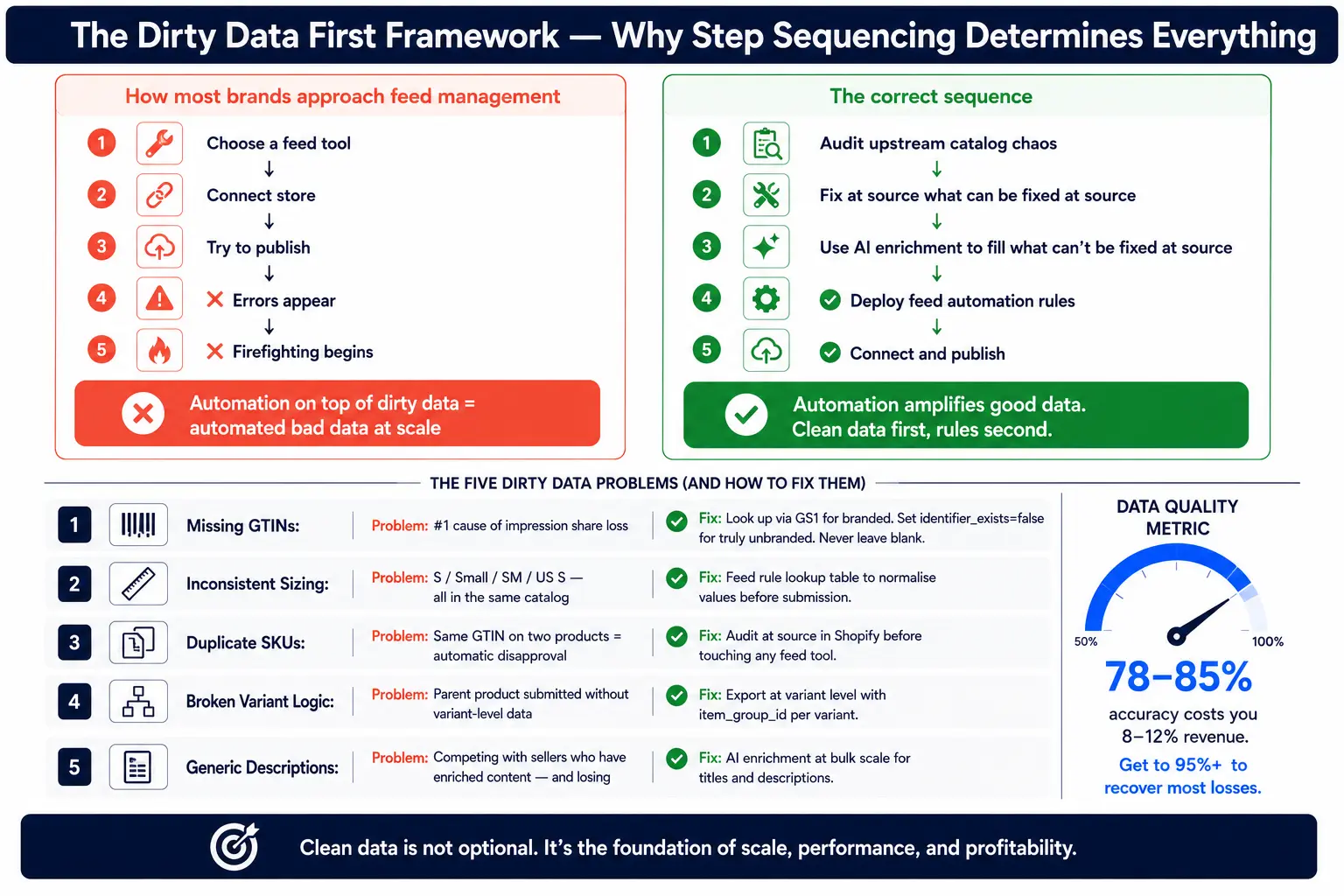
Most brands approach feed management like this: Step 1: Choose a feed tool Step 2: Connect store. Step 3: Try to publish
The right approach: Step 1 → Audit your upstream catalog chaos Step 2 → Fix at the source what can be fixed at the source Step 3 → Use AI enrichment to fill what can't be fixed at source Step 4 → Deploy feed automation rules Step 5 → Connect and publish
Feed automation is Step 4, not Step 1. Position it that way, and everything downstream works better.
The Five Most Common Dirty Data Problems (And How to Handle Each)
Problem 1: Missing GTINs
GTINs (Global Trade Item Numbers — barcodes) are required for all branded products on Google. Missing GTINs are the #1 cause of impression share loss.
Triage approach:
Products with real GTINs, but you don't have them → Look them up via the GS1 registry or manufacturer spec sheets. Priority: your top-selling SKUs first.
Products you manufactured yourself with no barcode → Set identifier_exists = false explicitly. Do not leave the field blank.
Bundles with no GTIN → Set identifier_exists = false.
GTIN completion is one of the few feed optimizations with a direct, documented impression share impact that you can measure in Merchant Center within days of making the change.
Problem 2: Inconsistent Sizing Charts
Apparel stores frequently have size values across multiple formats in the same catalog: "S", "Small", "SM", "US S". Google requires standardized values.
Fix approach: Use feed rules to normalize size values before submission. Create a lookup table: IF size = "SM" OR size = "small" → output "S". This is one of the few scenarios where a rule-based approach beats AI — because your internal naming conventions are idiosyncratic, not random.
Problem 3: Duplicate SKUs
Duplicate SKUs cause chaos in variant mapping, GTIN association, and campaign segmentation.
Fix approach: Audit at the source in Shopify before touching any feed tool. Duplicate SKUs in your product catalog mean Google may receive the same GTIN on two different products, which triggers an automatic disapproval. Fix at source or feed rule, populate item_group_id, and give each variant its own unique GTIN.
Problem 4: Broken Variant Logic
Products with color/size variants are frequently submitted as a single parent product without variant-level data. Google needs each variant as its own row with its own item_group_id.
Fix approach: Ensure your Shopify feed exports at the variant level, not the product level. Most feed management tools handle this automatically, but verify it in your feed preview.
Problem 5: Inconsistent or Generic Descriptions
Titles are generic. Descriptions are either copied from manufacturer specs or barely exist. Images are functional but not optimized. Submitting this raw data to your channels means competing with sellers who've invested in enriched content and losing.
Fix approach: Use AI enrichment to rewrite titles and descriptions in bulk scale. 1A I rewrite your titles and descriptions per channel, structured for the keywords each platform prioritizes.
The data quality metric to track:
You'll probably find you're at 78-85% accuracy. That's not unusual, but it's costing you 8-12% of revenue. Get that number above 95% and you'll claw back most of your losses.
Learn how FeedOn.ai's AI audit identifies dirty data errors across your entire catalog before submission.
Which Automation Rules Should You Set Up First?
"Rule-based automation" is listed as a feature on every feed tool roundup. Nobody ever tells you which 3–5 rules to create first, or why the sequencing matters for ROAS.
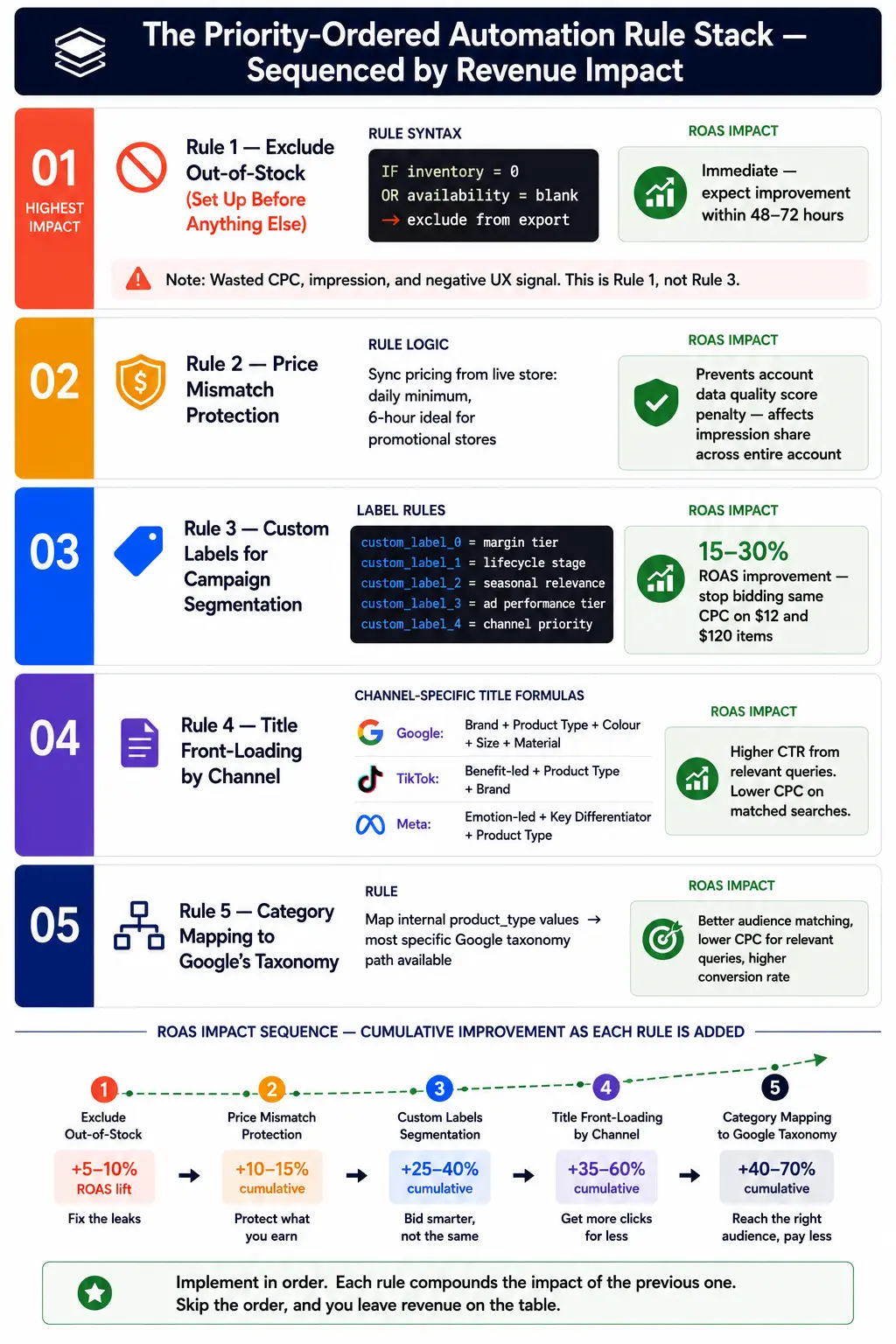
Here is the priority-ordered rule stack, built around revenue impact:
Rule 1: Exclude Out-of-Stock Products (Set Up Before Anything Else)
If it's not sellable, it shouldn't be visible. Start with this rule: IF inventory = 0 OR availability = blank → exclude from export. Whether it's Shopping or Meta DPAs, showing out-of-stock products just burns budget.
This is Rule 1 because showing an out-of-stock product costs you the CPC, the impression, and — if someone clicks and can't buy — a negative user experience signal that trains Google to distrust your account.
ROAS impact: Immediate. Expect your campaign ROAS to improve within 48–72 hours of implementing this rule as wasted spend drops.
Rule 2: Price Mismatch Protection
A feed that says a product costs $99 when your website shows $119 flags as unreliable. A feed that shows a product as in stock when it sold out triggers a negative user experience signal that affects your account's overall data quality score.
Set your feed to sync pricing from your live Shopify store at a minimum of daily, ideally every 6 hours. For stores with frequent promotions, use supplemental feeds to push price overrides immediately without waiting for a full feed re-index.
ROAS impact: Prevents disapprovals. Maintains account data quality score. Avoids Google's trust penalty, which suppresses impression share across your entire account — not just the products with errors.
Rule 3: Custom Labels for Campaign Segmentation
IF price > $100 → custom_label_0 = high-ticket. IF product_type contains "clearance" → custom_label_1 = promo. This helps you group SKUs by margin, lifecycle, or promo eligibility — and then structure campaigns or bidding rules around them.
Build at least five custom label rules before launching campaigns:
custom_label_0 = margin tier (high-margin / mid-margin / low-margin)
custom_label_1 = lifecycle stage (new / bestseller / clearance)
custom_label_2 = seasonal relevance (evergreen / seasonal / promotional)
custom_label_3 = ad performance tier (after 30 days — top performer / average / poor)
custom_label_4 = channel priority (multi-channel / Google-only / exclude)
ROAS impact: Enables intelligent bidding. You stop bidding the same CPC on a $12 low-margin item and a $120 high-margin item. This single rule set regularly produces 15–30% ROAS improvements at the campaign level.
Rule 4: Title Front-Loading by Channel
Title front-loading logic inverts between Google and Amazon. Google may show only the first 25 to 64 characters; Amazon weights the first 80 for mobile.
For Google Shopping: Brand + Product Type + Colour + Size + Material For TikTok: Benefit-led headline + Product Type + Brand For Meta: Emotion-led + Product Type + Key Differentiator
Create channel-specific title transformation rules that pull from your master title and restructure for each output. This is where a single-source-of-truth feed with channel-specific outputs becomes invaluable. The answer is not four hand-maintained feeds; it is one source of truth with channel-specific output transformations.
Rule 5: Category Mapping to Google's Taxonomy
Generic or missing Google Product Category values result in your products appearing in the wrong Shopping subcategory, targeting the wrong audience, and losing the auction to competitors who are properly categorized. Build a rule that maps your internal product_type values to the most specific Google product taxonomy path available.
ROAS impact: Better audience matching, lower CPC for relevant queries, higher conversion rate.
Explore FeedOn.ai's rule-based automation and AI enrichment features
How Do You Handle Feed Automation During a Flash Sale or Black Friday?
Static feed setup guides are everywhere. Nobody explains the dynamic, time-sensitive override scenario.
Here is the exact operational playbook for running a flash sale, Black Friday promotion, or clearance event without breaking your live feed.

The 72-Hour Pre-Sale Checklist
72 hours before:
Create a supplemental feed with promotional pricing. Do not modify your primary feed use the supplemental feed to override price and sale_price fields. This allows you to revert instantly by deleting the supplemental feed at sale end.
Set sale_price_effective_date with the exact start and end timestamps in ISO 8601 format (e.g., 2026-11-28T00:00:00-05:00/2026-11-28T23:59:59-05:00)
Add promotion_id values for any Google Merchant Promotions you're running (showing the "SALE" badge in Shopping results)
Update custom_label_2 to "black-friday" for all promotional SKUs so you can segment these in campaigns
24 hours before:
Submit your supplemental feed to Merchant Center. Allow 12–24 hours for processing.
Verify that promotional pricing is live in your feed preview check at least 20 SKUs manually
Update product copy for Black Friday, holidays, or seasonal campaigns across all channels.
During the sale:
Monitor your feed error dashboard every 4 hours — flash sales generate inventory velocity that causes stock sync lag. Out-of-stock products that remain live in your feed will trigger availability mismatches.
Set up automated alerts for any new disapprovals (your feed management tool should support this)
If a product sells out during the sale: ensure availability syncs to "out of stock" immediately. One of the most damaging things is leaving out-of-stock products in your feed with in_stock status. Google will disapprove of them, and it trains their algorithm to trust your feed less. Ensure your feed syncs availability in real time or, at minimum, daily.
After the sale:
Delete or deactivate the supplemental feed; do not edit your primary feed's prices
Use a separate supplemental feed for clearance pricing on unsold stock
Update custom_label_1 to "clearance" for leftover inventory and adjust bids down in your campaign
Having an account suspended over Black Friday weekend could be catastrophic for your company. The supplemental feed approach keeps your primary feed clean and makes rollback a 30-second action.
See how FeedOn.ai handles seasonal promotional feed updates
The Live Migration Playbook-Switching from Spreadsheets Without Killing Campaigns
Nobody writes about this. Every feed management guide assumes you're starting fresh. You're not. You have existing campaigns, live bids, current disapprovals, and customer traffic depending on continuity.

Here is the step-by-step migration path from manual spreadsheet feeds to automated feed management — without a single hour of campaign downtime.
Stage 1: Run Both Feeds in Parallel (Days 1–5)
Do not cancel your old feed. Upload your new automated feed as a second supplemental data source in Google Merchant Center. Allow both feeds to coexist.
In Merchant Center, this means:
Your old spreadsheet feed remains the primary data source
Your new automated feed is submitted as an additional feed
Google reconciles attributes from both feeds (new feed values override old feed values where they conflict)
This parallel-running approach lets you:
Verify that your new feed doesn't introduce new errors
Compare product approval rates between the old and new feed
Check that your campaigns haven't changed product eligibility for any high-value SKUs
Stage 2: Validate Feed Quality Before Switching (Days 3–7)
In Merchant Center Diagnostics, compare:
Total products in old feed vs new feed (should be equal or higher)
Disapprovals in old feed vs new feed (new feed should have fewer)
Missing attribute warnings (new feed should have fewer)
Only proceed to Stage 3 if your new feed has equal or fewer disapprovals than your old feed.
Stage 3: Flip the Primary Source (Day 7–8)
Once validated, set the new automated feed as your primary data source. Remove the old spreadsheet feed.
Watch your campaign metrics for 48 hours:
Impression volume (should stay the same or increase)
Approved product count (should stay the same or increase)
CTR (may improve if titles are better optimised)
Disapproval rate (should drop)
Stage 4: Campaign Safeguards
Before you flip the primary source, set campaign-level ROAS targets 10–15% lower than your current targets. This gives Google's bidding algorithm room to adapt to the new feed data without aggressively cutting impressions during recalibration. Reset to target ROAS after 72 hours.
The rollback protocol: If your new feed introduces unexpected disapprovals or campaign performance drops >20% in 48 hours, simply re-promote your old spreadsheet feed as primary. You've lost nothing. The parallel-running stage is your insurance policy.
Product feeds are not a setup task you complete once. They are a continuous operational discipline. The dropshippers who build durable businesses treat their feed infrastructure the same way a logistics company treats its fleet: scheduled maintenance, performance monitoring, supplier relationship management, and a clear recovery plan when something breaks.
See FeedOn.ai's Shopify integration and real-time sync capabilities
Feed Automation for Edge-Case Product Types
Every feed tutorial uses a standard t-shirt or a pair of headphones as its example. What about the product types that actually cause headaches?

Bundles
Bundles have no manufacturer GTIN. Google requires you to set identifier_exists = false for true bundles where no single GTIN covers the bundle combination. If your bundle contains one product that has a GTIN, do not use that product's GTIN for the bundle; it will create a duplicate GTIN conflict.
Feed rule: IF product_type contains "bundle" → identifier_exists = false, is_bundle = yes
For Title: List the primary product first, then "Bundle" or "Set" in the title. Google Shopping uses this to distinguish bundle listings from individual product listings.
Custom/Made-to-Order Items
Custom products have no inventory to deplete, but Google still needs accurate availability signals. Your feed needs to reflect actual stock levels, not approximate availability. If your feed says "in stock" but you're actually out, the AI tries to complete the transaction and hits a MERCHANDISE_NOT_AVAILABLE error. Each error damages your reliability score, and the AI starts showing you less frequently.
For made-to-order: Use availability = preorder with an availability_date set to your standard production lead time (e.g., 14 days from today, rolling). Use supplemental feeds to update the availability_date weekly.
For configurable variants (engraving, custom text): Submit the base variant as the main product. Use product_highlight attributes to describe configurability. Do not submit individual custom variants — the combination count makes this unmanageable.
Digital Goods
Digital goods have no shipping costs and no physical size/weight attributes. Ensure:
shipping is correctly set to free (or your digital delivery cost)
tax is correct; digital goods tax rules vary by country/state
condition = new for all digital goods (always)
product_type uses Google's digital goods taxonomy paths where available
Subscription Products
Subscription products are increasingly supported in Google Merchant Center through the subscription_cost attribute, which lets you show the recurring price rather than only the upfront cost. This is a significant conversion advantage for subscription-first brands that most competitors haven't implemented.
FeedOn.ai handles multi-format catalogs including bundles, digital goods, and subscription products
How Do You Know Your Feed Is Working? The Weekly KPI Dashboard
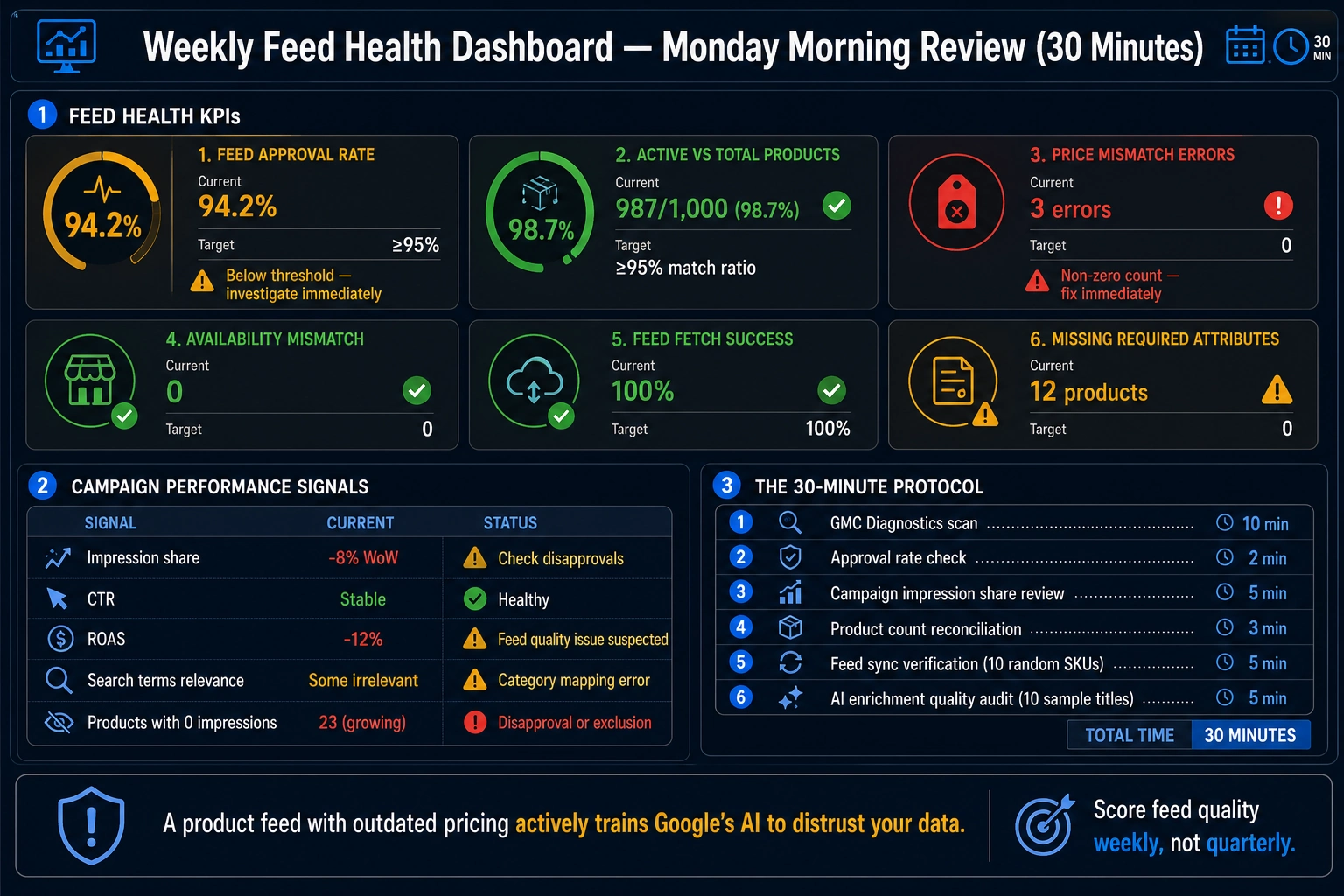
Setup is covered. Post-launch monitoring is ignored. Here is the exact set of KPIs and signals you should be reviewing every week to know whether your automated feed is healthy.
Feed Health KPIs (Check Every Monday Morning)
KPI                                   Where to Find It                     Healthy Benchmark     Action Threshold
Feed approval rate                    GMC → Products → Diagnostics         ≥95%                  <90% → investigate immediately
Active products vs total products     GMC → Products → All Products        Match ratio ≥95%      Any sudden drop
Price mismatch errors                 GMC → Diagnostics → Item Issues      0                     Any non-zero count
Availability mismatch errors          GMC → Diagnostics → Item Issues      0                     Any non-zero count
Feed fetch success rate               GMC → Feeds → Feed Status            100%                  Any failure
Missing required attributes           GMC → Diagnostics                    0                     Any count growing
Campaign Performance Signals Tied to Feed Quality
Signal                   Healthy Trend          Feed-Related Warning Sign
Impression share         Stable or growing      Sudden drop → check disapprovals
CTR                      Stable or growing      Sudden drop → check title quality
ROAS                     Stable or growing      Drop with stable spend → feed quality issue
Search terms report      Relevant queries       Irrelevant queries → category mapping error
0 impressions            Declining over time    Growing count → disapproval or exclusion issue
The Weekly Feed Health Protocol (30 Minutes)
GMC Diagnostics scan (10 minutes): Check for any new item issues since last week. Categorise by type. Flag any critical or high issues.
Approval rate check (2 minutes): If below 95%, investigate immediately.
Campaign impression share review (5 minutes): If impression share dropped >10% week-over-week with no budget change, suspect a disapproval event.
Product count reconciliation (3 minutes): Compare the number of products in your Shopify store vs the number of active products in GMC. They should be within 2–3% (accounting for legitimately excluded products like out-of-stock or below-cost).
Feed sync verification (5 minutes): Spot-check 10 random SKUs. Confirm that the price, availability, and title in your feed match your live website exactly.
AI enrichment quality audit (5 minutes): Sample 10 AI-rewritten titles and descriptions. Are they accurate? Do they read naturally? Flag any that need manual correction.
A product feed with outdated pricing or availability does not just cause disapprovals, it actively trains Google's AI to distrust your data. Google's systems score feed quality based on completeness, accuracy, and consistency with your website.
FeedOn.ai's feed health monitoring dashboard gives you a real-time quality score across your entire catalog
The Honest No-Code Ceiling — Where Do You Actually Need a Developer?
Every feed management tool claims "no coding required." That's true at the entry level. Here is where it stops being true — benchmarked against five increasingly complex scenarios.
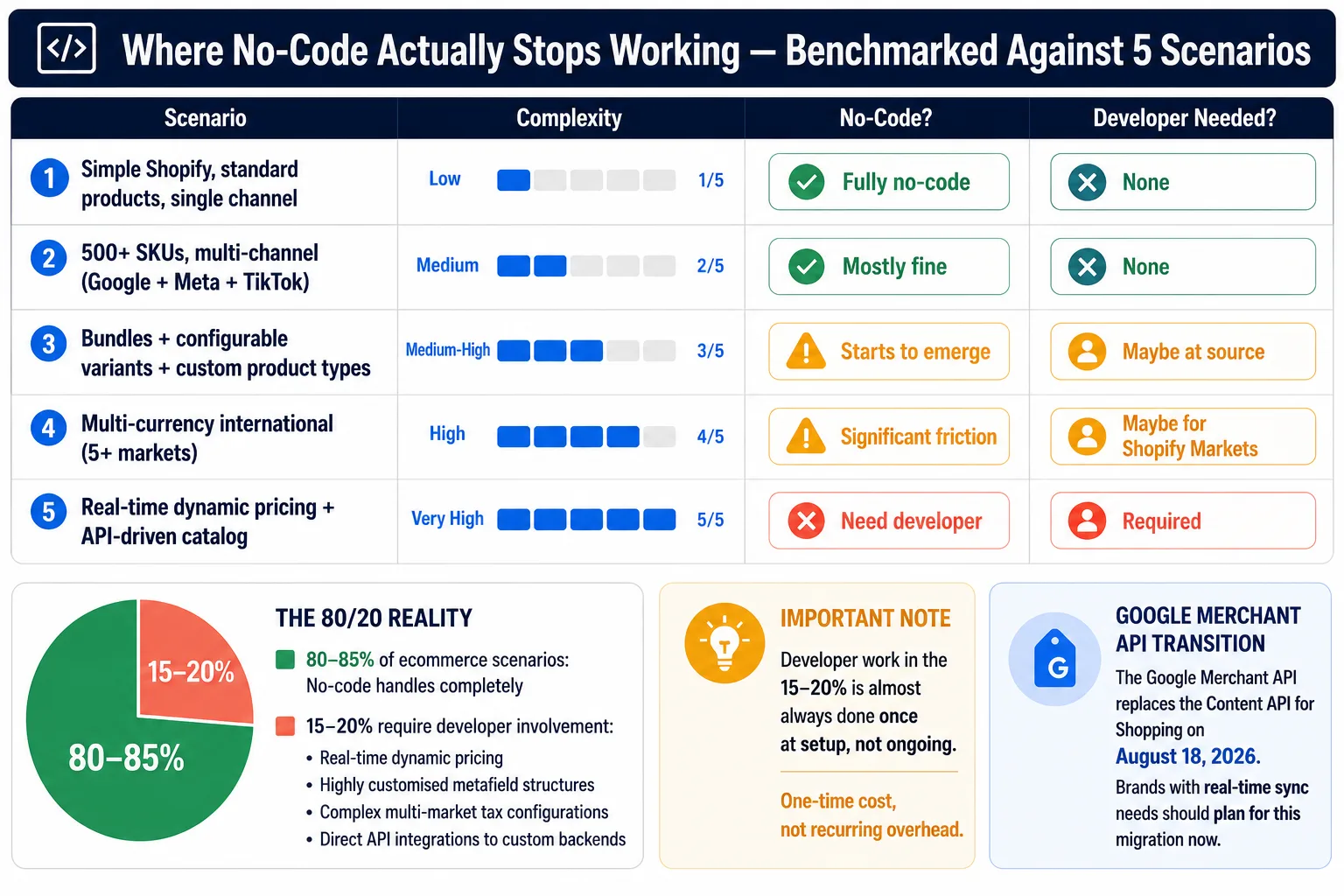
Scenario 1: Simple Shopify Store, Standard Products, Single Channel
No-code ceiling: None. This is exactly what no-code tools are built for. Connect Shopify, run the audit, and publish to Google. Zero developer work required.
Scenario 2: 500+ SKUs, Multi-Channel (Google + Meta + TikTok), Standard Products
No-code ceiling: Still mostly fine. Channel-specific output rules can be configured in the UI. The only manual work is setting up supplemental feeds for channel-specific attributes that your master feed doesn't contain. No developer needed.
Scenario 3: Product Bundles + Configurable Variants + Custom Product Types
No-code ceiling: Starts to emerge here. Complex variant mapping logic (especially when your Shopify metafields aren't structured consistently) may require feed rule logic that goes beyond what a UI rule builder can express. At this point, you either need a developer to clean up your Shopify metafield structure at the source, or you need a feed tool with advanced conditional logic.
Free AI tools can't connect to your store, sync changes automatically, process images to extract attributes, validate against Google's live requirements, or monitor your feed health on an ongoing basis.
Scenario 4: Multi-Currency International (5+ Markets)
No-code ceiling: Significant friction. Currency conversion rules, market-specific pricing, tax configuration per country, language-specific titles — all of these can technically be configured without code using the right tool, but the complexity multiplies quickly. FeedOn generates localized titles and descriptions from a single feed, what used to take our team a full week now runs in minutes. Even with AI-powered localization, international tax and pricing configuration often require developer involvement to ensure Shopify Markets is set up correctly at the source.
Developer need: The feed tool probably doesn't need a dev. Your Shopify markets and pricing infrastructure might.
Scenario 5: Real-Time Dynamic Pricing + API-Driven Catalog Updates
No-code ceiling: You need a developer or a tool with a direct API integration to your pricing engine. If your prices change more than 4–6 times per day (e.g., algorithmically repriced products, auction-based inventory), scheduled feed refreshes cannot keep up. For brands with fast-moving inventory, flash sales, or frequent price changes, sync every six hours using supplemental feeds or an automated platform integration. Beyond 6 price changes per day, you need the Google Merchant API for real-time pushes.
The Google Merchant API, which replaces the Content API for Shopping on August 18, 2026, processes inventory and pricing updates faster than the legacy system, which directly benefits brands that maintain real-time feed sync.
The honest answer: No-code tools handle 80–85% of e-commerce scenarios without any developer involvement. The remaining 15–20% real-time dynamic pricing, highly customized metafield structures, complex multi-market tax configurations, and direct API integrations to custom backends will require developer time. The good news is that this developer work is almost always done once, at setup, not ongoing.
Compare FeedOn.ai's capabilities against your specific catalog complexity
How Your Feed Structure Determines Visibility in AI Shopping Surfaces (2026 and Beyond)
This is the most forward-looking section of this guide and the one your competitors haven't written yet.
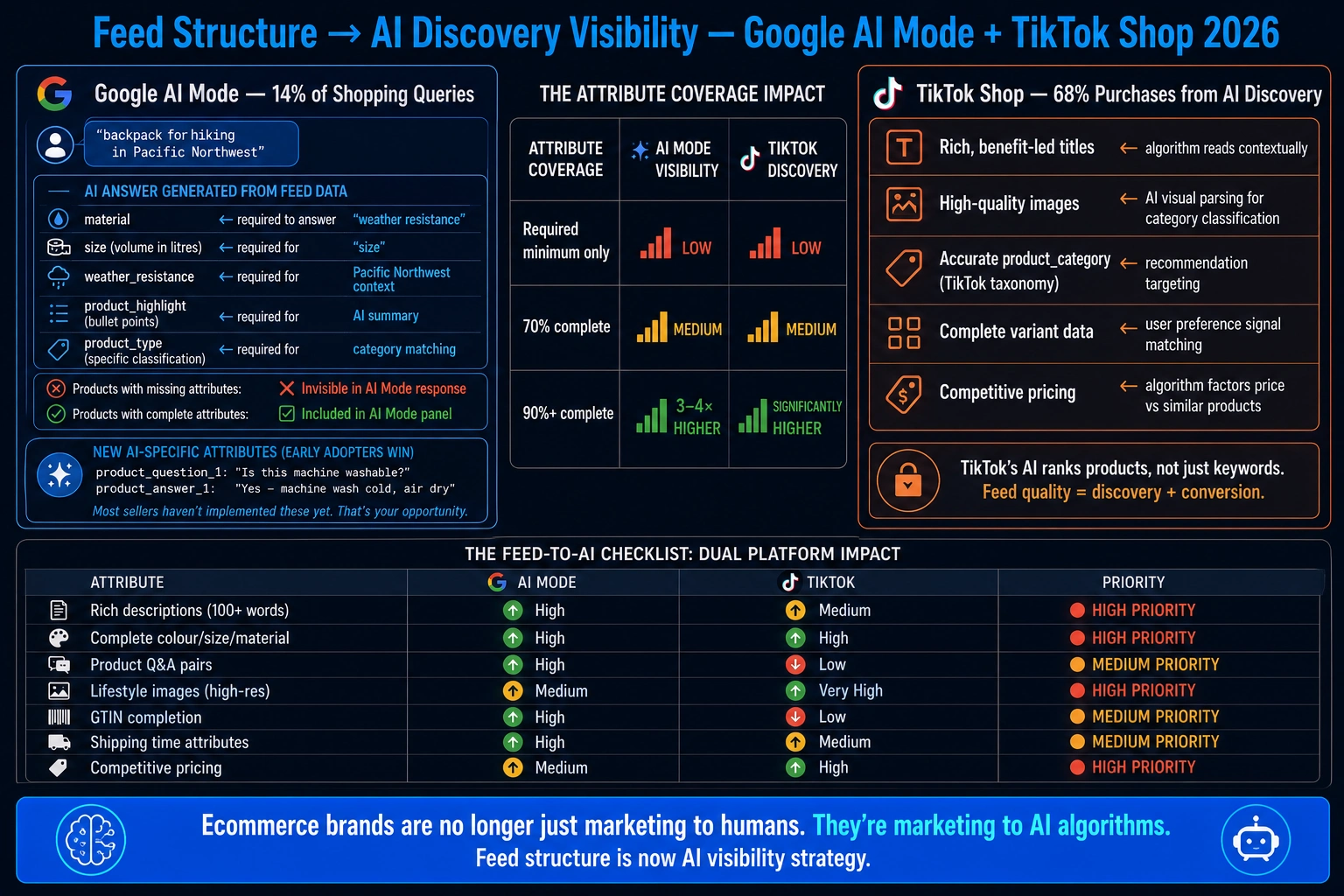
In 2025–2026, the rules of product discovery have fundamentally changed. In 2026, the rules of product discovery have been rewritten entirely. Google's AI Overviews, conversational shopping assistants, and machine learning ranking systems have fundamentally changed how products get found, evaluated, and selected. Your product data feeds are no longer just a technical export. They are the primary signal that determines whether your products get discovered at all.
Google AI Mode: The New Discovery Layer
Google AI Overviews now appear on 14% of shopping queries, reshaping e-commerce SEO, traffic, and visibility. Your e-commerce visibility depends less on rankings alone and more on whether Google can read, trust, and surface your product data. Based on 20.9 million shopping SERPs, AI Overviews grew from 2.1% in November 2025 to 14.0% in March 2026, a sharp jump that turns search into a visibility problem, not just an ads problem. AI-powered product discovery on Google, driven by Gemini, shifts users from keyword searches to agent-led conversations. It draws results from Google's Shopping Graph, a real-time database of over 50 billion listings, to deliver personalized, relevant product recommendations.
What this means for your feed structure:
In AI Mode, results are presented as curated product panels and summaries rather than a traditional ranked list of links. A query like "backpack for a hiking trip in the Pacific Northwest" may generate product suggestions that reflect attributes such as weather resistance, size, and materials alongside pricing, reviews, and availability.
To answer that query, Google's AI needs your feed to contain material, weather resistance, size (volume in liters), product highlight (bullet points), and an accurate product_type classification. A feed with only the required minimum attributes title, description, price, availability will be invisible in AI Mode responses.
Stores with near-complete attribute coverage see 3 to 4 times higher visibility in AI recommendations compared to stores with sparse data. Prioritize color, size, material, max_handling_time, and shipping detail. These are the attributes most commonly skipped and the ones AI Mode needs to answer conversational purchase queries. Completing them expands both paid shopping impression share and AI recommendation eligibility.
New AI-specific attributes to implement now:
In 2025, Google added dozens of new attributes specifically designed for AI conversations. Most sellers haven't touched these yet. That's your opportunity. Instead of hoping the AI can parse your description for answers, you can now provide explicit Q&A pairs.
Add product_question_1, product_answer_1 pairs for your top-converting SKUs. Focus on:
Common pre-purchase questions ("Is this machine washable?")
Size/fit questions ("Does this run large?")
Compatibility questions ("Will this work with X?")
Care/maintenance questions
TikTok Shop's AI Discovery Engine
68% of TikTok Shop purchases in 2026 originate from AI recommendations rather than active search queries, according to industry analysis. TikTok Shop's AI Discovery Engine is a machine learning system that analyzes user behavior, engagement patterns, and purchase signals to surface products before shoppers actively search for them. This matters for e-commerce sellers because algorithmic product placement now accounts for the majority of product discovery on social commerce platforms, fundamentally changing how customers find and buy items online.
What TikTok's AI needs from your feed:
Rich, benefit-led titles (not keyword-stuffed, but contextually descriptive)
High-quality images that AI can visually parse for product category classification
Accurate product_category mapping using TikTok's taxonomy
Complete variant data (colour, size) so the recommendation engine can target by user preference signals
Competitive pricing (TikTok's algorithm factors in price competitiveness against similar products)
TikTok publicly explains that its recommendation systems consider signals such as user interactions, video information, and device or account settings. TikTok Shop adds commerce context on top of that: product listings, product cards, creator content, Shop Ads, search behavior, conversion, inventory, fulfillment, customer experience, and product relevance.
The AI discovery insight nobody in the top 5 articles mentions: Almost half of Americans in 2025 said their e-commerce purchases had been influenced by AI recommendations, and nearly one-third of US shoppers said they'd used ChatGPT on their way to making a purchase. Traffic from AI engines to retail sites was up 4,700% year-over-year as of July 2025.
Ecommerce brands are no longer just marketing to humans; they're marketing to AI algorithms too. Implementing strategies like answer engine optimization (AEO), schema markup, and agentic checkout modules will ensure that AI engines can find your brand, understand your brand, and buy from your brand.
The feed-to-AI-visibility checklist:
Feed Attribute                               AI Mode Impact     TikTok Discovery Impact
Rich product descriptions                    High               Medium
Complete colour/size/material attributes     High               High
Product Q&A pairs                            High               Low
High-resolution lifestyle images             Medium             Very High
GTIN completion                              High               Low
Shipping time attributes                     High               Medium
Product highlights                           High               Low
Competitive pricing vs category              Medium             High
See how FeedOn.ai generates AI-optimised titles, descriptions, and structured attributes for Google AI Mode and TikTok discovery
Ready to Stop Losing Revenue to Feed Problems?
Google Merchant Center sees every gap and disapproves products daily. Whether you're on Shopify, WooCommerce, or a custom platform, you're paying for ads that never show.
Start your free FeedOn.ai plan Get your feed health score in under 5 minutes. 200 products and 3,000 AI credits included. No credit card required.