
Product Feed for Dropshipping: The Complete Guide for Sellers Who've Moved Past the Basics
Most guides about product feeds for dropshipping stop at the same place: what a CSV is, why automation is better than manual uploads, and which tool you should pay for. If you've already been through that content and still have questions about feed quality, channel conflicts, supplier negotiations, or what happens when things break this guide is written for you.
This is not an introduction. This is the operational playbook.
What a Product Feed Actually Does (And Where It Can Fail You)
A product feed is a structured file CSV, XML, API endpoint, or EDI that moves product data from a supplier's system into yours, and from your store out to sales channels like Google Shopping, Meta, Amazon, or TikTok Shop.
The mechanism sounds simple. In practice, it's the single most fragile part of a dropshipping operation.

Here's why: the feed is a live bridge between three separate systems your supplier's inventory database, your storefront, and your sales channels. Any break in that bridge causes cascading failures: overselling when your supplier runs out of stock, price mismatches that get your Google Shopping account flagged, or product disapprovals on Amazon because a GTIN doesn't validate against their catalog.
FeedOn's AI feed management platform is built specifically to hold that bridge together automatically catching errors, filling attribute gaps, and keeping your feeds compliant across every channel. This guide explains the operational logic behind why those capabilities matter.
Part 1: Auditing a Supplier's Feed Before You Onboard Them
One of the most common mistakes dropshippers make is treating a supplier's feed as a given. It arrives in your inbox as a CSV or FTP link, and you import it. What you don't do but should is put it through a structured quality audit before a single product goes live.

Here is a practical audit framework. Score each area and use the result to decide whether to onboard, negotiate, or walk away.
The Product Feed Health Score (A–F)
Completeness (25 points)
Check whether the feed contains all fields your channels require. For Google Shopping, the mandatory set is: id, title, description, link, image_link, availability, price, brand, and either gtin or mpn. Missing any one of these makes the product ineligible for listing. See Google Shopping's complete required attributes for 2026 for the full reference.

Score:
All required fields present across 100% of SKUs: A
Required fields present but with gaps in 10–20% of SKUs: B/C
Core fields missing across more than 20% of SKUs: D/F
Data accuracy (25 points)
Pull 20 SKUs at random and manually verify: Does the price in the feed match the supplier's live website? Does the stock status reflect reality? Does the image URL resolve? Price and availability errors are the leading cause of platform disapprovals and account flags.
Score:
All 20 spot-checked SKUs accurate: A
1–3 discrepancies: B/C
4+ discrepancies: D/F — do not import this feed until resolved
Content quality (25 points)
Read five product titles and five descriptions. Are they generic supplier copy? Do they contain keyword stuffing, promotional language ("BEST DEAL!!!"), or HTML artifacts? Are the images clean no watermarks, no text overlays, minimum 800×800 resolution?
Score:
Titles include brand + product type + key attributes; descriptions are informative and accurate: A
Titles are generic but usable; descriptions are thin but truthful: B/C
Titles are promotional, keyword-stuffed, or duplicated; descriptions contain HTML or are copied across multiple SKUs: D/F
Technical structure (25 points)
Is the feed delivered in a format your systems can parse reliably? Is there a consistent SKU/ID that won't change between updates? Are category values standardised, or does each product have a different taxonomy string?
Score:
Machine-readable format (XML/API), stable IDs, consistent category taxonomy: A
CSV with consistent structure but manually delivered: B/C
Inconsistent IDs, irregular delimiters, or email-only delivery with no schedule: D/F
Interpreting your score:
90–100: Import and monitor
70–89: Import with enrichment pipeline in place
50–69: Negotiate feed improvements before scaling
Below 50: Do not import at scale, use for testing only while pushing supplier to improve
Running this audit manually is practical for one or two suppliers. At scale, FeedOn's automated feed audit runs 60+ quality checks across your entire catalog and gives every product a 0–100 health score, surfacing exactly which SKUs need attention before they cause disapprovals.
Part 2: Feed Refresh Frequency - The Decision That Affects Your Platform Standing
How often your feed updates is not just a technical setting. It is a business risk decision.
Here is how to think about it by supplier type:
Daily bulk update (most common from older suppliers)
The supplier sends a full file usually CSV via FTP or email-once per day, typically overnight. This means your store can be up to 24 hours behind on stock levels. For slow-moving, high-ticket products, this is acceptable. For fast-moving, low-priced commodities, a 24-hour lag means overselling is virtually guaranteed during peak periods.
Intra-day delta feeds
Some suppliers send smaller "delta" files every 1–4 hours containing only changed records. This significantly reduces your exposure to overselling without requiring the processing overhead of a full feed refresh each time.
Real-time API
The gold standard. Your system polls the supplier's API at set intervals (every 5–15 minutes) for live stock levels. This is the setup that makes multi-channel selling at scale viable.
The platform risk angle
When your feed sends Google Shopping a product marked "in stock" and the customer lands on a page that says "out of stock" or worse, completes a purchase and then gets an apology email Google treats this as a misrepresentation signal. Enough of these and you face suppressed listings, account warnings, or in serious cases, a Merchant Center suspension.
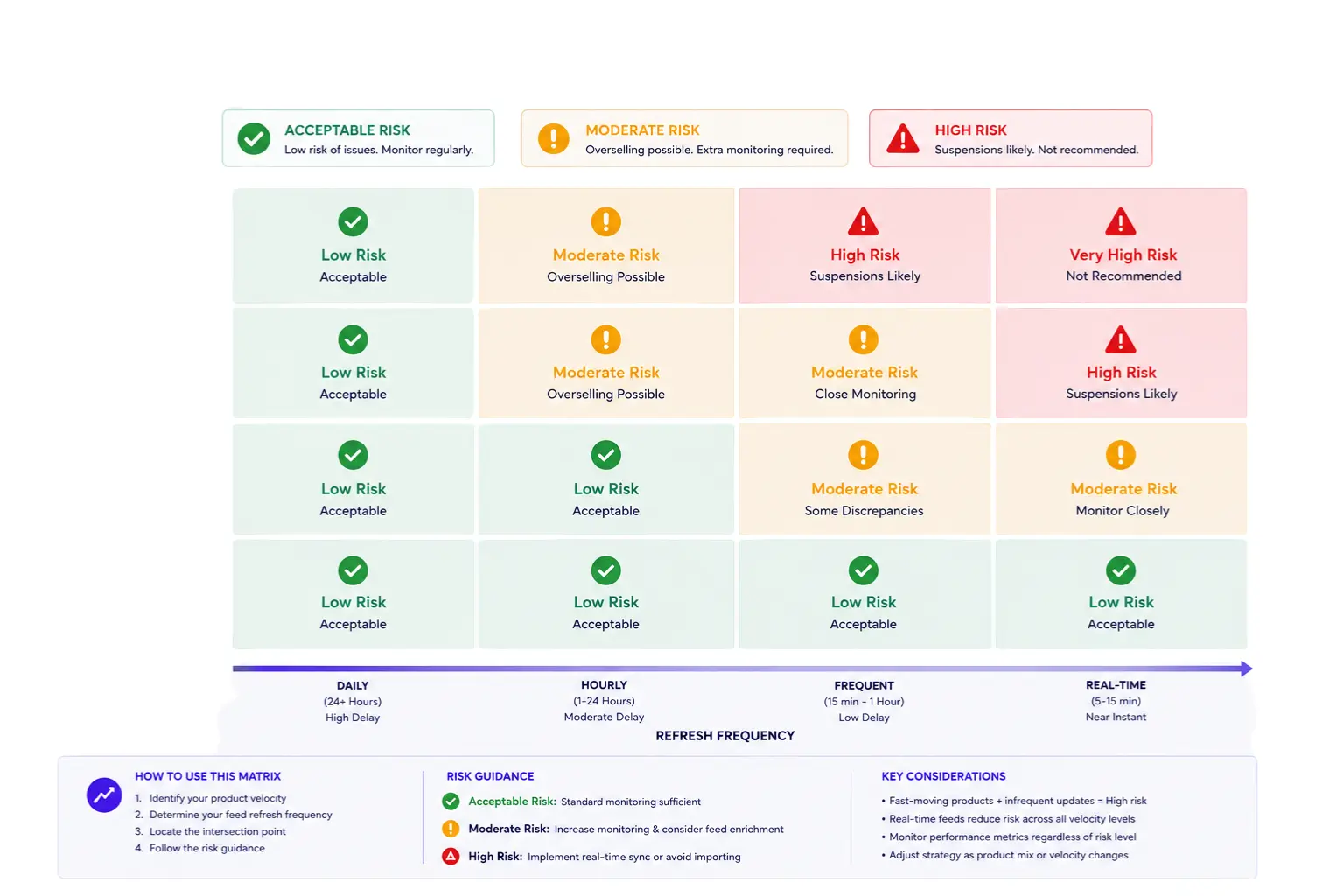
The practical rule: match your feed refresh frequency to your supplier's stock volatility. A supplier who sells seasonal fashion with weekly sellouts requires a different setup than one who sells industrial hardware that moves slowly. How AI is changing product feed management in 2026 covers how modern feed tools now predict and pre-empt these stock sync issues automatically.
Part 3: How to Negotiate Better Feed Terms With Your Supplier
This is the conversation most dropshippers never have.
Your supplier's default offering is whatever requires the least effort on their side: usually a daily CSV emailed manually. But suppliers who want long-term retail partners are usually open to improvement if you ask in the right way.

What to ask for and how to frame it
Frame every request around your ability to generate more revenue for them. This is not about your convenience; it's about selling more of their products.
Update frequency: "We're seeing stock-out errors on around 8% of orders, which we believe is hurting our repeat purchase rate. Would you be able to move to an intra-day feed update even every 4 hours so we can reduce overselling? We think this would increase our order volume by 15–20%."
Format upgrade: "Our current integration requires manual processing of the CSV, which creates a 2–4 hour delay in our system. If you could host the file on an FTP URL or provide an API endpoint, we could automate the import and handle a much higher volume with you."
GTIN/identifier provision: "Google Shopping requires a valid GTIN for most product categories. We're currently having around 12% of listings disapproved because of missing GTINs. Could you include the UPC or EAN codes in the feed? Without them, we can't list those SKUs on Google at all."
Image quality: "Our current images are 500×500px, which falls below Google Shopping's recommended 800×800 minimum. This is affecting our click-through rate on Shopping ads. Could you provide a higher-resolution image URL in the feed?"
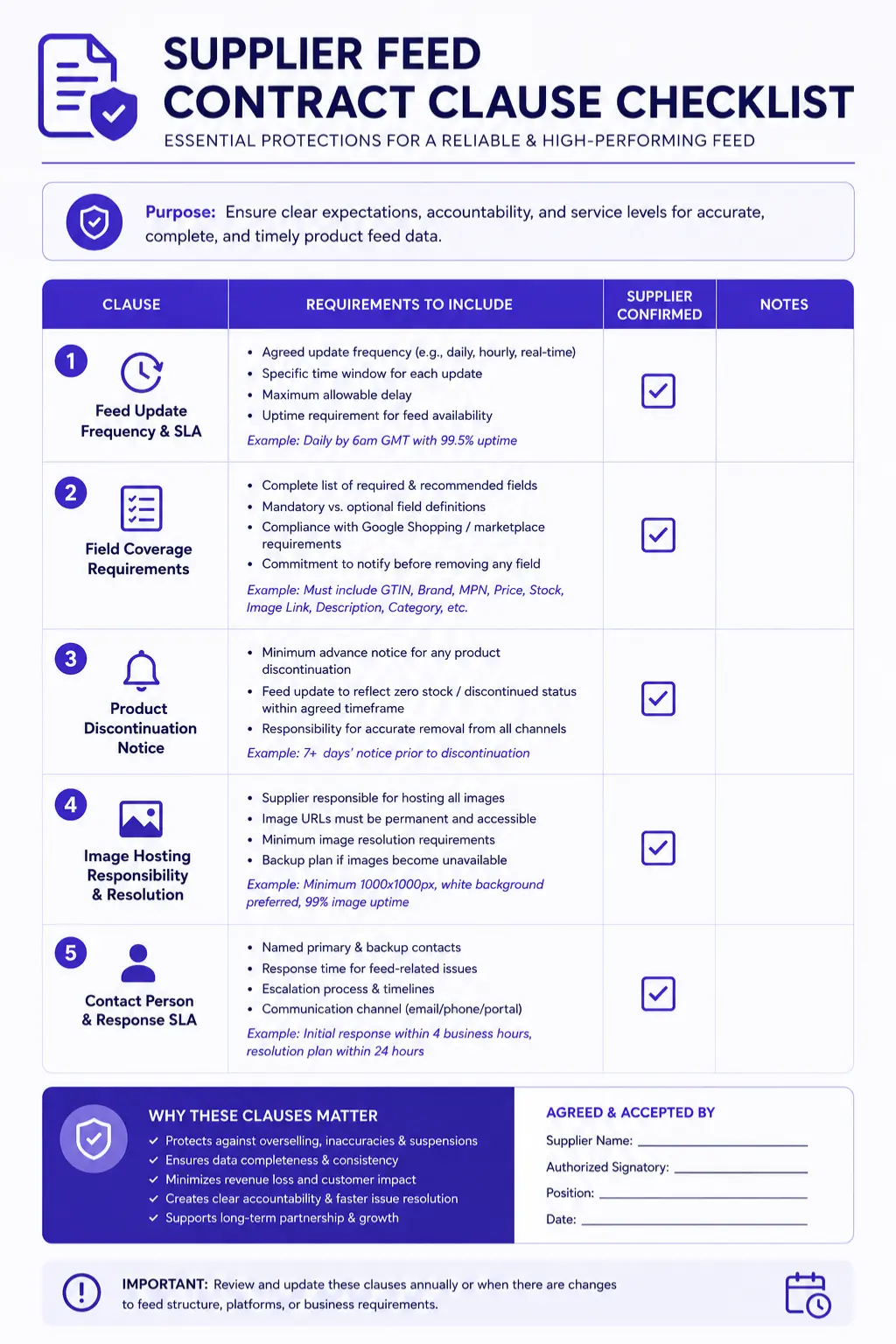
What to include in your supplier agreement
If you're formalising a partnership with a major supplier, push to include:
Feed update frequency (minimum, agreed SLA)
Field coverage requirements (list of mandatory fields)
Notification window for product discontinuation (e.g., 7 days' notice before a SKU is removed)
Image hosting responsibility and resolution standard
Contact person for feed issues with a response SLA
For cases where the supplier simply cannot provide GTIN data or enriched attributes, FeedOn's AI attribute extraction can fill 15+ fields automatically pulling colour from product images, classifying gender and age group from text, and extracting size from variant data so you're not dependent on your supplier's content quality to get your products approved.
Part 4: The Channel Conflict Matrix - One Feed Will Underperform Everywhere
This is where most intermediate dropshippers lose money without realising it.
You build one master product feed. You submit it to Google Shopping, Meta, TikTok Shop, and Amazon. It passes basic validation on all four. And then you wonder why performance is weaker than expected on three of them.
The reason: each channel has a different attribute schema, different title formatting expectations, different identifier requirements, and different image specifications. A feed optimised for one channel will silently underperform on the others.
Here is a practical comparison of the four major channels:
Channel Requirements at a Glance
Attribute                  Google Shopping                           Meta                                        TikTok Shop             Amazon
Required identifiers       GTIN or MPN + brand                       Brand, GTIN, or MPN (at least one)          Category ID, brand      ASIN (or UPC to create one)
Title max length           150 characters                            150 characters                              255 characters          200 characters
Title priority position    Brand + product type in first 70 chars    Product type first                          Hook/benefit first      Brand first
Description max            5,000 characters                          9,999 characters                            1,000 characters        2,000 characters (bullet points preferred)
Image min resolution       800×800px recommended                     500×500px min                               800×800px recommended   1,000×1,000px (required for zoom)
Availability values        in stock / out of stock                   in stock / out of stock /preorder           Available / Unavailable Generally follows ASIN setup
Price format               29.99 USD                                 29.99 USD                                   Numeric                 Numeric
Condition field            Required: new / used / refurbished.       Required                                    Not required            Required
Key conflict zone          GTIN validation is strict                 Requires inventory field for Marketplace    Algorithm               Category taxonomy completely separate from Google's
For deep dives on specific channels: see FeedOn's complete guides on Google Shopping required attributes and Meta catalog requirements.
Where the Real Conflicts Live
Title optimisation is channel-specific. Google Shopping rewards titles with brand + product type + key attributes in the first 70 characters. TikTok Shop, by contrast, is discovery-driven - titles that lead with a benefit or hook ("Adjustable Laptop Stand for Hybrid Workers") tend to perform better than attribute-first titles. Writing one title and submitting it everywhere means it's suboptimal on most channels.
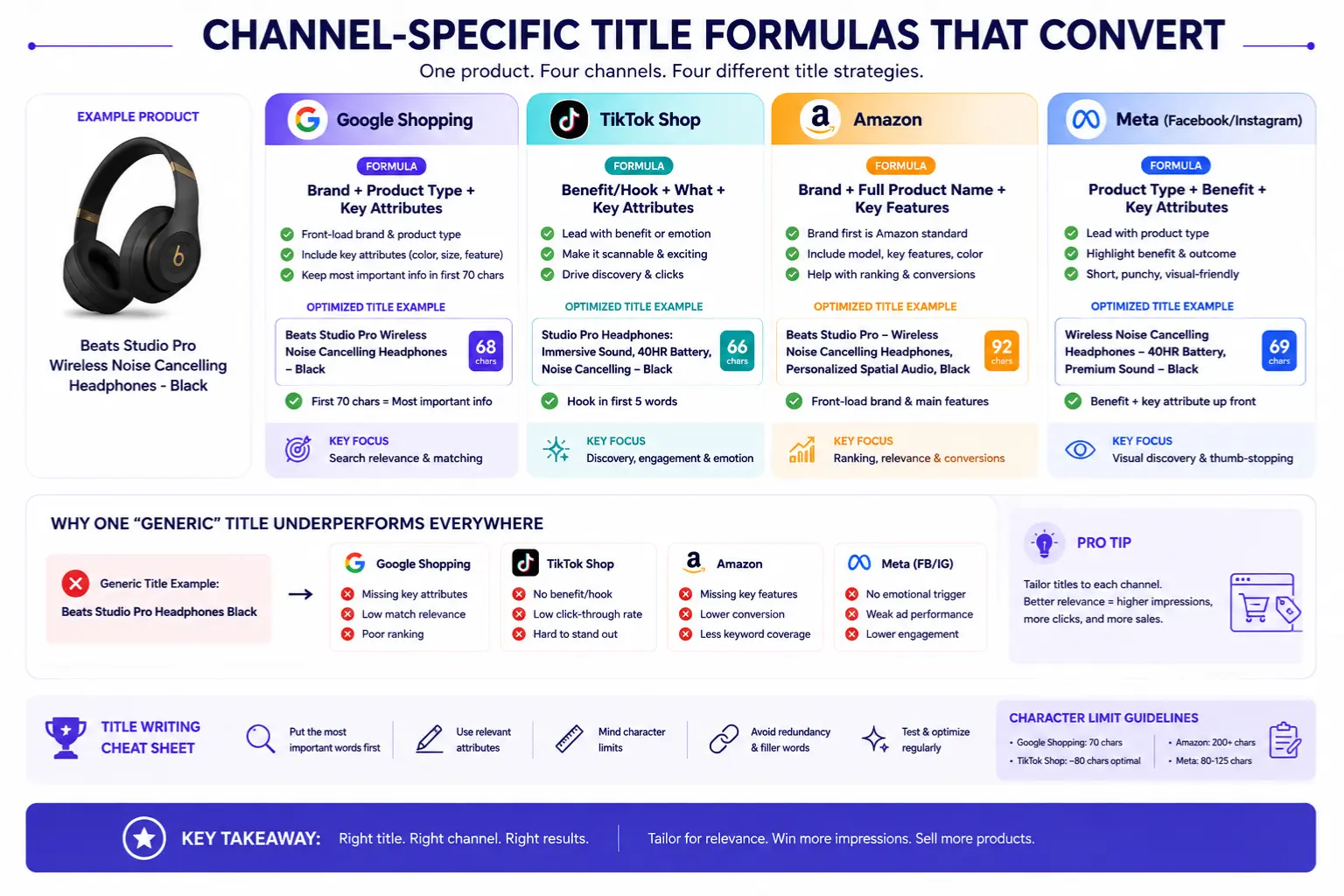
GTINs create approval divergence. Google cross-checks submitted GTINs against its product knowledge graph. Setting identifier_exists: false when a GTIN actually exists will get caught and result in disapproval. Amazon requires a UPC to create a new ASIN, so if your supplier hasn't provided one, you either can't list or must purchase a GS1 barcode. Meta is more lenient - you can use an MPN or brand as a substitute in many cases.
Image requirements diverge at scale. If your supplier provides 500×500px images, you can meet Meta's minimum but will underperform on Google Shopping (recommended 800×800px) and fail Amazon's zoom requirement (1,000×1,000px). This is a supplier negotiation point, not a feed tool workaround.
The practical solution is to build a master feed with the highest-common-denominator requirements, and then use feed rules to produce channel-specific output variants. FeedOn's multi-channel publishing handles exactly this one source feed, automatic field mapping and format conversion per channel so Google, Meta, TikTok, Amazon, Pinterest, and Bing each receive a feed shaped to their own rules.
Part 5: Multi-Supplier Feed Architecture
Running a single-supplier dropshipping store is relatively simple. Running 5, 10, or 30 suppliers simultaneously is an entirely different engineering problem and one that the top-ranking content on this topic completely ignores.
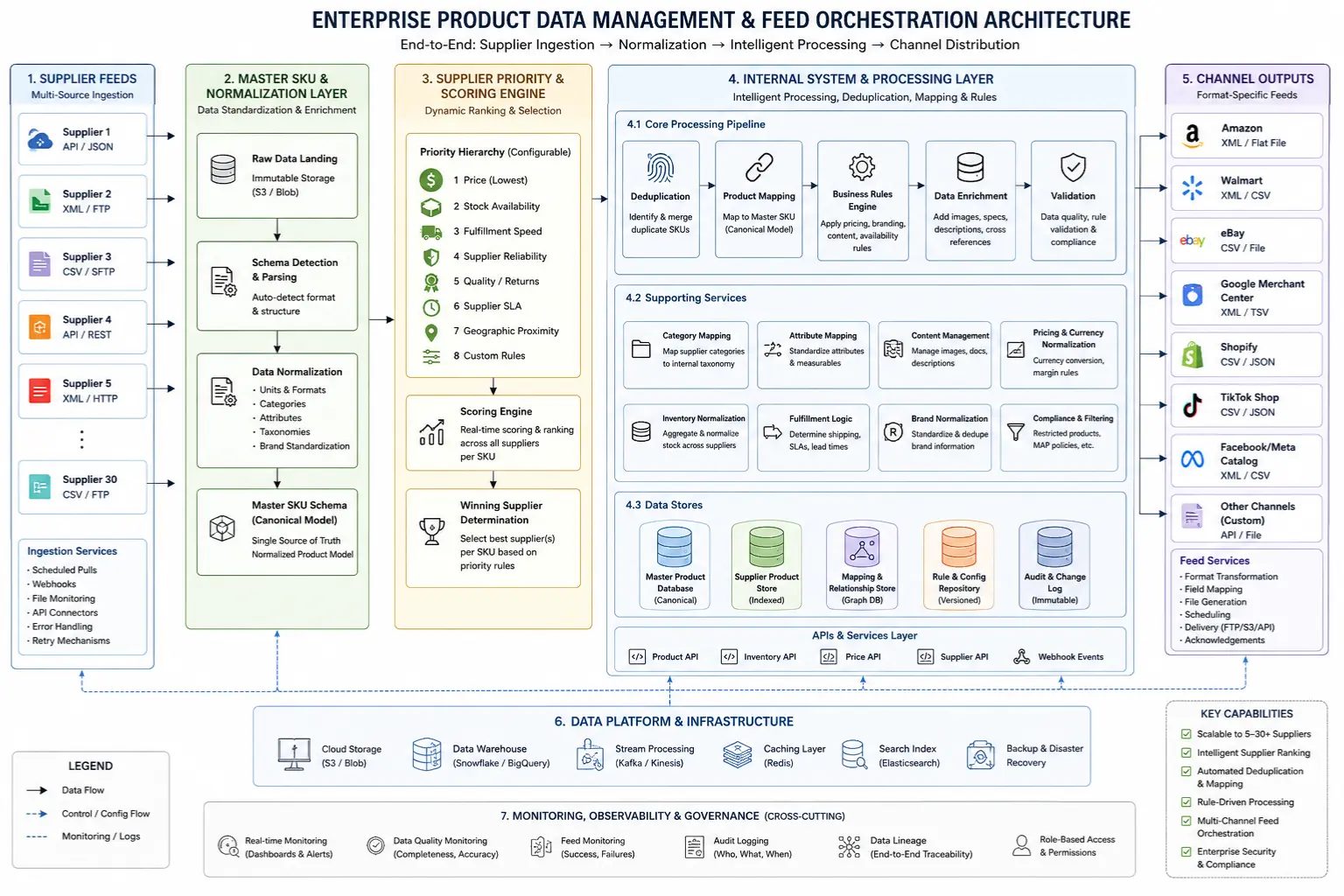
Here is how to think about structuring a multi-supplier feed architecture.
The Core Problem
Every supplier uses their own SKU system. Supplier A calls a product BLK-CHAIR-001. Supplier B calls the same product CH-BLACK-ERGO-001. If both are in your catalogue, you now have a deduplication problem. Worse: if Supplier A prices it at $89 and Supplier B prices it at $76, and your platform has both listed, you need a priority rule for which version wins.
Step 1: Define a master SKU schema
Before importing any supplier feed, define your own internal SKU format. Strip out supplier-specific prefixes and translate every product into your schema. Example: {CATEGORY}-{SUPPLIER_CODE}-{SUPPLIER_SKU} → FURN-A-001, FURN-B-002.
This gives you a stable internal ID that persists even if a supplier changes their SKU system which they will.
Step 2: Build a supplier priority hierarchy

When the same product is available from multiple suppliers, you need a documented ruleset for which source wins. A common hierarchy:
Price: Lowest landed cost wins (including shipping from supplier to end customer)
Stock depth: If prices are within 5% of each other, favour the supplier with higher stock level
Fulfilment speed:Iif stock levels are comparable, favour the supplier with the shorter ship time
Reliability score: If all else is equal, route to the supplier with the best historical fill rate
Document this hierarchy and build it into your integration logic, not your manual process.
Step 3: Set discontinuation and new-product rules
A supplier removing a product from their feed without warning is one of the most common causes of 404 errors in dropshipping stores. Define rules in advance:
If a SKU disappears from a supplier feed for one cycle: flag for review, do not auto-delist
If a SKU disappears for three consecutive cycles: mark as out of stock and suppress from channels
If a SKU disappears for 30 days: delist and redirect the URL
For new products: decide whether new supplier SKUs are automatically imported to a staging environment for review, or auto-published. Most mature operations use staging, with a daily or weekly review and publish workflow.
Step 4: Normalise category taxonomy
Every supplier categorises products differently. Supplier A may have "Office > Seating > Ergonomic Chairs." Supplier B may have "Furniture > Chairs > Office." Google Shopping's product taxonomy is a separate system from both.
Build a category mapping table that translates every supplier's taxonomy into your internal taxonomy, and then maps your internal taxonomy to each channel's required taxonomy. This is a one-time investment that saves enormous amounts of manual work at scale. FeedOn's feed management platform applies these mapping rules automatically, normalising category taxonomy across suppliers and outputting channel-ready feeds without manual intervention.
Part 6: What Happens When Your Feed Breaks - Platform Consequences by Channel

None of the top-ranking guides address this. But it's the conversation every dropshipper needs to have before it happens to them.
Google Shopping / Merchant Center
Feed errors in Google Merchant Center fall into three categories: warnings, item-level disapprovals, and account-level suspensions.
Warnings are advisory. Your feed has issues but products are still serving. Common warning triggers: missing optional attributes, image resolution below recommended, titles without key attributes.
Item-level disapprovals mean specific products stop serving. Common causes: price mismatch between feed and landing page, missing required attributes (GTIN, availability), prohibited content, policy violations. Fix the underlying issue, update the feed, and the product usually re-enters the auction within 1–3 business days after Google recrawls.
Account-level suspensions are the most serious. These can happen from repeated misrepresentation (price/availability mismatches at scale), policy violations, or a pattern of disapprovals that triggers a manual review. Reinstatement is not automatic it requires an appeal and can take weeks. Critically: do not appeal before your site and feed are fully fixed and Google has had time to recrawl updated pages. Submitting an appeal while old content is still indexed is one of the most common reasons appeals fail.
Dropshipping stores face additional scrutiny. Google expects transparency about who fulfils the order and where products ship from. Inconsistencies between your feed, your product pages, and your checkout create misrepresentation signals even when there's no intent to deceive.
A proactive feed audit run before you submit, and on a recurring schedule is the most effective defence against account-level suspensions. FeedOn's audit flags price mismatches, invalid GTINs, broken image URLs, and policy violations before they reach Google's reviewers.
Meta (Facebook and Instagram)
Meta's Commerce Manager disapprovals are more granular and typically easier to resolve than Google's. Common causes specific to dropshipping:
Product images showing competitor logos or watermarks
Missing condition attribute (new/used/refurbished is required)
Checkout policy pages that don't match the shipping or return terms in the feed
Unlike Google, Meta's review cycles are shorter most item-level disapprovals resolve within 24–48 hours of a feed update. For a full reference on staying compliant, see the Meta catalog requirements guide.
Amazon
Amazon's feed errors are more structured because the catalogue system is ASIN-based, not feed-based. The most common failure point for dropshippers: if you're listing against an existing ASIN, your price or stock data must be continuously synchronised. Pricing suppressions happen automatically when Amazon's algorithm determines your offer is no longer competitive or when your price significantly exceeds the historical buy-box range.
The pre-launch QA process that prevents most of these issues
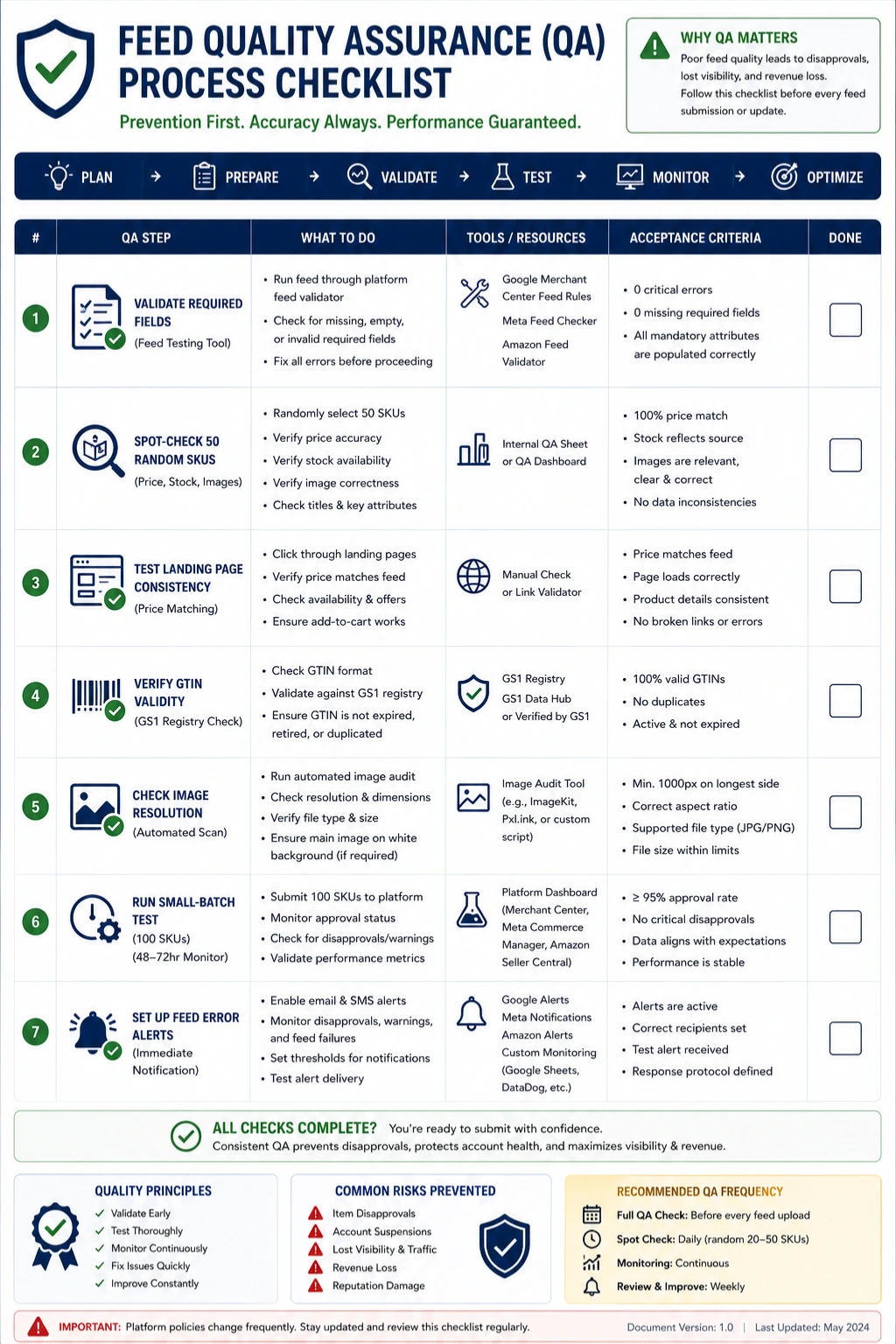
Before you push any new supplier feed live at scale, run this checklist:
Validate required fields: Run the feed through Google Merchant Center's feed testing tool, or FeedOn's automated audit, before full submission
Spot-check 50 random SKUs - Verify price, stock status, and image URL against the supplier's live site
Test landing page consistency - Confirm that prices in the feed exactly match prices on your product pages (to the cent, including tax configuration)
Verify GTIN validity - Cross-reference against Open Product Data or the GS1 registry before submission
Check image resolution - Automate a resolution check across all image URLs before import
Run a small-batch test - Submit 100 SKUs first and monitor for 48–72 hours before pushing the full catalogue
Set up feed error alerts - Configure monitoring so that any feed processing failure triggers an immediate alert, not a scheduled review
Part 7: Enriching a Raw Supplier Feed with AI - A Practical Workflow
Most supplier feeds are content-thin. Titles are generic. Descriptions are either copied from manufacturer specs or barely exist. Images are functional but not optimised. Submitting this raw data to your channels means competing with sellers who've invested in enriched content and losing.
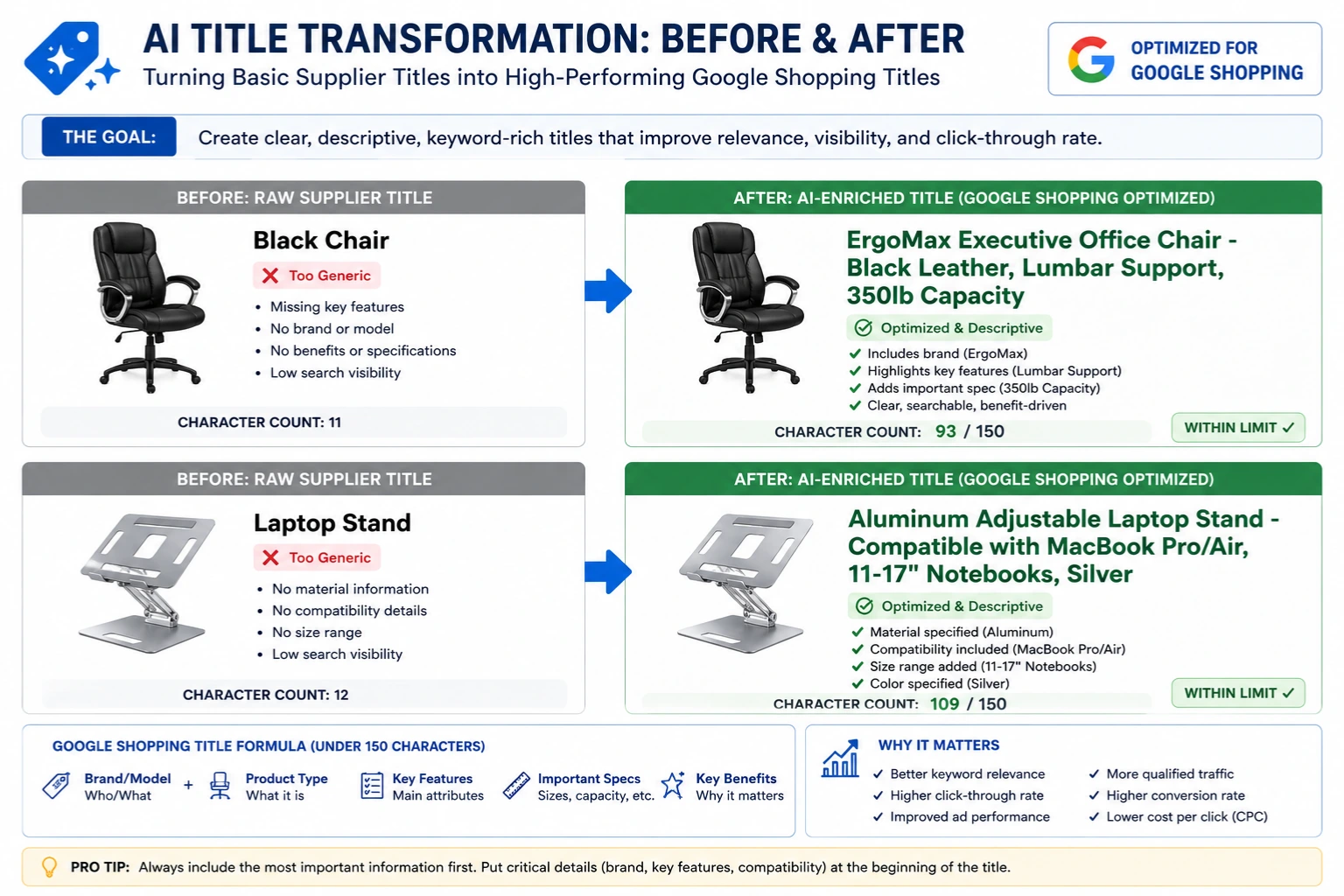
AI makes feed enrichment at scale genuinely practical. Here is a repeatable workflow.
Step 1: Identify enrichment priorities
Not every field needs AI attention. Focus effort where the return is highest:
Titles: The single highest-impact field for Google Shopping performance. A well-structured title directly affects which search queries your product appears for. See how to optimise product feeds for Google Shopping for the title formula that works per category.
Descriptions: Critical for AI-driven discovery tools (Google's Shopping Graph, Meta's Advantage+ creative) which use description content to match products to shopper intent
Category mapping: LLMs can reliably categorise products from title + description into Google's product taxonomy
Attribute extraction: Pulling structured attributes (colour, material, dimensions) from unstructured description text
Step 2: Build your enrichment prompt
For bulk title rewriting, a reliable prompt structure is:
"You are an ecommerce product data specialist. Rewrite the following product title for Google Shopping. The title must: (1) start with the brand name, (2) include the core product type, (3) include the two most purchase-relevant attributes (e.g., size, colour, material, compatibility), (4) be under 150 characters, (5) contain no promotional language or punctuation. Input title: [TITLE]. Additional product data: [DESCRIPTION EXCERPT]."
For bulk description rewriting:
"Write a 150–200 word product description for the following item. The description must: (1) open with the primary use case or customer benefit, (2) include 3–5 specific product attributes as factual statements, (3) avoid promotional superlatives ('best', 'amazing', 'incredible'), (4) include natural keyword usage without stuffing, (5) close with a practical use case or compatibility note. Input data: [RAW SUPPLIER DESCRIPTION] + [TITLE] + [AVAILABLE ATTRIBUTES]."
Step 3: Process in batches and validate
Run enrichment in batches of 50–100 SKUs, not the full catalogue at once. Review the first batch output before scaling AI output can surface systematic errors (wrong assumptions about the product type, invented specifications) that you want to catch early.
Critical rule: never allow AI-generated content to claim specifications that aren't in the source data. If a supplier's raw data doesn't mention a weight rating, don't let AI invent one. Platform policies and customer trust depend on accuracy.
Step 4: Use purpose-built tools for scale
Manual prompt workflows work for hundreds of SKUs. For thousands, you need FeedOn's AI attribute extraction, which uses Vision AI to scan product images and automatically extract colour, pattern, and material and uses text AI to classify gender, age group, brand, and product type from titles and descriptions. This bridges the gap between raw supplier data and what Google Shopping and Meta actually require, without manual intervention per product.
Step 5: Feed enriched content back to the correct field
Make sure your AI-enriched title goes into the title field that maps to Google's title attribute, not into a custom field that never reaches the channel. Test the field mapping explicitly before any enriched feed goes live. FeedOn's multi-channel publishing handles this mapping automatically per destination channel so enriched titles are formatted and delivered correctly to Google, Meta, TikTok, and Amazon without separate manual exports.
Part 8: Handling Out-of-Stock and Discontinued Products Without Destroying Your SEO
This is a problem that creates a fork in the road and the wrong path destroys accumulated SEO equity.
When a product goes out of stock temporarily, the instinct is often to delete it from the feed and let the URL 404. This is almost always the wrong move.
The correct approach by scenario:
Temporarily out of stock (expected restock within 30 days)
Set availability: out of stock in your feed this pauses it from Google Shopping serving but preserves the product history
Keep the URL live with an "out of stock" notice and expected restock date
Do not delete from any channel your product history, review count, and ranking signals are preserved for when it returns
Out of stock with uncertain restock
Mark out of stock in the feed
Suppress from paid channels (no point paying for clicks on unavailable products)
Keep the URL live with organic SEO
Add a "notify me" email capture this generates warm leads for the moment the product returns
Permanently discontinued
301 redirect the URL to the most relevant in-stock category or similar product
Remove from all feeds
Submit the old URL in Google Search Console for removal from Shopping if it's causing disapproval signals
Do not let discontinued product URLs serve 404s for extended periods this damages crawl budget and sends negative signals about site quality
The feed-to-SEO connection that most guides miss: Google Shopping's performance and your organic search ranking are not fully separate systems. Products that have built up click-through history, conversion data, and positive engagement signals in Merchant Center carry some of that authority. Abruptly deleting and recreating the same product (new ID, new URL) resets that history to zero. Preserve continuity wherever possible.
Putting It Together: The Operating Model
Here is how a mature dropshipping operation approaches product feeds as an ongoing practice rather than a setup task:
Weekly:
Audit feed error reports from all channels FeedOn's feed audit surfaces these automatically
Review new-product staging queue and publish approved items
Check for newly discontinued SKUs and process URL redirects
Monthly:
Score active supplier feeds against the Health Score framework above
Review channel performance by product to identify candidates for enrichment
Pull the supplier reliability report: fill rate, price accuracy, update frequency compliance
Quarterly:
Renegotiate feed terms with underperforming suppliers using the script templates from Part 3
Audit category taxonomy mapping against each channel's latest taxonomy updates (Google updates its product taxonomy regularly)
Review AI enrichment quality across a random sample of 100 SKUs
As needed:
Pre-launch QA for any new supplier feed (checklist in Part 6)
Feed break recovery protocol (platform-specific, documented in a runbook)
Supplier contract renewal with updated feed SLA requirements
For Shopify stores specifically, see the best feed management tools for Shopify in 2026 for how to fit these workflows into the Shopify ecosystem — including where the native Google channel falls short and when you need a dedicated feed management layer.
Summary
Product feeds are not a setup task you complete once. They are a continuous operational discipline.
The dropshippers who build durable businesses treat their feed infrastructure the same way a logistics company treats its fleet: scheduled maintenance, performance monitoring, supplier relationship management, and a clear recovery plan when something breaks.
The gap between a raw supplier CSV imported with no changes and a properly audited, enriched, multi-channel-optimised feed is the difference between products that get clicked and products that sit invisible.
That gap is where your competitive advantage lives and where FeedOn does its work.
Ready to audit your current feed? Start your free trial no credit card required. Upload your feed in CSV or XML format and get a full health report in under five minutes.