
TikTok Shop Product Feed Optimization: Everything Competitors Won't Tell You
Every TikTok Shop feed guide covers the same ground: fill in the required fields, keep titles under 34 characters, and upload a compliant image. Then they stop.
They don't explain why a feed that says "Live" in Seller Center gets zero FYP circulation. They don't explain what happens to your affiliate creators when you update a SKU mid-campaign. They don't explain how five rejected listings quietly damage an account health score you didn't know existed. And they don't show you how to migrate an existing Google Shopping catalog to TikTok without rebuilding from scratch.
This guide answers those questions, all of them. It also covers the questions no other source has answered: how TikTok's algorithm actually uses feed attributes, how to handle 3-dimension variant axes, how to sync inventory across TikTok, Shopify, and Amazon simultaneously, and what feed requirements differ market-by-market across the US, UK, and Southeast Asia.
How TikTok's Algorithm Uses Feed Attributes to Rank Products on the FYP
Every TikTok Shop feed guide tells you what fields to fill in. None explain what the algorithm actually does with those fields once your product is live.
Here is the mechanism.
The FYP Is Not a Search Engine – It's a Distribution Engine
Google Shopping ranks products in response to a query. TikTok's For You Page distributes products to audiences before they've expressed a specific intent. That fundamental difference changes which feed attributes matter and why.

On Google, your title is a keyword-matching signal. On TikTok, your title is a content classification signal – the algorithm uses it to decide which interest clusters your product belongs to and, therefore, which users to show it to.
Which Feed Attributes Drive FYP Distribution
Title (34-character limit for FYP placement) TikTok's internal testing has consistently shown that titles under 34 characters receive meaningfully broader FYP distribution than longer titles. The mechanism: shorter titles are treated as cleaner classification signals. A 28-character title, "Waterproof Hiking Boot Women", gives the algorithm one unambiguous product category and one audience signal (Women's). A 70-character title with four comma-separated attributes creates signal noise that the distribution engine resolves conservatively, defaulting to a narrower audience estimate.
Category Mapping Accuracy TikTok's category taxonomy is proprietary and does not map directly to Google's product taxonomy. Correct category assignment is one of the strongest FYP distribution signals because it determines which shopping tab collections your product appears in and which creator content gets algorithmically paired with your listing through the affiliate discovery mechanism. A product mapped to the wrong category may appear live, pass quality checks, and receive zero Shopping tab placement.
video_link Attribute This field exists in TikTok's feed spec and is absent from Google's. A product with a video_link pointing to a shoppable TikTok video receives a significant distribution multiplier – the algorithm preferentially surfaces shoppable products that have associated video content because it increases the likelihood of in-feed conversion. Sellers who leave this field blank are leaving a major ranking lever untouched.
Image Quality Score TikTok's vision AI scores every product image on dimensions that don't appear in any error message: scene complexity, white background ratio, text overlay presence, and whether the image contains a lifestyle or studio context. Products with low image quality scores receive reduced FYP impression allocation, even if the image passes the technical format requirements. This is one of the primary causes of "live but zero impressions" situations.
Engagement Velocity on Associated Video Content If a creator's video featuring your product drives above-average engagement (saves, shares, and comment rate) in the first 2 hours after posting, TikTok's algorithm retroactively boosts the product's Shopping tab visibility. This means your feed data quality directly determines your eligibility for the creator-driven distribution flywheel.
How to Test the Algorithm's Response to Your Feed Attributes
The cleanest test structure:
Publish two versions of the same product with the only difference being title length (under 34 chars vs. 50+ chars)
Assign both to the same ad set with identical budget
Measure FYP impression share at 48 hours and 7 days
Do this before scaling a catalog. The title length finding alone typically produces measurable impression differences within a week.
FeedOn's multi-channel publishing feature generates channel-specific titles for TikTok separately from your Google and Meta titles, so the 34-character FYP-optimised version doesn't get used on Amazon, where keyword density matters more. See the full channel differentiation logic in our multi-channel feed management guide.
The Silent Suppression Problem: A Pre-Launch Feed Audit Checklist
The most dangerous TikTok Shop feed problem isn't a rejection. It's a listing that syncs successfully, shows as "Live" in Seller Center, and receives zero distribution because TikTok's automated quality system has flagged it for suppression without sending you an error.

Silent suppressions are the most common cause of "My products are live, but I'm getting no sales" situations, and no competitor guide covers them.
What Triggers Silent Suppression (Not Listed in TikTok's Documentation)
Before/After Image Patterns: Images that juxtapose two states of a product a "before" using it and an "after" are heavily associated with health, beauty, and wellness claims in TikTok's vision classifier. Products in non-health categories that happen to use this image structure (e.g., a cleaning product showing a dirty surface and a clean one) can be flagged and suppressed even when they're fully policy-compliant.
Fix: Use a single-state product image. Show the product in use, not a comparative outcome.
Superlative and Absolute Language in Titles/Descriptions: Words and phrases that TikTok's text classifier associates with unverifiable claims: "best", "most effective", "#1", "guaranteed", "clinically proven", "dermatologist approved" (without a verifiable citation in the listing), and "safe for all skin types". These don't generate hard rejections in most categories; they generate silent impression throttling.
Fix: Run every title and description through a phrase blocklist before publishing. Build the list from TikTok's restricted language documentation plus the patterns above.
Price-to-Category Ratio Anomalies: TikTok's pricing quality model flags products where the listed price is a significant outlier from the average price in that category on the platform. A $4.99 item listed in a category where average prices are $25–$60 triggers a low-price anomaly flag (associated with dropshipping quality signals). A $300 item in a category where average prices are $15–$40 triggers a price credibility flag.
Fix: Before launch, research the price distribution in your target category. If your price is a genuine outlier, add sufficient product context (bundle contents, materials, brand provenance) to justify it.
Text Overlay on Primary Product Images: Images with text overlaid on the product itself, not a clean studio shot, are downgraded by TikTok's image quality classifier. This includes watermarks, promotional text ("20% OFF"), and even subtle brand name text on the image.
Fix: Use clean product-only images for the primary image field. Marketing overlays belong in your video content, not your catalog image.
Duplicate Listing Detection: TikTok's deduplication engine checks product titles, images, and price points against your existing catalog and against other sellers' catalogs. Near-duplicate listings (same product, slightly different title) can trigger suppression of the lower-quality version without a notification.
The Pre-Launch Suppression Audit Checklist
Run this before every catalog batch goes live:
Image checks:
The primary image is product-only, with a white or clean background and no text overlay
No before/after compositional structure in any image
Image resolution meets spec (minimum 1:1 ratio, 720px minimum)
No watermarks or logos overlaid on product
Title and description checks:
No superlative language ("best", "most", "#1", "guaranteed")
No absolute health claims without certification
Title under 34 characters for FYP distribution optimization
Description contains no promotional pricing language ("was $X, now $Y")
Pricing checks:
Price is within 3× of category average on TikTok Shop
Compare Price (if used) is a genuine prior price, not inflated for strike-through display
Bundle pricing math is consistent (individual item price × quantity = bundle price logic)
Data integrity checks:
All variant SKU IDs are unique and not reused from deprecated listings
Category mapping verified against TikTok's native taxonomy (not auto-translated from Google taxonomy)
video_link field populated where video content exists
Post-sync visibility check (run 24–48 hours after listing goes live):
Search your product title in TikTok Shop's native search – does it appear?
Check the product's impression data in Seller Center analytics. Any impressions at all within 48 hours?
If there are zero impressions at 48 hours with no rejection message, assume silent suppression and audit against this checklist
FeedOn's FeedPilot audit runs automated checks across your full catalog before publication, including image quality signals, prohibited phrase detection, and cross-channel consistency validation. It catches the data problems that lead to suppressions before they happen. See also how product feed auditing works in the broader Google Shopping context many of the same principles apply to TikTok.
Google Shopping → TikTok Shop: The Complete Field-Mapping Migration Guide

If you already have a working Google Merchant Center feed, you have approximately 80% of what TikTok Shop needs. The remaining 20% requires intentional data transformation, and nobody has published a clear field-by-field mapping to show you where the gaps are.
Here is the complete translation.
Direct Field Mappings (Google → TikTok)
Google Shopping Field    TikTok Shop Field     Notes
id                       sku_id                Must be stable – changing this breaks affiliate tracking
title                    product_name          Truncate to 34 chars for FYP; keep full version for search
description              description           TikTok allows more HTML than Google; restructure for in-app search
link                     product_url           Must be a live, accessible URL
image_link               main_image            TikTok requires 1:1 ratio; Google allows 4:3
price                    price                 Format: numeric only, currency in separate column
availability             stock_quantity        Google uses 'in stock'/'out of stock'; TikTok requires numeric quantity
brand                    brand                 Direct map
gtin                     product_barcode       Direct map; optional on TikTok but improves trust score
mpn                      seller_sku            Use as your internal reference
condition                condition             Google: new/refurbished/used; TikTok: new/second-hand
Fields That Require Transformation
google_product_category → TikTok category ID This is the biggest migration challenge. Google uses its own taxonomy (e.g., "Apparel & Accessories > Shoes > Athletic Shoes"). TikTok uses a completely different proprietary category tree with numeric IDs. There is no automated mapping – you must manually match each Google category to the closest TikTok category ID using TikTok's Category Tree API or the category lookup in Seller Center.
Recommended approach: Export your unique Google category values, build a mapping table, and apply it as a transformation rule in your feed tool before publishing to TikTok.
Price format Google Shopping accepts the price in the format 19.99 USD. TikTok requires the numeric value (19.99) and the currency code in a separate column (currency: USD). This is a simple transformation but causes consistent sync failures for merchants who don't account for it.
availability → stock_quantity Google's binary stock status (in stock / out of stock) needs to become a numeric quantity for TikTok. If your inventory system doesn't surface real-time quantity data to your feed, use a conservative placeholder (e.g., 99 for always-available items, 0 for out-of-stock) rather than leaving the field blank.
Fields That Exist in TikTok But Not Google
TikTok Field           Purpose                               Where to Source the Data
video_link             Links to shoppable TikTok video       Your TikTok content calendar / creator partnerships
currency               Separate currency column              Your store's operating currency
seller_note            Seller-visible internal note          Optional; use for internal QA flagging
package_weight         Shipping calculation                  Your product/warehouse data
package_dimensions     Shipping calculation                  Your product/warehouse data
is_cod_open            Cash-on-delivery flag                 Fulfillment capability
Fields That Exist in Google But Don't Map to TikTok
ads_redirect — TikTok doesn't use this
custom_label_0–4 — These are Google Ads-specific; use TikTok's product tagging for equivalent functionality
promotion_id — TikTok has its own promotion system; don't attempt to map this
shopping_ads_excluded_country — TikTok uses market-level seller accounts instead
The Migration Workflow Step by Step
Export your Google feed as a CSV or XML
Rename and restructure columns using the direct mapping table above
Build your category mapping table match each Google category to TikTok category IDs
Split the price field into value and currency columns
Convert availability to numeric stock_quantity
Add TikTok-only fields: video_link where available, package_weight, package_dimensions
Run the pre-launch audit checklist from Section 2
Upload to TikTok Seller Center via feed URL or file upload
Post-sync: verify category mappings by checking that products appear in the correct Shopping tab collections
FeedOn handles this transformation workflow automatically; the same catalog that feeds your Google Shopping channel gets reformatted with TikTok-specific field structure, category mapping, and title truncation when you add TikTok as a publishing destination. See how the multi-channel publishing workflow manages per-channel transformation from a single source feed and how it compares to building manual export pipelines in our best feed management tools comparison.
TikTok Shop Feed Management for Creator-First Brands
If you're running an affiliate program with creators on TikTok, your product feed is no longer just an advertising data file. It is the infrastructure that creator commissions, content attribution, and campaign stability depend on.

Most brands don't realize this until something breaks.
The SKU Stability Problem
When a creator's TikTok video features your product, TikTok's affiliate system links that video to a specific product ID (sku_id) in your catalog. The creator earns commission on every sale that originates from that link.
When you update your catalog - changing a variant's sku_id, deprecating a product, or restructuring a bundle, the affiliate link breaks. The creator's existing content still drives traffic. But the traffic now lands on a dead product page, a 404, or a different product. The creator earns nothing. You lose the sale. And TikTok's algorithm downgrades content that links to non-converting destinations.
At scale, with 50 creators running 200 active videos featuring your products, a single catalog restructure can silently break thousands of affiliate links overnight.
Affiliate-Safe Feed Management: The Operating Principles
1. Treat sku_id as immutable once a product is live: Never change a sku_id after a product goes live. If you need to restructure your product architecture, create new SKU IDs for the new versions and deprecate the old ones with a transition period, not an instant deletion.
2. Establish freeze windows before major catalog updates: Before any significant catalog restructure (variant consolidation, category remapping, bundle repricing), establish a 72-hour freeze window and notify your creator partners. Give creators the list of affected product IDs and their replacement IDs so they can update their links proactively.
3. Maintain a product ID change log accessible to creator partners: A simple shared document or creator portal page that tracks old_sku_id → new_sku_id, change date, and whether the affiliate link needs updating. This reduces support tickets from creators and protects your commission attribution data.
4. Use seller_sku as your internal reference, not sku_id: Your internal warehouse or ERP system will have its own product identifiers. Map those to TikTok's sku_id field separately; don't use them as the same value. This gives you flexibility to restructure internal systems without touching the TikTok-facing sku_id that creator content depends on.
5. Set inventory buffers specifically for creator-active products: Products being actively promoted by creators should have a reserved stock buffer of at least 10–15% above your normal safety stock threshold. When a creator video goes viral, inventory can deplete in hours. An out-of-stock status on a creator-linked product doesn't just lose the sale, it downgrades the creator's content in TikTok's algorithm (non-converting affiliate links lose distribution) and damages your creator relationship.
What to Do When You Must Change a SKU
If a structural change to your catalog is unavoidable:
Create the new product listing with the new sku_i don't modify the existing one
Set the existing product to zero inventory (not deleted) with a 30-day sunset window
Communicate the change to active creator partners with the new product URL for link updates
Keep the old product page live (but out of stock) during the transition so existing video links don't 404
After 30 days, deprecate the old listing
This process protects commission attribution during the transition and prevents the content downgrade that comes from broken links.
For feed infrastructure that supports the kind of real-time inventory sync this requires, keep TikTok stock quantities accurate as inventory moves—see how FeedOn's Shopify integration handles real-time catalog updates and how multi-channel inventory management works across simultaneous channel destinations.
Variant Data for Products with 3+ Dimension Axes
TikTok Shop allows up to 3 variant attributes per product (e.g., size, colour, and material). For products with more natural variation axes or for bundles and configurable products, this limit creates real structural problems that no guide has addressed.

The 3-Attribute Limit and What It Actually Means
TikTok's 3-attribute limit means you can define three dimensions of variation per product listing, with each dimension containing multiple options. For example:
Attribute 1: Size (S, M, L, XL)
Attribute 2: Color (Black, White, Navy)
Attribute 3: Material (Cotton, Polyester)
This produces up to 36 variant combinations (4 × 3 × 3). Each combination needs its own sku_id, its own price (if prices vary by variant), and its own stock_quantity.
The problem arises when your product naturally has more than 3 meaningful variation axes.
Strategy 1: Collapse Correlated Attributes
For products where two attributes are naturally correlated (e.g., material and finish are always paired), combine them into a single attribute value:
Instead of:
Material: Cotton / Polyester / Linen
Finish: Matte / Glossy / Natural
Combine into:
Style: Matte Cotton / Glossy Polyester / Natural Linen
This reduces 6 attribute values across 2 dimensions into 3 values in 1 dimension, freeing up a dimension slot for a more independent variation axis.
Strategy 2: Use Multi-Packs and Bundles as Separate Listings
For configurable products where customers select components (e.g., a furniture set where seat fabric, frame color, and leg material are all independent choices), TikTok's variant system is genuinely too limited. The correct approach: create separate listings for each configuration set, using consistent naming to signal the relationship.
Example – instead of one listing with 4 variation axes:
"Modular Sofa – Light Grey Fabric, Black Frame" (own listing)
"Modular Sofa – Beige Fabric, Walnut Frame" (own listing)
"Modular Sofa – Dark Navy Fabric, Brass Frame" (own listing)
Each configuration becomes its own product. Use a consistent product name prefix and a unique suffix that identifies the configuration. This avoids TikTok's variant attribute limit while maintaining catalog clarity.
Strategy 3: Flatten Size Ranges into Ranges Rather Than Individual Sizes
For apparel with wide size ranges, instead of listing every individual size as a variant, group them:
XS–S
M–L
XL–2XL
3XL–4XL
This works when your fulfillment process allows it (e.g., you ship one size within the range based on the order note). It reduces variant count significantly and avoids the 3-axis limit for products that also vary by color and material.
Avoiding GMC-Style Duplicate Title Problems on TikTok
TikTok's deduplication engine checks for near-identical product listings. When you create separate listings for configurations (Strategy 2), ensure each listing's product_name differs meaningfully not just in the configuration suffix but also in the primary attribute front-loaded in the name.
For the sofa example:
Light Grey Modular Sofa – Black Frame, Easy Assembly
Beige Modular Sofa – Walnut Frame, Easy Assembly
Modular Sofa Configuration A
Modular Sofa – Option 1
See how FeedOn handles variant-level attribute routing in the Shopify feed management context. The same SKU-level attribute injection that makes Google variant titles unique applies when generating TikTok-specific variant data.
Multi-Channel Inventory Sync: TikTok + Shopify + Amazon Without Overselling
Selling the same SKUs simultaneously across TikTok Shop, your Shopify shopfront, and Amazon is one of the highest-risk operational scenarios in e-commerce. Every guide focuses on single-channel sync. None tackle the multi-channel allocation problem.
Here is the architecture for doing it without overselling.
The Oversell Risk and Why It's Worse on TikTok
On Amazon and Google, demand is relatively predictable, driven by search volume patterns you can model. On TikTok, a single creator video can drive demand from zero to hundreds of units sold per hour with no warning. If that inventory is also allocated across Shopify and Amazon, an uncoordinated TikTok spike can consume all available stock before your other channels update.

The result: Amazon orders you can't fulfill (account health hit), Shopify orders that are cancelled (customer trust damage), and a TikTok Shop out-of-stock flag that downgrades your algorithmic distribution for weeks.
The Reserved Stock Buffer Model
The most reliable approach: don't give every channel access to 100% of available inventory. Instead, segment your total available stock across channels with buffers.
Example for 500 units of available inventory:
Channel         Allocated Stock     Buffer     Net Available
Shopify         200                 10%        180
TikTok Shop     200                 20%        160
Amazon          100                 10%        90
Why TikTok gets a larger buffer: The viral demand spike risk is highest on TikTok. A larger buffer means your feed shows out-of-stock earlier (when real stock hits 40 units), protecting against overselling when a video spikes.
Threshold Rules That Prevent Oversell
Configure your feed management tool to automatically set stock_quantity = 0 in the TikTok feed when your Shopify inventory falls below a threshold, not when it actually hits zero. A threshold of 15–20% of your average order velocity gives your sync process time to propagate before stock depletes.
For example, if your product typically sells 50 units per day across all channels combined, set your TikTok out-of-stock threshold at 30 units. The TikTok listing goes dark at 30 units, protecting the Shopify and Amazon channels from the last units being consumed by a TikTok spike.
Priority Ordering for High-Demand Events
During planned high-demand events (creator campaigns and TikTok Live selling sessions), flip the priority order temporarily:
Reduce Shopify's available allocation before the event
Allocate the freed inventory to TikTok Shop's buffer
Set Amazon to inventory-hold or seller-fulfilled hold during the event window
After the event, rebalance allocations based on actual depletion
This is the operational discipline that high-velocity TikTok sellers use, and it requires a feed platform that can execute stock quantity updates across multiple channel feeds in near real-time.
FeedOn's real-time Shopify sync ensures that stock changes propagate immediately to your published feed URLs, meaning your TikTok Shop feed reflects current inventory rather than lagging behind on a scheduled fetch. See how the real-time sync mechanism works for Shopify stores and how it extends to multi-channel publishing.
TikTok Shop Account Health Decoded: How Feed Errors Compound into Restrictions
Multiple sources warn that "repeated rejections harm account health". None of them explain how the system actually works, what the thresholds are, or how to recover.
Here is what the enforcement pattern data reveals.
The Violation Point Model
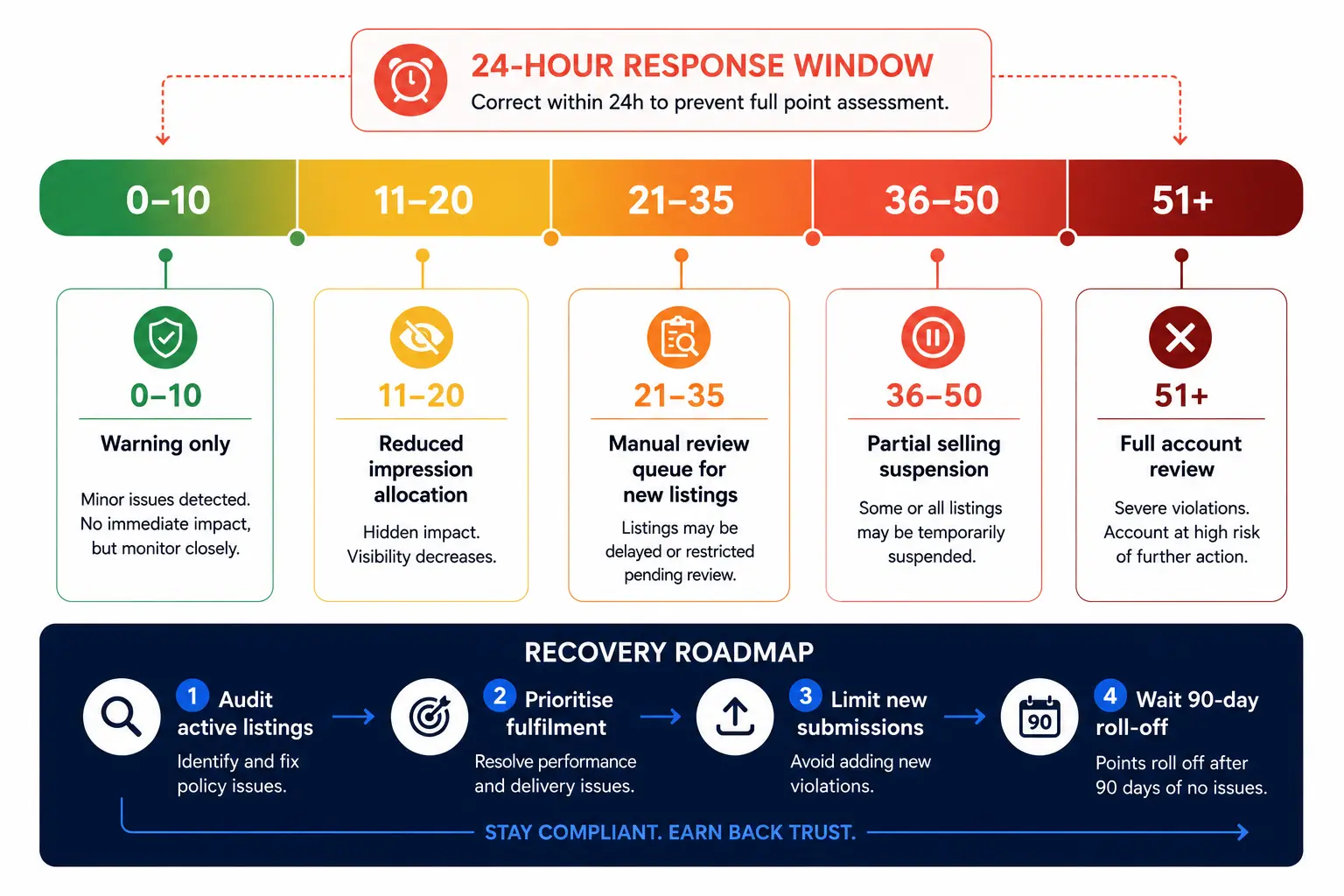
TikTok Shop's account health system operates on an accumulating violation point model — similar in structure to Amazon's performance dashboard but with less transparency. Points accumulate from:
Product quality violations (feed-related):
Listing rejected for prohibited content: 2–6 points (varies by severity)
Listing rejected for inaccurate product information: 1–3 points
Product description does not match physical product: 3–8 points
Counterfeit / IP infringement (if unintentional): 6–12 points
Fulfilment violations (non-feed but compounded by feed errors):
Late shipment: 1–2 points per instance
Order cancellation by seller: 2–4 points
Accumulation windows: Points are assessed on a rolling 90-day window in most markets (US and UK confirmed; SEA markets may vary). Points from over 90 days ago fall off automatically.
What Thresholds Trigger What Consequences
Violation Points (90-day window)        Consequence
1–10                                    Warning notification; no operational impact
11–20                                   Reduced product impression allocation (partial suppression)
21–35                                   New listing approval placed under manual review queue (slower review)
36–50                                   Selling privileges partially suspended (existing listings stay live; new listings paused)
51+                                     Full account review; risk of permanent suspension
The most important threshold is 11–20 points, because this is where the business impact begins, reduced impressions, but most sellers never see this happen because there's no explicit notification. Products seem to perform worse with no explanation.
The 24-Hour Response Window
TikTok's enforcement pattern shows that responding to a rejection notice within 24 hours (either by correcting the listing or submitting an appeal) typically prevents the full violation point from being assessed. Corrections acknowledged after 24 hours receive the full point value. After 72 hours with no response, the point is locked and cannot be reduced through appeal.
This means your feed monitoring and rejection notification workflow needs to surface issues within hours, not days.
The Difference Between a QC Reject and a Policy Freeze
QC Reject: Generated by automated image and data quality checks. Appeals are fast (usually resolved in 1–3 business days). The fix is usually in the data: change the image, remove a prohibited phrase, or correct a category mapping.
Policy Freeze: Generated when a product is flagged for potential policy violation review (counterfeit, restricted category, or unverified health claims). These go into a manual review queue. Resolution timelines are 5–15 business days. During a policy freeze, the product is delisted, existing orders are held, and the violation points are not assessed until review concludes.
If you receive a policy freeze, do not relist the product under a different sku_id while the review is active. Duplicate listings of products under policy review are treated as evasion and assessed maximum violation points.
The Account Health Recovery Roadmap
If your account has accumulated 20+ points:
Audit every active listing against the pre-launch checklist in Section 2: Proactively correct any listing that might generate additional rejections; reducing future point accumulation is more important than appealing past points.
Prioritise fulfilment performance: Fulfilment violations compound with product violations in the total score. Clean fulfilment during a recovery period offsets some of the impact.
Avoid new listing bursts during recovery: New listings in a degraded account state receive more aggressive quality scrutiny. Submit 10–15 new listings per day maximum, ensuring each one passes the full pre-launch audit before submission.
After 90 days of clean operation: The oldest violation points fall off the rolling window. Account health scores typically recover to normal thresholds within one full 90-day cycle if no new violations are accumulated.
The feed quality foundation is what prevents point accumulation in the first place. FeedOn's FeedPilot audit catches the data quality issues that generate feed-related violations before they reach Seller Center, particularly the image quality signals, prohibited phrase patterns, and category mapping errors that most rejections trace back to.
Market-by-Market Feed Requirements: US vs UK vs Southeast Asia
TikTok Shop operates under meaningfully different rules across markets. What passes review in the US gets rejected in Thailand. What's a recommended field in the UK is a required field in Indonesia.

No guide has published a structured comparison. Here it is.
New Seller Listing Limits
Market             Daily New Listing Cap     Probationary Period
United States      100 listings/day          First 30 days
United Kingdom     100 listings/day          First 30 days
Thailand           50 listings/day           First 60 days
Indonesia          50 listings/day           First 60 days
Vietnam            50 listings/day           First 60 days
Malaysia           75 listings/day           First 45 days
Philippines        50 listings/day           First 60 days
Exceeding the daily limit doesn't generate an error; listings above the cap simply enter a queue and are processed over subsequent days. However, listing a full 10,000-product catalog on Day 1 of a new TikTok Shop account will result in the catalog being processed over 100+ days, with no control over which products go live first. Prioritise your highest-velocity SKUs in the initial batch.
Currency and Pricing Field Requirements
Market        Currency Code      Price Format                               Compare-at Price
US            USD                Numeric + separate currency column         Optional
UK            GBP                Numeric + separate currency column         Optional
Thailand      THB                Must include VAT (7%) in listed price      Optional
Indonesia     IDR                Numeric; minimum price 1,000 IDR           Optional
Vietnam       VND                Must include VAT (10%) in listed price     Optional
Malaysia      MYR                Numeric + separate currency column         Optional
The VAT inclusion requirement in Thailand and Vietnam is a common migration failure for sellers expanding from US/UK operations. A product priced at $20 USD gets migrated to Thailand at 700 THB, but if the VAT component (7%) isn't added, the listing fails the pricing compliance review.
Restricted Category Differences
Health and Beauty:
US: Supplements require FDA disclaimer in description; no efficacy claims
UK: Products must comply with UK Cosmetics Regulation; EU CPNP registration may be required
SEA: Certification requirements vary significantly by country. Thailand requires FDA-TH registration for supplements. Indonesia requires BPOM registration for cosmetics and supplements. Attempting to sell without these in the relevant market is an automatic rejection.
Electronics:
US: CE marking not required; FCC documentation improves approval speed
UK: UKCA marking required post-Brexit for electronics sold to UK customers
SEA: Country-specific electrical safety certifications required; plug standard compatibility claim required
Apparel:
US/UK: Care label compliance (fiber content disclosure) required in description
SEA: Sizing standards differ significantly from Western sizing. Using Western-only sizing labels (S/M/L without local size equivalents) reduces conversion and may generate customer dispute violations
Language Requirements
US, UK: English only in primary fields
Thailand: Thai language in description field required for organic search visibility (English titles are accepted for catalog; Thai descriptions improve in-app search performance)
Indonesia: Bahasa Indonesia in description field strongly recommended; English-only descriptions receive reduced in-app search indexing
Vietnam: Vietnamese in description field for search indexing; English titles accepted
Malaysia, Philippines: English accepted in all markets
This has significant implications for feed management: if you're operating across US/UK and SEA markets, you need a per-market description variant, not a single description field. FeedOn's per-channel field configuration supports this; see how multi-channel feed publishing handles market-level variants and how the broader small business feed management guide covers multi-market expansion.
Optimizing Product Descriptions for TikTok Shop's In-App Search
Every guide frames TikTok description optimization around ad compliance and content policy. None address how TikTok Shop's native in-app search engine actually indexes product descriptions and what keyword patterns drive discovery within the platform.

How TikTok Shop's Internal Search Works
TikTok Shop's in-app search is not Google. It indexes product text differently and weights signals that don't exist in traditional shopping search:
The product name carries the highest ranking weight for in-app search, not just FYP distribution. The most important keywords for in-app search should appear in the product_name field within the 34-character limit where possible.
Description text is indexed as a full-text search field with substantially less weight than product names. But descriptions are the primary field for long-tail query matching. A shopper searching for "waterproof trail shoe for wide feet, size 9" is matching against description text, not just the title.
Attribute fields (color, size, material) are separately indexed and used as filter signals in search results. A product without a structured color attribute doesn't appear in color-filtered search results even if the color appears in the description text. Structured attributes always outperform description text for filter-based search.
Video content engagement is a search ranking signal. Products whose associated videos have above-average engagement (saves, shares, comments) receive a search ranking boost. This means your SEO on TikTok Shop is partially determined by your creator content strategy, not just your data quality.
Description Structure for In-App Search
Paragraph 1 (indexed most heavily by TikTok's search crawler): Open with the most important purchase-decision information in plain language. Answer the question a buyer would type. Example: A waterproof trail running shoe for women. Available in wide width. The Gore-Tex membrane keeps feet dry in heavy rain. Ideal for muddy trails and all-weather running.
Paragraph 2 (specification details): Structured specification data in a scannable format. Material breakdown, weight, warranty, and care instructions. TikTok's search crawler treats structured specification text as high-confidence attribute data.
Paragraph 3 (social proof context): Creator or community context where relevant. "Featured by outdoor creators with 2M+ followers." This is TikTok-native trust language that performs better in the platform context than traditional e-commerce social proof.
What to avoid in TikTok Shop descriptions:
Markdown formatting (bold, headers): TikTok's description renderer strips these inconsistently
External links or references to other platforms
Promotional language in the description body (reserve for dedicated promotion fields)
Keyword stuffing TikTok's text classifier penalizes repetitive keyword patterns in descriptions the same way Google does in titles
The In-App Search Keyword Research Process
TikTok's native search suggest feature (the autocomplete that appears when you type in TikTok Shop's search bar) is your most direct keyword signal. Unlike Google, TikTok's search suggestions reflect what actual buyers type within the platform, not what they type in a general web search engine.
Process:
Open TikTok Shop's in-app search
Type your core product category and note every autocomplete suggestion
These suggestions are your primary description keywords; use them naturally in Paragraph 1 and 2
Cross-reference against your existing Google Shopping keyword data, noting which terms appear in TikTok's suggestions that don't appear in your Google keyword set (these are TikTok-native search patterns)
For platforms handling product description generation at scale, see how FeedOn's AI Copy Boosters generate channel-specific descriptions rather than repurposing a single description across all channels. The structural difference between a TikTok description and a Google Shopping description is significant enough that they should be generated separately.
Product Review Timeline: What Actually Affects Speed and How to Expedite
Every guide says a TikTok product review takes "a few business days". The real range is 4 hours to 6 weeks, depending on factors that are never documented.

Here is what actually determines your review timeline.
Factors That Shorten Review Time
Account age and health score: Established sellers (12+ months active, account health score above 80) benefit from expedited automated review queues. New accounts (under 90 days) are routed through more thorough human review regardless of product category.
Product category: Standard apparel and home goods in compliant condition typically resolve in 1–3 business days. Electronics, supplements, beauty, and health products are routed to category-specialist reviewers with 3–7 business day timelines. The category routing is automatic; there's no way to reclassify a supplement as a general wellness item to get faster review.
Completeness of submitted data: Products submitted with all optional fields populated (GTIN, brand certification, package dimensions, and video link) move through automated quality checks faster because the system has sufficient data to make a confidence decision without escalating to human review. Incomplete submissions are more likely to be queued for manual inspection.
Image quality score: Products with high image quality scores (clean background, correct ratio, no text overlay, and proper lighting) pass the automated image quality gate and proceed to content review faster. Low-scoring images are held for manual image review in an additional queue with its own backlog.
How Review Speed Varies by Market
US and UK: Fastest review infrastructure; automated review handles >80% of standard products
Thailand and Vietnam: Manual review for health/beauty categories takes 7–14 business days
Indonesia: BPOM-regulated products require documentation upload and specialist review (10–21 business days for supplements and cosmetics)
How to Expedite Review for Time-Sensitive Launches
Before submission:
Ensure every optional field is populated (GTIN, full attribute set, package dimensions)
Use a clean studio product image that passes the silent suppression checklist from Section 2
Pre-verify your category mapping against TikTok's current taxonomy; category mismatch is the most common reason products enter manual review
After submission:
If your product is in the "Under Review" status for more than 5 business days with no communication, use TikTok Seller Center's support chat to flag it as time-sensitive with a launch date
Provide your seller account age, product category, and submission date in the support ticket; this information routes the escalation to the correct review team
For regulated category products (supplements, electronics), proactively attach certification documentation in the support ticket even if the system didn't prompt for it during submission; it reduces back-and-forth delays
During major platform events, TikTok's review infrastructure experiences significant backlogs during major sale events (11.11, Black Friday, and TikTok Live Grand Sales). Submit new listings at least 14 business days before any event you intend to participate in.
Keeping your feed data clean and complete is the single most effective way to avoid review delays, because the automated gate clears faster when the data is unambiguous. FeedOn's FeedPilot audit catches the data quality gaps that cause manual review escalations before your listings reach Seller Center. The same feed health principles that apply to Google Merchant Center apply here; see the Google Shopping feed setup guide for the baseline audit principles that translate directly to TikTok feed preparation.
Putting It All Together: TikTok Feed Management as a System
The ten questions this guide answers are not ten separate problems. They're the same underlying challenge: TikTok Shop's algorithm, enforcement system, and data architecture are more complex than any competitor guide acknowledges.

The sellers who perform consistently on TikTok Shop treat their product feed as living infrastructure, not a one-time CSV upload. They:
Engineer their titles for FYP distribution, not just keyword matching
Run a suppression audit before every batch goes live
Maintain SKU stability as operational discipline, not just a technical detail
Allocate inventory across channels with explicit buffers instead of shared pools
Monitor account health as proactively as they monitor ROAS
Adapt their data structure for each market rather than force-fitting a single global feed
The infrastructure that makes all of this manageable at scale is a feed platform that handles per-channel transformation, real-time sync, and data quality enforcement automatically rather than requiring manual intervention for every channel-specific requirement.
If you're managing a catalog across TikTok Shop, Google Shopping, and Meta simultaneously, FeedOn's free trial lets you test the full multi-channel workflow on 200 products with channel-specific title generation, AI attribute extraction, and the feed audit that catches suppression risks before launch.
Frequently Asked Questions (FAQs)
1. What is TikTok Shop product feed optimisation?
TikTok Shop product feed optimisation is the process of improving your product data—including titles, descriptions, images, categories, attributes, and pricing—to increase product visibility, reduce listing rejections, and improve conversions on TikTok Shop.
2. Why is product feed optimisation important for TikTok Shop?
A well-optimised product feed helps TikTok understand your products, improves product discoverability, increases listing quality, reduces catalog errors, and gives your products a better chance of appearing in search results and recommendation feeds.
3. What information should every TikTok Shop product feed include?
A high-quality TikTok Shop feed should include the following:
Clear product titles
Detailed product descriptions
High-resolution images
Accurate pricing
Product categories
Brand information
Product attributes like size, color, and material
Inventory availability
Shipping details where applicable.
4. How should I optimise product titles for TikTok Shop?
Product titles should be concise, easy to understand, and highlight the product's key benefit. Unlike Google Shopping, TikTok generally performs better with shorter, more engaging titles that appeal to shoppers browsing through video content.
5. How are TikTok Shop product titles different from Google Shopping titles?
Google Shopping titles are typically keyword-rich and specification-focused, while TikTok Shop titles should be shorter, benefit-driven, and optimised for discovery within a social commerce environment.
6. What image requirements does TikTok Shop have?
TikTok Shop recommends high-quality product images with a minimum resolution of 600 × 600 pixels, clean backgrounds, and clear product visibility. Lifestyle images can also improve engagement and creator adoption.
7. Why are product categories important in TikTok Shop?
Correct category mapping helps TikTok understand your products and reduces the chances of listing rejections. Accurate categories also improve product visibility and help shoppers find relevant products.
8. What are the most common TikTok Shop feed errors?
Common issues include:
Missing product attributes
Incorrect categories
Poor-quality images
Price mismatches
Short or incomplete descriptions
Missing brand information
Inconsistent inventory data.
9. How often should I update my TikTok Shop product feed?
Your product feed should be updated automatically whenever inventory, pricing, product availability, or product information changes. Frequent synchronisation helps prevent listing errors and improves customer experience.
10. Does product feed optimisation improve TikTok Shop sales?
Yes. Optimised product feeds can improve product visibility, increase click-through rates, reduce catalog disapprovals, and support higher conversion rates by presenting more accurate and engaging product information.
11. What role do product descriptions play in TikTok Shop?
Product descriptions should explain product benefits, answer common customer questions, and encourage purchases. Story-driven, conversational descriptions typically perform better than simple lists of technical specifications.
12. Can AI help optimise TikTok Shop product feeds?
Yes. AI tools can automatically generate optimised product titles, improve descriptions, extract missing attributes, recommend categories, detect feed errors, and create channel-specific product content at scale.
13. What products perform best on TikTok Shop?
Products with strong visual appeal, clear demonstrations, problem-solving benefits, and viral potential often perform well. Beauty, fashion, home products, electronics, and lifestyle accessories are among the most popular categories on TikTok Shop.
14. Can I use the same product feed for Google Shopping and TikTok Shop?
It's possible, but it's not recommended. Each platform has different optimisation requirements, category structures, and audience behaviour. Creating channel-specific feeds usually delivers better performance across multiple sales channels.
15. How can FeedOn help optimise TikTok Shop product feeds?
FeedOn helps automate TikTok Shop feed optimisation by improving product titles and descriptions with AI, mapping categories, extracting product attributes, auditing feed quality, fixing catalog issues, and publishing optimised feeds specifically for TikTok Shop requirements.