
Headless Commerce Product Feed Sync: The Engineering Guide Nobody Else Has Written
Every guide on headless commerce product feed sync makes the same promise: connect your commerce backend to your frontend with webhooks, trigger ISR revalidation on price changes, and your product data will always be fresh.
That advice is not wrong. It is just the first 10% of the problem.
The other 90% is what happens in production: webhooks that arrive out of order; CDN edges that serve stale prices during the 90-second rebuild gap; catalog sizes that make static generation impractical; three systems that all claim to own the same product field; and behavioral event streams that silently stop working the moment you go headless, breaking your recommendation engine without a single error message.
If you're a frontend engineer, backend architect, or platform engineer responsible for keeping product data accurate in a headless stack, this is the guide you actually needed.
The ISR Race Condition: What Shoppers See in the 90-Second Rebuild Gap
Incremental Static Regeneration (ISR) is the canonical pattern for keeping headless product pages current without full site rebuilds. The flow is straightforward: Shopify or your commerce backend fires a webhook on a price or inventory change → your Next.js app receives the webhook → ISR revalidation is triggered → the CDN edge refreshes the affected page.
The problem is the gap.

The Race Window
Between the moment a webhook fires and the moment the CDN edge serves the regenerated page, there is a window typically of 30 to 90 seconds depending on your infrastructure during which shoppers can access the stale cached version.
In most scenarios, this is acceptable. A product title changing from "Summer Collection" to "Summer 2026 Collection", showing stale for 90 seconds, is a non-issue.
The scenarios where this is not acceptable:
Scenario A: Flash sale price drops at exactly 12:00 PM: You reduce 200 product prices from $89.99 to $49.99 for a 2-hour sale. For the 90 seconds following the webhook, some shoppers see the old price. They add to the cart at $89.99 (the cached price). When they hit checkout, they see $49.99 (the live price). Result: confusion, abandoned carts, and support tickets.
Scenario B: Last unit sold while a cached page says "In Stock": Your last unit of a high-demand SKU sells at 2:14 PM. The webhook fires. At 2:15 PM – still within the revalidation gap – another shopper sees the cached "In Stock" page, adds to the cart, and reaches checkout only to be told the item is unavailable. Oversell risk in a headless stack without cart-time server validation.
Scenario C: Price error corrected midday: You discover a pricing mistake, $9.99 instead of $99.99, at 11:03 AM. You correct it in the backend. Between 11:03 and the CDN refresh, the incorrect price is still live. Legally and commercially, this is the most serious scenario.
The Fixes: Layered Safety Architecture
No single fix solves the race condition entirely. The correct approach is a layered defense:
Stale-While-Revalidate with price-sensitivity tagging: Use Cache-Control: stale-while-revalidate directives, but tag price and inventory fields separately from editorial content. Price changes trigger an aggressive revalidation priority (purge immediately) while title changes use a standard queue. Most CDN providers (Cloudflare, Vercel Edge, and Fastly) support surrogate key purging that allows field-level cache invalidation rather than full-page purging.
Cart-time server validation (non-negotiable): Every add-to-cart action must perform a server-side price and inventory check at the moment of cart creation; it must not trust the displayed price from the cached page. This is the most important safety net. A customer sees the cached price on the product page; the moment they add it to the cart, your server validates it against the live commerce backend. If the price has changed, display the updated price before checkout proceeds.
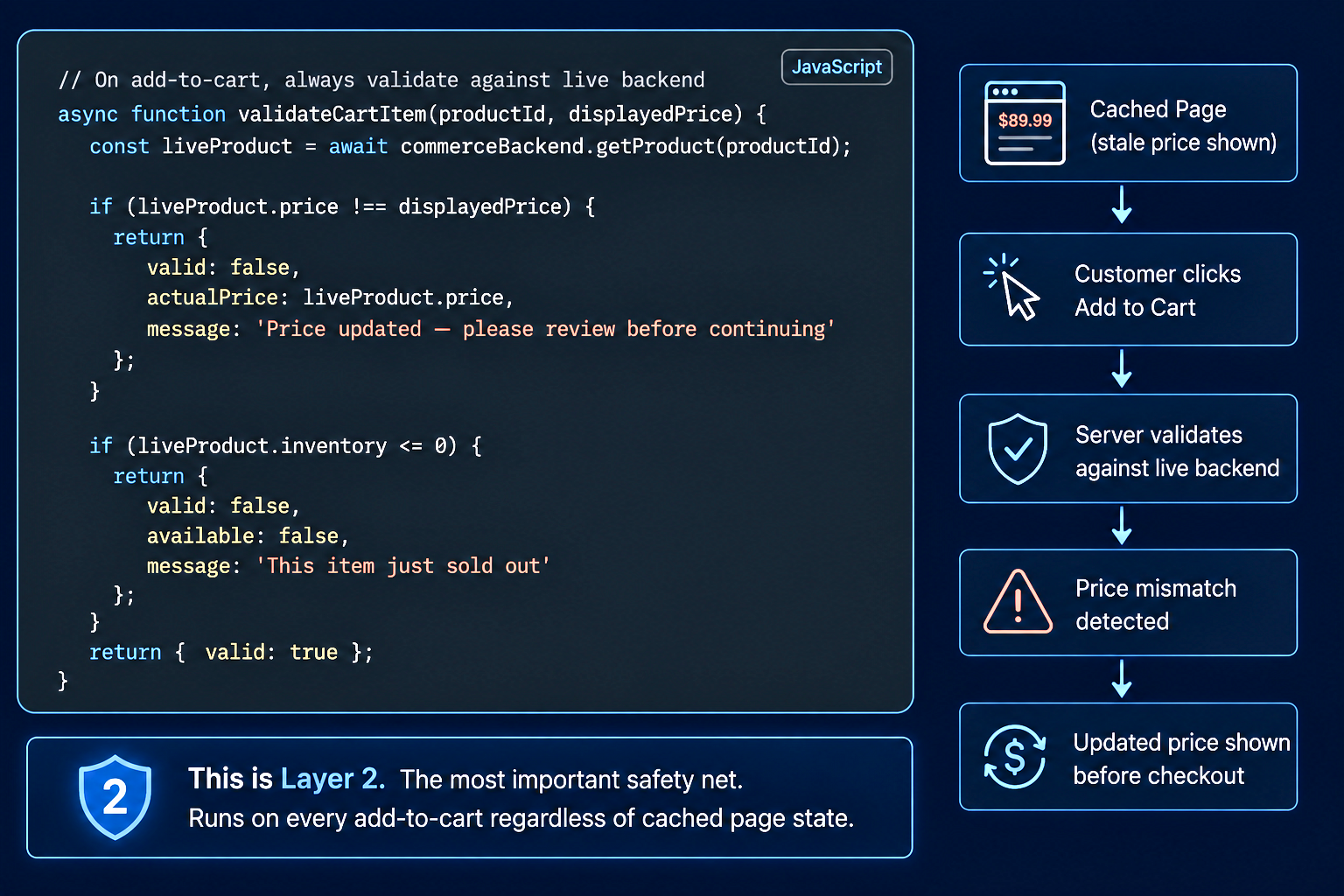
Optimistic lock on last-unit inventory: For products with inventory below a threshold (e.g., fewer than 5 units), bypass the static cache entirely and serve inventory status from a real-time API call on every page load. The performance cost of one API call for a low-stock product is acceptable relative to the oversell risk. Flag these products with a low_stock custom label in your feed management workflow.
Webhook acknowledgement with retry timeout: Your webhook handler should return a 200 acknowledgement only after the ISR revalidation job has been queued, not just after the webhook has been received. If the revalidation job fails to queue (infrastructure error or rate limit), the webhook retry mechanism re-fires the event, and the queue picks it up. Without this, a webhook that fires but fails to trigger revalidation produces no error and leaves the page permanently stale.
Managing the feed data that flows from your commerce backend through these layers and keeping it consistent with what Google Shopping and Meta Catalogue display is a separate but connected challenge. FeedOn's real-time feed sync ensures that the same price correction that triggers your ISR revalidation also propagates to your channel feeds immediately so your shopping ads don't continue serving the stale price after your shopfront has corrected it. See how this connects to feed error recovery in Google Merchant Center.
Webhook Reliability: Building a Sync That Survives Out-of-Order, Duplicate, and Dropped Events
"Use webhooks for real-time sync" is the advice every guide gives. None of them mention that webhook delivery is not guaranteed, ordering is not guaranteed, and the same event can fire multiple times.
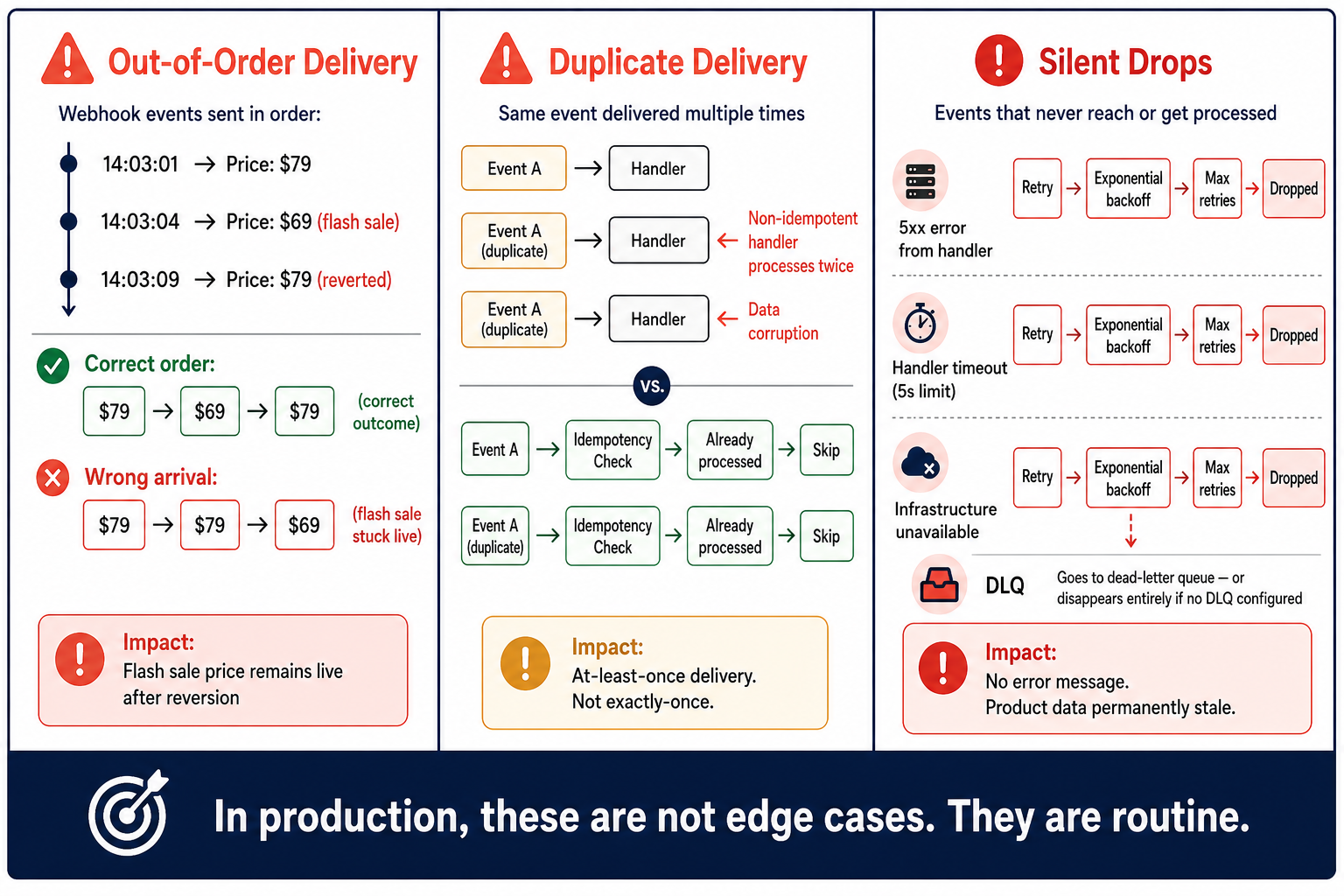
In production, these are not edge cases. They are routine.
The Three Failure Modes
Failure Mode 1: Out-of-order delivery: Your commerce backend fires three webhooks in quick succession: optimization,
14:03:01 - Product A price changes to $79
14:03:04 - Product A price change to $69 (flash sale applied)
14:03:09 - Product A price change to $79 (flash sale reverted to the wrong product)
If your webhook handler processes these in arrival order rather than event timestamp order and the network delivers event 3 before event 2, you might apply $79 → $69 → $79 correctly, or you might apply $79 → $79 → $69, leaving the flash sale price live after it should have been reverted.
Failure Mode 2: Duplicate delivery: Shopify and most commerce platforms guarantee at-least-once delivery, not exactly-once delivery. Under high load or network instability, the same webhook event can fire 2–5 times. If your handler is not idempotent – if processing the same event twice produces a different result than processing it once – you'll get data corruption.
Failure Mode 3: Silent drops Webhooks fail silently when your handler returns a 5xx error, your handler times out (most platforms have a 5-second timeout window), or your infrastructure is temporarily unavailable. The platform marks the webhook as failed and retries on an exponential backoff schedule, but if your handler is consistently unavailable, events get dropped from the retry queue after a maximum retry window (typically 24–48 hours on most platforms).
The Reliable Webhook Architecture
A production-grade headless feed sync does not rely on direct webhook → handler → database updates. It uses a queue as the intermediate layer:
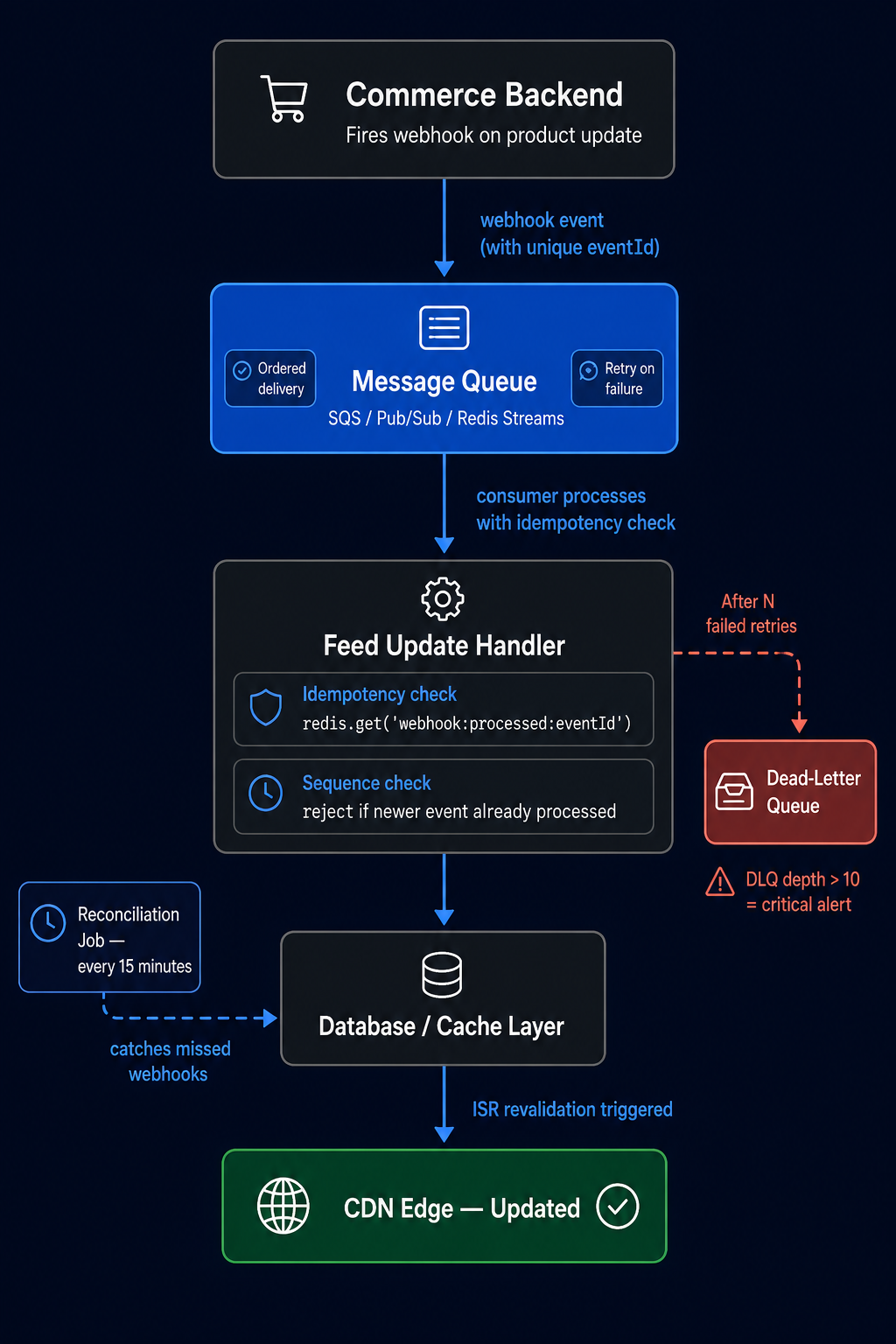
Idempotency keys: every webhook event from your commerce platform contains a unique event ID. Your handler must check this ID against a processed-events log before taking action:
Dead-letter queues: Events that fail processing after N retry attempts must be routed to a dead-letter queue, not silently discarded. Your operations dashboard should surface DLQ depth as a critical alert. A DLQ with 50 events means 50 product updates that never reached your shopfront or channel feeds.
The reconciliation job (the most important thing nobody builds) and webhooks should be treated as a low-latency optimization, not the source of truth. The source of truth is your commerce backend. Every production headless stack needs a scheduled reconciliation job that runs every 15 minutes and compares the database state of your product feed against the live state of the commerce backend:
This job catches every event that the webhook pipeline missed, including network failures, handler timeouts, and dropped retries—and ensures your feed converges to the correct state within 20 minutes even if webhooks fail entirely.
The same reconciliation principle applies to your downstream channel feeds. When FeedOn syncs your product data to Google Shopping, Meta Catalog, and TikTok Shop, it maintains its own consistency check between your source catalog and the published channel feeds, not just relying on event-triggered updates. This is the architecture behind how AI is changing product feed management in 2026 not just speed, but reliability.
API Rate Limit Architecture: Surviving Flash Sales and Bulk Imports
One source in this SERP notes that a 10,000-SKU catalog requires 40 sequential API calls for initial static generation. It identifies this as a limitation but offers no solution.
Here is the full architecture for managing rate limits in production.
The Rate Limit Problem at Scale
Shopify's Storefront API uses a point-based rate limit system (currently 1,000 points per second per app, with complex queries costing more points). The Admin API uses a bucket system (typically 40 requests/second for Plus stores). Both systems are designed for predictable, distributed traffic not for
Initial catalog sync of 50,000 SKUs (requires thousands of sequential API calls)
Flash sale webhook storm where 500 products update simultaneously, each triggering a revalidation API call
Multiple app instances running concurrently against the same API quota
The Centralized Counter Pattern
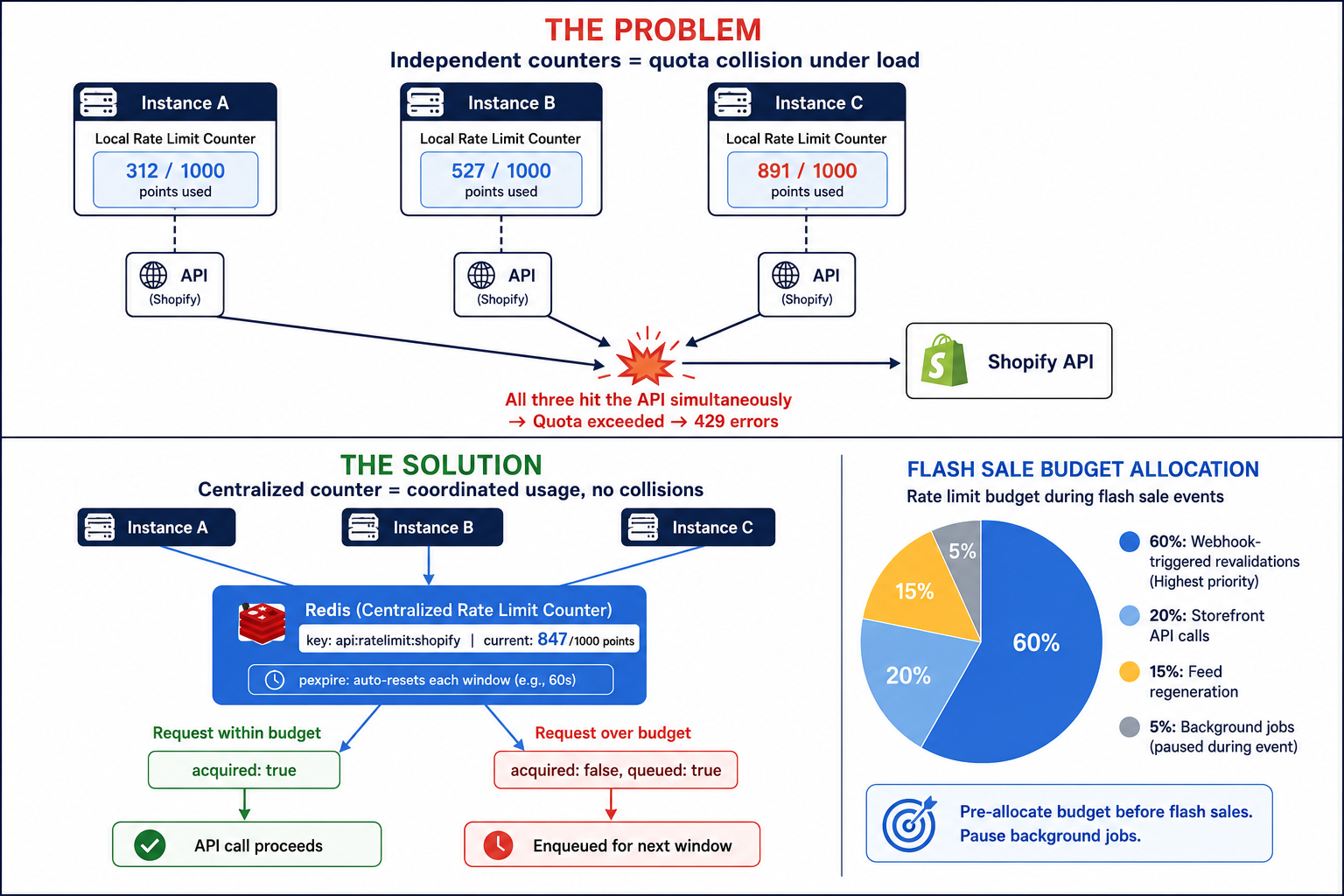
When multiple instances of your headless application share one API quota, each instance needs to read the current budget before making a call – not maintain its own independent counter.
Bulk Operations API for Initial Sync
For initial catalog imports and large batch updates, never use per-product REST or GraphQL calls. Use Shopify's Bulk Operations API, which processes the entire request asynchronously and returns a JSONL file:
The Bulk Operations API uses a single rate-limit "slot" rather than charging per-product. A 50,000-SKU initial sync that would require 200+ sequential API calls becomes a single bulk operation request. Poll for completion, then download the JSONL result file; there's no rate-limit exposure during processing.
Rate Limit Budget Allocation for Flash Sales
During flash sale events, your webhook storm and revalidation calls compete with your regular storefront API calls for the same budget. Pre-allocate rate limit budget before the event:
Pause background reconciliation jobs for the event duration
Switch static generation calls to use cached data with a longer stale window
Dedicate the full rate limit budget to processing webhook-triggered updates
Queue non-urgent operations (description updates and image refresh) for post-event processing
This connects directly to the feed publishing workflow: when your Shopify backend is under flash-sale load, your channel feeds also need to update simultaneously. FeedOn handles feed publishing as an independent process from your storefront infrastructure, meaning a rate-limited storefront doesn't block your Google Shopping or Meta feed updates from propagating.
Data Ownership in Composable Commerce: A Field-Level Authority Map
"Use a single source of truth" is the unanimous advice. Every guide then describes an architecture with three systems, each owning different parts of the product record, and leaves you to figure out what happens when they disagree.
Here is the framework for making three systems of record agree.

The Field-Type Taxonomy
Product data in a composable architecture falls into three categories, and each category has a different natural owner:
Transactional data - changes frequently, must be authoritative in real time, and has direct commercial consequence:
Price (including sale price and compare-at price)
Inventory quantity and availability
SKU and variant identifiers
Fulfillment status
Natural owner: Commerce backend (Shopify, Commercetools, BigCommerce). This data must always be read from the commerce backend at transaction time, never from a CMS or PIM cache.
Editorial content - changes occasionally and is authored by humans and requires a workflow and approval:
Product descriptions (marketing copy)
SEO meta titles and descriptions
Rich content blocks, video embeds, buyer guides
Brand storytelling content
Natural owner: Headless CMS (Contentful, Sanity, Storyblok). Editorial changes go through the CMS workflow and publish via CMS webhooks. The commerce backend is not involved.
Technical attributes - changes rarely, requires structured data governance, drives channel feed compliance.
GTINs, MPNs, brand identifiers
Material composition, dimensions, weight
Category classifications (Google taxonomy, TikTok category IDs)
Certifications, compliance flags
Natural owner: PIM (Akeneo, Pimcore, Plytix). Attribute data is mastered in the PIM and pushed to the commerce backend and CMS. Channel feeds read from PIM-sourced attributes.
Write Authority Rules by Field
Once you've established which system owns each field type, document explicit write authority rules:
Field                  Write Authority           Read Authority                            Conflict Rule
price                  Commerce backend only     All systems read from the backend.        The backend always wins
sale_price             Commerce backend only     All systems read from the backend.        The backend always wins
inventory_quantity     Commerce backend only     Backend for cart; feed for display        The backend always wins
product_title          PIM OR CMS                Commerce + CMS                            PIM title = canonical; CMS title = display variant
description            CMS only                  The commerce backend reads via API        CMS always wins
gtin                   PIM only                  Commerce reads GTIN from the PIM.         PIM always wins
google_category        PIM only                  Feed exports read from PIM                PIM always wins
seo_title              CMS only                  Head tag generation reads from the CMS.   CMS always wins
images                 Commerce backend + CMS    Both systems                              Source-specific: product images from backend, editorial from CMS
Cross-System Drift Detection
Even with clear write authority rules, systems drift. A price update in the commerce backend may not propagate correctly to your feed cache. A GTIN correction in the PIM may not reach the commerce backend's variant record. Drift detection catches these before they become customer-facing problems:
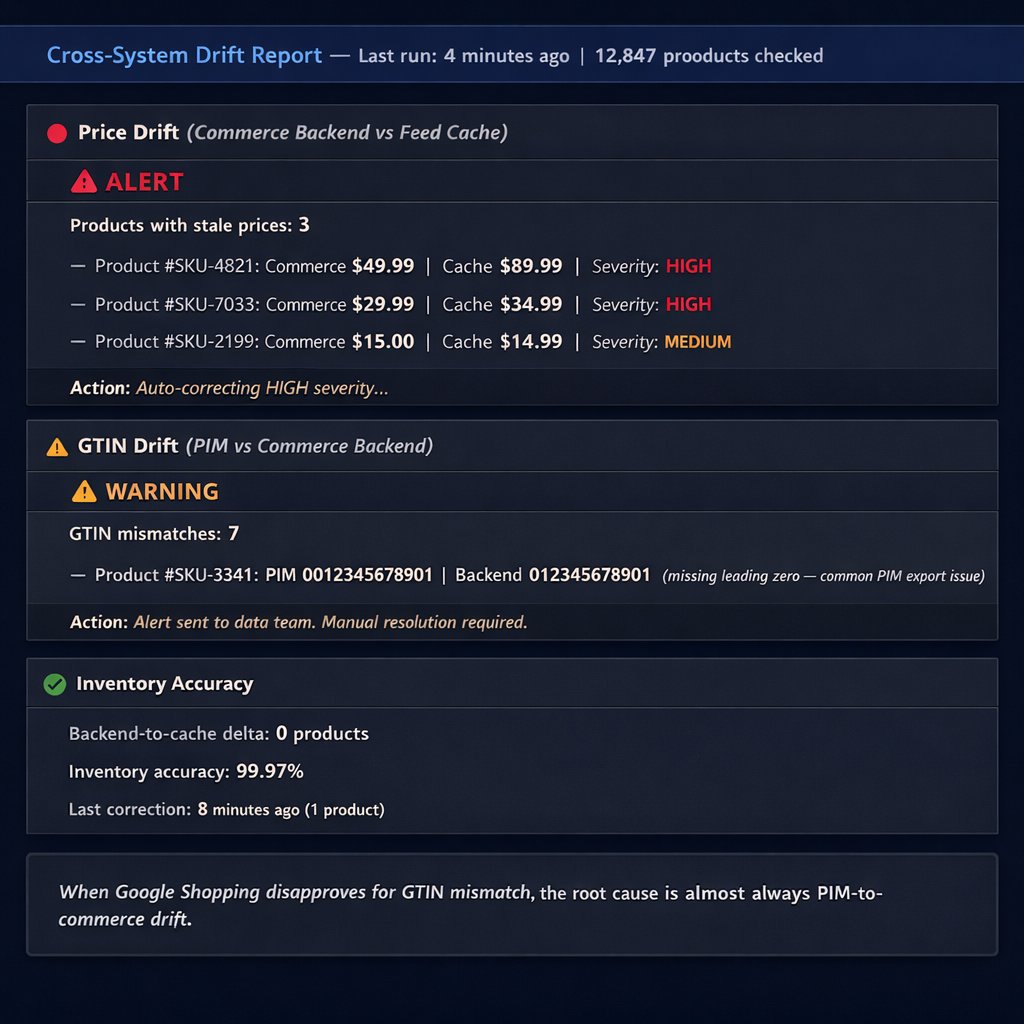
This data ownership framework directly affects your channel feed quality. When Google Shopping disapproves a product for a GTIN mismatch, the root cause is almost always PIM-to-commerce drift; the PIM has the correct GTIN, but the commerce backend (and therefore the feed) has an old or incorrect value. FeedOn's feed audit surfaces exactly these cross-system inconsistencies, flagging products where the GTIN in the feed doesn't match what the commerce backend reported using the same detection logic the drift job above implements. See also how this connects to fixing Google Merchant Center feed errors that often originate from data ownership gaps.
Headless Backend to Ad Channels: Generating Google, Meta, and TikTok Feeds from a GraphQL API
Every ranking guide treats "product feed sync" as a storefront problem: backend → frontend. None address the downstream channel problem: your headless backend doesn't have a native Google Merchant Center export.
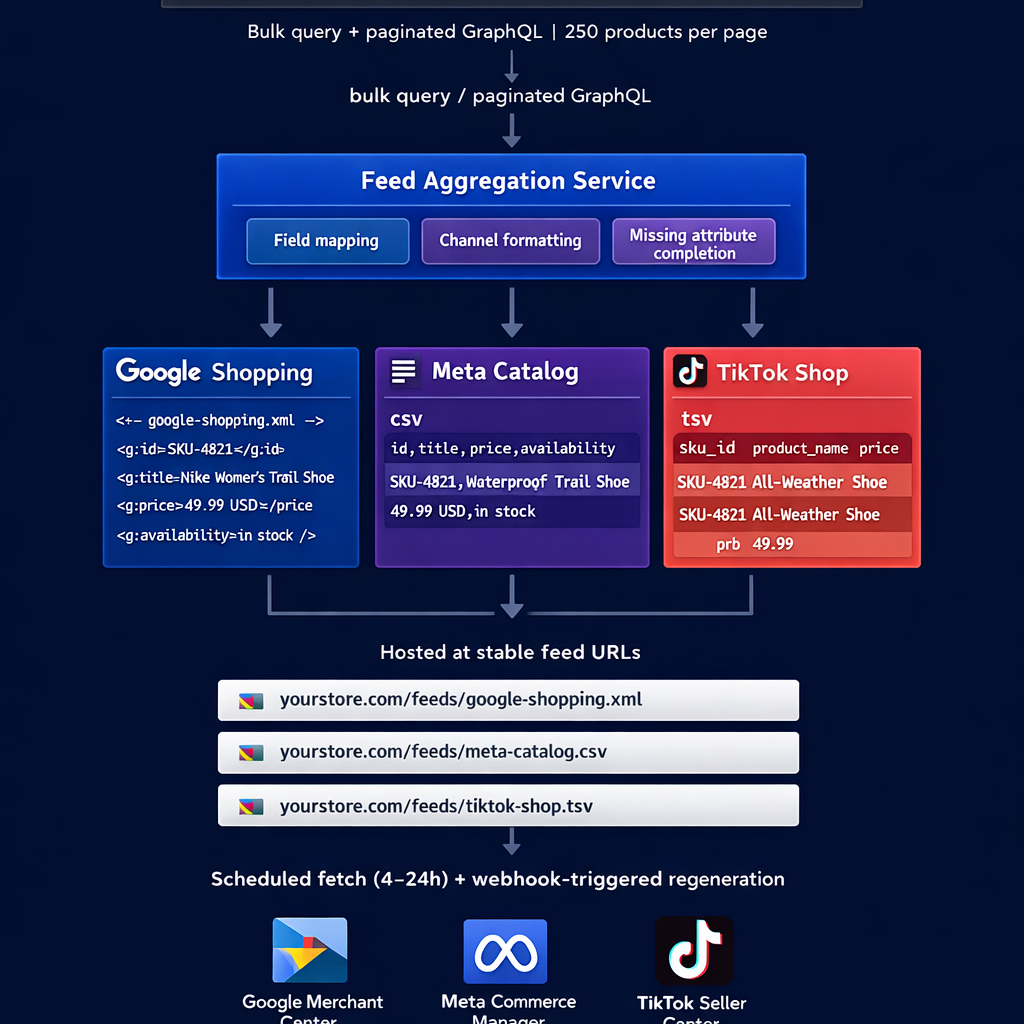
Traditional Shopify merchants get a Google feed URL out of the box. Headless architectures don't. You need to build or use a feed generation pipeline.
The Pipeline Architecture
Commerce Backend (GraphQL API)
│
▼ bulk query / paginated GraphQL
Feed Aggregation Service
│
▼ field transformation + channel-specific formatting
Channel Feed Files (XML for Google, CSV for Meta, TSV for TikTok)
│
▼ hosted at stable feed URLs
Google Merchant Center | Meta Commerce Manager | TikTok Seller Center
│
▼ scheduled fetch (every 4–24 hours) + webhook-triggered regeneration
Querying Your Shopify GraphQL API for Feed Data
A feed-generation query needs all product attributes, variants, and metafields in a single efficient request:
graphql
query GetProductsForFeed($cursor: String) {
products(first: 250, after: $cursor) {
pageInfo {
hasNextPage
endCursor
}
nodes {
id
title
description
handle
vendor
productType
tags
images(first: 1) {
nodes { url }
}
variants(first: 100) {
nodes {
id
sku
price
compareAtPrice
inventoryQuantity
barcode
selectedOptions {
name
value
}
image { url }
}
}
metafields(
identifiers: [
{ namespace: "feed", key: "gtin" }
{ namespace: "feed", key: "google_category" }
{ namespace: "feed", key: "material" }
{ namespace: "feed", key: "age_group" }
{ namespace: "feed", key: "gender" }
]
) {
key
value
}
}
}
}
Paginate through all products using the cursor, accumulating all nodes before generating the feed file.
Channel-Specific Field Transformations
The same product data require different structures for each channel:
Google Shopping (XML)
javascript
function transformForGoogle(product, variant) {
return {
'g:id': variant.sku ||
${product.id}_${variant.id},'g:title': buildGoogleTitle(product, variant), // Brand + Gender + Type + Attributes
'g:description': stripHtml(product.description).substring(0, 5000),
'g:link':
https://yourstore.com/products/${product.handle}?variant=${variant.id},'g:image_link': variant.image?.url || product.images.nodes[0]?.url,
'g:price':
${variant.price} USD,'g:sale_price': variant.compareAtPrice ?
${variant.price} USD: undefined,'g:availability': variant.inventoryQuantity > 0 ? 'in stock' : 'out of stock',
'g:brand': product.vendor,
'g:gtin': getMetafield(product, 'feed', 'gtin'),
'g:google_product_category': getMetafield(product, 'feed', 'google_category'),
'g:material': getMetafield(product, 'feed', 'material'),
'g:gender': getMetafield(product, 'feed', 'gender'),
'g:age_group': getMetafield(product, 'feed', 'age_group'),
'g:item_group_id': product.id,
'g:color': getOption(variant, 'Color'),
'g:size': getOption(variant, 'Size'),
};
}
Meta Catalog (CSV)
javascript
function transformForMeta(product, variant) {
return {
id: variant.sku,
title: buildMetaTitle(product, variant), // Benefit-first, 40-char truncation
description: buildMetaDescription(product), // Benefit-led, lifestyle-focused
availability: variant.inventoryQuantity > 0 ? 'in stock' : 'out of stock',
condition: 'new',
price:
${variant.price} USD,link:
https://yourstore.com/products/${product.handle}?variant=${variant.id},image_link: variant.image?.url || product.images.nodes[0]?.url,
brand: product.vendor,
google_product_category: getMetafield(product, 'feed', 'google_category'),
item_group_id: product.id,
color: getOption(variant, 'Color'),
size: getOption(variant, 'Size'),
};
}
Feed File Hosting and Update Triggers
Host generated feed files at stable, publicly accessible URLs:
Regenerate these files on two triggers:
Webhook trigger: Any product update webhook queues a feed regeneration job (debounced – don't regenerate for every individual product update during a flash sale; batch within a 5-minute window)
Scheduled regeneration: Full catalog regeneration every 4 hours as a fallback
The operational overhead of building and maintaining this pipeline per channel with channel-specific field transformation logic, format compliance, and update triggers is substantial. FeedOn provides this as a managed service: connect your Shopify store or custom API endpoint, and FeedOn generates channel-compliant feeds for Google Shopping, Meta Catalog, and TikTok Shop automatically, with webhook-triggered regeneration and AI-powered field completion for missing attributes. See how this compares to building custom export logic in the best product feed management software comparison and how it integrates with Shopify-specific feed workflows.
Large Catalog Architecture: Sync Strategy for 50,000+ SKUs
Static generation at build time breaks down well before 50,000 SKUs. The architecture that works at 500 SKUs, building every product page at deploy time, creates 45-minute build windows, rate limit exhaustion, and CDN cache sizes that exceed practical limits.
Here is the architecture shift that large catalogs require.

The Architectural Inflection Points
Under 5,000 SKUs: Full static generation is feasible. Build all PDPs at deploy time. ISR handles incremental updates.
5,000–20,000 SKUs: Hybrid static generation. Statically generate only top-traffic PDPs (your top 20% by traffic volume, identified from analytics). Remaining PDPs use on-demand ISR generated on the first request and cached at the edge. This reduces build time by 60–80% while maintaining static performance for high-traffic pages.
20,000–100,000 SKUs: Search index as primary data layer. At this scale, ISR for every PDP is impractical. Use Algolia or Elasticsearch as the primary product data layer that the storefront reads from. The commerce backend webhook updates the search index, and the storefront reads directly from the index on each request. Pages are server-rendered with a short cache TTL (60–300 seconds) rather than statically generated.
100,000+ SKUs: Edge rendering with distributed caching. Commerce backend → message queue → search index update → edge workers render product pages with per-product cache TTLs. Static generation is abandoned entirely at this scale.
The Search Index Pattern for Large Catalogs
Commerce Backend
│ webhook on product update
▼
Message Queue
│ consumer updates search index
▼
Algolia / Elasticsearch Index
│ storefront reads from index on every request
▼
Server-Rendered PDP (60-second cache TTL)
The search index becomes the read path for your storefront. The commerce backend is the write path. This decoupling means:
A 50,000-SKU "initial sync" becomes an index build job, not a build-time process
Product updates propagate through the queue to the index in seconds
No API rate limit exposure on the storefront read path
Search functionality (filtering, faceting, search-as-you-type) is a free benefit of the architecture
For the channel feed side of a large catalog, bulk export from the search index is more efficient than paginated GraphQL queries. FeedOn's bulk catalog processing handles large catalogs without per-product API call overhead, the same architecture consideration that makes the search index pattern effective for storefronts. See the B2B feed management guide for how large catalog complexity compounds in B2B contexts with pricing tiers and customer-specific visibility.
Multi-Region Localization: Syncing Prices, Descriptions, and Availability Across Markets
Guides say headless "supports multi-market and localization." None cover the implementation, and the implementation has real failure modes.
The Three Localization Problems
Problem 1: CDN cache serving wrong currency on region-specific cache hit If your product pages include the price in the page HTML, and your CDN caches at the global edge, a UK shopper might get a US-cached page showing USD prices. The fix is to never include the price in the cached HTML, fetch it client-side from a locale-aware API call, or use a Vary header on accept-language to maintain separate cache versions per locale.
Problem 2: Differential availability across regions A product in stock in the UK but out of stock in the US needs to show "In Stock" to UK shoppers and "Out of Stock" to US shoppers from the same product page. Static generation cannot handle this; you'd need region-specific builds. The correct approach: availability status is never in the cached HTML. It's always fetched server-side or client-side with locale context.
Problem 3: Locale-aware feed queries for channel exports Your Google Shopping feed for the UK needs GBP prices and UK availability. Your US feed needs USD prices and US availability. These require locale-parameterized queries:
graphql
query GetProductsForRegion($country: CountryCode!, $language: LanguageCode!) @inContext(country: $country, language: $language) {
products(first: 250) {
nodes {
title
description
variants(first: 100) {
nodes {
price { amount currencyCode }
inventoryItem {
inventoryLevels(first: 5) {
nodes {
location { name country }
quantities(names: ["available"]) { name quantity }
}
}
}
}
}
}
}
}
Run this query separately for each market (country code + language code) and generate separate feed files per market.
For multi-market feed publishing, FeedOn handles locale-specific feed generation as part of the multi-channel publishing workflow running separate feed exports for each market with the correct currency, language, and availability context, without requiring separate codebases per market. This is particularly relevant for small and medium businesses expanding across markets; see the small business feed management guide for a practical overview of multi-market expansion considerations.
Zero-Downtime Migration: Running Two Product Backends Simultaneously During Cutover
Platform migrations are the most dangerous moment in a headless stack's lifecycle and the most completely unaddressed topic in this SERP. Every guide assumes you're building fresh. The reality is that most teams are migrating from an existing platform (Magento, WooCommerce, or a legacy monolith) while keeping the live store running.
The Dual-Write Architecture
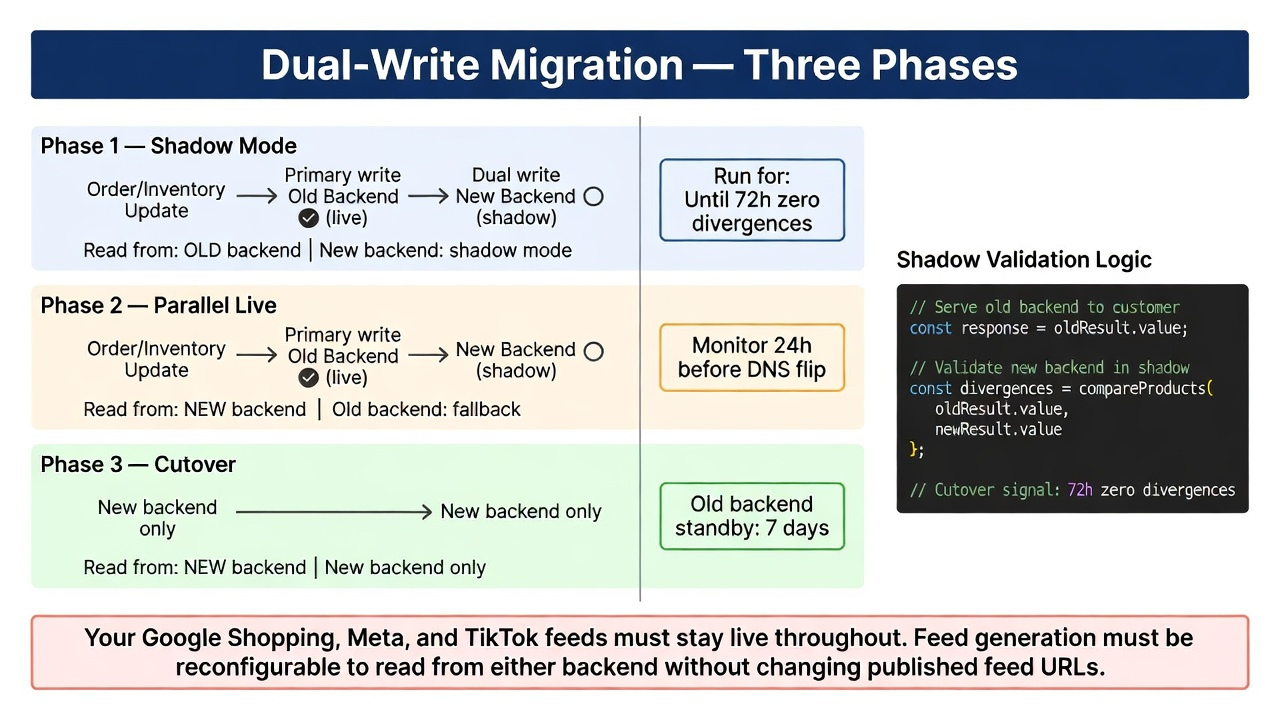
The safest migration pattern runs both backends simultaneously for an overlap window:
Write path (orders, inventory updates):
Primary system (old platform) ──┬── writes to old backend
└── dual-writes to new backend
Read path (storefront, feeds):
Phase 1: Read from old backend (new backend in shadow mode)
Phase 2: Read from new backend (old backend as fallback)
Phase 3: Read from new backend only (old backend deprecated)
Dual-write implementation: Every inventory mutation order placed, stock adjusted, and price updated writes to both backends simultaneously. The new backend's write path must be idempotent (duplicate writes produce the same result, not duplicate records). Failures on the new backend do not block the primary write; they're queued for retry.
Read-Shadow Validation
During Phase 1 (shadow mode), your new backend processes all reads but doesn't serve them; it records what it would have returned alongside what the old backend actually returned and alerts on divergences:
javascript
async function getProductShadow(productId) {
const [oldResult, newResult] = await Promise.allSettled([
oldBackend.getProduct(productId),
newBackend.getProduct(productId)
]);
// Serve old backend result to the customer
const response = oldResult.value;
// Validate new backend in shadow
if (newResult.status === 'fulfilled') {
const divergences = compareProducts(oldResult.value, newResult.value);
if (divergences.length > 0) {
await logDivergence({ productId, divergences, timestamp: Date.now() });
}
}
return response;
}
Run the shadow phase until your divergence log is empty for 72 consecutive hours. That's your cutover confidence signal.
Inventory Reconciliation During Overlap
The highest-risk period is when both backends are live and orders can come from both systems. Implement an inventory reconciliation check that runs every 5 minutes during the overlap window:
Compare available inventory in old backend vs. new backend for every active SKU
Alert on any divergence greater than 2 units
Auto-correct new backend inventory from old backend (old is authoritative during overlap)
Log every correction for post-migration audit
DNS Cutover
Once shadow validation passes:
Flip the storefront read path to the new backend (feature flag, not DNS change)
Monitor for 24 hours: the old backend remains available as an immediate fallback
After 24 hours clean operation, flip DNS
Keep old backend on standby for 7 days before decommissioning
The key implication of migration: your feeds (Google Shopping, Meta, and TikTok) must stay live and accurate throughout the migration window. FeedOn's feed generation can be reconfigured to read from either backend or from the reconciled state without changing your published feed URLs. This means Google Merchant Center sees an uninterrupted, valid feed throughout the cutover. See how dropshipping feed management handles supplier catalog migrations for a related operational challenge with comparable dual-source complexity.
Feed Sync Observability: The Monitoring Stack That Catches Stale Data in Seconds
"Monitor sync latency and error rates with alerts" is the advice. No guide covers what to actually instrument.

Here is the full observability stack for a headless product feed sync pipeline.
The Four Metrics That Matter
Metric 1: Time-to-CDN for a price change (T2CDN) The most important single metric in a headless feed sync. Measure the elapsed time between a price update event in the commerce backend and the moment a CDN edge node serves the updated price.
Instrument this by:
Tagging each product update with a timestamp in the commerce backend (last_updated_at)
Including this timestamp as a hidden field in your rendered product page HTML
Polling a sample of product pages from multiple edge locations every 60 seconds and comparing the page's last_updated_at against the backend's current value
Alert threshold: T2CDN > 5 minutes for price-critical fields is a warning. T2CDN > 15 minutes is a critical alert (probable broken webhook pipeline).
Metric 2: Webhook delivery latency and failure rate Your webhook handler should emit metrics on every invocation:
Delivery latency (time from event timestamp to handler invocation)
Processing success/failure rate
DLQ depth (events waiting in dead-letter queue)
Alert threshold: DLQ depth > 10 events is a warning. Failure rate > 2% over a 15-minute window is critical.
Metric 3: Backend-to-edge delta The difference between the current state of your commerce backend and the state of your CDN-cached pages. Computed by the drift detection job from Section 4, but surfaced in a dashboard:
Backend-to-edge delta:
Price: 12 products have stale prices (avg lag: 4.2 min)
Inventory: 3 products show in stock, but backend shows out-of-stock ← CRITICAL
Images: 0 stale
Metric 4: Channel feed freshness For each channel feed (Google Shopping XML, Meta CSV, TikTok TSV), track:
Age of the current feed file (time since last full regeneration)
Number of products in the feed vs. number of active products in the backend
Price mismatch count: products where the feed price differs from the current backend price
Alert threshold: Feed age > 6 hours for price-sensitive catalogs. Price mismatch count > 0 is a warning (> 5 is critical).
The Sync Health Dashboard
Build a single dashboard that non-engineers can read:
FEED SYNC HEALTH — Last updated: 2 minutes ago
Storefront sync
Webhook pipeline: Healthy (last event: 4 min ago)
CDN freshness: All products current
DLQ depth: 3 events (processing)
T2CDN (p95): 2.4 min
Channel feeds
Google Shopping: 12,847 products | Last updated: 18 min ago | 0 price mismatches
Meta Catalog: 12,847 products | Last updated: 21 min ago | 0 price mismatches
TikTok Shop: 12,831 products | Last updated: 2h 14min ago | 16 missing SKUs
Data integrity
Backend-to-cache delta: 0 products with stale prices
PIM-to-backend GTIN drift: 0 mismatches
Inventory accuracy: 99.98%
The TikTok row in this example is flashing a warning: 16 missing SKUs and a feed that hasn't updated in 2 hours. That's a problem you want to catch here, not when TikTok flags disapprovals. FeedOn's channel feed dashboard shows real-time sync status across all published channels' feed age, product count, and error flags so the operational visibility layer is built in rather than requiring custom instrumentation. See how the FeedPilot audit surfaces these gaps automatically and how feed errors compound in the Google Merchant Center error guide.
Behavioral Events vs. Catalog Sync: Why Headless Breaks Recommendation Engines
This is the most invisible failure mode in headless commerce and the only one that Adobe Commerce's developer documentation explicitly calls out (while every other guide ignores it completely).
The Two Separate Sync Problems
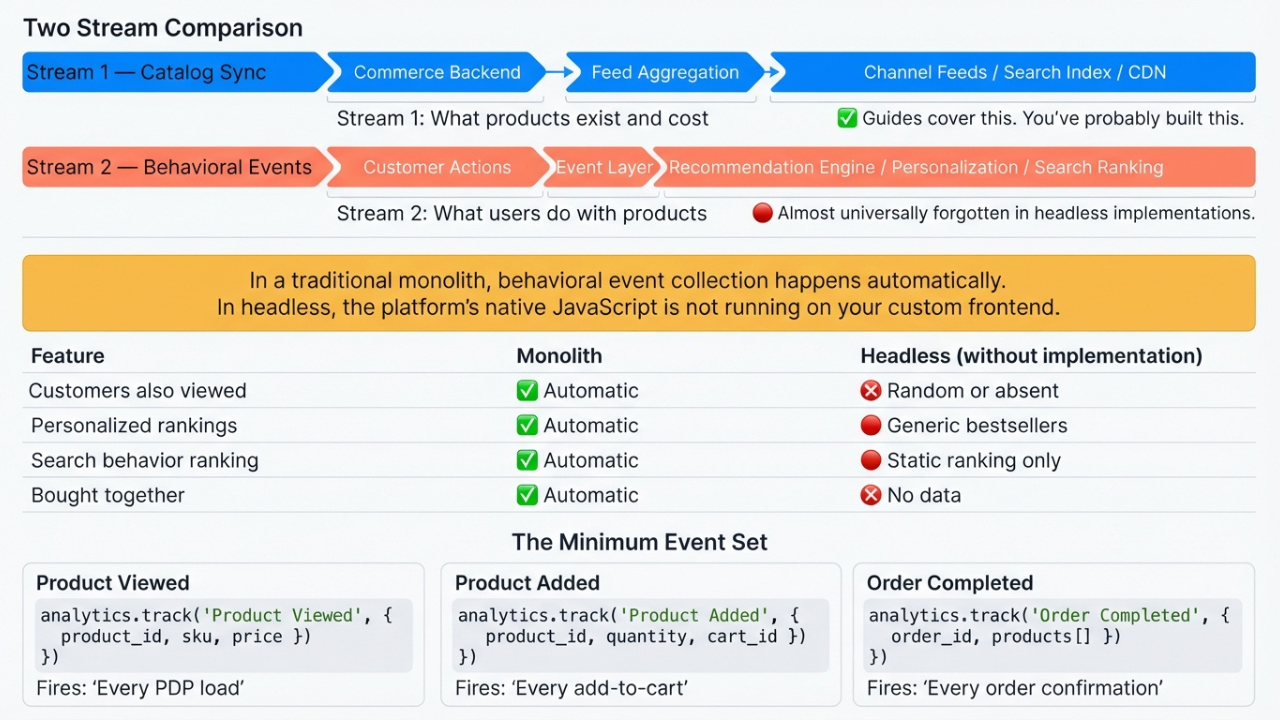
When you go headless, you're managing two fundamentally different data streams:
Stream 1: Catalog sync – product attributes, prices, and inventory – is what this entire guide has been about. You move structured product data from your commerce backend to your storefront, channel feeds, and search index.
Stream 2: Behavioral events – what users do with your products – is an entirely separate stream that headless implementations almost universally forget to implement. This stream powers:
"Customers also viewed" recommendations
"Frequently bought together" suggestions
Personalized homepage product rankings
Search result ranking based on purchase behavior
Inventory replenishment predictions
In a traditional monolithic commerce setup (non-headless Shopify, Magento, or WooCommerce), behavioral event collection happens automatically; the platform's native JavaScript captures add-to-cart, product views, and purchase events and sends them to the recommendation engine.
In a headless setup, the platform's native JavaScript is not running on your custom frontend. The event stream is silently empty. Your recommendation engine has no behavioral data. "Customers also viewed" shows random products or stops appearing entirely. Personalization defaults to generic bestseller rankings.
What Events to Implement and How
The minimum behavioral event set for functional recommendations:
javascript
// Product view event — fire on every PDP load
analytics.track('Product Viewed', {
product_id: product.id,
sku: variant.sku,
category: product.productType,
name: product.title,
brand: product.vendor,
price: parseFloat(variant.price),
currency: 'USD',
position: null, // position in a list, if applicable
});
// Add to cart event — fire on cart addition
analytics.track('Product Added', {
product_id: product.id,
sku: variant.sku,
name: product.title,
price: parseFloat(variant.price),
quantity: quantity,
cart_id: cart.id,
});
// Purchase event — fire on order confirmation
analytics.track('Order Completed', {
order_id: order.id,
revenue: parseFloat(order.totalPrice),
products: order.lineItems.map(item => ({
product_id: item.merchandise.product.id,
sku: item.merchandise.sku,
name: item.merchandise.product.title,
price: parseFloat(item.merchandise.price.amount),
quantity: item.quantity,
})),
});
Send these events to your recommendation engine (Klevu, Bloomreach, Nosto, or your commerce platform's native engine if it has a headless event API) AND to your analytics platform (Segment, Amplitude, or GA4).
Verifying Your Behavioral Event Pipeline
After implementing behavioral events, verify they're flowing:
Open your storefront in an incognito window
View 5 product pages, add 2 to cart, complete a test purchase
Check your analytics platform's real-time event stream; all 8 events should appear within 30 seconds
Check your recommendation engine's data feed; the events should appear in its activity log within 5 minutes
If the recommendation engine's activity log is empty after 24 hours of live traffic, your behavioral event pipeline is broken, and your personalization features are silently degraded.
The catalog sync that feeds your Google Shopping and Meta channel ads is only half the product data story. The behavioral data that powers on-site conversion recommendations, search ranking, and personalization needs its own implementation in a headless stack. FeedOn handles the catalog side; your analytics and recommendation stack handles the behavioral side. Make sure both are instrumented before launch.
For a full picture of how AI is reshaping both catalog data management and the behavioral signals that feed into channel optimization, see how AI is changing product feed management in 2026 and the ultimate Google Shopping feed optimization guide for the catalog-side optimization principles that complement this behavioral layer.
The Full Headless Feed Sync Architecture
Pulling all ten sections together, a production-grade headless product feed sync architecture looks like this:
Commerce Backend ──────── PIM ──────── CMS
│ │ │
│ webhooks │ attribute │ editorial
│ (idempotent) │ sync │ webhooks
▼ ▼ ▼
Message Queue ──────── Field Authority Router
│ │
▼ ▼
Reconciliation Job Drift Detector
│ │
▼ ▼
Search Index / Database ← ─ ─ ─ ─ ─ ─ ─ ┘
│
├─── Storefront (ISR + cart-time validation)
│
├─── Channel Feed Generator
│ ├── Google Shopping XML
│ ├── Meta Catalog CSV
│ └── TikTok Shop TSV
│
└─── Observability Dashboard
├── T2CDN metric
├── Webhook health
├── Feed freshness
└── Behavioral event stream check
Every component in this diagram is something a competitor guide either ignores or dismisses in a sentence. The teams that implement all of it run headless stacks that stay accurate, recover from failures automatically, and give them the operational visibility to catch problems before customers do.
The feed management layer's channel-compliant exports, per-channel field transformation, and AI attribute enrichment for the missing fields that cause feed disapprovals are where FeedOn fits in this architecture. If you're building a headless stack and need the channel feed component to be production-ready without building the XML/CSV generation, transformation, and update pipeline from scratch, start with FeedOn's free trial to see how it integrates with your commerce backend as a feed generation endpoint.